

K-WANG


ABB AX400 series conductivity analyzer
ABB AX400 series conductivity analyzer
The ABB AX400 series conductivity analyzer is an industrial grade monitoring device that supports single/dual sensor inputs. It has three installation methods: wall mounted, pipeline mounted, and panel mounted. Its core function is to continuously monitor conductivity and support temperature automatic compensation (compatible with Pt100/Pt1000 sensors). The measurement range is 0~10000 µ S/cm, and the accuracy is better than ± 1% reading; The device is equipped with dual 5-digit LCD backlit display screens and a 5-key operation panel, supporting 4 analog output ranges (0-10mA/0-20mA/4-20mA, etc.), 3-5 relay outputs, and can be configured with 5-digit safety codes to protect parameters. It also provides functions such as sensor calibration, alarm settings, and fault diagnosis, and is widely used in industrial scenarios such as chemical, pharmaceutical, and water treatment.
Product Overview
Basic positioning
The ABB AX400 series is an industrial grade conductivity analyzer designed for continuous monitoring and control of fluid conductivity in industrial processes, supporting single or dual sensor inputs.
The equipment has automatic temperature compensation function, which can correct the measured value to the standard reference temperature of 25 ℃, ensuring data accuracy and suitable for complex industrial environments.
Core strengths
Multiple installation methods are compatible: wall mounted, pipeline mounted, and panel mounted to meet different site layout requirements.
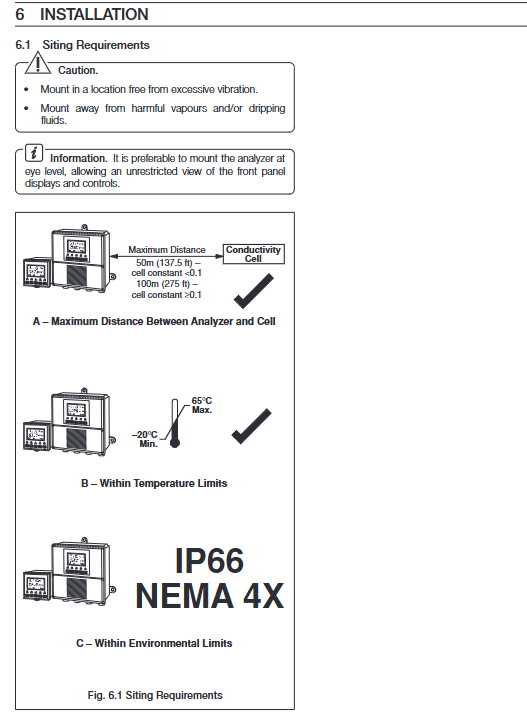
High protection and stability: protection level IP66/NEMA4X, working temperature -20~65 ℃, storage temperature -25~75 ℃, humidity ≤ 95% RH (no condensation).
Flexible output and alarm: supports analog signal retransmission, relay alarm, and can adapt to various industrial control systems.
Safe and convenient operation: Parameters are protected from accidental changes through a 5-digit security code, and the backlit display screen supports multilingual switching.
Core technical parameters
Category key parameter details
Conductivity measurement range: 0~0.5~10000 µ S/cm (supports multiple electrode constants)
Units µ S/cm, µ S/m, mS/cm, mS/m, M Ω· cm, TDS
Accuracy better than ± 1% reading
Temperature related compensation range -10~150 ℃ (14~302 ° F)
Programmable temperature coefficient of 0-5%/℃, supporting fixed curves such as HCl/NaCl/NH3
Sensor type Pt100/Pt1000 (programmable selection)
Output configuration analog output 2-channel standard (4-channel optional), isolated, supports 0-10mA/0-20mA/4-20mA
Relay output with 3 standard channels (5 optional), single pole double throw, contact capacity 5A/115/230V AC
Power supply and power consumption power input 85-265V AC 50/60Hz; Optional 12-30V DC/24V AC
Power consumption<10VA
Operation and Function Configuration
(1) Operation interface and buttons
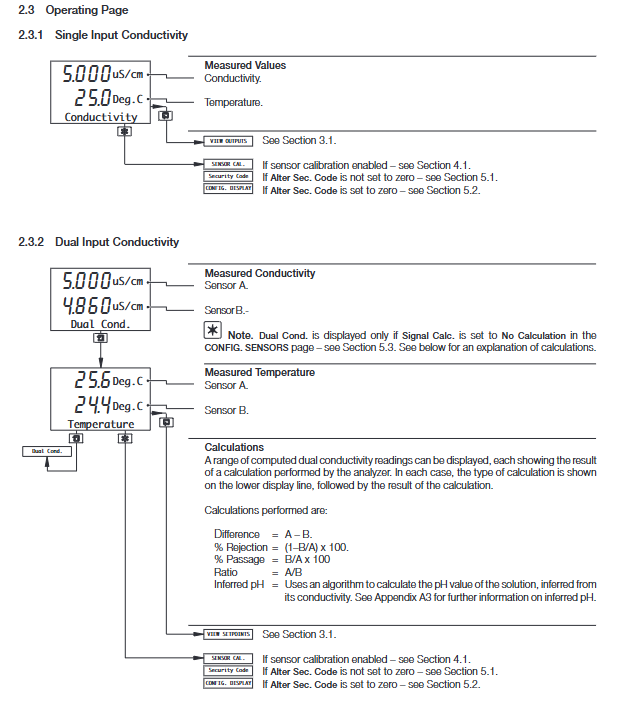
Display screen: Dual 5-digit 7-segment LCD (displaying measured values such as conductivity and temperature)+16 character dot matrix screen (displaying units and menu information), supporting backlight on/automatic mode.
Button function: 5 thin film buttons, which respectively realize menu switching, page scrolling, parameter adjustment, confirmation and saving operations.
(2) Core functional modules
sensor configuration
Supports single/dual sensors (Sensor A/B), with the ability to set conductivity units, electrode constants (0.01~10 cm ⁻¹), temperature compensation types, TDS coefficients (0.4~0.8), and units (ppm/mg/l/mg/kg).
In dual sensor mode, data calculation methods can be selected: difference (A-B), ratio (A/B),% pass rate (B/A × 100),% retention rate ((1-B/A) × 100), and derived pH (requiring NH3/NaOH temperature compensation).
Calibration function
You need to enable the 'Enable Cal.' permission and enter a 5-digit calibration code to perform calibration.
Calibration parameters: sensor slope (0.2000~5.000), sensor offset, temperature slope (0.2000~1.500), temperature offset (-40.0~40.0 ℃), support resetting to default values.
alarm configuration
Supports 3-5 alarm channels, with adjustable alarm types (off/alarm/status), associated parameters (conductivity/temperature or calculated values of sensors A/B), safe mode (Yes/No), action type (high/low), set value, hysteresis (0-5%), and delay time (0-60s).
Output configuration
Analog output can be assigned to measurement parameters or temperature, supporting linear/bilinear/2 decade logarithmic/3 decade logarithmic curves.
Fault default output: can be set to turn off/hold/drive to default value (0~22mA).
(3) Security protection
Parameter protection: Modifying the configuration requires entering a 5-digit security code (00000~19999) to prevent unauthorized operations.
Calibration protection: Calibration operation requires inputting a 5-digit calibration code to avoid incorrect calibration affecting accuracy.
Installation and maintenance
(1) Installation requirements
Installation environment: Keep away from excessive vibration, harmful vapors, and dripping liquids. It is recommended to install at a visual height for easy operation and observation.
Distance between electrode and analyzer: maximum 50m for electrode constant<0.1, maximum 100m for electrode constant ≥ 0.1.
Wiring specifications: The power supply must be grounded, and signal cables and power cables should be wired separately. It is recommended to use shielded twisted pair cables, with the shielding layer connected to the grounding column of the shell.
(2) Calibration and maintenance
Calibration preparation: A standard resistance box (0~10k Ω, accuracy ± 0.1%) and a digital milliampere meter (0~20mA) are required.
Calibration process: Disconnect the sensor → Connect the calibration device → Enter the calibration menu → Adjust slope/offset → Save parameters.
Daily maintenance: Regularly clean electrodes, check cable connections, and recalibrate if measurement deviations occur.
(3) Fault diagnosis
Possible causes and troubleshooting measures for fault phenomena
Display error code "FAULT TYPE 0001" sensor connection loose/electrode damaged. Check the sensor wiring and replace the electrode
Conductivity unresponsive, electrode contamination/incorrect parameter settings. Clean the electrode and verify the electrode constant and temperature compensation settings
Abnormal temperature reading. Temperature sensor malfunction/wiring error. Check Pt100/Pt1000 wiring and replace the sensor
Alarm does not trigger alarm setting value error/excessive hysteresis. Reset alarm parameters to reduce hysteresis
Applicable scenarios
Chemical industry: Monitor electrolyte solution concentration and changes in conductivity during reaction processes.
Pharmaceutical industry: Quality monitoring of purified water and water for injection (WFI).
Water treatment industry: reverse osmosis system, ion exchanger effluent monitoring.
Food and beverage industry: Control of solution concentration during production processes (such as saltwater and syrup).
- YOKOGAWA
- Reliance
- ADVANCED
- SEW
- ProSoft
- WATLOW
- Kongsberg
- FANUC
- VSD
- DCS
- PLC
- man-machine
- Covid-19
- Energy and Gender
- Energy Access
- Renewable Integration
- Energy Subsidies
- Energy and Water
- Net zero emission
- Energy Security
- Critical Minerals
- A-B
- petroleum
- Mine scale
- Sewage treatment
- cement
- architecture
- Industrial information
- New energy
- Automobile market
- electricity
- Construction site
- HIMA
- ABB
- Rockwell
- Schneider Modicon
- Siemens
- xYCOM
- Yaskawa
- Woodward
- BOSCH Rexroth
- MOOG
- General Electric
- American NI
- Rolls-Royce
- CTI
- Honeywell
- EMERSON
- MAN
- GE
- TRICONEX
- Control Wave
- ALSTOM
- AMAT
- STUDER
- KONGSBERG
- MOTOROLA
- DANAHER MOTION
- Bentley
- Galil
- EATON
- MOLEX
- Triconex
- DEIF
- B&W
- ZYGO
- Aerotech
- DANFOSS
- KOLLMORGEN
- Beijer
- Endress+Hauser
- schneider
- Foxboro
- KB
- REXROTH
- YAMAHA
- Johnson
- Westinghouse
- WAGO
- TOSHIBA
- TEKTRONIX
- BENDER
- BMCM
- SMC
- HITACHI
- HIRSCHMANN
- XP POWER
- Baldor
- Meggitt
- SHINKAWA
- Other Brands
- UniOP
- KUKA
- IBA
- Beckhoff
- ADLINK
-
ENOTEC OXITEC 5000 SME-53310000 InSitu O2 Gas Analyzer System
-
TRICONEX 3723X 32-Channel TMR Analog Input Module with HART for Tricon CX
-
GE 151X1233DB02SA02 Rev A Pitch Converter 30 Nm DC Pitch Conversion Module
-
GE 151X1207CK02SA02 77MM DE Excitation Module for Mark VI Turbine Control Systems
-
HIMA H6200A Analogue Isolator Power Supply for HIMax Safety Systems
-
ABB SACO 64D4 Digital Annunciator Unit with 64 Alarm Channels
-
Allen-Bradley 5069-L306ER - SER A CompactLogix Controller PLC
-
Omron CJ1W-CORT21 - CANopen Master Unit PLC Module
-
Danfoss 131B9523 / FC-102P5K5T4E20H1 - 5.5kW VLT HVAC Drive Inverter
-
Schneider Electric LXM32MU90M2 - Lexium 32 Servo Drive Controller
-
Danfoss AKD102P15KT4P21H1 - 15kW 131L2413 ADAP-KOOL Drive Inverter
-
Kollmorgen S70602-NANANA - Servo Drive Controller
-
Allen-Bradley 6189-PS2 - Power Supply Industrial Computer PS
-
Beijer E900T / 03010F - Operator Panel IFC ETTP HMI
-
Schneider Electric LMC20 - PacDrive Motion Controller PLC
-
Sartorius CAW2S1-3DC-NCE - COMBICS 2 Industrial Scale Terminal
-
Kollmorgen / Danaher S30301-NA / S300 - SERVOSTAR343 Servo Drive Controller
-
Siemens A5E00159503 - 12 INCH TFT Touch Panel HMI
-
Siemens 3UF5021-3AB00-1 - SIMOCODE DP Basic Unit Control Module
-
Danfoss 131B8872 / FC-202PK37T4E20H1 - 0.37kW VLT AQUA Drive Inverter
-
Atlas Copco ICB421-2003D / VSK001001 - W9139 ICM431-0025C ICM431-0025D Controller
-
Lenze EV82EV751_4C - Version 4A39 Frequency Inverter Drive
-
Atlas Copco / ABB 3HAB8101-19/07B - Robot Cable Assembly Harness
-
Beijer X2 Pro7-B2 - Operator Panel HMI Touch Screen
-
Honeywell CDW45L - Damper Actuator
-
B&R X67DM9331.L12 - Rev. I0 Digital Mixed Module
-
B&R X67DM9331.L12 - Rev. H0 Digital Mixed Module
-
Sanyo Denki PMM-BA-5604-1 - Pentasyn Stepper Motor Driver
-
SICK AWS1-113 / 1008900 - Evaluation Unit
-
Siemens 1TF6064-1AF71-3AH1 - SIMOTICS Synchronous Servo Motor
-
Heidenhain ERN680.P003-4096 / 29416004 - Rotary Encoder
-
Schneider Electric LC1G185EHEA - TeSys Control Contactor
-
Parker SBC HPD5N - High Performance Drive Electronics SPA
-
Advantech UNO-2170-CE11BE - Embedded Automation Computer IPC
-
Siemens 6AG1231-4HF32-4XB0 - SIPLUS S7-1200 SM 1231 Analog Input Module
-
Advantech UNO-2170-BTO - Embedded Automation Computer IPC
-
Jumo SR-96/4-001.0.0.00.111 - Solid State Relay Power Controller
-
Pepperl+Fuchs FC-21-V - FC-20P Safety Barrier Module
-
Emerson SP1404 - Unidrive AC Drive Inverter
-
B&R X67AI1233 - Rev.C0 Analog Input Module
-
Mitsubishi FR-F740-00250-EC - Frequency Inverter AC Drive
-
Allen-Bradley 2711P-T7C21D8S - PANELVIEW PLUS 7 SERIES B Touch Screen HMI
-
Pilz PMCprotego D.03/000/0/0/2/208-480VAC / 8176101 - Servo Amplifier Drive
-
Reliance Electric 57C414 / 57414-1N - Modbus Interface Module
-
Mitsubishi FR-F740-00250-EC - Frequency Inverter AC Drive
-
Siemens 6SN1123-1AA00-0EA2 - Version A 160A SIMODRIVE Power Module
-
Siemens 1TF6064-1AF71-3AH1 - SIMOTICS Synchronous Servo Motor
-
AEG ALU202 / DAP216 / DEP216 / DAU202 - SIM216 SIM203 DNP205 ADU205 PLC Controller KIT
-
Atlas Copco / ABB 3HAB8101-19/07B - Robot Cable Assembly Harness
-
Hitachi CPU22-02HB - Micro-EHV Programmable Controller PLC
-
Parker SBC HPD5N - High Performance Drive Electronics SPA
-
Jetter JX3-THI2-RTD - JX3-BP Temperature Input Module
-
Eaton DC1-34014FB-A20N - 5.5kW Inverter Variable Frequency Drive
-
Eaton DS7-34DSX041N0-D - Soft Starter
-
Reliance Electric 57C422B / 57422-2E - 2-Axis Servo Controller
-
Hitachi CPU22-02HB - Micro-EHV Programmable Controller PLC
-
Eaton DC1-34014FB-A20N - 5.5kW Frequency Inverter Variable Frequency Drive
-
Siemens 6SN1123-1AA00-0EA2 - Version A 160A SIMODRIVE Power Module
-
Reliance Electric 57C414 / 57414-1N - Modbus Interface Module
-
Eaton DS7-34DSX041N0-D - Soft Starter
-
Reliance Electric 57C422B / 57422-2E - 2-Axis Servo Controller
-
Johnson Controls DX-9120-8454 - Digital Controller
-
Jetter JX3-THI2-RTD - JX3-BP Temperature Input Module
-
Siemens 6SL3210-1KE21-7AP1 - SINAMICS G120C DP 7.5kW BOP-2 Inverter Drive
-
Siemens 1FK7042-2AF21-1QG0 - SIMOTICS S Synchronous Servo Motor
-
Mettler Toledo IND570 - Harsh Analog Weighing Terminal Controller
-
Schneider Electric TM238LDA24DR - Modicon M238 Programmable Logic Controller PLC
-
Hitachi EH-CPU548 - EH-150 PLC CPU Module
-
Honeywell Q7750A2003 - Excel 10 Zone Controller
-
Ferag 584.002.V003 - Control Panel HMI
-
Danfoss AK-SM 720 / 080Z8511 - ADAP-KOOL System Manager Controller
-
Ferag 584.002.V003 - Control Panel HMI
-
Kern 3210001.001 / LOP-KS 2903440.001 - PRT.205A.0000.V001.02341 Servo Controller Board
-
Reliance Electric 57C424 - Maxpak III High Speed Link Module
-
Telemecanique XBTA70101PA - Compact Terminal HMI Panel
-
Reliance Electric 57C424 - Maxpak III High Speed Link Module
-
Reliance Electric 57C422B - 2-Axis Servo Controller
-
Honeywell Q7750A2003 - Excel 10 Zone Controller
-
Telemecanique XBTN400 - Magelis Small Panel HMI
-
Schneider Electric TM172PDG42S - Modicon Programmable Logic Controller PLC
-
Fanuc HE693THM884M - Thermocouple Input Module
-
Selectron PMC22BAEZD / 220735 - Selecontrol PMC 22 ABEZD Controller Module
-
Baumuller BUS21-22/45-31-020 - Servo Drive Inverter
-
Schneider Electric TM172PDG42S - Modicon Programmable Logic Controller PLC
-
Schneider Electric ATV32HD11N4 - Altivar Variable Frequency Drive Inverter
-
Lenze 494_E.4B - DC Speed Controller
-
NORD SK300E-111-340-B - SKDA130E-111-340-IBS-AAA Frequency Inverter
-
Reliance Electric GMI-S02 - AC/AC Converter 380/400V 50/60Hz 2.3/2.8A Drive
-
Hakko / Monitouch V710CD - Operator Panel HMI Touch Screen
-
B&R 5PC910.SX01-00 / 5YZCAA00700000-005 - Automation PC Industrial Computer
-
Hitachi EH-CPU548 - EH-150 PLC CPU Module
-
Tecnau / Fortec FORTEC-04/UL / 10117 - PCB Circuit Board
-
Bosch PSS 2037 10B - Power Supply Module
-
Newall B602000 - Digital Readout Scale
-
ELCON PC Controller - Industrial PC Controller
-
Siemens 3UF5100-0AB00 - SIMOCODE-DP Control Module
-
Omron NS8-TV00B-V2 - Touch Screen HMI Panel
-
Siemens 6ES5264-8MA12 / IP264 - CAM Controller Module
-
Allen-Bradley 1756-L72S - SER B GuardLogix Safety Controller
-
Schneider Electric SXWMPC15A10001 - SmartX Controller Automation Server
-
Telemecanique LC1F265F7 - TeSys F Contactor
-
Siemens 6ES7314-6CH04-0AB0 - SIMATIC S7-300 CPU 314C-2 DP PLC
-
Allen-Bradley 1734-EI4S - POINT I/O Safety Module
-
Allen-Bradley 2711P-T7C4D8 / 2711P-RP8D - PanelView Plus HMI Touch Screen Logic Module
-
Ropex UPT-640-V - Resistron Temperature Controller
-
KEB 07.F5.B3A-0A00 - VERSION 1.1 Combivert Frequency Inverter
-
Sensopart V50-OB-A3-IW-M2-L - VISOR Vision Sensor Camera
-
SICK AFM60A-S1NB018X12 / 1059040 - Absolute Rotary Encoder
-
Kern AG KMC600 / 2903436.001 - Servo Drive Controller
-
Lenze E82EV302_4C200 / 13015655 - VERSION 3D35 Frequency Inverter Drive
-
Schneider Electric XBTOT2210 - Magelis Touch Screen HMI Panel
-
Baumuller BM5-O-SAF-000-000-000-001-202 - Parameter Safety Module
-
SICK UE4470-22EE690 - Safety Relay Controller
-
Hitachi EH-CPU448 / EH-150 - PLC CPU Module
-
Rexroth VT5005-13 - R5 00010592 Proportional Valve Amplifier Board
-
Siemens 6ES7510-1DJ00-0AB0 - SIMATIC ET 200SP CPU PLC
-
Beckhoff CX5120-0121 - 2GB Embedded PC Controller
-
Priva BlueiD S10 / 5010002 - SN3t 5020004 5010101 Building Automation Controller
-
Sigmatek DM161 - S-DIAS Digital Mix I/O Module
-
Telemecanique LC3D50P7A64 - Star Delta Starter Contactor
-
Siemens 6SN1123-1AA00-0BA2 - SIMODRIVE 611 Power Module
-
Siemens 6SN1124-1AA00-0CA1 - SIMODRIVE 611 Power Module
-
Dixell XC1015D-1C01F / XC1000D - Compressor Controller
-
Siemens A5E02184619 / 19T 577B - Industrial Touch Screen HMI Panel
-
Siemens 6SE6420-2AD27-5CA1 - Filter 6SE6400-2FS03-8CD0 Micromaster Inverter
-
Schneider Electric LC1G400LSEN - TeSys Control Contactor
-
Baldor BPS10-200-20-P - Servo Drive Motor Controller
-
Ingersoll Rand X4I / Y06IR03.00 - Air Compressor Controller

K-JIANG

Add: Jimei North Road, Jimei District, Xiamen, Fujian, China
Tell:+86-15305925923