

K-WANG
+086-15305925923
Service expert in industrial control field!


Product
Article
NameDescriptionContent
Adequate Inventory, Timely Service
pursuit of excellence


Ship control system
Equipment control system
Power monitoring system
Current position:
新闻动态
newS
Brand
ABB NextMove ESB-2 motion controller
ABB NextMove ESB-2 motion controller
ABB NextMove ESB-2 motion controller
Safety Notice
Only qualified personnel should attempt to start-up, program or troubleshoot this equipment. This
equipment may be connected to other machines that have rotating parts or parts that are controlled
by this equipment. Improper use can cause serious or fatal injury.
Precautions
Do not touch any circuit board, power device or electrical connection before you first
ensure that no high voltage is present at this equipment or other equipment to which it is
connected. Electrical shock can cause serious or fatal injury. Only qualified personnel
should attempt to start-up, program or troubleshoot this equipment.
Be sure that you are completely familiar with the safe operation and programming of this
equipment. This equipment may be connected to other machines that have rotating parts
or parts that are controlled by this equipment. Improper use can cause serious or fatal
injury.
MEDICAL DEVICE / PACEMAKER DANGER: Magnetic and electromagnetic fields in the
vicinity of current carrying conductors and industrial motors can result in a serious health
hazard to persons with cardiac pacemakers, internal cardiac defibrillators,
neurostimulators, metal implants, cochlear implants, hearing aids, and other medical
devices. To avoid risk, stay away from the area surrounding a motor and its current
carrying conductors.
The stop input to this equipment should not be used as the single means of achieving a
safety critical stop. Drive disable, motor disconnect, motor brake and other means
should be used as appropriate.
Improper operation or programming may cause violent motion of the motor shaft and
driven equipment. Be certain that unexpected motor shaft movement will not cause injury
to personnel or damage to equipment. Peak torque of several times the rated motor
torque can occur during control failure.
The safe integration of this equipment into a machine system is the responsibility of the
machine designer. Be sure to comply with the local safety requirements at the place
where the machine is to be used. In Europe these are the Machinery Directive, the
ElectroMagnetic Compatibility Directive and the Low Voltage Directive. In the United
States this is the National Electrical code and local codes.
Electrical components can be damaged by static electricity. Use ESD (electrostatic
discharge) procedures when handling this equipment.
WARNING
WARNING
WARNING
CAUTION
CAUTION
CAUTION
CAUTION
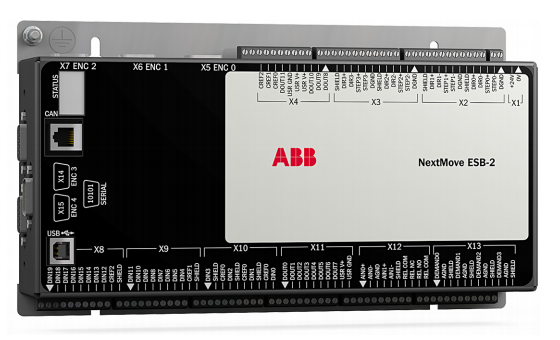
NextMove ESB-2 features
NextMove ESB-2 is a high performance multi-axis intelligent controller for servo and stepper
motors.
NextMove ESB-2 features the Mint motion control language. Mint is a structured form of
Basic, custom designed for stepper or servo motion control applications. It allows you to get
started very quickly with simple motion control programs. In addition, Mint includes a wide
range of powerful commands for complex applications.
Standard features include:
Control of 4 stepper axes and either 3 or 4 servo axes (model dependent).
Additional encoder input for master follower applications.
A wide variety of motion types including point to point moves, software cams and
gearing.
20 general purpose digital inputs, software configurable as level or edge triggered.
12 general purpose digital outputs.
2 differential analog inputs with 12-bit resolution.
4 single-ended analog outputs with 12-bit resolution.
USB 1.1 serial port (compatible with USB 2.0 and USB 3.0).
CANopen protocol for communication with Mint controllers and other third party
CANopen devices.
Programmable in Mint.
Drop-in replacement for NextMove ESB
This manual is intended to guide you through the installation of NextMove ESB-2.
The chapters should be read in sequence.
The Basic Installation section describes the mechanical installation of the NextMove ESB-2.
The following sections require knowledge of the low level input/output requirements of the
installation and an understanding of computer software installation. If you are not qualified in
these areas you should seek assistance before proceeding.
Note: You can check that you have the latest firmware and Mint WorkBench releases
by visiting the website www.abbmotion.com
Receiving and inspection
When you receive your NextMove ESB-2, there are several things you should do
immediately:
1. Check the condition of the shipping container and report any damage immediately to the
carrier that delivered your NextMove ESB-2.
2. Remove the NextMove ESB-2 from the shipping container and remove all packing
material. The container and packing materials may be retained for future shipment.
3. Verify that the catalog number of the NextMove ESB-2 you received is the same as the
catalog number listed on your purchase order. The catalog number is described in the
next section.
4. Inspect the NextMove ESB-2 for external damage during shipment and report any
damage to the carrier that delivered your NextMove ESB-2.
5. If NextMove ESB-2 is to be stored for several weeks before use, be sure that it is stored
in a location that conforms to the storage humidity and temperature specifications shown
in section 7.1.11.
2.2.1 Identifying the catalog number
Different models of NextMove ESB-2 are available. As a reminder of which product has been
installed, it is a good idea to write the catalog number in the space provided below.
A description of the catalog numbers are show in the following table:
Catalog
number
Description Serial
port
Stepper
output
type
NSB202-501 3 servo axes, 4 stepper axes, 2 extra encoder inputs RS232 Differential
NSB202-502 3 servo axes, 4 stepper axes, 2 extra encoder inputs RS485
NSB203-501 3 servo axes, 4 stepper axes, 2 extra encoder inputs RS232 Open
collector NSB203-502 3 servo axes, 4 stepper axes, 2 extra encoder inputs RS485
NSB204-501 4 servo axes, 4 stepper axes, 1 extra encoder input RS232 Differential
NSB204-502 4 servo axes, 4 stepper axes, 1 extra encoder input RS485
NSB205-501 4 servo axes, 4 stepper axes, 1 extra encoder input RS232 Open
collector NSB205-502 4 servo axes, 4 stepper axes, 1 extra encoder input RS485
Introduction
You should read all the sections in Basic Installation to ensure safe installation.
It is important that the correct steps are followed when installing the NextMove ESB-2. This
section describes the mechanical installation of the NextMove ESB-2.
3.1.1 Location requirements
You must read and understand this section before beginning the installation.
To prevent equipment damage, be certain that input and output signals are
powered and referenced correctly.
To ensure reliable performance of this equipment be certain that all signals to/
from the NextMove ESB-2 are shielded correctly.
Avoid locating the NextMove ESB-2 immediately above or beside heat
generating equipment, or directly below water steam pipes.
Avoid locating the NextMove ESB-2 in the vicinity of corrosive substances or
vapors, metal particles and dust.
The safe operation of this equipment depends upon its use in the appropriate environment.
The following points must be considered:
The NextMove ESB-2 is designed to be mounted indoors, permanently fixed and
located.
The NextMove ESB-2 must be secured by the slots in the metal case.
The NextMove ESB-2 must be installed in an ambient temperature of 0 °C to 45 °C
(32 °F to 113 °F).
The NextMove ESB-2 must be installed in relative humidity levels of less than 80% for
temperatures up to 31 °C (87 °F) decreasing linearly to 50% relative humidity at 45 °C
(113 °F), non-condensing.
The NextMove ESB-2 must be installed where the pollution degree according to IEC
60664-1 shall not exceed 2.
There shall not be abnormal levels of nuclear radiation or X-rays.
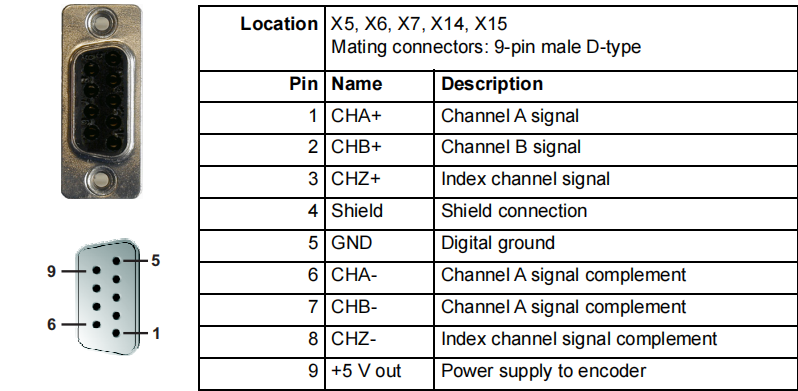
Five incremental encoders may be connected to NextMove ESB-2, each with
complementary A, B and Z channel inputs. Each input channel uses a MAX3095 differential
line receiver with pull up resistors and terminators. Encoders must provide RS422 differential
signals. The use of individually shielded twisted pair cable is recommended. A 5 V (±5%),
250 mA supply is provided on each connector for powering the encoder. The same 5 V
supply is also present on connectors X2 and X3 for powering external circuits (see sections
4.4.1 and 4.4.2). Ensure that the total combined current demand of all 5 V outputs does not
exceed 1.85 A.
Encoder inputs ENC 0 - ENC 3 can be read and controlled with a range of Mint keywords
beginning with ENCODER... . When using these keywords, the encoder’s number is used
as the channel parameter. For example, Print ENCODER(2) reads the ENC 2 input.
Encoder input ENC 4 can be read and controlled with a range of Mint keywords
beginning with AUXENCODER... . When its position has been latched by a fast interrupt
(see section 4.3.1.1) it can also be controlled using Mint keywords beginning with
FASTAUX... . When using the AUXENCODER... or FASTAUX... keywords, the channel
parameter 1 is used (i.e. auxiliary encoder channel 1). For example,
Print FASTAUXENCODER(1) reads the latched value read from ENC 4. Note that
auxiliary encoder channel 0 is used to reference the auxiliary encoder input formed by
digital inputs DIN17 - DIN19 (see section 4.3.1.4).
Figure 20: Encoder inputs - keyword and channel summary
Location X5, X6, X7, X14, X15
Mating connectors: 9-pin male D-type
Pin Name Description
1 CHA+ Channel A signal
2 CHB+ Channel B signal
3 CHZ+ Index channel signal
4 Shield Shield connection
5 GND Digital ground
6 CHA- Channel A signal complement
7 CHB- Channel A signal complement
8 CHZ- Index channel signal complement
9 +5 V out Power supply to encoder
1
9 5
6
ENC 0
ENC 1
ENC 2
ENC 3
DIN17
DIN18
DIN19
ENC 4 Print ENCODER(0)
Print ENCODER(1)
Print ENCODER(2)
Print ENCODER(3)
Print AUXENCODER(1)
Print FASTAUXENCODER(1)
Print AUXENCODER(0)
- YOKOGAWA
- Reliance
- ADVANCED
- SEW
- ProSoft
- WATLOW
- Kongsberg
- FANUC
- VSD
- DCS
- PLC
- man-machine
- Covid-19
- Energy and Gender
- Energy Access
- Renewable Integration
- Energy Subsidies
- Energy and Water
- Net zero emission
- Energy Security
- Critical Minerals
- A-B
- petroleum
- Mine scale
- Sewage treatment
- cement
- architecture
- Industrial information
- New energy
- Automobile market
- electricity
- Construction site
- HIMA
- ABB
- Rockwell
- Schneider Modicon
- Siemens
- xYCOM
- Yaskawa
- Woodward
- BOSCH Rexroth
- MOOG
- General Electric
- American NI
- Rolls-Royce
- CTI
- Honeywell
- EMERSON
- MAN
- GE
- TRICONEX
- Control Wave
- ALSTOM
- AMAT
- STUDER
- KONGSBERG
- MOTOROLA
- DANAHER MOTION
- Bentley
- Galil
- EATON
- MOLEX
- Triconex
- DEIF
- B&W
- ZYGO
- Aerotech
- DANFOSS
- KOLLMORGEN
- Beijer
- Endress+Hauser
- schneider
- Foxboro
- KB
- REXROTH
- YAMAHA
- Johnson
- Westinghouse
- WAGO
- TOSHIBA
- TEKTRONIX
- BENDER
- BMCM
- SMC
- HITACHI
- HIRSCHMANN
- XP POWER
- Baldor
- Meggitt
- SHINKAWA
- Other Brands
- UniOP
- KUKA
- IBA
- Beckhoff
- ADLINK
51
-
ALPHA WIRE 1636-RD001 - Hook-Up Wire
-
FANUC A06B-6078-H211#H501 / A06B6078H211H501 - Servo Amplifier Module
-
Alpha H47016 / CA400 - 400W Switching Power Supply Unit
-
Alpha Wire 2821/2 WH001 - Multi-Conductor Communication Control Cable
-
Wittenstein Alpha SP 100S-MF2-25-1E1-2S - Planetary Gearbox Reducer
-
FANUC A06B-6090-H008 / A06B6090H008 - Servo Power Supply Module
-
Alpha Wire 2821/2 WH001 - Multi-Conductor Communication Control Cable
-
NOVOTRON / Alpha NBL2-0080-45-3-320 T0B + SP075-MF1-3-031-000 - Servo Motor with Planetary Gearbox
-
Alpha 0100044-001 CXRF 48/4.6KW - Rectifier Module
-
Lambada-TDK / Alpha YM-00-470B / AMAT 50513215200 - 600W Power Supply Unit
-
FANUC A06B-6290-H122 - Alpha iSV 10HV-B 3-Axis Servo Amplifier Drive
-
Alpha SP 140S-MF1-5-1/1-2S - Planetary Gearbox Reducer
-
Wittenstein Alpha SP 100S-MF1-5-1K1-2S - Planetary Gearbox Reducer
-
Wittenstein Alpha LP 120Z-MF1-10-1/1-3S-INF - LP Series Planetary Gearbox
-
Wittenstein Alpha LP 090-M01-7-111-000 / Schneider - Planetary Gearbox with Servo Motor
-
Alpha TP 050-MX1-7-450-000 - Gearbox Reducer
-
Fanuc A06B-0377-B577#7000 - AC Servo Motor Alpha M2.5/3000
-
ALPHA WIRE 1705-SL001 - Hook-Up Wire
-
ALPHA WIRE 1953/3T-BK003 - Hook-Up Wire
-
ALPHA WIRE 5855/7-SL001 - Hook-Up Wire
-
ALPHA WIRE 2158-NA005 - Hook-Up Wire
-
Wittenstein Alpha TP 025S-MF1-7-0G0-2S - Planetary Gearbox
-
ALPHA WIRE 5356C - 37 Conductor 20AWG Foil & Braid Shield Cable
-
Wittenstein Alpha NP 025S-MF1-5-1G1-1S - Planetary Gearbox
-
Allen Bradley / Alpha N-3412-2-H00AA / LP 120-M02-100-111-000 - Servo Motor with Planetary Gearbox
-
FANUC A06B-6089-H204 - Alpha Series Servo Amplifier Module
-
Man Diesel & Turbo 3157168-7 - Alpha Lubricator Sbu
-
FANUC A20B-2100-0742 - ALPHA ia Servo Control Board
-
ALPHA ALPHA6000E-31R5GB - Frequency Inverter Drive Power Converter
-
Alpha Industries G287775-1 / 5985-01-341-9652 - Variable Attenuator
-
FANUC A06B-6124-H206 - Alpha iSV Servo Amplifier Module
-
Wittenstein Alpha NP 025S-MF1-5-1G1-1S - Planetary Gearbox
-
NOVOTRON / Alpha NBL2-0080-45-0-320-B-S-A + SK060-MF1-3-031-000 - Servo Motor with Alpha Gearbox
-
FANUC A20B-2100-0742 - ALPHA ia Servo Control Board
-
Honeywell CK65-L0N-BLC210F / CK65 - Mobile Computer Barcode Scanner
-
Wittenstein Alpha TK+ 004S-MF2-12-5B1-1S10 - Right Angle Gearbox
-
FANUC A20B-2100-0742 - ALPHA ia Servo Control Board
-
Rexroth MSK071E-0450-NN-M1-UG1-NNNN - 3-Phase AC Motor with Alpha Reducer
-
JAVAD ALPHA2 - GPS Receiver GrAnt G3
-
GROSCHOPP / Alpha WK 1621309 / EK 66-45 NR + TP 010-MF2-61-030-000 - Motor with Alpha Gearbox Construction
-
ALPHA WIRE 5060C-SL005 - Multi-Conductor Cable Wire
-
ALPHA B10 K X 2 T80887 - Potentiometer
-
Alpha 400W J40005 - Switching Power Supply Unit
-
FANUC A20B-1007-0650 - ALPHA Power Supply Module Board
-
Eberline HP-100B - Gas Proportional Alpha Beta Probe GM Geiger Counter
-
ALPHA WIRE 5858-BK001 - Single Conductor Hook-Up Wire
-
FANUC A06B-6127-H103 - Alpha I AiSV-20HV Servo Amplifier Module
-
VIASYS / CareFusion SOMNOSTAR CEPHALO PRO - Portable EEG Neurodiagnostic Sleep System
-
DSI Surgical Instruments Universal - Dental Implant Abutment Surgical Instruments Kit
-
FANUC A06B-6078-H211#H501 / A06B6078H211H501 - Servo Amplifier Module
-
Fanuc A06B-6089-H209 - Alpha Series Servo Amplifier Module
-
Generic / DSI Straight Anatomic Plastic Adapter Head + Screw Hex - Dental Implant Fixture
-
FANUC A20B-1006-0680 - ALPHA Power Supply Module Board
-
B&L Biotech Alpha II - Endodontic Starter Kit
-
FANUC A06B-0166-B088 C009A5653 - AC Servo Motor
-
ALPHA WIRE 74010-BK002 - Multi-Conductor Cable Wire
-
Wittenstein Alpha SPK 100-MF2-10-041-000 - Gear Box Reducer Ratio 10:1
-
Alpha Getriebebau 10-FL-M1-5 - 10:1 Ratio 7/8 Inch Shaft Gear Reducer
-
ALPHA WIRE 2172-SV005 - Multi-Conductor Cable Wire
-
Aloka UST-5410 - Linear Array Probe Compatible Transducer
-
Alpha Xtra-Guard 1 SupraShield - Multiconductor Cable 16 AWG 2 Conductor
-
ALPHA ALPHA7000E-37R5GB/3011PB - Frequency Inverter Drive Power Converter
-
SIEMENS / Alpha 1FT5066 / SP 100 ROD 426B - Servo Motor with Actuator
-
FANUC A06B-6089-H210 / A06B6089H210 - Servo Amplifier Module
-
LAMBDA ALPHA 600W H60553 - Switching Power Supply Unit
-
Alpha 400W J40071A - Switching Power Supply Unit
-
Hyva Alpha Series FC A4.5-3-98-K6-1DA-HC / 70593139 - Dump Body Hydraulic Cylinder
-
ALPHA WIRE 1293C-SL001 - Multi-Conductor Cable Wire
-
NSS Galaxy / Alpha 20 and 16 - Floor Strip and Wax Slow Speed Buffer and Wet Vac
-
Alpha Xtra-Guard 1 SupraShield - Multiconductor Cable 16 AWG 2 Conductor
-
ALPHA ALPHA6000-3015JB - Frequency Inverter Drive Power Converter
-
Densei-Lambda MA4000591A/ME Alpha 400 / MV6500271A Alpha II-650 - Power Supply Unit
-
Wittenstein Alpha SP 140G-MF2-28-0E1-2S-PGG - Planetary Gear Reducer
-
FANUC ROBOCUT ALPHA-1iC - CNC Wire EDM Machine
-
Fanuc A06B-6081-H101 - Alpha Series Power Supply Module PSMR-1
-
ALPHA WIRE 5855-BL001 - Hook-Up Wire
-
Wittenstein Alpha SPK 100-MF2-20-141-000 - Right Angle Gear Reducer 20:1 Ratio
-
LNS ALPHA SL65-S - Bar Feed System
-
ALPHA WIRE 5356C - 37 Conductor 20AWG Foil & Braided Shield TC Shield Cable
-
TDK-Lambda / Alpha H60552 - 600W Switching Power Supply Unit
-
Bruker Alpha - Infrared Spectrometer FTIR Instrument
-
Wittenstein Alpha SP 060S-MF1-7-0B1-2S - Planetary Gearbox Reducer
-
Digital Alpha VME 5/480 - VME SBC Motherboard CPU Board
-
Glentek Alpha Series - Digital Brushless Servo Amplifier Drive
-
Wittenstein Alpha TPM 004S-021M-6KB1-053B-G6 - Rotary Servo Actuator
-
Wittenstein Alpha TP 110-MF2-61-031-000 / 20009377 - Planetary Gearbox Reducer
-
Emerson Alpha 1800 24 60 / 5070800001 - Rectifier Power Module
-
Fanuc A06B-0377-B577#7000 - AC Servo Motor Alpha M2.5/3000
-
Novotron / Alpha NBL2-0080-45-3-320 T0B + SP075 - Servo Motor with Alpha Gearbox
-
Alpha & Omega Semiconductor AOD442 - N-Channel MOSFET Reel Surface Mount
-
Alpha Wire 2156-NA005 - Hook-Up Wire Cable
-
Sankyo 15AD-04277R-LR3VW1 - Rotary Indexer with Motor
-
Wittenstein Alpha TP025S-MF1-7-0G0-2S - Planetary Gearbox i=7
-
Fanuc A20B-2001-0950 - Control Circuit Board PCB
-
TDK-Lambda / Alpha H60553 - 600W Switching Power Supply Unit
-
Alpha Wire 391845-WH001 - Hook-Up Wire Cable
-
Wittenstein Alpha SPK 100-MF2-10-041-000 - Gear Box Reducer Ratio 10:1
-
Novotron / Alpha NBL2-0080-45-0-320-B-S-A + SK060 - Servo Motor with Alpha Gearhead
-
Wittenstein Alpha TP050S-MA2-27.5-0G1-2S - Planetary Gearbox Reducer
-
Fanuc A06B-6096-H305 - Alpha Servo Amplifier Module
-
TDK-Lambda / Alpha H47006 / CA400 - 400W Switching Power Supply
-
Wittenstein Alpha SPK140 MF2-10-051-000 - Bevel Planetary Gearbox Reducer
-
Fanuc A06B-6117-H205 - Alpha iSV Servo Amplifier Module
-
Fanuc A20B-1007-0650 - Alpha Power Supply Module Board PCB
-
Alpha Wire 2248C-SL005 - Multi-Conductor Cable Wire
-
Alpha Wire 6829-BK001 - Hook-Up Wire Cable
-
Wittenstein Alpha SPK+100S-MF2-25-1E1-1K01 - Right Angle Planetary Gearbox Reducer
-
MAN B&W 99100724 - Maintenance Tools Set for Alpha Lubricator
-
Tokyo Electron (TEL) A3619-9215E / Vexta - Carrier Transfer Assembly
-
Tokyo Electron (TEL) Alpha 8 Auto Shutter 200mm - Diffusion Furnace Auto Shutter Assembly
-
Fanuc A06B-6089-H105 - Alpha Series Servo Amplifier Module
-
Aikoku Alpha EZ Amplifier Type Z - Servo Amplifier Drive
-
Fanuc A06B-6096-H204 - Dual Axis Alpha Servo Amplifier Module
-
Ferrocontrol / Alpha Getriebebau FMR063-04-60-RMK-B0 - Servo Controller with Gear Reducer
-
Fanuc A20B-1006-0680 - Alpha Power Supply Module Board PCB
-
Wittenstein Alpha SP 140S-MF1-5-0I1-2S / 20027211 - Servo Speed Reducer Gearbox
-
Stanley / Alpha 21A108721 - QMP Controller Unit
-
TDK-Lambda / Alpha J40071A - 400W Switching Power Supply Unit
-
Fanuc A06B-0235-B300 - AC Servo Motor Alpha iFS 8/4000
-
Tokyo Electron (TEL) Alpha 8s Manifold Flange Plenum - Right Side Ports Manifold Flange
-
Fuji Frontier 570 PS1 / Alpha 650II - Power Supply Assembly
-
Tokyo Electron (TEL) WCIF-01A - T-Bawl Control Unit PCB Assembly
-
Fanuc A06B-6079-H106 - Alpha Servo Drive Amplifier Module
-
Fanuc A06B-6096-H204 - Dual Axis Alpha Servo Amplifier Module
-
Fanuc A06B-6114-H302 - Triple Axis Servo Drive Amplifier Module
-
Fanuc A06B-6110-H015 - Alpha Servo Amplifier Module
-
Hitachi Aloka Prosound Alpha 7 Premier - Diagnostic Ultrasound System
-
Alpha BC35 - Canning Line for Carbonated Beverages Beer RTD

K-JIANG

Add: Jimei North Road, Jimei District, Xiamen, Fujian, China
Tell:+86-15305925923