

K-WANG


Emerson PACSystems ™ Ethernet Switch SLM082
Emerson PACSystems ™ Ethernet Switch SLM082
Product Core Overview
(1) Product positioning
SLM082 is a powerful management industrial switch suitable for harsh industrial environments such as wide temperature, high dust, and humidity. It supports web, console (CLI), third-party SNMP software, and exclusive "PACSystems Ethernet Switch Configuration Tool" for management, and can configure multiple switches simultaneously and monitor their status.
(2) Software core functions
Specific description of functional categories
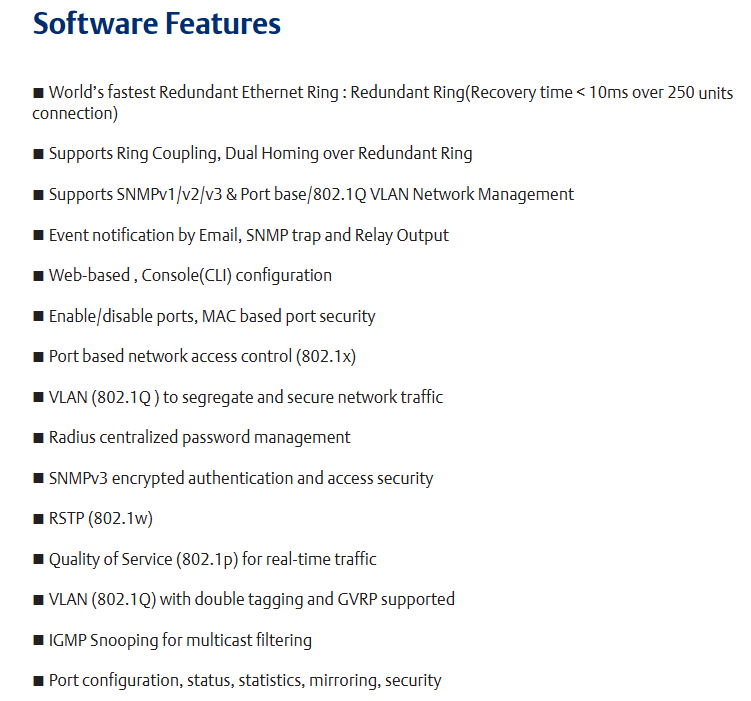
Network redundancy supports the world's fastest redundant Ethernet ring (with a recovery time of less than 10ms when 250 devices are cascaded), enabling ring coupling and dual home topology; Compatible with RSTP (802.1w) Fast Spanning Tree Protocol
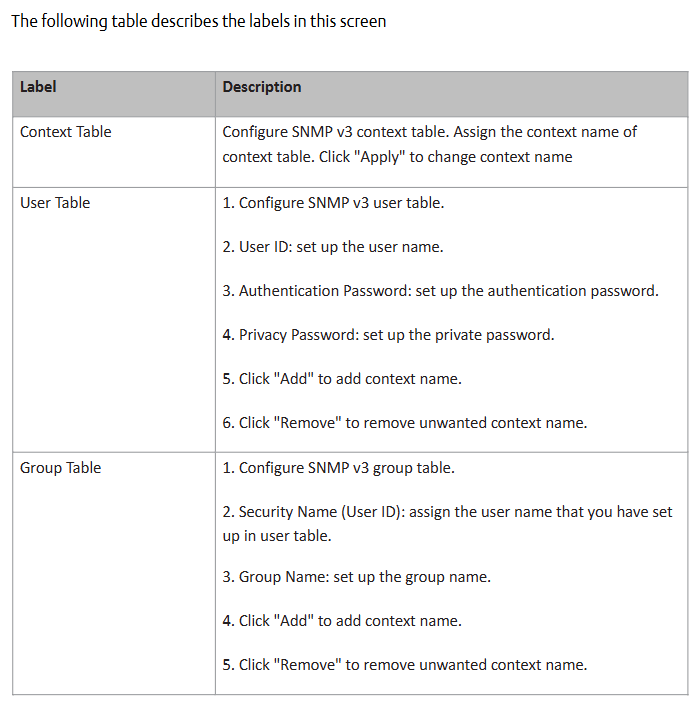
Network management supports the SNMP v1/v2/v3 protocol; Support VLAN partitioning based on port/802.1Q standards; Support LLDP (Link Layer Discovery Protocol) to automatically discover network node information
Event notifications can generate event alerts through email (SMTP), SNMP Trap, and relay output
Traffic control supports 802.1p Quality of Service (QoS) to ensure real-time traffic; Support IGMP Snooping multicast filtering to reduce network bandwidth usage
Security protection supports port enable/disable, MAC address based port security, 802.1x port authentication, and Radius centralized password management; SNPv3 encryption authentication
(3) Hardware core features
Power supply: Three redundant DC inputs.
Environmental adaptability: working temperature -40~70 ℃, storage temperature -40~85 ℃, working humidity 5%~95% (no condensation), protection level IP30.
Port configuration: 8 10/100Base-T (X) Ethernet ports (RJ45 interface), 2 100/1000Base-X SFP optical ports, and 1 Console port.
Physical dimensions: 52mm (width) x 106mm (depth) x 144mm (height).
Hardware Installation
SLM082 supports two installation methods to meet the needs of different industrial scenarios:
(1) DIN rail installation
The switch backplane comes with a DIN rail kit, which can be directly fastened to the standard DIN rail for fixation. The installation steps are simple and do not require additional drilling.
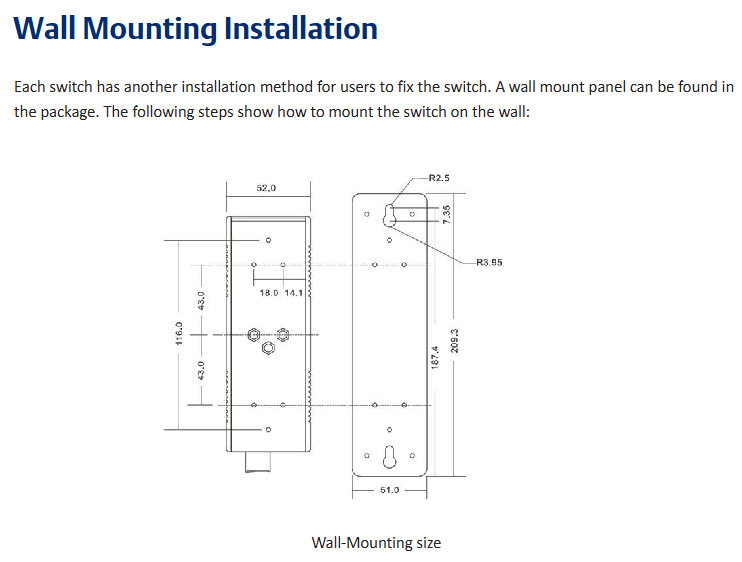
(2) Wall mounted installation
The packaging contains a wall mounted panel, which needs to be punched on the wall according to the dimensions indicated in the manual (such as aperture, hole spacing, etc.). After fixing the wall mounted panel with screws, the switch can be installed.
Hardware interface and indicator lights
(1) Front panel interface (Table 3.1)
Interface Type Quantity Function Description
10/100Base-T (X) ports with 8 RJ45 interfaces, supporting automatic negotiation (rate/duplex mode), default rate "automatic", duplex "automatic", flow control "disabled"
100/1000Base-X SFP ports with 2 optical ports, used to connect fiber optic modules and support high-speed data transmission
Console port with one RJ45 interface, connected to the computer via an RS-232 adapter cable for CLI management
Press the Reset button for 5 seconds to restore the switch to factory settings
(2) Meaning of front panel indicator lights (Table 3.2)
LED identification color status description
The green constant light of PW1/PW2/PW3 corresponds to the activated power supply module (PW1/PW2) or power interface (PW3)
R. The M (Ring Master) green constant light switch is the master node (Ring Master) of the redundant ring
The redundant ring with green constant brightness has been enabled;
Slow flashing: Redundant ring topology abnormality;
Flash: Redundant ring is working normally
Fault: The yellow light is constantly on, indicating a power failure or port interruption/malfunction
10/100Base-T (X) port LNK/ACT green constant light: port link established;
Flashing: The port is transmitting data and the link and activity status of the corresponding Ethernet port
10/100Base-T (X) port Full Duplex yellow constant light port works in full duplex mode
SFP port LNK/ACT green/yellow constant light: optical port link established;
Blinking: The optical port is transmitting data, and the corresponding link and activity status of the optical port are flashing
(3) Top panel component
Terminal block: includes PW1/PW2 (12-48V DC power input) and relay output interfaces( 1A@24VDC ).
Power interface (PW3): 12-45V DC power input socket.
Reset button: Press for 3 seconds to reset the device, press for 5 seconds to restore factory settings.
Console port: RJ45 interface, used for CLI management connection.
Cable Configuration
(1) Ethernet cable
Applicable standards: 10BASE-T supports Category 3/4/5 unshielded twisted pair (UTP), while 100BASE-TX requires Category 5 UTP.
Maximum transmission distance: Both are 100m (328 feet), with RJ45 connectors.
Pin definition: In 100BASE-TX/10BASE-T cables, pins 1/2 are used for sending data and pins 3/6 are used for receiving data; Supports automatic MDI/MDI-X functionality, allowing for direct connection between computers and switches (without the need for crossovers).
(2) SFP optical module and fiber optic
Optical module type: Supports multi-mode (transmission distance 0-550m, wavelength 850nm, fiber specifications 50/125 μ m or 62.5/125 μ m) and single-mode SFP modules, with LC connectors.
Connection rule: The TX port of switch A needs to be connected to the RX port of switch B to ensure the correct transmission of optical signals.
(3) Console cable
Cable specifications: The package contains a DB-9 (female) to RJ45 cable, which is used to connect the computer COM port to the switch Console port.
Pin correspondence: Pin 2 (RD, receive data) of the computer end (DB-9 male head) corresponds to Pin 2 (TD, send data) of the DB-9 female head, Pin 3 (TD, send data) corresponds to Pin 3 (RD, receive data) of the female head, and Pin 5 (GD, ground) corresponds to Pin 5 (GD, ground) of the female head.
Web Management Configuration
Web management is based on the built-in HTML web pages (Flash storage) of the switch, supporting IE5.0 and above browsers (with Java Applets network port permissions enabled), and compatible with both HTTP and HTTPS modes.
(1) Login preparation and default parameters
Default parameters: IP address 192.168.0.100, subnet mask 255.255.255.0, default gateway 192.168.0.254, username/password "admin".
Login steps: Open the browser and enter "http:///device IP" or "https://device IP". Enter the username and password to enter the management interface.
(2) Core configuration function
1. Basic Settings (5.1.5)
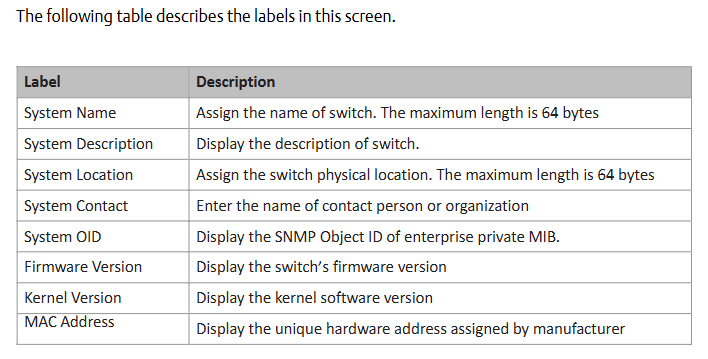
Switch information: System name (maximum 64 bytes), physical location, contacts, firmware version (default 1.03), kernel version (default v2.49), device MAC address, etc. can be modified.
Administrator password: Old username/password verification is required, and the new password must be at least 8 characters long, containing 1 uppercase letter, 1 number, and 1 special character (such as @ # $).
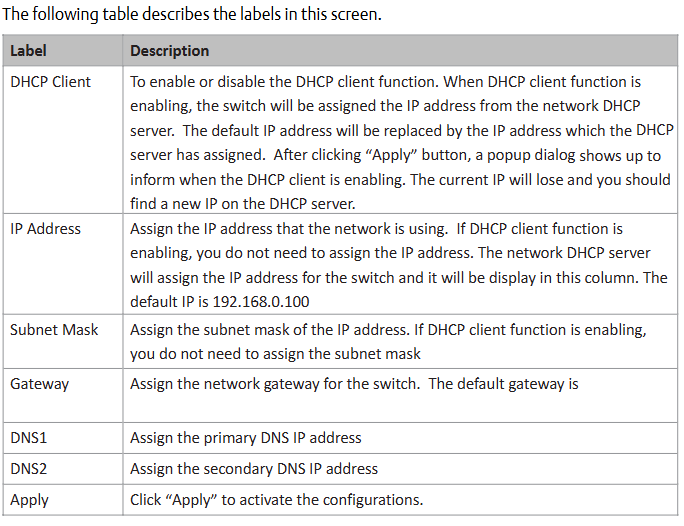
IP configuration: You can manually set IP/subnet mask/gateway/DNS, or enable DHCP clients to automatically obtain IP (if there is a DHCP server in the network).
SNTP time synchronization: After enabling the SNTP client, you can set the time zone (such as GMT Greenwich Mean Time), SNTP server IP, and support daylight saving time configuration (setting start and end times and offsets).
2. Backup and Upgrade (5.1.6)
Configure backup/restore: Back up the current configuration file (such as data.bin) through the TFTP server, or restore the configuration from the TFTP server.
Firmware upgrade: Prepare a TFTP server and store firmware files (such as image. bin). Enter the server IP and file name in the interface, click "Upgrade" to complete the upgrade (power off is prohibited during the upgrade, and the physical loop must be removed first).
3. DHCP Server (5.1.7)
Function switch: When enabled, the switch acts as a DHCP server and can assign dynamic IP addresses to LAN devices.
Parameter configuration: Set IP allocation range (such as 192.168.0.2-192.168.0.200), subnet mask, gateway DNS, And the IP lease duration (default 168 hours).
Port IP binding: A fixed IP can be assigned to a specified port to ensure that the device obtains the same IP every time it connects.
4. Port settings (5.1.8)
Port control: Set port enable/disable, rate/duplex mode (such as auto negotiation, 100 full), flow control mode (symmetric/asymmetric), and port security (only allow MAC addresses in the security list to forward data when enabled).
Rate limit: It can limit the inbound/outbound traffic of ports and support classification restrictions based on "broadcast frames", "broadcast+multicast frames", and "broadcast+multicast+flood unicast frames".
Trunk port aggregation: supports static aggregation or 802.3ad LACP dynamic aggregation, merging multiple physical ports into logical links to improve bandwidth; The number of active ports in the aggregation group can be set, and the backup port will be automatically activated in case of failure.
5. Network redundancy (5.1.9)
Redundant Ring: Supports three topologies: ring, ring coupling, and dual homing. It requires specifying the "Ring Master", "First Ring Port", and "Second Ring Port"; Ring coupling is used to split a large ring into two small rings, reducing the impact of topological changes; Dual attribution is used to connect redundant rings and backbone switches through RSTP links.
RSTP configuration: After enabling RSTP, the bridge priority (0-61440, a multiple of 4096, with higher priority for smaller values), maximum aging time (6-40 seconds), Hello time (1-10 seconds), and forwarding delay (4-30 seconds) can be set, satisfying the formula "2 × (forwarding delay -1) ≥ maximum aging time ≥ 2 × (Hello time+1)".
6. VLAN configuration (5.1.10)
802.1Q Tag VLAN: Based on the IEEE 802.1Q standard, cross vendor switch VLAN partitioning is achieved by inserting VLAN tags (VID) into Ethernet frames, supporting GVRP protocol automatic synchronization of VLAN configuration; By default, all ports belong to the default VLAN with VID=1 (which cannot be deleted). Ports can be set to Access (only carrying untagged frames), Trunk (only carrying tagged frames), or Hybrid (simultaneously carrying two types of frames) modes.
Port based VLAN: Logical networks are divided by ports, and only members of the same VLAN can exchange data. Ports that are not selected are automatically assigned to another VLAN; Ignore VLAN tags when enabled.
7. Traffic priority (5.1.12)
QoS strategy: Supports "strict priority" (high priority queue data is transmitted first until empty) or "8:4:2:1 weighted fair queue" (proportionally transmitting high/medium/low/lowest priority queue data).
Priority classification:
Port based: Assign a priority level of "high/medium/low/lowest" to each port.
Based on COS/802.1p: Map to level 4 queue according to the 802.1p field values (0-7) in the frame.
Based on TOS/DSCP: Map to level 4 queue according to the TOS/DSCP field values (0-63) in the IP header.
8. Security Configuration (5.1.14)
IP Security: Only allow IPs in the 'Secure IP List' to manage switches through Web/SNMP.
Port security: After enabling, the port is prohibited from learning new MAC addresses and only forwards MAC frames from the security list.
MAC blacklist: Discard frames with target MAC addresses in the blacklist to prevent specific devices from receiving data.
802.1x authentication: Radius server IP, authentication port (default 1812), billing port (default 1813), shared key, etc. need to be configured, supporting four authorization modes: port "Accept", "Reject", "Authorize", and "Disable".
9. Alarm and Monitoring (5.1.15-5.1.17)
System alarms: Supports SYSLOG (local/remote server logs), SMTP email alarms, and can be triggered by events such as "system cold start", "power status", "SNMP authentication failure", "redundant ring topology change", etc; The fault relay is triggered synchronously when an alarm is triggered, and the Fault LED is constantly on.
Status monitoring: View MAC address table (dynamic/static entries, support aging time setting), port statistics (data volume, error frames, etc.), system event logs (can be refreshed/cleared), port mirroring (copy source port TX/RX data to target port monitoring).
- YOKOGAWA
- Reliance
- ADVANCED
- SEW
- ProSoft
- WATLOW
- Kongsberg
- FANUC
- VSD
- DCS
- PLC
- man-machine
- Covid-19
- Energy and Gender
- Energy Access
- Renewable Integration
- Energy Subsidies
- Energy and Water
- Net zero emission
- Energy Security
- Critical Minerals
- A-B
- petroleum
- Mine scale
- Sewage treatment
- cement
- architecture
- Industrial information
- New energy
- Automobile market
- electricity
- Construction site
- HIMA
- ABB
- Rockwell
- Schneider Modicon
- Siemens
- xYCOM
- Yaskawa
- Woodward
- BOSCH Rexroth
- MOOG
- General Electric
- American NI
- Rolls-Royce
- CTI
- Honeywell
- EMERSON
- MAN
- GE
- TRICONEX
- Control Wave
- ALSTOM
- AMAT
- STUDER
- KONGSBERG
- MOTOROLA
- DANAHER MOTION
- Bentley
- Galil
- EATON
- MOLEX
- Triconex
- DEIF
- B&W
- ZYGO
- Aerotech
- DANFOSS
- KOLLMORGEN
- Beijer
- Endress+Hauser
- schneider
- Foxboro
- KB
- REXROTH
- YAMAHA
- Johnson
- Westinghouse
- WAGO
- TOSHIBA
- TEKTRONIX
- BENDER
- BMCM
- SMC
- HITACHI
- HIRSCHMANN
- XP POWER
- Baldor
- Meggitt
- SHINKAWA
- Other Brands
- UniOP
- KUKA
- IBA
- Beckhoff
- ADLINK
-
TRICONEX 3723X 32-Channel TMR Analog Input Module with HART for Tricon CX
-
GE 151X1233DB02SA02 Rev A Pitch Converter 30 Nm DC Pitch Conversion Module
-
GE 151X1207CK02SA02 77MM DE Excitation Module for Mark VI Turbine Control Systems
-
HIMA H6200A Analogue Isolator Power Supply for HIMax Safety Systems
-
ABB SACO 64D4 Digital Annunciator Unit with 64 Alarm Channels
-
Allen-Bradley 5069-L306ER - SER A CompactLogix Controller PLC
-
Omron CJ1W-CORT21 - CANopen Master Unit PLC Module
-
Danfoss 131B9523 / FC-102P5K5T4E20H1 - 5.5kW VLT HVAC Drive Inverter
-
Schneider Electric LXM32MU90M2 - Lexium 32 Servo Drive Controller
-
Danfoss AKD102P15KT4P21H1 - 15kW 131L2413 ADAP-KOOL Drive Inverter
-
Kollmorgen S70602-NANANA - Servo Drive Controller
-
Allen-Bradley 6189-PS2 - Power Supply Industrial Computer PS
-
Beijer E900T / 03010F - Operator Panel IFC ETTP HMI
-
Schneider Electric LMC20 - PacDrive Motion Controller PLC
-
Sartorius CAW2S1-3DC-NCE - COMBICS 2 Industrial Scale Terminal
-
Kollmorgen / Danaher S30301-NA / S300 - SERVOSTAR343 Servo Drive Controller
-
Siemens A5E00159503 - 12 INCH TFT Touch Panel HMI
-
Siemens 3UF5021-3AB00-1 - SIMOCODE DP Basic Unit Control Module
-
Danfoss 131B8872 / FC-202PK37T4E20H1 - 0.37kW VLT AQUA Drive Inverter
-
Atlas Copco ICB421-2003D / VSK001001 - W9139 ICM431-0025C ICM431-0025D Controller
-
Lenze EV82EV751_4C - Version 4A39 Frequency Inverter Drive
-
Atlas Copco / ABB 3HAB8101-19/07B - Robot Cable Assembly Harness
-
Beijer X2 Pro7-B2 - Operator Panel HMI Touch Screen
-
Honeywell CDW45L - Damper Actuator
-
B&R X67DM9331.L12 - Rev. I0 Digital Mixed Module
-
B&R X67DM9331.L12 - Rev. H0 Digital Mixed Module
-
Sanyo Denki PMM-BA-5604-1 - Pentasyn Stepper Motor Driver
-
SICK AWS1-113 / 1008900 - Evaluation Unit
-
Siemens 1TF6064-1AF71-3AH1 - SIMOTICS Synchronous Servo Motor
-
Heidenhain ERN680.P003-4096 / 29416004 - Rotary Encoder
-
Schneider Electric LC1G185EHEA - TeSys Control Contactor
-
Parker SBC HPD5N - High Performance Drive Electronics SPA
-
Advantech UNO-2170-CE11BE - Embedded Automation Computer IPC
-
Siemens 6AG1231-4HF32-4XB0 - SIPLUS S7-1200 SM 1231 Analog Input Module
-
Advantech UNO-2170-BTO - Embedded Automation Computer IPC
-
Jumo SR-96/4-001.0.0.00.111 - Solid State Relay Power Controller
-
Pepperl+Fuchs FC-21-V - FC-20P Safety Barrier Module
-
Emerson SP1404 - Unidrive AC Drive Inverter
-
B&R X67AI1233 - Rev.C0 Analog Input Module
-
Mitsubishi FR-F740-00250-EC - Frequency Inverter AC Drive
-
Allen-Bradley 2711P-T7C21D8S - PANELVIEW PLUS 7 SERIES B Touch Screen HMI
-
Pilz PMCprotego D.03/000/0/0/2/208-480VAC / 8176101 - Servo Amplifier Drive
-
Reliance Electric 57C414 / 57414-1N - Modbus Interface Module
-
Mitsubishi FR-F740-00250-EC - Frequency Inverter AC Drive
-
Siemens 6SN1123-1AA00-0EA2 - Version A 160A SIMODRIVE Power Module
-
Siemens 1TF6064-1AF71-3AH1 - SIMOTICS Synchronous Servo Motor
-
AEG ALU202 / DAP216 / DEP216 / DAU202 - SIM216 SIM203 DNP205 ADU205 PLC Controller KIT
-
Atlas Copco / ABB 3HAB8101-19/07B - Robot Cable Assembly Harness
-
Hitachi CPU22-02HB - Micro-EHV Programmable Controller PLC
-
Parker SBC HPD5N - High Performance Drive Electronics SPA
-
Jetter JX3-THI2-RTD - JX3-BP Temperature Input Module
-
Eaton DC1-34014FB-A20N - 5.5kW Inverter Variable Frequency Drive
-
Eaton DS7-34DSX041N0-D - Soft Starter
-
Reliance Electric 57C422B / 57422-2E - 2-Axis Servo Controller
-
Hitachi CPU22-02HB - Micro-EHV Programmable Controller PLC
-
Eaton DC1-34014FB-A20N - 5.5kW Frequency Inverter Variable Frequency Drive
-
Siemens 6SN1123-1AA00-0EA2 - Version A 160A SIMODRIVE Power Module
-
Reliance Electric 57C414 / 57414-1N - Modbus Interface Module
-
Eaton DS7-34DSX041N0-D - Soft Starter
-
Reliance Electric 57C422B / 57422-2E - 2-Axis Servo Controller
-
Johnson Controls DX-9120-8454 - Digital Controller
-
Jetter JX3-THI2-RTD - JX3-BP Temperature Input Module
-
Siemens 6SL3210-1KE21-7AP1 - SINAMICS G120C DP 7.5kW BOP-2 Inverter Drive
-
Siemens 1FK7042-2AF21-1QG0 - SIMOTICS S Synchronous Servo Motor
-
Mettler Toledo IND570 - Harsh Analog Weighing Terminal Controller
-
Schneider Electric TM238LDA24DR - Modicon M238 Programmable Logic Controller PLC
-
Hitachi EH-CPU548 - EH-150 PLC CPU Module
-
Honeywell Q7750A2003 - Excel 10 Zone Controller
-
Ferag 584.002.V003 - Control Panel HMI
-
Danfoss AK-SM 720 / 080Z8511 - ADAP-KOOL System Manager Controller
-
Ferag 584.002.V003 - Control Panel HMI
-
Kern 3210001.001 / LOP-KS 2903440.001 - PRT.205A.0000.V001.02341 Servo Controller Board
-
Reliance Electric 57C424 - Maxpak III High Speed Link Module
-
Telemecanique XBTA70101PA - Compact Terminal HMI Panel
-
Reliance Electric 57C424 - Maxpak III High Speed Link Module
-
Reliance Electric 57C422B - 2-Axis Servo Controller
-
Honeywell Q7750A2003 - Excel 10 Zone Controller
-
Telemecanique XBTN400 - Magelis Small Panel HMI
-
Schneider Electric TM172PDG42S - Modicon Programmable Logic Controller PLC
-
Fanuc HE693THM884M - Thermocouple Input Module
-
Selectron PMC22BAEZD / 220735 - Selecontrol PMC 22 ABEZD Controller Module
-
Baumuller BUS21-22/45-31-020 - Servo Drive Inverter
-
Schneider Electric TM172PDG42S - Modicon Programmable Logic Controller PLC
-
Schneider Electric ATV32HD11N4 - Altivar Variable Frequency Drive Inverter
-
Lenze 494_E.4B - DC Speed Controller
-
NORD SK300E-111-340-B - SKDA130E-111-340-IBS-AAA Frequency Inverter
-
Reliance Electric GMI-S02 - AC/AC Converter 380/400V 50/60Hz 2.3/2.8A Drive
-
Hakko / Monitouch V710CD - Operator Panel HMI Touch Screen
-
B&R 5PC910.SX01-00 / 5YZCAA00700000-005 - Automation PC Industrial Computer
-
Hitachi EH-CPU548 - EH-150 PLC CPU Module
-
Tecnau / Fortec FORTEC-04/UL / 10117 - PCB Circuit Board
-
Bosch PSS 2037 10B - Power Supply Module
-
Newall B602000 - Digital Readout Scale
-
ELCON PC Controller - Industrial PC Controller
-
Siemens 3UF5100-0AB00 - SIMOCODE-DP Control Module
-
Omron NS8-TV00B-V2 - Touch Screen HMI Panel
-
Siemens 6ES5264-8MA12 / IP264 - CAM Controller Module
-
Allen-Bradley 1756-L72S - SER B GuardLogix Safety Controller
-
Schneider Electric SXWMPC15A10001 - SmartX Controller Automation Server
-
Telemecanique LC1F265F7 - TeSys F Contactor
-
Siemens 6ES7314-6CH04-0AB0 - SIMATIC S7-300 CPU 314C-2 DP PLC
-
Allen-Bradley 1734-EI4S - POINT I/O Safety Module
-
Allen-Bradley 2711P-T7C4D8 / 2711P-RP8D - PanelView Plus HMI Touch Screen Logic Module
-
Ropex UPT-640-V - Resistron Temperature Controller
-
KEB 07.F5.B3A-0A00 - VERSION 1.1 Combivert Frequency Inverter
-
Sensopart V50-OB-A3-IW-M2-L - VISOR Vision Sensor Camera
-
SICK AFM60A-S1NB018X12 / 1059040 - Absolute Rotary Encoder
-
Kern AG KMC600 / 2903436.001 - Servo Drive Controller
-
Lenze E82EV302_4C200 / 13015655 - VERSION 3D35 Frequency Inverter Drive
-
Schneider Electric XBTOT2210 - Magelis Touch Screen HMI Panel
-
Baumuller BM5-O-SAF-000-000-000-001-202 - Parameter Safety Module
-
SICK UE4470-22EE690 - Safety Relay Controller
-
Hitachi EH-CPU448 / EH-150 - PLC CPU Module
-
Rexroth VT5005-13 - R5 00010592 Proportional Valve Amplifier Board
-
Siemens 6ES7510-1DJ00-0AB0 - SIMATIC ET 200SP CPU PLC
-
Beckhoff CX5120-0121 - 2GB Embedded PC Controller
-
Priva BlueiD S10 / 5010002 - SN3t 5020004 5010101 Building Automation Controller
-
Sigmatek DM161 - S-DIAS Digital Mix I/O Module
-
Telemecanique LC3D50P7A64 - Star Delta Starter Contactor
-
Siemens 6SN1123-1AA00-0BA2 - SIMODRIVE 611 Power Module
-
Siemens 6SN1124-1AA00-0CA1 - SIMODRIVE 611 Power Module
-
Dixell XC1015D-1C01F / XC1000D - Compressor Controller
-
Siemens A5E02184619 / 19T 577B - Industrial Touch Screen HMI Panel
-
Siemens 6SE6420-2AD27-5CA1 - Filter 6SE6400-2FS03-8CD0 Micromaster Inverter
-
Schneider Electric LC1G400LSEN - TeSys Control Contactor
-
Baldor BPS10-200-20-P - Servo Drive Motor Controller
-
Ingersoll Rand X4I / Y06IR03.00 - Air Compressor Controller
-
NORD SK 530P-221-340-A - Frequency Inverter

K-JIANG

Add: Jimei North Road, Jimei District, Xiamen, Fujian, China
Tell:+86-15305925923