

K-WANG


UniOP ePALM10 Handheld Human Computer Interface
UniOP ePALM10 Handheld Human Computer Interface
Basic Information
Product positioning: UniOP series handheld human-machine interface, using a sturdy polyamide shell, with high impact resistance and environmental interference resistance. The core is suitable for mobile operation scenarios in factory workshops, and can achieve functions such as equipment debugging, data monitoring, and alarm processing.
Core advantages: Integrated emergency stop button, enable switch and other safety components, with a protection level of IP65, supporting multiple communication protocols, balancing portability and industrial grade reliability.
Core hardware parameters
Parameter category, specific specifications, key notes
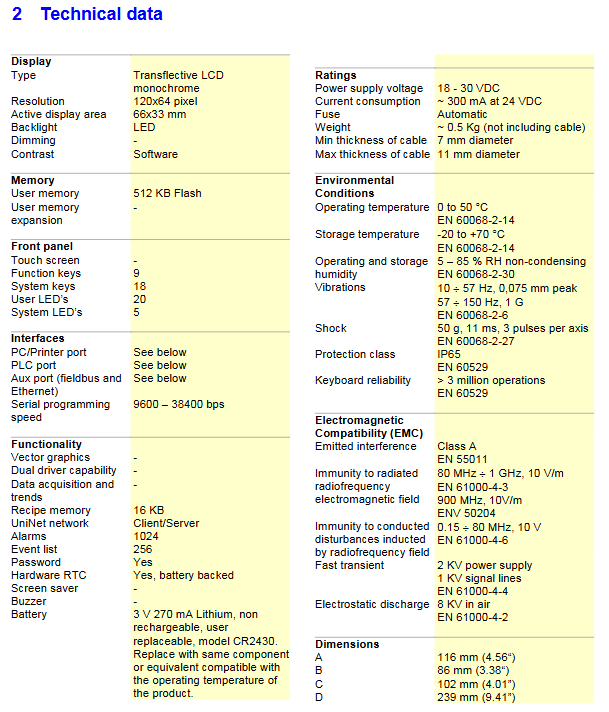
Display module 120x64 pixel monochrome semi transparent reflective LCD, effective display area 66x33mm, LED backlight, software adjustable contrast and dimming, still clear and readable in strong light environment, meeting the visual needs of industrial sites
Operating component 27 key keyboard (9 function keys+18 system keys) with tactile feedback; 20 user LED indicator lights+5 system LED indicator lights, keyboard lifespan>3 million times, LED displays device status intuitively
Storage configuration includes 512KB Flash user memory and 16KB recipe memory to meet program storage and recipe data storage requirements
Clock and battery hardware real-time clock (RTC), equipped with 3V 270mA lithium manganese battery (CR2430), non rechargeable. Users can replace the battery to backup the real-time clock, event list, and recipe data. Replacement will result in loss of backup data
The power supply specification is wide voltage 18-30VDC, with a current consumption of about 300mA at 24VDC. It is equipped with an automatic fuse that meets the industrial power environment and has overcurrent protection
Physical dimensions: Main body size 116mm (width) x 86mm (height) x 102mm (depth), cable diameter 7-11mm, weight approximately 0.5Kg (excluding cable) Portable design, suitable for handheld mobile operation
Protection level IP65 (whole machine protection), compliant with EN 60529 standard for dust and water resistance, suitable for harsh industrial environments
Environmental and Compliance Standards
Environmental adaptability parameters
Working temperature: 0~50 ℃;
Storage temperature: -20~+70 ℃ (compliant with EN 60068-2-14 standard);
Humidity requirement: The working and storage environment should be between 5-85% RH (non condensing) (in accordance with EN 60068-2-30 standard);
Anti vibration: 10~57Hz (0.075mm peak), 57~150Hz (1G) (compliant with EN 60068-2-6 standard);
Impact resistance: 50G, 11ms, 3 times per axis (compliant with EN 60068-2-27 standard).
Electromagnetic compatibility and safety compliance
Emission interference: Class A (EN 55011 standard);
Anti interference: radiated RF 80MHz~1GHz (10V/m), conducted interference 0.15~80MHz (10V), electrostatic 8KV air/1KV signal line, fast transient 2KV power supply (compliant with EN 61000 series standards);
Safety standards: Following EN 60204-1 (Industrial Control System Safety) and EN 60950 (Electrical Equipment Safety), all circuits (including emergency stop and enable switch circuits) are SELV safe low voltage circuits.
Model selection and communication specifications
(1) Model Selection Table (8 Core Models)
Model Communication Type Cable Length Enable Switch Type Core Configuration
EPALM10-0061 serial port (RS232/422/485) 5m dual 2-position (NO contact) including PC/Printer port, PLC port, Aux port
EPALM10-0062 serial port (RS232/422/485) 10m dual 2-position (NO contact) including PC/Printer port, PLC port, Aux port
EPALM10-3P61 serial port (RS232/422/485) 5m single 3-bit (dual NO contacts) including PC/Printer port, PLC port, Aux port
EPALM10-3P62 serial port (RS232/422/485) 10m single 3-bit (dual NO contacts) including PC/Printer port, PLC port, Aux port
EPALM10-0066 Ethernet (10base/T) 5m single 3-bit (dual NO contacts) with SCM11 module, no traditional serial port, only Ethernet programming
EPALM10-0068 Ethernet (10base/T) 10m single 3-bit (dual NO contacts) with SCM11 module, no traditional serial port, only Ethernet programming
EPALM10-0067 Profibus DP 10m single 3-bit (dual NO contacts) with TCM08 module and RS232 programming port on the back
EPALM10-0069 Profibus DP 5m single 3-digit (dual NO contacts) with TCM08 module and RS232 programming port on the back
(2) Core communication capability
Basic communication functions
Serial version: Supports RS232/RS422/RS485 protocol, baud rate 9600-38400bps, no parity check, 1 stop bit;
Ethernet version: 10base/T Ethernet interface, supporting device connection, network programming, and data transmission (alarm/recipe/event);
Profibus DP version: Supports Profibus DP bus communication, with built-in terminal resistors, and can only be used as network endpoint nodes.
Expansion and compatibility
Serial version compatible with TCM series modules: TCM01(Siemens S7 MPI)、TCM02(Moeller Suconet K)、TCM03(DeviceNet)、TCM09(CANopen);
Supports dual drive communication and can connect two types of devices simultaneously;
Compatible with over 130 industrial equipment communication drivers, supporting UniNet network (Client/Server mode) and OPC Server data services.
Software and Security Features
Programming and Data Processing
Programming software: UniOP Designer 6, intuitive operation, supports macro editor custom keyboard logic;
Data display: Dynamic data can be presented in formats such as numbers, text, bar charts, graphic images, etc;
Data storage and transmission: Supports 1024 alarms, 256 event lists, recipe data can be transmitted to the host through Ethernet, supports custom report printing with serial port printers;
Multi language support: The number of languages at runtime is limited by memory, and all text can be exported in Unicode format for easy translation.
Security protection function
Password protection: Level 8 password protection, restricting device operation and data access permissions;
Emergency stop button: Hardware hard wired, dual N C (normally closed) contacts, only supports low voltage circuit (<48VDC) connection;
Enable switch: There are two types: dual 2-position (requires simultaneous pressing to enable) and single 3-position (1st gear release, 2nd gear enable, 3rd gear emergency stop), both of which are NO (normally open) contacts;
Operation taboos: Do not use tools to operate the keyboard, do not open the back cover when powered on, and service personnel must discharge static electricity before operating live equipment.
Operation and Maintenance Guide
(1) Battery replacement
Reason for replacement: When the battery is low, the red system LED flashes to indicate that it needs to be replaced in a timely manner to avoid data loss;
Replacement steps: ① Turn off the device power; ② Loosen the 6 fixing screws of the housing with a screwdriver; ③ Open the device and remove the battery from the CPU subsystem; ④ Replace the CR2430 battery with the same model (it is strictly prohibited to mix other models to avoid the risk of explosion); ⑤ Reinstall the device and tighten the screws; ⑥ Verify real-time clock after power on;
Attention: Replacement may result in loss of clock, event list, and formula data. Used batteries must be disposed of according to regulations.
(2) Daily maintenance
Cleaning requirements: Only use a soft cloth and neutral soap to wipe the panel, and do not use any solvents;
Installation environment: Avoid continuous direct sunlight (accelerating panel film aging), and prohibit contact with corrosive chemicals;
Troubleshooting: When unable to enter configuration mode, you can turn off the power and press and hold any three buttons until the screen displays configuration mode.
(3) Power supply and grounding
Power supply requirements: The power supply should have dual or reinforced insulation, and the power should meet the power consumption requirements of the equipment;
Grounding specification: The equipment must be reliably connected to the protective earth (PE), and grounding can suppress electromagnetic interference and ensure the stability of the control system;
Power supply circuit: It can be floating or grounded, and the floating circuit is connected to the power supply ground through a 1M Ω resistor and a 3.3nF capacitor inside.
Accessory information
core components
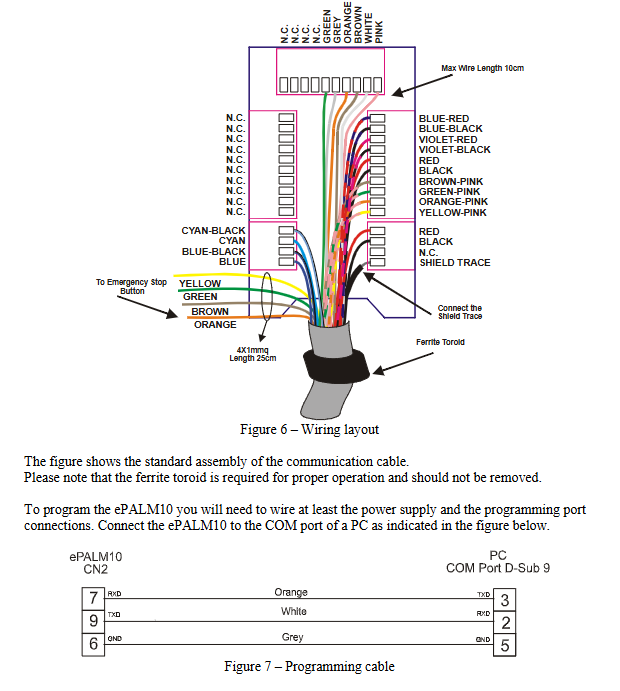
Programming cable: CA234 (used for connecting Profibus DP version and computer programming);
Hook accessories: AHOOK01 (non-magnetic hook, convenient for hanging equipment), AHOOK02 (with magnetic hook, not suitable for -0067 model);
Printable legend: Supports custom keyboard legend design and production.
Accessory usage: Hook accessories enhance equipment portability and adapt to mobile operation scenarios in workshops; Specialized programming cables ensure the stability of programming connections for devices of different versions.
- YOKOGAWA
- Reliance
- ADVANCED
- SEW
- ProSoft
- WATLOW
- Kongsberg
- FANUC
- VSD
- DCS
- PLC
- man-machine
- Covid-19
- Energy and Gender
- Energy Access
- Renewable Integration
- Energy Subsidies
- Energy and Water
- Net zero emission
- Energy Security
- Critical Minerals
- A-B
- petroleum
- Mine scale
- Sewage treatment
- cement
- architecture
- Industrial information
- New energy
- Automobile market
- electricity
- Construction site
- HIMA
- ABB
- Rockwell
- Schneider Modicon
- Siemens
- xYCOM
- Yaskawa
- Woodward
- BOSCH Rexroth
- MOOG
- General Electric
- American NI
- Rolls-Royce
- CTI
- Honeywell
- EMERSON
- MAN
- GE
- TRICONEX
- Control Wave
- ALSTOM
- AMAT
- STUDER
- KONGSBERG
- MOTOROLA
- DANAHER MOTION
- Bentley
- Galil
- EATON
- MOLEX
- Triconex
- DEIF
- B&W
- ZYGO
- Aerotech
- DANFOSS
- KOLLMORGEN
- Beijer
- Endress+Hauser
- schneider
- Foxboro
- KB
- REXROTH
- YAMAHA
- Johnson
- Westinghouse
- WAGO
- TOSHIBA
- TEKTRONIX
- BENDER
- BMCM
- SMC
- HITACHI
- HIRSCHMANN
- XP POWER
- Baldor
- Meggitt
- SHINKAWA
- Other Brands
- UniOP
- KUKA
- IBA
- Beckhoff
- ADLINK
-
FANUC A06B-0169-B088 - AC Servo Motor Alpha M40 3000 3 KW
-
ALPHA WIRE 1299C-SLATE-1000 - Multi-Conductor Cable Wire
-
alpha / Wittenstein SK+180S-MF1-10-1M1-1K - Hypoid Gearbox i=10
-
ALPHA WIRE 1181/40C SL005 - Multi-Conductor Cable Wire
-
Generic / DSI Straight Anatomic Plastic Adapter Head + Screw Hex - Dental Implant Fixture
-
Alpha II-650 MV6500526A - Power Supply Unit
-
ALPHA WIRE 7036 WH001 - Hook-Up Wire
-
FANUC RDCGM00000004O / TP 050-MF1-7-061-000 - Gear Reducer / Alpha Gearbox
-
Alpha II-650 MV6500436A - TDK-Lambda Power Supply Unit
-
Alpha S-Alpha600 J60033 - 600W Switching Power Supply Unit
-
Alpha 1500W J00032 - Power Supply Unit
-
Alpha 600W H60638 - Switching Power Supply Unit
-
Alpha 650 MV6500314A - Power Supply Unit
-
Aloka UST-5413 - Linear Probe for Prosound Alpha 6
-
ALPHA WIRE TFT25015 NA002 - High Temperature Heat Shrink Tubing Wire Sleeving
-
JAVAD ALPHA2 / GrAnt-G3 - GPS Receiver
-
Alpha 400W H47318 - Switching Power Supply Unit
-
Alpha SG-ALPHA-202-001 / Q1001-010-001 - Circuit Board Module
-
Antlia Dual ERF H-Alpha & Cak/CaH - Density Astronomical Accessory
-
ALPHA WIRE 5100C SL033 - Multi-Conductor Cable Wire
-
ALPHA WIRE 5098C-SL033 - Multi-Conductor Cable Wire
-
Fanuc A06B-6290-H105 - Alpha Sv 80hv-B Module Servo Amplifier
-
FANUC A06B-6240-H105 - Aux Axis Alpha aiSV 80 Servo Amplifier
-
Endress+Hauser Alpha-Log RSA10-61B1S / 42974737/0130 - Data Logger Measurement Instrument
-
ALPHA WIRE 6363-SL002 - Multi-Conductor Cable Wire
-
Alpha SP100S-MF1-7-1K1-2S - Gear Reducer
-
Alpha SP 100G-MF1-4-0H1-2S-PGG - Planetary Gear Reducer
-
FANUC A06B-0143-B175 #0275 - Alpha 12/3000 AC Servo Motor
-
James Burn Alpha Doc P33 / GBC PDI - Automatic Punch DocuPunch
-
Titus HVAC 105383-01 - ALPHA BAC Controller and Actuator
-
Wittenstein Alpha SP 100S-MF2-20-0E0-2S - Planetary Gearbox i=20
-
Kashiyama Alpha-85-ZV / SP-8026G - Pump Controller
-
Christ Alpha 2-4 LDplus - Freeze Drier Part N/ 101542
-
Lambda / Alpha H40896 - 400W Power Supply Unit
-
Wittenstein Alpha LP-070S-MF1-3-1E1-38 - Planetary Gearbox
-
Matrox / EXO-2480 133-D06-3 / 398-17962-1 - Alpha Numeric PCB Board
-
Fanuc A06B-6096-H204 - Dual Axis Alpha Servo Amplifier Module
-
Alpha Wire 5002C-SL001 - Multi-Conductor Cable 2 Conductors 22AWG 300VAC
-
Alpha 600W H60638 - Switching Power Supply Unit
-
Alpha Scientific Spin Precession Dual Electro Magnet Beam Line Chamber - Electro Magnet Beam Line Chamber
-
ALPHA WIRE 6017C SL005 - Multi-Conductor Cable Wire
-
ALPHA WIRE 65804 SL002 - Multi-Conductor Cable Wire
-
Fanuc A06B-0152-B010 - AC Servo Motor Alpha A30/2000 with Brake
-
ALPHA WIRE 5856-VI001 - Hook-Up Wire
-
ALPHA WIRE M13142-SL001 - Multi-Conductor Cable Wire
-
Alpha & Omega AOZ1017 - 8-Pin SOIC SMD Buck Switching Regulator IC
-
Alpha 600W H67027 CA600 - 600W Switching Power Supply Unit
-
ALPHA WIRE 2845/7-RD001 - Hook-Up Wire
-
Wittenstein Alpha VH+063S-MF1-10-6H1-1K-0C2 - Worm Gear Reducer i=10
-
ALPHA WIRE 2414C SL022 - Multi-Conductor Cable Wire
-
ALPHA WIRE 5672-SL005 - Multi-Conductor Cable Wire
-
BECKHOFF / Alpha AM8021-0B10-0000 + CP 040-MO1-10 - Servo Motor with Planetary Gearbox
-
ALPHA Systems Lab Inc MBA-WV1-F / PCB-WV1-F - PCB Board
-
FANUC A06B-0826-B201 - Alpha P12 AC Spindle Motor
-
WF & HC / Alpha-E 10045 - Tiller Bar Flat Flange Inlet 3150LB 3X 2.5 Inch
-
Seiler Alpha Air 3 - Dental Microscope
-
Alpha 400W H47223 - Switching Power Supply Unit
-
Wittenstein Alpha SP 180S-MC1-5-1M0-2K - Planetary Gearbox
-
FANUC A06B-6117-H211 - Servo Amplifier Module Alpha iSV 160/160 Amp
-
Alpha S-Alpha600 J60033 - 600W Switching Power Supply Unit
-
Adaptive Alpha Eclipse StreetSmart Model 17X - Master Slave LED Sign 44 x 44 Inch
-
ALPHA WIRE 391697-WH005 / 391697WH005 - Hook-Up Wire
-
Generic 22W Laser Engraver Cutter - Smart Air Pump APP Control CNC Dual-core CPU DIY Tools
-
FANUC A06B-6102-H226 / A06B6102H226 - Spindle Amplifier Module
-
FANUC A06B-6090-H006 / A06B6090H006 - Servo Power Supply Module
-
Alpha Wire Apr-19 - High Low Temperature Cable 75 FT
-
Wittenstein Alpha HG+ 075S-MF2-28-6E1-1S10 - Hypoid Gearbox Reducer i=28
-
Alpha J00032 - 1500W Power Supply Unit
-
Alpha H47038 - 400W Power Supply Unit
-
FANUC A06B-6096-H204 - Dual Axis Alpha Servo Amplifier Module
-
Wittenstein Alpha LPB090-MO1-10-111-00 - Alpha Planetary Gearbox
-
ALPHA WIRE 2842/19-YL001 - Hook-Up Wire
-
WITTENSTEIN ALPHA HG+060S-MF1-56C1-1K00 - Planetary Gearbox
-
Basler A102K Alpha VIS - Black and White CCD Industrial Camera
-
Alpha H40935 - 400W Power Supply Unit
-
FANUC A06B-6114-H207 - 2-Axis Servo Amplifier Module SVM20/40i Alpha i Series
-
TDK-Lambda / Alpha H47318 - 400W Switching Power Supply Unit
-
HITACHI Aloka Prosound Alpha 7 Premier - Diagnostic Ultrasound System
-
Alpha SP100S-MF1-4-1E1-2S - Precision Gear Reducer
-
FANUC A20B-2001-0950 - Control Circuit Board PCB
-
ALPHA WIRE 2855/1-GR001 - Hook-Up Wire
-
FANUC A06B-6096-H204 - Dual Axis Alpha Servo Amplifier Module
-
Wittenstein Alpha LPB090-MO1-10-111-00 - Alpha Planetary Gearbox
-
ALPHA WIRE 2842/19-YL001 - Hook-Up Wire
-
Basler A102K Alpha VIS - Black and White CCD Industrial Camera
-
Wittenstein Alpha LP 090-M01-7-111-000 / Schneider - Gear Box i:7 Schneider Electric Servo Motor
-
LAMBDA ALPHA 600W H60554 - Switching Power Supply Unit
-
Fanuc A06B-0238-B100 / A860-2000-T301 - AC Servo Motor with Encoder
-
FANUC A06B-6290-H322 - ALPHA iSV 10/10/10HV-B 3-Axis Servo Drive
-
Polymotor Italiana 9919 121 90332 / Alpha SP75-M1-3 - D.C. Permanent Magnet Motor with Gearbox
-
MJ Research PTC-200 - PCR DNA Engine Thermal Cycler with Dual 48-Well Alpha Block
-
ALPHA WIRE 5002C-SL002 - Multi-Conductor Cable Wire
-
Fluke / Victoreen ASM 990 / 489-110D - Biomedical Radiation Detector Probe with Pelican Case
-
ALPHA WIRE 5855-BK001 - Hook-Up Wire 22AWG Silver Plated Copper
-
Tetra / Alpha 600W H60552 - Switching Power Supply Unit
-
Bruker Alpha FTIR Spectrometer / Alpha-P ATR - Infrared Spectrometer FTIR Instrument
-
Simagic AlphaM-FX-C 290mm FX-C - Formula Steering Wheel with Alpha Mini Wheel Base
-
Alpha Wire 5152C 20/2C - XtraGuard High Performance Instrumentation/Control Cable
-
ALPHA WIRE 1219/40C SL005 - Multi-Conductor Cable Wire
-
ALPHA WIRE 3131441 TN005 - Multi-Conductor Cable Wire
-
ALPHA WIRE 2172-SV005 - Multi-Conductor Cable Wire
-
FANUC A20B-2100-0742 - ALPHA ia Servo Control Board
-
Olympus Endo Alpha Cart TI-A1 - Medical Equipment Cart with Accessories
-
ALPHA WIRE 74010-BK002 - Multi-Conductor Cable Wire
-
Fanuc A06B-6110-H026#N - ALPHA i Power Supply Module PSM-26i
-
Alpha Laval SX2/013 - Rotary Lobe Pump
-
Alpha II-450P MV4500007B - Switching Power Supply Unit
-
TDK-Lambda / Alpha 400W - Switching Power Supply Unit
-
ALPHA ALPHA6000E-3015GB/3018PB - Frequency Inverter Drive Power Converter
-
ALPHA WIRE 391245-WH005 - Hook-Up Wire
-
Alpha H60562 CA600 - 600W Switching Power Supply Unit
-
Fanuc A06B-0147-B675 - Alpha 22/2000 3.8kW 2000rpm AC Servo Motor
-
ALPHA WIRE 9821 - Twinaxial Cable 1PR 25AWG Poly Insulation
-
Fanuc / Alpha A16B-2203-0820 - ALPHA i Spindle Wiring PCB
-
FANUC A20B-2100-0742 - ALPHA ia Servo Control Board
-
Fanuc A06B-6096-H104 - Alpha Servo Module
-
Fuji Electric RYT202D5-VV2 / Faldic Alpha5 - Servo Amplifier
-
ALPHA WIRE 2817/6 20 AWG - PTFE High Temperature Cable
-
Aloka Prosound Alpha 10 / EU-6031C / JB-274D - High Voltage Power Supply for Ultrasound
-
Wittenstein Alpha SP 140S-MF1-5-01F-2S - Planetary Gearbox
-
FANUC A06B-6124-H205 - Alpha iSV Servo Amplifier Module
-
TDK-Lambda / Alpha MV6500314A - 650W Power Supply Unit
-
TDK-Lambda / Alpha H47318 - 400W Switching Power Supply Unit
-
Alpha H47318 - 400W Switching Power Supply Unit
-
CNC Bearing / Alpha AR090-S1-300-20-N - Robotics Bearing Component
-
Alpha CA400 5A,3.3Q,5B,12/12E / DXH47037 - 400W Power Supply Unit
-
FANUC A20B-2100-0742 - ALPHA ia Servo Control Board
-
Fanuc / Amada A04B-0810-C403 / LC1212 alpha II - Pressure Regulator

K-JIANG

Add: Jimei North Road, Jimei District, Xiamen, Fujian, China
Tell:+86-15305925923