

K-WANG


Rockwell Automation 1756 Series ControlNet Communication Module
Model Core Features Applicable Scenarios
1756-CN2 standard media (non redundant), conventional industrial environment without anti-corrosion coating, single network link
1756-CN2K standard media (non redundant), with anti-corrosion coating (model ending with "K" mark), corrosive industrial environment (such as chemical and metallurgical)
1756-CN2R redundant media (dual link A/B), high reliability demand scenario without anti-corrosion coating (such as energy, transportation)
1756-CN2RK redundant media (dual link A/B) with anti-corrosion coating and high reliability requirements scenario
1756-CN2RXT redundant media, wide temperature design (-25~70 ℃), without anti-corrosion coating for extreme temperature environments (such as outdoor and refrigerated)
Rockwell Automation 1756 Series ControlNet Communication Module
Product Family and Core Positioning
1. Model classification and functional differences
The 1756 series ControlNet module is divided into "media type", "corrosion resistance", and "temperature adaptation range" to meet the needs of different industrial scenarios. The specific model functions are as follows:
Model Core Features Applicable Scenarios
1756-CN2 standard media (non redundant), conventional industrial environment without anti-corrosion coating, single network link
1756-CN2K standard media (non redundant), with anti-corrosion coating (model ending with "K" mark), corrosive industrial environment (such as chemical and metallurgical)
1756-CN2R redundant media (dual link A/B), high reliability demand scenario without anti-corrosion coating (such as energy, transportation)
1756-CN2RK redundant media (dual link A/B) with anti-corrosion coating and high reliability requirements scenario
1756-CN2RXT redundant media, wide temperature design (-25~70 ℃), without anti-corrosion coating for extreme temperature environments (such as outdoor and refrigerated)
2. Core advantages of ControlNet network
The ControlNet network connected to the module combines I/O network and Peer to Peer network functions, with the core features of:
Deterministic communication: ensuring repeatable and low latency transmission of critical control data;
Support redundancy: Redundant models (CN2R/CN2RK/CN2RXT) achieve network fault redundancy switching through dual links (A/B) to improve system stability.

Environmental requirements and safety certification
1. Basic environmental standards
Pollution level: only applicable to industrial environments with pollution level 2 (defined by IEC/EN 60664-1, which means the air contains only a small amount of non-conductive dust);
Overvoltage category: Class II application (IEC/EN 60664-1), suitable for downstream equipment in industrial distribution systems;
Altitude: up to 2000 meters (6562 feet), no need to downgrade for use;
Installation form: Open device, to be installed in an enclosure that meets the following requirements:
Protection level: at least IP54 (EN/IEC 60529);
Flame retardant rating: Non metallic shells must meet a 5VA flame spread rating;
Operation restriction: Tools are required to open the inside of the casing to prevent personnel from coming into contact with live parts.
2. Hazardous Area Certification
The module has been certified for hazardous areas in multiple regions, and the requirements for different regions are as follows:
Core requirements for certification areas
North America (Class I, Div 2) is suitable for A/B/C/D hazardous areas (such as environments containing flammable gases), with a temperature code of T4;
It is strictly prohibited to plug in or unplug modules/wiring in non power off or unknown non hazardous areas;
Components cannot be replaced, otherwise they may compromise their suitability for hazardous locations.
ATEX/UKEX equipment group II, category 3, protection type "Ex ec IIC T4 Gc" (increased safety type);
Only applicable to Zone 2 hazardous areas (where explosive gas environments rarely occur or occur in the short term);
It needs to be used with a UKEX/ATEX certified casing (IP54 or above).
IECEx certification protection type is the same as ATEX (Ex ec IIC T4 Gc), suitable for Zone 2 hazardous areas;
Transient protection must be met (peak voltage at the power supply end ≤ 140% of the rated value).
3. Requirements for electrostatic protection
The module is sensitive to static electricity, and the following should be followed during operation:
Contact with grounded objects to release static electricity, or wear a grounded wristband;
Do not touch module connectors, pins, and internal circuits;
When not in use, it should be stored in anti-static packaging;
Prioritize using anti-static workbenches.
Installation and wiring operations
1. Preparation before module installation
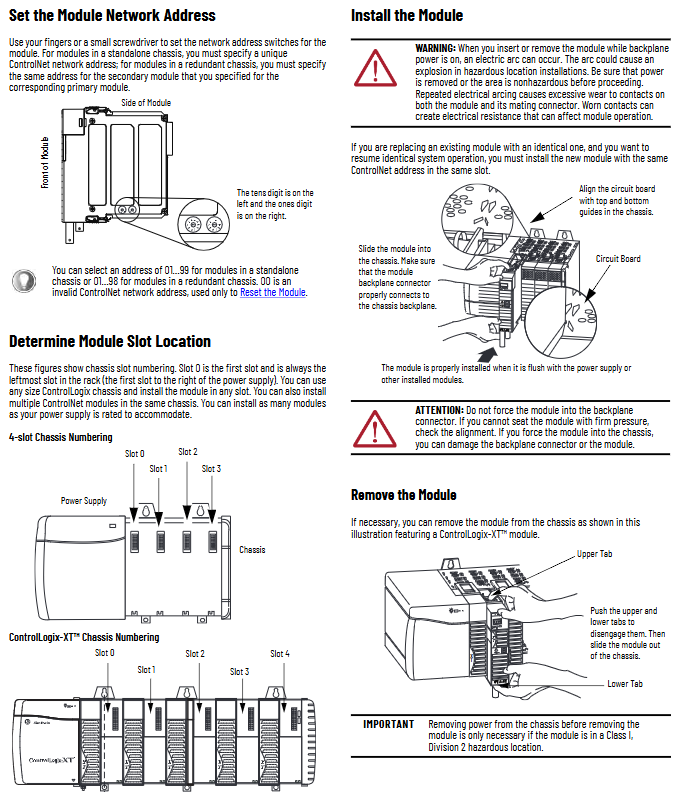
Slot position: Supports any size of ControlLogix chassis and can be installed in any slot (ensuring sufficient power capacity);
Redundant system requirements: The primary/backup modules need to be installed in the same slot of the corresponding chassis (such as the primary module in slot 3, and the backup module also needs to be in slot 3 of the backup chassis).
Network address setting:
Address range: Independent chassis modules range from 01 to 99, redundant chassis modules range from 01 to 98 (00 is an invalid address, only used for resetting);
Setting method: Adjust through the two digit dip switch on the side of the module (ten digits on the left and one digit on the right), ensuring that the address is unique within the same network.
2. Module installation and disassembly steps
(1) Installation steps
Confirm that the power supply of the chassis has been disconnected (power must be cut off in hazardous areas, and normal environments can support live plugging, but it is not recommended);
Align the module circuit board with the upper and lower rails of the chassis, and smoothly push it into the backplane connector;
Confirm that the module is flush with the power/other modules and not loose (do not forcefully press to avoid damaging the connector).
(2) Disassembly steps
Press the upper/lower tabs on both sides of the module to unlock it;
Smoothly slide the module out of the chassis, and power off in hazardous areas first.
3. ControlNet network wiring (Tap connection)
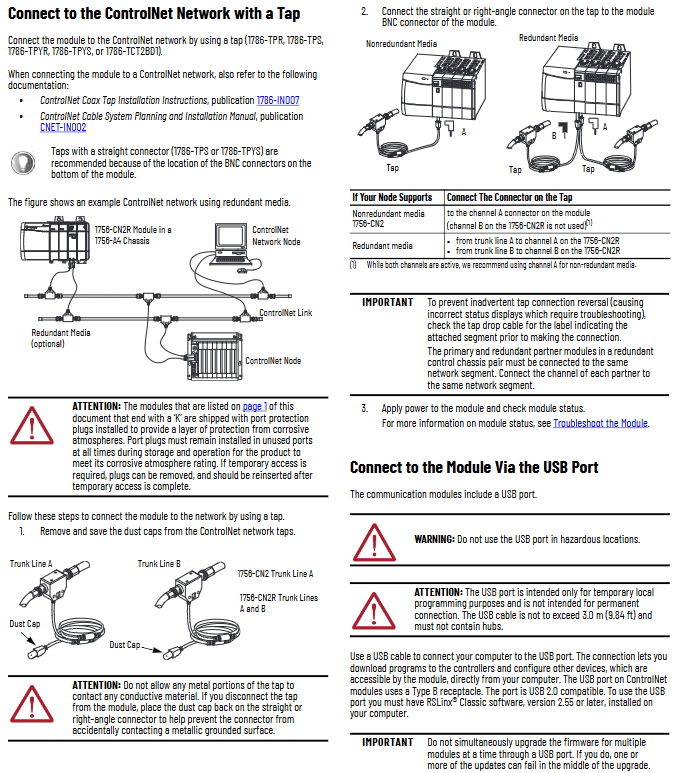
The module needs to be connected to the network through a ControlNet tap (Tap, such as 1786-TPR/TPS/TPYR/TPYS/TCT2BD1), with the following specific requirements:
Media type wiring method
Non redundant (CN2/CN2K) only connects the tap to module A channel (B channel is not used), and the tap needs to be selected as a direct connection type (such as 1786-TPS) to adapt to the BNC interface at the bottom of the module
Redundant (CN2R/CN2RK/CN2RXT) tap A is connected to module A channel, and tap B is connected to module B channel; Dual links need to be simultaneously connected to the network backbone (Trunk Line A/B)
Key wiring precautions:
Unused ports (such as the B channel of CN2) need to retain protective plugs (pre installed with the "K" model) to ensure the anti-corrosion level;
When the tap changer is disconnected from the module, it is necessary to immediately cover it with a dust cap to prevent the metal part from contacting the grounding surface;
In a redundant system, the main/backup modules need to be connected to the same network segment (such as the main module A channel connected to Trunk A, and the backup module A channel also needs to be connected to Trunk A).
4. USB port usage specifications
The module is equipped with a USB 2.0 Type B port, which is only used for temporary local programming. Core limitations:
Prohibited from use in hazardous areas;
Cable length ≤ 3 meters (9.84 feet), cannot be connected to a USB hub;
RSLinx Classic 2.55 and above software must be installed;
It is prohibited to upgrade multiple module firmware through USB at the same time to avoid upgrade failure.
Module reset and troubleshooting
1. Restore factory settings (reset operation)
When a module needs to clear configuration or fix exceptions, the following steps can be performed:
Disconnect the power supply of the chassis and remove the module;
Set the dip switch to "00" (invalid address, only used for reset);
Reinstall the module and connect the power supply;
After the module displays "Reset Complete Change Switch Settings", disconnect the power and remove the module;
Return the dip switch to the target address (01~99/98), reinstall and power on.
2. Core methods for troubleshooting
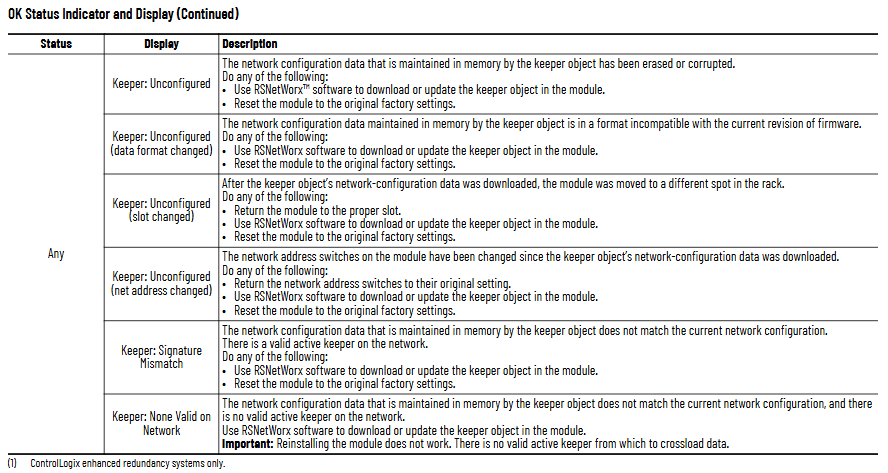
By using the OK status indicator light and network channel indicator light (A/B) of the module to locate the fault, the key status interpretation is as follows:
(1) OK status indicator light (core fault diagnosis)
Reason and solution for malfunction of indicator light status display information
Turn off power failure or internal failure: Check the power connection and module for tightness. If it is ineffective, replace the module
Reset Complete Change Switch Settings address to 00 (invalid): Reset valid address (01~99/98)
Frequent red FAIL power on test failure: replace module directly
Flashing red DUPLICATE NOTE DETECTED Network address conflict: Replace with unique address
Flashing red Image update Needed firmware needs to be updated: Use ControlFLASH software to upgrade Boot image
Evergreen/Blinking Green CPU=xx% (xx ≥ 80) CPU utilization is too high (over 80%): Check the number of network connections and optimize the control program
Blinking green NET ERR network wiring error or no other nodes: Check cables, terminators, and ensure that at least one other node is online
(2) Network channel indicator light (A/B channel status)
Interpretation of indicator light status channel (A/B) status
Evergreen is operating normally, and channel communication is functioning properly
Flashing green/extinguishing temporary error, module can self recover
Flashing red/off media malfunction (such as disconnection, looseness) or no other nodes: Check cables, terminators, and add online nodes
Constant red channel fault: power off reset module, if ineffective, contact Rockwell technical support
Key technical parameters
Parameter category 1756-CN2/CN2K 1756-CN2R/CN2RK 1756-CN2RXT
Backboard current 1.1A (5.1V DC) 1.3A (5.1V DC) 1.3A (5.1V DC)
Working temperature: 0~60 ℃ (32~140 ℉) 0~60 ℃ (32~140 ℉) -25~70 ℃ (-13~158 ℉)
Isolation voltage 30V DC (continuous), basic insulation between ControlNet/USB and backplane (500V AC withstand voltage for 60 seconds) on the same left (redundant models additionally support A/B channel isolation) on the same left
Anti corrosion grade (with "K") ASTM B845-97 G3 grade (ANSI/ISA 71.04), IEC 60721-3-3 CX grade same as left
The wiring category for ControlNet ports is Class 1, and for USB ports it is Class 3. Same as left
- YOKOGAWA
- Reliance
- ADVANCED
- SEW
- ProSoft
- WATLOW
- Kongsberg
- FANUC
- VSD
- DCS
- PLC
- man-machine
- Covid-19
- Energy and Gender
- Energy Access
- Renewable Integration
- Energy Subsidies
- Energy and Water
- Net zero emission
- Energy Security
- Critical Minerals
- A-B
- petroleum
- Mine scale
- Sewage treatment
- cement
- architecture
- Industrial information
- New energy
- Automobile market
- electricity
- Construction site
- HIMA
- ABB
- Rockwell
- Schneider Modicon
- Siemens
- xYCOM
- Yaskawa
- Woodward
- BOSCH Rexroth
- MOOG
- General Electric
- American NI
- Rolls-Royce
- CTI
- Honeywell
- EMERSON
- MAN
- GE
- TRICONEX
- Control Wave
- ALSTOM
- AMAT
- STUDER
- KONGSBERG
- MOTOROLA
- DANAHER MOTION
- Bentley
- Galil
- EATON
- MOLEX
- Triconex
- DEIF
- B&W
- ZYGO
- Aerotech
- DANFOSS
- KOLLMORGEN
- Beijer
- Endress+Hauser
- schneider
- Foxboro
- KB
- REXROTH
- YAMAHA
- Johnson
- Westinghouse
- WAGO
- TOSHIBA
- TEKTRONIX
- BENDER
- BMCM
- SMC
- HITACHI
- HIRSCHMANN
- XP POWER
- Baldor
- Meggitt
- SHINKAWA
- Other Brands
- UniOP
- KUKA
- IBA
- Beckhoff
- ADLINK
-
FANUC A06B-0169-B088 - AC Servo Motor Alpha M40 3000 3 KW
-
ALPHA WIRE 1299C-SLATE-1000 - Multi-Conductor Cable Wire
-
alpha / Wittenstein SK+180S-MF1-10-1M1-1K - Hypoid Gearbox i=10
-
ALPHA WIRE 1181/40C SL005 - Multi-Conductor Cable Wire
-
Generic / DSI Straight Anatomic Plastic Adapter Head + Screw Hex - Dental Implant Fixture
-
Alpha II-650 MV6500526A - Power Supply Unit
-
ALPHA WIRE 7036 WH001 - Hook-Up Wire
-
FANUC RDCGM00000004O / TP 050-MF1-7-061-000 - Gear Reducer / Alpha Gearbox
-
Alpha II-650 MV6500436A - TDK-Lambda Power Supply Unit
-
Alpha S-Alpha600 J60033 - 600W Switching Power Supply Unit
-
Alpha 1500W J00032 - Power Supply Unit
-
Alpha 600W H60638 - Switching Power Supply Unit
-
Alpha 650 MV6500314A - Power Supply Unit
-
Aloka UST-5413 - Linear Probe for Prosound Alpha 6
-
ALPHA WIRE TFT25015 NA002 - High Temperature Heat Shrink Tubing Wire Sleeving
-
JAVAD ALPHA2 / GrAnt-G3 - GPS Receiver
-
Alpha 400W H47318 - Switching Power Supply Unit
-
Alpha SG-ALPHA-202-001 / Q1001-010-001 - Circuit Board Module
-
Antlia Dual ERF H-Alpha & Cak/CaH - Density Astronomical Accessory
-
ALPHA WIRE 5100C SL033 - Multi-Conductor Cable Wire
-
ALPHA WIRE 5098C-SL033 - Multi-Conductor Cable Wire
-
Fanuc A06B-6290-H105 - Alpha Sv 80hv-B Module Servo Amplifier
-
FANUC A06B-6240-H105 - Aux Axis Alpha aiSV 80 Servo Amplifier
-
Endress+Hauser Alpha-Log RSA10-61B1S / 42974737/0130 - Data Logger Measurement Instrument
-
ALPHA WIRE 6363-SL002 - Multi-Conductor Cable Wire
-
Alpha SP100S-MF1-7-1K1-2S - Gear Reducer
-
Alpha SP 100G-MF1-4-0H1-2S-PGG - Planetary Gear Reducer
-
FANUC A06B-0143-B175 #0275 - Alpha 12/3000 AC Servo Motor
-
James Burn Alpha Doc P33 / GBC PDI - Automatic Punch DocuPunch
-
Titus HVAC 105383-01 - ALPHA BAC Controller and Actuator
-
Wittenstein Alpha SP 100S-MF2-20-0E0-2S - Planetary Gearbox i=20
-
Kashiyama Alpha-85-ZV / SP-8026G - Pump Controller
-
Christ Alpha 2-4 LDplus - Freeze Drier Part N/ 101542
-
Lambda / Alpha H40896 - 400W Power Supply Unit
-
Wittenstein Alpha LP-070S-MF1-3-1E1-38 - Planetary Gearbox
-
Matrox / EXO-2480 133-D06-3 / 398-17962-1 - Alpha Numeric PCB Board
-
Fanuc A06B-6096-H204 - Dual Axis Alpha Servo Amplifier Module
-
Alpha Wire 5002C-SL001 - Multi-Conductor Cable 2 Conductors 22AWG 300VAC
-
Alpha 600W H60638 - Switching Power Supply Unit
-
Alpha Scientific Spin Precession Dual Electro Magnet Beam Line Chamber - Electro Magnet Beam Line Chamber
-
ALPHA WIRE 6017C SL005 - Multi-Conductor Cable Wire
-
ALPHA WIRE 65804 SL002 - Multi-Conductor Cable Wire
-
Fanuc A06B-0152-B010 - AC Servo Motor Alpha A30/2000 with Brake
-
ALPHA WIRE 5856-VI001 - Hook-Up Wire
-
ALPHA WIRE M13142-SL001 - Multi-Conductor Cable Wire
-
Alpha & Omega AOZ1017 - 8-Pin SOIC SMD Buck Switching Regulator IC
-
Alpha 600W H67027 CA600 - 600W Switching Power Supply Unit
-
ALPHA WIRE 2845/7-RD001 - Hook-Up Wire
-
Wittenstein Alpha VH+063S-MF1-10-6H1-1K-0C2 - Worm Gear Reducer i=10
-
ALPHA WIRE 2414C SL022 - Multi-Conductor Cable Wire
-
ALPHA WIRE 5672-SL005 - Multi-Conductor Cable Wire
-
BECKHOFF / Alpha AM8021-0B10-0000 + CP 040-MO1-10 - Servo Motor with Planetary Gearbox
-
ALPHA Systems Lab Inc MBA-WV1-F / PCB-WV1-F - PCB Board
-
FANUC A06B-0826-B201 - Alpha P12 AC Spindle Motor
-
WF & HC / Alpha-E 10045 - Tiller Bar Flat Flange Inlet 3150LB 3X 2.5 Inch
-
Seiler Alpha Air 3 - Dental Microscope
-
Alpha 400W H47223 - Switching Power Supply Unit
-
Wittenstein Alpha SP 180S-MC1-5-1M0-2K - Planetary Gearbox
-
FANUC A06B-6117-H211 - Servo Amplifier Module Alpha iSV 160/160 Amp
-
Alpha S-Alpha600 J60033 - 600W Switching Power Supply Unit
-
Adaptive Alpha Eclipse StreetSmart Model 17X - Master Slave LED Sign 44 x 44 Inch
-
ALPHA WIRE 391697-WH005 / 391697WH005 - Hook-Up Wire
-
Generic 22W Laser Engraver Cutter - Smart Air Pump APP Control CNC Dual-core CPU DIY Tools
-
FANUC A06B-6102-H226 / A06B6102H226 - Spindle Amplifier Module
-
FANUC A06B-6090-H006 / A06B6090H006 - Servo Power Supply Module
-
Alpha Wire Apr-19 - High Low Temperature Cable 75 FT
-
Wittenstein Alpha HG+ 075S-MF2-28-6E1-1S10 - Hypoid Gearbox Reducer i=28
-
Alpha J00032 - 1500W Power Supply Unit
-
Alpha H47038 - 400W Power Supply Unit
-
FANUC A06B-6096-H204 - Dual Axis Alpha Servo Amplifier Module
-
Wittenstein Alpha LPB090-MO1-10-111-00 - Alpha Planetary Gearbox
-
ALPHA WIRE 2842/19-YL001 - Hook-Up Wire
-
WITTENSTEIN ALPHA HG+060S-MF1-56C1-1K00 - Planetary Gearbox
-
Basler A102K Alpha VIS - Black and White CCD Industrial Camera
-
Alpha H40935 - 400W Power Supply Unit
-
FANUC A06B-6114-H207 - 2-Axis Servo Amplifier Module SVM20/40i Alpha i Series
-
TDK-Lambda / Alpha H47318 - 400W Switching Power Supply Unit
-
HITACHI Aloka Prosound Alpha 7 Premier - Diagnostic Ultrasound System
-
Alpha SP100S-MF1-4-1E1-2S - Precision Gear Reducer
-
FANUC A20B-2001-0950 - Control Circuit Board PCB
-
ALPHA WIRE 2855/1-GR001 - Hook-Up Wire
-
FANUC A06B-6096-H204 - Dual Axis Alpha Servo Amplifier Module
-
Wittenstein Alpha LPB090-MO1-10-111-00 - Alpha Planetary Gearbox
-
ALPHA WIRE 2842/19-YL001 - Hook-Up Wire
-
Basler A102K Alpha VIS - Black and White CCD Industrial Camera
-
Wittenstein Alpha LP 090-M01-7-111-000 / Schneider - Gear Box i:7 Schneider Electric Servo Motor
-
LAMBDA ALPHA 600W H60554 - Switching Power Supply Unit
-
Fanuc A06B-0238-B100 / A860-2000-T301 - AC Servo Motor with Encoder
-
FANUC A06B-6290-H322 - ALPHA iSV 10/10/10HV-B 3-Axis Servo Drive
-
Polymotor Italiana 9919 121 90332 / Alpha SP75-M1-3 - D.C. Permanent Magnet Motor with Gearbox
-
MJ Research PTC-200 - PCR DNA Engine Thermal Cycler with Dual 48-Well Alpha Block
-
ALPHA WIRE 5002C-SL002 - Multi-Conductor Cable Wire
-
Fluke / Victoreen ASM 990 / 489-110D - Biomedical Radiation Detector Probe with Pelican Case
-
ALPHA WIRE 5855-BK001 - Hook-Up Wire 22AWG Silver Plated Copper
-
Tetra / Alpha 600W H60552 - Switching Power Supply Unit
-
Bruker Alpha FTIR Spectrometer / Alpha-P ATR - Infrared Spectrometer FTIR Instrument
-
Simagic AlphaM-FX-C 290mm FX-C - Formula Steering Wheel with Alpha Mini Wheel Base
-
Alpha Wire 5152C 20/2C - XtraGuard High Performance Instrumentation/Control Cable
-
ALPHA WIRE 1219/40C SL005 - Multi-Conductor Cable Wire
-
ALPHA WIRE 3131441 TN005 - Multi-Conductor Cable Wire
-
ALPHA WIRE 2172-SV005 - Multi-Conductor Cable Wire
-
FANUC A20B-2100-0742 - ALPHA ia Servo Control Board
-
Olympus Endo Alpha Cart TI-A1 - Medical Equipment Cart with Accessories
-
ALPHA WIRE 74010-BK002 - Multi-Conductor Cable Wire
-
Fanuc A06B-6110-H026#N - ALPHA i Power Supply Module PSM-26i
-
Alpha Laval SX2/013 - Rotary Lobe Pump
-
Alpha II-450P MV4500007B - Switching Power Supply Unit
-
TDK-Lambda / Alpha 400W - Switching Power Supply Unit
-
ALPHA ALPHA6000E-3015GB/3018PB - Frequency Inverter Drive Power Converter
-
ALPHA WIRE 391245-WH005 - Hook-Up Wire
-
Alpha H60562 CA600 - 600W Switching Power Supply Unit
-
Fanuc A06B-0147-B675 - Alpha 22/2000 3.8kW 2000rpm AC Servo Motor
-
ALPHA WIRE 9821 - Twinaxial Cable 1PR 25AWG Poly Insulation
-
Fanuc / Alpha A16B-2203-0820 - ALPHA i Spindle Wiring PCB
-
FANUC A20B-2100-0742 - ALPHA ia Servo Control Board
-
Fanuc A06B-6096-H104 - Alpha Servo Module
-
Fuji Electric RYT202D5-VV2 / Faldic Alpha5 - Servo Amplifier
-
ALPHA WIRE 2817/6 20 AWG - PTFE High Temperature Cable
-
Aloka Prosound Alpha 10 / EU-6031C / JB-274D - High Voltage Power Supply for Ultrasound
-
Wittenstein Alpha SP 140S-MF1-5-01F-2S - Planetary Gearbox
-
FANUC A06B-6124-H205 - Alpha iSV Servo Amplifier Module
-
TDK-Lambda / Alpha MV6500314A - 650W Power Supply Unit
-
TDK-Lambda / Alpha H47318 - 400W Switching Power Supply Unit
-
Alpha H47318 - 400W Switching Power Supply Unit
-
CNC Bearing / Alpha AR090-S1-300-20-N - Robotics Bearing Component
-
Alpha CA400 5A,3.3Q,5B,12/12E / DXH47037 - 400W Power Supply Unit
-
FANUC A20B-2100-0742 - ALPHA ia Servo Control Board
-
Fanuc / Amada A04B-0810-C403 / LC1212 alpha II - Pressure Regulator

K-JIANG

Add: Jimei North Road, Jimei District, Xiamen, Fujian, China
Tell:+86-15305925923