

K-WANG
+086-15305925923
Service expert in industrial control field!


Product
Article
NameDescriptionContent
Adequate Inventory, Timely Service
pursuit of excellence


Ship control system
Equipment control system
Power monitoring system
Current position:
新闻动态
newS
Brand
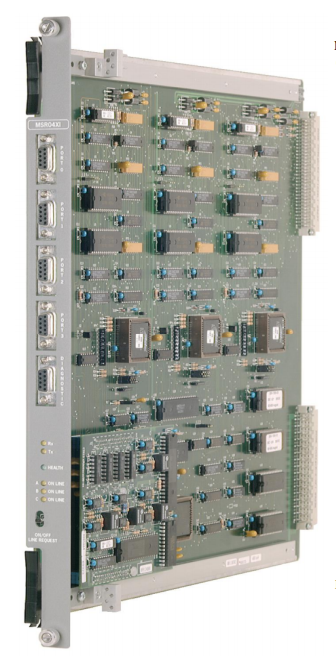
ABB Serial Communications Module RS232
ABB Serial Communications Module RS232
ABB Serial Communications Module RS232
INTRODUCTION AND TECHNICAL DATA
PURPOSE
The Serial Communications Module provides a serial interface between the SC300E
environment and a variety of remote devices complying with the standard RS232-C. At least
one Serial Communications Module must be used in the system and fitted in Slot 10 of the
main chassis to enable communications between the system processors and the
workstations. The workstation link is used for loading the application software and monitoring
ladder and diagnostic functions. The link utilises Port 0 of the module. Additional modules can
be fitted to any other I/O slot, ‘wrong slotting’ is prevented by mechanical coding blocks (Figure
2-1 ). The system software identifies the module via a built-in hardware identifier.
Circuit triplication and voting procedures make the module single fault tolerant and front panel
indicators show Tx/Rx activity, the circuit on-line status and the health of the module.
Communications connections are via four identical ports on the front panel (Ports 0 to 3) and
these connections are duplicated on the field connector (J2) at the rear. A fifth port is for
diagnostic purposes only. The module is compatible with ‘single slot hot repair’ and the front
panel has a switch to enable a request that the module be taken off line.
This document is intended to provide a general understanding of the function of Serial
Communications Module, sufficient to enable basic maintenance operations to be effected in
the field.
Triguard SC300E
Ejector lever
User COMMports
Diagnosticport
Mechanical coding block
(Upper)
Connector J1
(Module ID)
Link LK2
(Voltage Mon)
Link LK2 Link LK4
Tx / Rx LEDs
Health LED
ON/OFF LEDs
ON/OFF Line
Request switch
Ejector lever
Connector J2
RS232 Daughterboard
Mechanical coding block
(Lower)
ASSOCIATED DOCUMENTATION
Reference No Title
008-5097 Chassis User Manual
SPECIFICATION
Model MSR04XI
Communications Serial RS232
Mictrocontroller Intel family
Communication ports: Port 0: RS232 9600 or 19200 Baud
Port 1: RS232 9600 or 19200 Baud
Port 2: RS232 9600 or 19200 Baud (see Note)
Port 3: RS232 9600 or 19200 Baud (see Note)
Diagnostic: for diagnostics purposes only Note:
Ports 2 & 3 must be set to the same Baud
rate.
rate. Isolation Ports 0 to 3, 1kV
Indicators Tx, Rx, Health, 3 x On Line
Hot repair procedure Single slot
Module power consumption 3.5W
Overall size (mm)
Overall size (inches)
400(9U)H x 397L x 28W
15.75H x 15.63L x 1.1W
Weight 1.3kg
Triguard SC300E
ENVIRONMENTAL SPECIFICATIONS
The maximum ambient temperature measured at the hottest point within the Triguard system
shall not be greater than 60 degrees centigrade.
Temperature operating: +5°C to +60°C
Temperature storage: -25°C to +70°C
Humidity 5% to 95% non-condensing at ambient <40°C
EMC/RFI Immunity Tested and certified to IEC 1131-Part 2 1994
Vibration/Shock Tested and certified to IEC 1131-Part 2 1994
Certification:
General Certification: Ref. SC300E Product Guide (ref 008-5209)
TRANSPORT AND HANDLING
The MSR04XI module must be transported and stored in its original packing material which
should be retained for this purpose.
TECHNICAL DESCRIPTION
PHYSICAL
The Serial Communications Module is a 9U high PCB with integral front panel and front and
rear connectors; a plug-in daughter board carries the RS232 interface circuits. Figure 1-1
shows the general layout, location of the connectors and front panel components.
Mechanical coding blocks
All Input/Output modules carry two mechanical coding blocks equipped with pins which mate
with holes in corresponding blocks in the chassis and prevent the module being inserted into
the wrong slot. The pins in the module blocks are factory installed in a pattern determined by
the module and corresponding set screws are removed from the chassis coding blocks to
enable fitting. Unused holes are plugged with set screws. The chassis mechanical coding
block configuration for this module is shown in Figure 2-1 .
Triguard SC300E
On the lower section of the PCB are three further links, LK2, LK3 and LK4, located and
configured as follows:
LK2 (2-pin) located approximately 220mm down from the top of the module and 110mm in from
the front face, used in the voltage monitoring circuit, always fitted.
LK3 (3-pin) located beneath the plug in daughterboard. Used for 3-2-1-or 3-2-0 operation,
factory fitted hard wired, all pins linked for 3-2-1 mode.
LK4 (3-pin) located approximately 250mm down from the top of the module and 220mm from
the front face, used for the daughterboard clock speed setting, pins 1 and 2 linked.
Table 2-1. Default link settings
Link Default setting
LK1 (3 off x 3 pin) Links not fitted
LK2 (3 off x 8 pin) Fitted
LK2 (2 pin) Fitted
LK3 (3 pin) Hard wired (all pins linked)
LK4 (3 pin) Fitted (pins 1 & 2 linked
EXTERNAL CONNECTIONS
Pinouts and signals for front panel connectors J4 to J6 through to J2 backplane are given in
Table 2-2.
Is your interface DTE (data terminal equipment) or DCE (data communications equipment)?:
The point of reference for all signals is the terminal (or PC).
Transmit and receive leads (2 or 3) can be reversed depending on the use of the equipment,
either DTE or DCE.
THEORY OF OPERATION
Triplicated data enters and leaves the module (Figure 2-3 ) via the chassis backplane
connector J1 and is isolated from the MPP by bus transceivers. Data for transmission is
loaded into dual port RAM in each of the three circuit branches and is voted 2-oo-3 before being
passed to the USARTs on the daughter board where it is serialised and sent to the appropriate
communications port.
Data received at the ports is converted to parallel form by the USART and written to dual port
RAM in each branch, the data is accompanied by information about the status of the ports and
the embedded microprocessor. The dual port memory is then read by the MPP via a second
set of transceivers.
The four communications ports are configured to run in full duplex mode using an RS232
interface and having a maximum rate of 19200 Baud. The communications ports are isolated
from the module circuits by opto-isolators and connected to field connector J2 at the rear of the
module. The ports are capable of powering modems or line drivers for transmission over long
distances.
Power for the module circuits is derived from the dual redundant SC300E power supply units,
individual auctioneering and regulating circuits supplying various logic areas. The
communications port opto-isolators and interfaces also have separate supplies.
- YOKOGAWA
- Reliance
- ADVANCED
- SEW
- ProSoft
- WATLOW
- Kongsberg
- FANUC
- VSD
- DCS
- PLC
- man-machine
- Covid-19
- Energy and Gender
- Energy Access
- Renewable Integration
- Energy Subsidies
- Energy and Water
- Net zero emission
- Energy Security
- Critical Minerals
- A-B
- petroleum
- Mine scale
- Sewage treatment
- cement
- architecture
- Industrial information
- New energy
- Automobile market
- electricity
- Construction site
- HIMA
- ABB
- Rockwell
- Schneider Modicon
- Siemens
- xYCOM
- Yaskawa
- Woodward
- BOSCH Rexroth
- MOOG
- General Electric
- American NI
- Rolls-Royce
- CTI
- Honeywell
- EMERSON
- MAN
- GE
- TRICONEX
- Control Wave
- ALSTOM
- AMAT
- STUDER
- KONGSBERG
- MOTOROLA
- DANAHER MOTION
- Bentley
- Galil
- EATON
- MOLEX
- Triconex
- DEIF
- B&W
- ZYGO
- Aerotech
- DANFOSS
- KOLLMORGEN
- Beijer
- Endress+Hauser
- schneider
- Foxboro
- KB
- REXROTH
- YAMAHA
- Johnson
- Westinghouse
- WAGO
- TOSHIBA
- TEKTRONIX
- BENDER
- BMCM
- SMC
- HITACHI
- HIRSCHMANN
- XP POWER
- Baldor
- Meggitt
- SHINKAWA
- Other Brands
- UniOP
- KUKA
- IBA
- Beckhoff
- ADLINK
51
-
ALPHA WIRE 1636-RD001 - Hook-Up Wire
-
FANUC A06B-6078-H211#H501 / A06B6078H211H501 - Servo Amplifier Module
-
Alpha H47016 / CA400 - 400W Switching Power Supply Unit
-
Alpha Wire 2821/2 WH001 - Multi-Conductor Communication Control Cable
-
Wittenstein Alpha SP 100S-MF2-25-1E1-2S - Planetary Gearbox Reducer
-
FANUC A06B-6090-H008 / A06B6090H008 - Servo Power Supply Module
-
Alpha Wire 2821/2 WH001 - Multi-Conductor Communication Control Cable
-
NOVOTRON / Alpha NBL2-0080-45-3-320 T0B + SP075-MF1-3-031-000 - Servo Motor with Planetary Gearbox
-
Alpha 0100044-001 CXRF 48/4.6KW - Rectifier Module
-
Lambada-TDK / Alpha YM-00-470B / AMAT 50513215200 - 600W Power Supply Unit
-
FANUC A06B-6290-H122 - Alpha iSV 10HV-B 3-Axis Servo Amplifier Drive
-
Alpha SP 140S-MF1-5-1/1-2S - Planetary Gearbox Reducer
-
Wittenstein Alpha SP 100S-MF1-5-1K1-2S - Planetary Gearbox Reducer
-
Wittenstein Alpha LP 120Z-MF1-10-1/1-3S-INF - LP Series Planetary Gearbox
-
Wittenstein Alpha LP 090-M01-7-111-000 / Schneider - Planetary Gearbox with Servo Motor
-
Alpha TP 050-MX1-7-450-000 - Gearbox Reducer
-
Fanuc A06B-0377-B577#7000 - AC Servo Motor Alpha M2.5/3000
-
ALPHA WIRE 1705-SL001 - Hook-Up Wire
-
ALPHA WIRE 1953/3T-BK003 - Hook-Up Wire
-
ALPHA WIRE 5855/7-SL001 - Hook-Up Wire
-
ALPHA WIRE 2158-NA005 - Hook-Up Wire
-
Wittenstein Alpha TP 025S-MF1-7-0G0-2S - Planetary Gearbox
-
ALPHA WIRE 5356C - 37 Conductor 20AWG Foil & Braid Shield Cable
-
Wittenstein Alpha NP 025S-MF1-5-1G1-1S - Planetary Gearbox
-
Allen Bradley / Alpha N-3412-2-H00AA / LP 120-M02-100-111-000 - Servo Motor with Planetary Gearbox
-
FANUC A06B-6089-H204 - Alpha Series Servo Amplifier Module
-
Man Diesel & Turbo 3157168-7 - Alpha Lubricator Sbu
-
FANUC A20B-2100-0742 - ALPHA ia Servo Control Board
-
ALPHA ALPHA6000E-31R5GB - Frequency Inverter Drive Power Converter
-
Alpha Industries G287775-1 / 5985-01-341-9652 - Variable Attenuator
-
FANUC A06B-6124-H206 - Alpha iSV Servo Amplifier Module
-
Wittenstein Alpha NP 025S-MF1-5-1G1-1S - Planetary Gearbox
-
NOVOTRON / Alpha NBL2-0080-45-0-320-B-S-A + SK060-MF1-3-031-000 - Servo Motor with Alpha Gearbox
-
FANUC A20B-2100-0742 - ALPHA ia Servo Control Board
-
Honeywell CK65-L0N-BLC210F / CK65 - Mobile Computer Barcode Scanner
-
Wittenstein Alpha TK+ 004S-MF2-12-5B1-1S10 - Right Angle Gearbox
-
FANUC A20B-2100-0742 - ALPHA ia Servo Control Board
-
Rexroth MSK071E-0450-NN-M1-UG1-NNNN - 3-Phase AC Motor with Alpha Reducer
-
JAVAD ALPHA2 - GPS Receiver GrAnt G3
-
GROSCHOPP / Alpha WK 1621309 / EK 66-45 NR + TP 010-MF2-61-030-000 - Motor with Alpha Gearbox Construction
-
ALPHA WIRE 5060C-SL005 - Multi-Conductor Cable Wire
-
ALPHA B10 K X 2 T80887 - Potentiometer
-
Alpha 400W J40005 - Switching Power Supply Unit
-
FANUC A20B-1007-0650 - ALPHA Power Supply Module Board
-
Eberline HP-100B - Gas Proportional Alpha Beta Probe GM Geiger Counter
-
ALPHA WIRE 5858-BK001 - Single Conductor Hook-Up Wire
-
FANUC A06B-6127-H103 - Alpha I AiSV-20HV Servo Amplifier Module
-
VIASYS / CareFusion SOMNOSTAR CEPHALO PRO - Portable EEG Neurodiagnostic Sleep System
-
DSI Surgical Instruments Universal - Dental Implant Abutment Surgical Instruments Kit
-
FANUC A06B-6078-H211#H501 / A06B6078H211H501 - Servo Amplifier Module
-
Fanuc A06B-6089-H209 - Alpha Series Servo Amplifier Module
-
Generic / DSI Straight Anatomic Plastic Adapter Head + Screw Hex - Dental Implant Fixture
-
FANUC A20B-1006-0680 - ALPHA Power Supply Module Board
-
B&L Biotech Alpha II - Endodontic Starter Kit
-
FANUC A06B-0166-B088 C009A5653 - AC Servo Motor
-
ALPHA WIRE 74010-BK002 - Multi-Conductor Cable Wire
-
Wittenstein Alpha SPK 100-MF2-10-041-000 - Gear Box Reducer Ratio 10:1
-
Alpha Getriebebau 10-FL-M1-5 - 10:1 Ratio 7/8 Inch Shaft Gear Reducer
-
ALPHA WIRE 2172-SV005 - Multi-Conductor Cable Wire
-
Aloka UST-5410 - Linear Array Probe Compatible Transducer
-
Alpha Xtra-Guard 1 SupraShield - Multiconductor Cable 16 AWG 2 Conductor
-
ALPHA ALPHA7000E-37R5GB/3011PB - Frequency Inverter Drive Power Converter
-
SIEMENS / Alpha 1FT5066 / SP 100 ROD 426B - Servo Motor with Actuator
-
FANUC A06B-6089-H210 / A06B6089H210 - Servo Amplifier Module
-
LAMBDA ALPHA 600W H60553 - Switching Power Supply Unit
-
Alpha 400W J40071A - Switching Power Supply Unit
-
Hyva Alpha Series FC A4.5-3-98-K6-1DA-HC / 70593139 - Dump Body Hydraulic Cylinder
-
ALPHA WIRE 1293C-SL001 - Multi-Conductor Cable Wire
-
NSS Galaxy / Alpha 20 and 16 - Floor Strip and Wax Slow Speed Buffer and Wet Vac
-
Alpha Xtra-Guard 1 SupraShield - Multiconductor Cable 16 AWG 2 Conductor
-
ALPHA ALPHA6000-3015JB - Frequency Inverter Drive Power Converter
-
Densei-Lambda MA4000591A/ME Alpha 400 / MV6500271A Alpha II-650 - Power Supply Unit
-
Wittenstein Alpha SP 140G-MF2-28-0E1-2S-PGG - Planetary Gear Reducer
-
FANUC ROBOCUT ALPHA-1iC - CNC Wire EDM Machine
-
Fanuc A06B-6081-H101 - Alpha Series Power Supply Module PSMR-1
-
ALPHA WIRE 5855-BL001 - Hook-Up Wire
-
Wittenstein Alpha SPK 100-MF2-20-141-000 - Right Angle Gear Reducer 20:1 Ratio
-
LNS ALPHA SL65-S - Bar Feed System
-
ALPHA WIRE 5356C - 37 Conductor 20AWG Foil & Braided Shield TC Shield Cable
-
TDK-Lambda / Alpha H60552 - 600W Switching Power Supply Unit
-
Bruker Alpha - Infrared Spectrometer FTIR Instrument
-
Wittenstein Alpha SP 060S-MF1-7-0B1-2S - Planetary Gearbox Reducer
-
Digital Alpha VME 5/480 - VME SBC Motherboard CPU Board
-
Glentek Alpha Series - Digital Brushless Servo Amplifier Drive
-
Wittenstein Alpha TPM 004S-021M-6KB1-053B-G6 - Rotary Servo Actuator
-
Wittenstein Alpha TP 110-MF2-61-031-000 / 20009377 - Planetary Gearbox Reducer
-
Emerson Alpha 1800 24 60 / 5070800001 - Rectifier Power Module
-
Fanuc A06B-0377-B577#7000 - AC Servo Motor Alpha M2.5/3000
-
Novotron / Alpha NBL2-0080-45-3-320 T0B + SP075 - Servo Motor with Alpha Gearbox
-
Alpha & Omega Semiconductor AOD442 - N-Channel MOSFET Reel Surface Mount
-
Alpha Wire 2156-NA005 - Hook-Up Wire Cable
-
Sankyo 15AD-04277R-LR3VW1 - Rotary Indexer with Motor
-
Wittenstein Alpha TP025S-MF1-7-0G0-2S - Planetary Gearbox i=7
-
Fanuc A20B-2001-0950 - Control Circuit Board PCB
-
TDK-Lambda / Alpha H60553 - 600W Switching Power Supply Unit
-
Alpha Wire 391845-WH001 - Hook-Up Wire Cable
-
Wittenstein Alpha SPK 100-MF2-10-041-000 - Gear Box Reducer Ratio 10:1
-
Novotron / Alpha NBL2-0080-45-0-320-B-S-A + SK060 - Servo Motor with Alpha Gearhead
-
Wittenstein Alpha TP050S-MA2-27.5-0G1-2S - Planetary Gearbox Reducer
-
Fanuc A06B-6096-H305 - Alpha Servo Amplifier Module
-
TDK-Lambda / Alpha H47006 / CA400 - 400W Switching Power Supply
-
Wittenstein Alpha SPK140 MF2-10-051-000 - Bevel Planetary Gearbox Reducer
-
Fanuc A06B-6117-H205 - Alpha iSV Servo Amplifier Module
-
Fanuc A20B-1007-0650 - Alpha Power Supply Module Board PCB
-
Alpha Wire 2248C-SL005 - Multi-Conductor Cable Wire
-
Alpha Wire 6829-BK001 - Hook-Up Wire Cable
-
Wittenstein Alpha SPK+100S-MF2-25-1E1-1K01 - Right Angle Planetary Gearbox Reducer
-
MAN B&W 99100724 - Maintenance Tools Set for Alpha Lubricator
-
Tokyo Electron (TEL) A3619-9215E / Vexta - Carrier Transfer Assembly
-
Tokyo Electron (TEL) Alpha 8 Auto Shutter 200mm - Diffusion Furnace Auto Shutter Assembly
-
Fanuc A06B-6089-H105 - Alpha Series Servo Amplifier Module
-
Aikoku Alpha EZ Amplifier Type Z - Servo Amplifier Drive
-
Fanuc A06B-6096-H204 - Dual Axis Alpha Servo Amplifier Module
-
Ferrocontrol / Alpha Getriebebau FMR063-04-60-RMK-B0 - Servo Controller with Gear Reducer
-
Fanuc A20B-1006-0680 - Alpha Power Supply Module Board PCB
-
Wittenstein Alpha SP 140S-MF1-5-0I1-2S / 20027211 - Servo Speed Reducer Gearbox
-
Stanley / Alpha 21A108721 - QMP Controller Unit
-
TDK-Lambda / Alpha J40071A - 400W Switching Power Supply Unit
-
Fanuc A06B-0235-B300 - AC Servo Motor Alpha iFS 8/4000
-
Tokyo Electron (TEL) Alpha 8s Manifold Flange Plenum - Right Side Ports Manifold Flange
-
Fuji Frontier 570 PS1 / Alpha 650II - Power Supply Assembly
-
Tokyo Electron (TEL) WCIF-01A - T-Bawl Control Unit PCB Assembly
-
Fanuc A06B-6079-H106 - Alpha Servo Drive Amplifier Module
-
Fanuc A06B-6096-H204 - Dual Axis Alpha Servo Amplifier Module
-
Fanuc A06B-6114-H302 - Triple Axis Servo Drive Amplifier Module
-
Fanuc A06B-6110-H015 - Alpha Servo Amplifier Module
-
Hitachi Aloka Prosound Alpha 7 Premier - Diagnostic Ultrasound System
-
Alpha BC35 - Canning Line for Carbonated Beverages Beer RTD

K-JIANG

Add: Jimei North Road, Jimei District, Xiamen, Fujian, China
Tell:+86-15305925923