

K-WANG


ABB AC500 Series PLC Module Wiring Guide Manual
ABB AC500 Series PLC Module Wiring Guide Manual
The ABB AC500 series PLC module wiring guide focuses on the wiring, installation, and safety specifications of various IO modules in this series of PLCs, covering multiple types of modules such as switch quantity, analog quantity, hybrid module, position module, bus interface module, CPU integrated IO, and communication card. It clarifies the terminal allocation, electrical connection method, power requirements, and anti-interference measures of each module, emphasizes safety points such as power-off operation, correct grounding, and cable selection, and details core concepts such as source/drain type differences and analog wiring system differences, providing comprehensive wiring technical support for PLC system construction.
Document Overview
Basic positioning
The document is a module wiring guide for ABB AC500 series PLC, with the core goal of standardizing the wiring and installation process of various IO modules to ensure stable system operation.
The target audience needs to have basic knowledge of AC500 system and Control Builder Plus/CoDeSys programming, and practical applications need to be adjusted according to the on-site situation.
core principle
Safety priority: All operations must be powered off to avoid overvoltage, short circuit, and grounding circuit risks.
Compatibility: The module supports source/drain input/output, multiple communication protocols, and adapts to different scene requirements.
Anti interference: Reduce the impact of electromagnetic interference through cable selection, wiring specifications, and grounding design.
Core Basic Concepts
(1) Interference processing and wiring
Interference type protection measures
The distance between strong and weak electrical interference is ≥ 20cm (220V/10A or above ≥ 60cm), and weak electrical interference is located below the cable trench
Separate installation of interference PLC and high-voltage electrical appliances inside the cabinet, and separate routing of IO lines and high-power lines in separate slots
RC filter for signal line interference and differential mode interference, differential amplifier+shielded wire for common mode interference
Frequency converter interference, isolation transformer, filter, and output reactor installed nearby
(2) Grounding specifications
Safe grounding: The grounding terminal of the power cord is connected to the cabinet to prevent electric shock and injury.
System grounding: The controller and the controlled equipment have the same potential, and the grounding resistance is ≤ 4 Ω.
Signal grounding: Switching quantities do not require grounding, analog quantities require single point grounding; Shielded wire can be grounded on one side (high-frequency can be grounded on both ends).
Communication grounding: GND grounding for non isolated 485 communication, single point grounding for isolated communication, using shielded twisted pair cables.
(3) Source leakage type and analog line system
Difference between source and drain types
Leakage type (NPN): When the signal is triggered, OUT and GND are conductive, and the COM terminal is connected to the positive pole of the power supply.
Source type (PNP): When the signal is triggered, OUT and VCC are conductive, and the COM terminal is connected to the negative terminal of the power supply.
Analog line system
Two wire system: The power supply and signal share two wires, and the sensor is passive and powered by the module.
Three wire system: Short circuit the power supply negative wire to the signal negative wire, with a power greater than that of the two wire system, and cannot be explosion-proof.
Four wire system: Two wires each for power and signal, active sensors, high measurement accuracy.
Discrimination method: Disassemble the module wires and measure the current with a multimeter. If there is a signal, it is a four wire system; if there is no signal, it is a two wire system.
Core parameters and wiring of various modules
(1) Switching module
Module type represents model, core specifications, wiring points
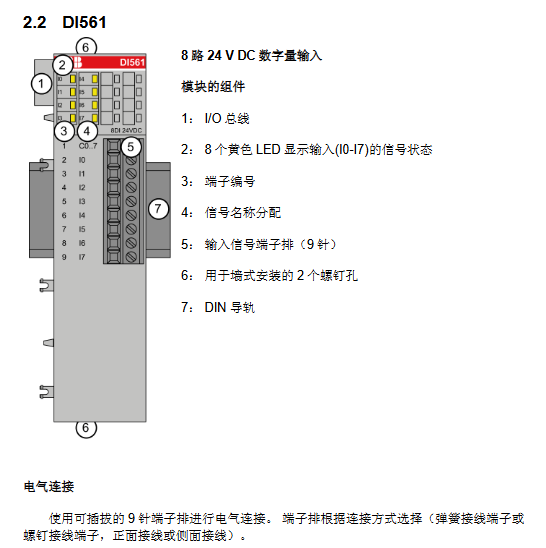
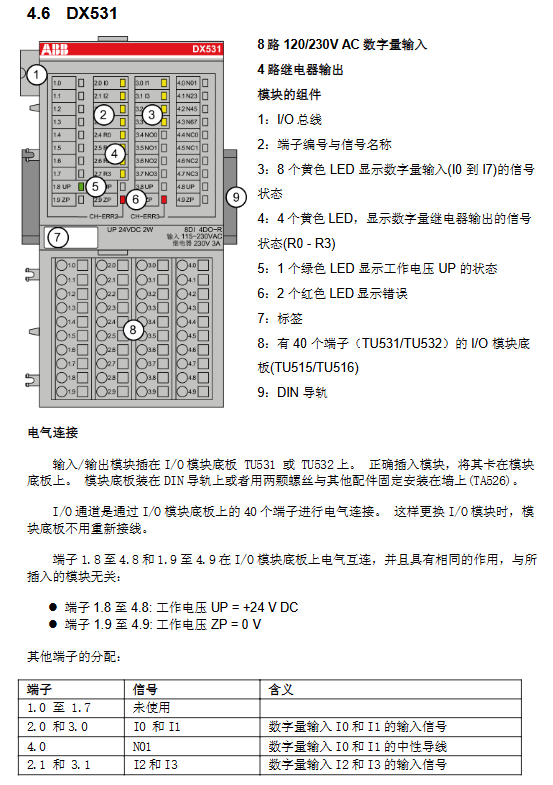
Input module DI524 32 channel 24V DC terminal 1.8-4.8 connected to UP (24V), 1.9-4.9 connected to ZP (0V)
Output module DO561 8-channel 24V DC transistor (0.5A) external power supply connected to UP/ZP, requiring 3A fast melting protection
Combination module DC522 16 channel configurable IO supports sensor power output (24V DC/0.5A)
(2) Analog quantity module
Core parameters
Resolution: AI523 (12 bits+sign bit), AI531 (15 bits+sign bit), AO561 (11/12 bits).
Support signals: voltage (0-10V, -10~+10V), current (4-20mA, 0-20mA), thermistor (Pt100/Pt1000), thermocouple (J/K/S type).
Wiring requirements
Analog signals require shielded cables, with both ends of the shielding layer grounded.
The three wire system of thermal resistance requires the occupation of two adjacent channels, with the same cross-sectional area of the wires.
Passive sensors are supplied with constant current by modules, while active sensors require independent power supply.
(3) Bus interface and communication card components
Module model, protocol type, core function, bus speed
CI501-PNIO PROFINET 4AI+2AO+8DI+8DO -
CI541-DP PROFIBUS 4AI+2AO+8DI+8DO -
CM572-DP PROFIBUS DP main station communication up to 12MBit/s
CM575-DN DeviceNet main station communication up to 500kBit/s
(4) CPU integrated IO module
Model, Digital Input, Digital Output, Analog Input, Analog Output
PM554 8-way 24V DC 6-way (transistor/relay) --
PM564 6 channels 24V DC (expandable to 8 channels) 6 channels (transistors/relays) 2 channels (0-10V) 1 channel (0-10V/4-20mA)
Safety operation standards
General Requirements
Before all wiring and module replacement operations, the power supply voltage and operating voltage must be turned off.
The module terminal can carry a maximum voltage of 240V AC, and it is necessary to avoid the risk of electric shock. Before operation, confirm that the power is turned off.
protective measures
The IO channel has protection against reverse connection, inversion, short circuit, and continuous overvoltage (up to 30V DC).
The output module does not have built-in short-circuit/overload protection and requires an external 3A (transistor output) or 5A (relay output) fast melting fuse.
Grounding and shielding
The signal line needs to have a unique reference ground to avoid forming a ground loop.
Shielded cables need to be grounded locally or at a single point in the control room in situations where conductive interference may occur.
- YOKOGAWA
- Reliance
- ADVANCED
- SEW
- ProSoft
- WATLOW
- Kongsberg
- FANUC
- VSD
- DCS
- PLC
- man-machine
- Covid-19
- Energy and Gender
- Energy Access
- Renewable Integration
- Energy Subsidies
- Energy and Water
- Net zero emission
- Energy Security
- Critical Minerals
- A-B
- petroleum
- Mine scale
- Sewage treatment
- cement
- architecture
- Industrial information
- New energy
- Automobile market
- electricity
- Construction site
- HIMA
- ABB
- Rockwell
- Schneider Modicon
- Siemens
- xYCOM
- Yaskawa
- Woodward
- BOSCH Rexroth
- MOOG
- General Electric
- American NI
- Rolls-Royce
- CTI
- Honeywell
- EMERSON
- MAN
- GE
- TRICONEX
- Control Wave
- ALSTOM
- AMAT
- STUDER
- KONGSBERG
- MOTOROLA
- DANAHER MOTION
- Bentley
- Galil
- EATON
- MOLEX
- Triconex
- DEIF
- B&W
- ZYGO
- Aerotech
- DANFOSS
- KOLLMORGEN
- Beijer
- Endress+Hauser
- schneider
- Foxboro
- KB
- REXROTH
- YAMAHA
- Johnson
- Westinghouse
- WAGO
- TOSHIBA
- TEKTRONIX
- BENDER
- BMCM
- SMC
- HITACHI
- HIRSCHMANN
- XP POWER
- Baldor
- Meggitt
- SHINKAWA
- Other Brands
- UniOP
- KUKA
- IBA
- Beckhoff
- ADLINK
-
ENOTEC OXITEC 5000 SME-53310000 InSitu O2 Gas Analyzer System
-
TRICONEX 3723X 32-Channel TMR Analog Input Module with HART for Tricon CX
-
GE 151X1233DB02SA02 Rev A Pitch Converter 30 Nm DC Pitch Conversion Module
-
GE 151X1207CK02SA02 77MM DE Excitation Module for Mark VI Turbine Control Systems
-
HIMA H6200A Analogue Isolator Power Supply for HIMax Safety Systems
-
ABB SACO 64D4 Digital Annunciator Unit with 64 Alarm Channels
-
Allen-Bradley 5069-L306ER - SER A CompactLogix Controller PLC
-
Omron CJ1W-CORT21 - CANopen Master Unit PLC Module
-
Danfoss 131B9523 / FC-102P5K5T4E20H1 - 5.5kW VLT HVAC Drive Inverter
-
Schneider Electric LXM32MU90M2 - Lexium 32 Servo Drive Controller
-
Danfoss AKD102P15KT4P21H1 - 15kW 131L2413 ADAP-KOOL Drive Inverter
-
Kollmorgen S70602-NANANA - Servo Drive Controller
-
Allen-Bradley 6189-PS2 - Power Supply Industrial Computer PS
-
Beijer E900T / 03010F - Operator Panel IFC ETTP HMI
-
Schneider Electric LMC20 - PacDrive Motion Controller PLC
-
Sartorius CAW2S1-3DC-NCE - COMBICS 2 Industrial Scale Terminal
-
Kollmorgen / Danaher S30301-NA / S300 - SERVOSTAR343 Servo Drive Controller
-
Siemens A5E00159503 - 12 INCH TFT Touch Panel HMI
-
Siemens 3UF5021-3AB00-1 - SIMOCODE DP Basic Unit Control Module
-
Danfoss 131B8872 / FC-202PK37T4E20H1 - 0.37kW VLT AQUA Drive Inverter
-
Atlas Copco ICB421-2003D / VSK001001 - W9139 ICM431-0025C ICM431-0025D Controller
-
Lenze EV82EV751_4C - Version 4A39 Frequency Inverter Drive
-
Atlas Copco / ABB 3HAB8101-19/07B - Robot Cable Assembly Harness
-
Beijer X2 Pro7-B2 - Operator Panel HMI Touch Screen
-
Honeywell CDW45L - Damper Actuator
-
B&R X67DM9331.L12 - Rev. I0 Digital Mixed Module
-
B&R X67DM9331.L12 - Rev. H0 Digital Mixed Module
-
Sanyo Denki PMM-BA-5604-1 - Pentasyn Stepper Motor Driver
-
SICK AWS1-113 / 1008900 - Evaluation Unit
-
Siemens 1TF6064-1AF71-3AH1 - SIMOTICS Synchronous Servo Motor
-
Heidenhain ERN680.P003-4096 / 29416004 - Rotary Encoder
-
Schneider Electric LC1G185EHEA - TeSys Control Contactor
-
Parker SBC HPD5N - High Performance Drive Electronics SPA
-
Advantech UNO-2170-CE11BE - Embedded Automation Computer IPC
-
Siemens 6AG1231-4HF32-4XB0 - SIPLUS S7-1200 SM 1231 Analog Input Module
-
Advantech UNO-2170-BTO - Embedded Automation Computer IPC
-
Jumo SR-96/4-001.0.0.00.111 - Solid State Relay Power Controller
-
Pepperl+Fuchs FC-21-V - FC-20P Safety Barrier Module
-
Emerson SP1404 - Unidrive AC Drive Inverter
-
B&R X67AI1233 - Rev.C0 Analog Input Module
-
Mitsubishi FR-F740-00250-EC - Frequency Inverter AC Drive
-
Allen-Bradley 2711P-T7C21D8S - PANELVIEW PLUS 7 SERIES B Touch Screen HMI
-
Pilz PMCprotego D.03/000/0/0/2/208-480VAC / 8176101 - Servo Amplifier Drive
-
Reliance Electric 57C414 / 57414-1N - Modbus Interface Module
-
Mitsubishi FR-F740-00250-EC - Frequency Inverter AC Drive
-
Siemens 6SN1123-1AA00-0EA2 - Version A 160A SIMODRIVE Power Module
-
Siemens 1TF6064-1AF71-3AH1 - SIMOTICS Synchronous Servo Motor
-
AEG ALU202 / DAP216 / DEP216 / DAU202 - SIM216 SIM203 DNP205 ADU205 PLC Controller KIT
-
Atlas Copco / ABB 3HAB8101-19/07B - Robot Cable Assembly Harness
-
Hitachi CPU22-02HB - Micro-EHV Programmable Controller PLC
-
Parker SBC HPD5N - High Performance Drive Electronics SPA
-
Jetter JX3-THI2-RTD - JX3-BP Temperature Input Module
-
Eaton DC1-34014FB-A20N - 5.5kW Inverter Variable Frequency Drive
-
Eaton DS7-34DSX041N0-D - Soft Starter
-
Reliance Electric 57C422B / 57422-2E - 2-Axis Servo Controller
-
Hitachi CPU22-02HB - Micro-EHV Programmable Controller PLC
-
Eaton DC1-34014FB-A20N - 5.5kW Frequency Inverter Variable Frequency Drive
-
Siemens 6SN1123-1AA00-0EA2 - Version A 160A SIMODRIVE Power Module
-
Reliance Electric 57C414 / 57414-1N - Modbus Interface Module
-
Eaton DS7-34DSX041N0-D - Soft Starter
-
Reliance Electric 57C422B / 57422-2E - 2-Axis Servo Controller
-
Johnson Controls DX-9120-8454 - Digital Controller
-
Jetter JX3-THI2-RTD - JX3-BP Temperature Input Module
-
Siemens 6SL3210-1KE21-7AP1 - SINAMICS G120C DP 7.5kW BOP-2 Inverter Drive
-
Siemens 1FK7042-2AF21-1QG0 - SIMOTICS S Synchronous Servo Motor
-
Mettler Toledo IND570 - Harsh Analog Weighing Terminal Controller
-
Schneider Electric TM238LDA24DR - Modicon M238 Programmable Logic Controller PLC
-
Hitachi EH-CPU548 - EH-150 PLC CPU Module
-
Honeywell Q7750A2003 - Excel 10 Zone Controller
-
Ferag 584.002.V003 - Control Panel HMI
-
Danfoss AK-SM 720 / 080Z8511 - ADAP-KOOL System Manager Controller
-
Ferag 584.002.V003 - Control Panel HMI
-
Kern 3210001.001 / LOP-KS 2903440.001 - PRT.205A.0000.V001.02341 Servo Controller Board
-
Reliance Electric 57C424 - Maxpak III High Speed Link Module
-
Telemecanique XBTA70101PA - Compact Terminal HMI Panel
-
Reliance Electric 57C424 - Maxpak III High Speed Link Module
-
Reliance Electric 57C422B - 2-Axis Servo Controller
-
Honeywell Q7750A2003 - Excel 10 Zone Controller
-
Telemecanique XBTN400 - Magelis Small Panel HMI
-
Schneider Electric TM172PDG42S - Modicon Programmable Logic Controller PLC
-
Fanuc HE693THM884M - Thermocouple Input Module
-
Selectron PMC22BAEZD / 220735 - Selecontrol PMC 22 ABEZD Controller Module
-
Baumuller BUS21-22/45-31-020 - Servo Drive Inverter
-
Schneider Electric TM172PDG42S - Modicon Programmable Logic Controller PLC
-
Schneider Electric ATV32HD11N4 - Altivar Variable Frequency Drive Inverter
-
Lenze 494_E.4B - DC Speed Controller
-
NORD SK300E-111-340-B - SKDA130E-111-340-IBS-AAA Frequency Inverter
-
Reliance Electric GMI-S02 - AC/AC Converter 380/400V 50/60Hz 2.3/2.8A Drive
-
Hakko / Monitouch V710CD - Operator Panel HMI Touch Screen
-
B&R 5PC910.SX01-00 / 5YZCAA00700000-005 - Automation PC Industrial Computer
-
Hitachi EH-CPU548 - EH-150 PLC CPU Module
-
Tecnau / Fortec FORTEC-04/UL / 10117 - PCB Circuit Board
-
Bosch PSS 2037 10B - Power Supply Module
-
Newall B602000 - Digital Readout Scale
-
ELCON PC Controller - Industrial PC Controller
-
Siemens 3UF5100-0AB00 - SIMOCODE-DP Control Module
-
Omron NS8-TV00B-V2 - Touch Screen HMI Panel
-
Siemens 6ES5264-8MA12 / IP264 - CAM Controller Module
-
Allen-Bradley 1756-L72S - SER B GuardLogix Safety Controller
-
Schneider Electric SXWMPC15A10001 - SmartX Controller Automation Server
-
Telemecanique LC1F265F7 - TeSys F Contactor
-
Siemens 6ES7314-6CH04-0AB0 - SIMATIC S7-300 CPU 314C-2 DP PLC
-
Allen-Bradley 1734-EI4S - POINT I/O Safety Module
-
Allen-Bradley 2711P-T7C4D8 / 2711P-RP8D - PanelView Plus HMI Touch Screen Logic Module
-
Ropex UPT-640-V - Resistron Temperature Controller
-
KEB 07.F5.B3A-0A00 - VERSION 1.1 Combivert Frequency Inverter
-
Sensopart V50-OB-A3-IW-M2-L - VISOR Vision Sensor Camera
-
SICK AFM60A-S1NB018X12 / 1059040 - Absolute Rotary Encoder
-
Kern AG KMC600 / 2903436.001 - Servo Drive Controller
-
Lenze E82EV302_4C200 / 13015655 - VERSION 3D35 Frequency Inverter Drive
-
Schneider Electric XBTOT2210 - Magelis Touch Screen HMI Panel
-
Baumuller BM5-O-SAF-000-000-000-001-202 - Parameter Safety Module
-
SICK UE4470-22EE690 - Safety Relay Controller
-
Hitachi EH-CPU448 / EH-150 - PLC CPU Module
-
Rexroth VT5005-13 - R5 00010592 Proportional Valve Amplifier Board
-
Siemens 6ES7510-1DJ00-0AB0 - SIMATIC ET 200SP CPU PLC
-
Beckhoff CX5120-0121 - 2GB Embedded PC Controller
-
Priva BlueiD S10 / 5010002 - SN3t 5020004 5010101 Building Automation Controller
-
Sigmatek DM161 - S-DIAS Digital Mix I/O Module
-
Telemecanique LC3D50P7A64 - Star Delta Starter Contactor
-
Siemens 6SN1123-1AA00-0BA2 - SIMODRIVE 611 Power Module
-
Siemens 6SN1124-1AA00-0CA1 - SIMODRIVE 611 Power Module
-
Dixell XC1015D-1C01F / XC1000D - Compressor Controller
-
Siemens A5E02184619 / 19T 577B - Industrial Touch Screen HMI Panel
-
Siemens 6SE6420-2AD27-5CA1 - Filter 6SE6400-2FS03-8CD0 Micromaster Inverter
-
Schneider Electric LC1G400LSEN - TeSys Control Contactor
-
Baldor BPS10-200-20-P - Servo Drive Motor Controller
-
Ingersoll Rand X4I / Y06IR03.00 - Air Compressor Controller

K-JIANG

Add: Jimei North Road, Jimei District, Xiamen, Fujian, China
Tell:+86-15305925923