

K-WANG


YOKOGAWA CENTUM VP System HMI (HIS)
YOKOGAWA CENTUM VP System HMI (HIS)
HIS Core Features and Hardware Composition
1. Core Features
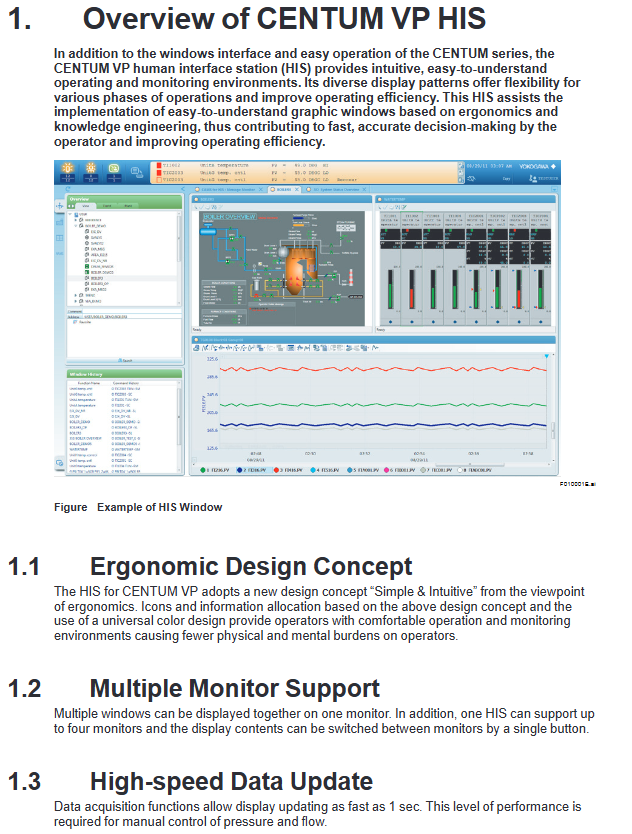
Ergonomic design: Adopting the concept of "Simple&Intuitive", unifying icons and colors, reducing the physical and mental burden of operation
Multi monitor support: 1 HIS can connect up to 4 monitors, and supports single button switching of monitor display content
High speed data update: The data collection and update speed is as fast as 1 second, meeting the manual control requirements for pressure and flow
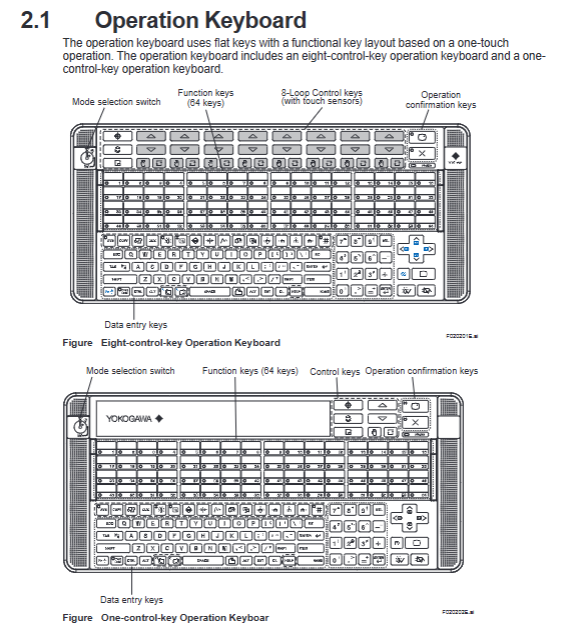
Operational inheritance: compatible with traditional HMI operation methods, supporting touch operation, 8 control keys, and 64 function keys
Cross system integration: can integrate alarms and events from ProSafe RS, STARDOM, PRM and other systems
2. Hardware composition
Operation keyboard: two types (8-key control type, 1-key control type), using flat key design, supporting one click operation
Core buttons: 64 function keys, mode selection switch, operation confirmation key, data input key
Special design: 8-key control type with touch sensor, suitable for high-frequency operation in industrial scenarios
Host configuration: Pre installed Microsoft Windows system, supports widescreen display, compatible with multi interface expansion
Core functions of operation and monitoring
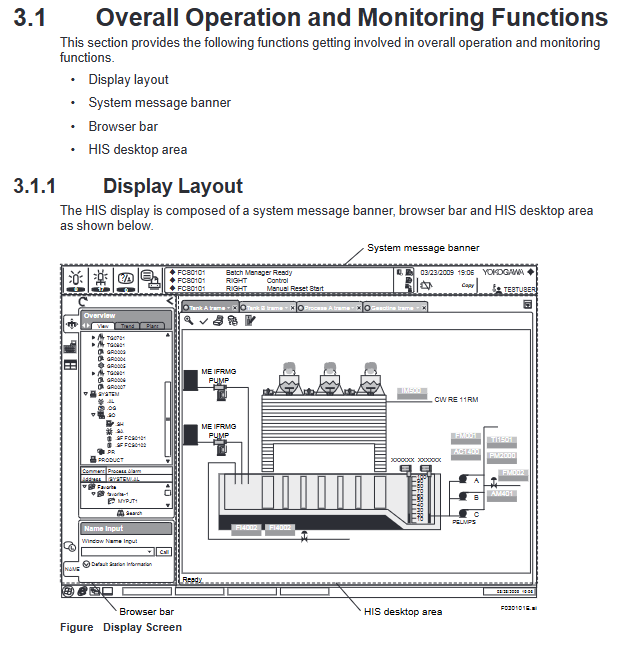
1. Overall display layout
The HIS display interface consists of three parts, with a fixed layout that does not obstruct each other:
System message bar: Permanent at the top, displaying alarm status through color/flashing, including date and time, username, and system status icon
Browser Bar: Used to call the operation monitoring window, supports tree display of factory hierarchy structure, and can minimize hiding
HIS desktop area: the core display area, including views, frames (up to 4 views/frames), container windows, and supports multi label switching
2. Core operation monitoring window
Window Type Core Function Key Parameters
Graphic view (graphic properties) visualizes the factory status with drawing objects and supports window calling to visually present device connections and operating parameters
Graphic view (controlling properties) displays the status of functional blocks on the dashboard, supporting parallel display of 8 large-sized/16 small-sized panels
Compact display of data values, function block modes, alarm status coverage PVI input, PID control, MLD manual loading and other multiple module types in panel view
Trend view time series display process data changes support simultaneous display of 8/16 pieces of data, with three split screen modes (pen split/simulated discrete split/reference mode split)
Tune view displays instrument tuning parameters and trends, supports time and data axis scaling adjustments
CAMS for HIS message monitoring integrates multiple system alarms and event support with intelligent filtering functions such as filtering, shelving, and suppression
3. Auxiliary support function
Report function: Generate daily/monthly reports based on Microsoft Excel, supporting automatic (timed/triggered) or manual printing
Imported data: settlement data (mean/total/maximum), trend data, historical messages, tag information, etc
Remote printing: supports other PCs within the network to print reports through Excel
Remote operation and monitoring: Implement remote operation and maintenance through the intranet, using the same operation window as the local HIS
Deployment requirements: The control network needs to be equipped with standard HIS to ensure reliability and real-time performance
CENTUM Desktop: A dedicated operating environment that hides Windows redundant features such as desktop icons and unrelated start menu items
HIS Utility tool: Configure the HIS operating environment, support user management, keyboard operations, security policies, CAMS parameters, and other settings
System management and security control
1. System management window
Window Name Core Usage Key Features
The system status overview displays the status of all sites and communication devices within the domain in a visual representation of normal/abnormal status through icons, and supports calling maintenance windows
The system alarm view displays hardware/communication error alarms arranged in reverse chronological order, accompanied by beeps and flashing prompts when triggered
The FCS status display view displays the hardware configuration and operational status of FCS, supports starting/closing control stations, and color coded device status
The HIS status display view shows the hardware configuration and operational status of HIS, and supports the effectiveness of switching control buses (Vnet/IP)
The HIS settings window includes 18 configuration tags (monitor, printer, trend, multi monitor, etc.) for configuring HIS operating parameters
2. Safety control system
Adopting a dual layer architecture of "CENTUM dedicated security+Windows IT security":
CENTUM dedicated security:
Permission classification: Level 3 standard permissions (S1 for monitoring only, S2 for monitoring+operation, S3 for full permissions)+Level 7 custom permissions (U1-U7)
Control granularity: Support setting operation permissions by function block and window, important operations require secondary confirmation
Tag priority: can mark important tags, ordinary tags, auxiliary tags, and differentiate alarm processing
IT security features:
Security Model: Supports traditional models, standard models (defense against network/direct attacks), and enhanced models (full threat defense)
Advanced features: password expiration (14 day advance reminder), prohibition of duplicate passwords, automatic logout (no operation timeout), user lockout (multiple password errors)
Authentication mode: Supports Windows single sign on, integrates Windows user accounts and HIS operation permissions
CAMS for HIS Alarm Management Core Function
As a core alarm management tool, following the EEMUA 191 standard, it solves the problem of alarm overflow:
1. Alarm integration and filtering
Integration scope: CENTUM VP process alarms, system alarms, operator guide messages, and external system alarms such as ProSafe RS and STARDOM
Filtering function: Basic filtering (process/system alarms), user-defined filtering, temporary filtering, supporting sorting by priority/response time
2. Intelligent alarm processing
Suspend function: Move non essential alarms to a temporary area and support manual/automatic shelving (triggered by conditions)
Suppression function: Suppress message display according to preset alarm groups/sites, reducing operation and maintenance load
Alarm setting value management: Save the engineering stage setting value as the benchmark value, support comparing the benchmark value with the current value, and overwrite updates
3. Data archiving and traceability
Support long-term data archiving, with the ability to trace alarm records through a historical viewer
Alarm details: including value-added information such as root cause analysis, role-playing suggestions, historical operation processes, etc
Applicable scenarios and industries
Applicable industries: factories in various fields such as petroleum refining, chemical industry, steel, food, electricity, etc
Core value: By visualizing operations, intelligent alarm management, and remote operation and maintenance, we aim to improve the efficiency and safety of factory operations, and support rapid decision-making
Key issues
Question 1: How does HIS's multi display support and data update feature meet the high-frequency operation requirements of industrial scenarios?
answer:
Multi monitor support: One HIS can connect up to four monitors and support single button switching of display content. It can simultaneously display various types of windows such as graphic views, trend views, alarm monitoring, etc., avoiding frequent window switching and adapting to the parallel monitoring needs of multiple parameters in industrial scenarios;
Data update performance: The data collection and display update speed is as fast as 1 second, meeting the real-time requirements of manual control of key parameters such as pressure and flow, and ensuring synchronization between operation instructions and feedback;
Hardware adaptation: The dedicated operation keyboard adopts a flat key design and one key operation logic. The 8-key control type includes a touch sensor, which reduces the fatigue of high-frequency operations and improves operation accuracy.
Question 2: As a core alarm management tool, how does CAMS for HIS solve the problem of alarm flooding in industrial scenarios?
answer:
Multi level filtering: supports basic filtering (by alarm type), user-defined filtering (by priority/response time), and temporary filtering, accurately filtering key alarms;
Intelligent processing mechanism: Reduce the number of alarms by "shelving" (temporarily hiding non essential alarms), "suppressing" (blocking redundant alarms by group/site), and "overlapping merging" (integrating duplicate alarms on the same label);
Value added information support: Alarm with root cause analysis and role-playing suggestions, helping operators quickly locate problems and avoid ineffective operations;
Set value management: Compare the benchmark alarm set value with the current value, promptly correct unreasonable settings, and reduce false alarms from the source.
Question 3: How does HIS's dual layer security control system ensure the operational safety of industrial control systems?
answer:
Fine grained control of permissions: CENTUM's dedicated security support divides the scope of operations according to user groups (such as specific FCS/windows), restricts operation permissions (monitoring/operation/engineering) according to permission levels (S1-S3+U1-U7), and requires secondary confirmation for important function block operations;
IT Security Enhancement: Implementing user account control based on Windows security features, supporting password expiration, prohibiting duplicate passwords, automatic logout, and defending against illegal login and password leakage;
Security model adaptation: Three security models (traditional/standard/enhanced) are provided, which can be selected according to the risk level of the factory. The standard model defends against network and direct attacks, while the enhanced model covers component theft and data leakage protection;
Operation traceability: User operation records are bound and archived with usernames, supporting security event traceability for easy responsibility identification and risk investigation.
- YOKOGAWA
- Reliance
- ADVANCED
- SEW
- ProSoft
- WATLOW
- Kongsberg
- FANUC
- VSD
- DCS
- PLC
- man-machine
- Covid-19
- Energy and Gender
- Energy Access
- Renewable Integration
- Energy Subsidies
- Energy and Water
- Net zero emission
- Energy Security
- Critical Minerals
- A-B
- petroleum
- Mine scale
- Sewage treatment
- cement
- architecture
- Industrial information
- New energy
- Automobile market
- electricity
- Construction site
- HIMA
- ABB
- Rockwell
- Schneider Modicon
- Siemens
- xYCOM
- Yaskawa
- Woodward
- BOSCH Rexroth
- MOOG
- General Electric
- American NI
- Rolls-Royce
- CTI
- Honeywell
- EMERSON
- MAN
- GE
- TRICONEX
- Control Wave
- ALSTOM
- AMAT
- STUDER
- KONGSBERG
- MOTOROLA
- DANAHER MOTION
- Bentley
- Galil
- EATON
- MOLEX
- Triconex
- DEIF
- B&W
- ZYGO
- Aerotech
- DANFOSS
- KOLLMORGEN
- Beijer
- Endress+Hauser
- schneider
- Foxboro
- KB
- REXROTH
- YAMAHA
- Johnson
- Westinghouse
- WAGO
- TOSHIBA
- TEKTRONIX
- BENDER
- BMCM
- SMC
- HITACHI
- HIRSCHMANN
- XP POWER
- Baldor
- Meggitt
- SHINKAWA
- Other Brands
- UniOP
- KUKA
- IBA
- Beckhoff
- ADLINK
-
FANUC A06B-0169-B088 - AC Servo Motor Alpha M40 3000 3 KW
-
ALPHA WIRE 1299C-SLATE-1000 - Multi-Conductor Cable Wire
-
alpha / Wittenstein SK+180S-MF1-10-1M1-1K - Hypoid Gearbox i=10
-
ALPHA WIRE 1181/40C SL005 - Multi-Conductor Cable Wire
-
Generic / DSI Straight Anatomic Plastic Adapter Head + Screw Hex - Dental Implant Fixture
-
Alpha II-650 MV6500526A - Power Supply Unit
-
ALPHA WIRE 7036 WH001 - Hook-Up Wire
-
FANUC RDCGM00000004O / TP 050-MF1-7-061-000 - Gear Reducer / Alpha Gearbox
-
Alpha II-650 MV6500436A - TDK-Lambda Power Supply Unit
-
Alpha S-Alpha600 J60033 - 600W Switching Power Supply Unit
-
Alpha 1500W J00032 - Power Supply Unit
-
Alpha 600W H60638 - Switching Power Supply Unit
-
Alpha 650 MV6500314A - Power Supply Unit
-
Aloka UST-5413 - Linear Probe for Prosound Alpha 6
-
ALPHA WIRE TFT25015 NA002 - High Temperature Heat Shrink Tubing Wire Sleeving
-
JAVAD ALPHA2 / GrAnt-G3 - GPS Receiver
-
Alpha 400W H47318 - Switching Power Supply Unit
-
Alpha SG-ALPHA-202-001 / Q1001-010-001 - Circuit Board Module
-
Antlia Dual ERF H-Alpha & Cak/CaH - Density Astronomical Accessory
-
ALPHA WIRE 5100C SL033 - Multi-Conductor Cable Wire
-
ALPHA WIRE 5098C-SL033 - Multi-Conductor Cable Wire
-
Fanuc A06B-6290-H105 - Alpha Sv 80hv-B Module Servo Amplifier
-
FANUC A06B-6240-H105 - Aux Axis Alpha aiSV 80 Servo Amplifier
-
Endress+Hauser Alpha-Log RSA10-61B1S / 42974737/0130 - Data Logger Measurement Instrument
-
ALPHA WIRE 6363-SL002 - Multi-Conductor Cable Wire
-
Alpha SP100S-MF1-7-1K1-2S - Gear Reducer
-
Alpha SP 100G-MF1-4-0H1-2S-PGG - Planetary Gear Reducer
-
FANUC A06B-0143-B175 #0275 - Alpha 12/3000 AC Servo Motor
-
James Burn Alpha Doc P33 / GBC PDI - Automatic Punch DocuPunch
-
Titus HVAC 105383-01 - ALPHA BAC Controller and Actuator
-
Wittenstein Alpha SP 100S-MF2-20-0E0-2S - Planetary Gearbox i=20
-
Kashiyama Alpha-85-ZV / SP-8026G - Pump Controller
-
Christ Alpha 2-4 LDplus - Freeze Drier Part N/ 101542
-
Lambda / Alpha H40896 - 400W Power Supply Unit
-
Wittenstein Alpha LP-070S-MF1-3-1E1-38 - Planetary Gearbox
-
Matrox / EXO-2480 133-D06-3 / 398-17962-1 - Alpha Numeric PCB Board
-
Fanuc A06B-6096-H204 - Dual Axis Alpha Servo Amplifier Module
-
Alpha Wire 5002C-SL001 - Multi-Conductor Cable 2 Conductors 22AWG 300VAC
-
Alpha 600W H60638 - Switching Power Supply Unit
-
Alpha Scientific Spin Precession Dual Electro Magnet Beam Line Chamber - Electro Magnet Beam Line Chamber
-
ALPHA WIRE 6017C SL005 - Multi-Conductor Cable Wire
-
ALPHA WIRE 65804 SL002 - Multi-Conductor Cable Wire
-
Fanuc A06B-0152-B010 - AC Servo Motor Alpha A30/2000 with Brake
-
ALPHA WIRE 5856-VI001 - Hook-Up Wire
-
ALPHA WIRE M13142-SL001 - Multi-Conductor Cable Wire
-
Alpha & Omega AOZ1017 - 8-Pin SOIC SMD Buck Switching Regulator IC
-
Alpha 600W H67027 CA600 - 600W Switching Power Supply Unit
-
ALPHA WIRE 2845/7-RD001 - Hook-Up Wire
-
Wittenstein Alpha VH+063S-MF1-10-6H1-1K-0C2 - Worm Gear Reducer i=10
-
ALPHA WIRE 2414C SL022 - Multi-Conductor Cable Wire
-
ALPHA WIRE 5672-SL005 - Multi-Conductor Cable Wire
-
BECKHOFF / Alpha AM8021-0B10-0000 + CP 040-MO1-10 - Servo Motor with Planetary Gearbox
-
ALPHA Systems Lab Inc MBA-WV1-F / PCB-WV1-F - PCB Board
-
FANUC A06B-0826-B201 - Alpha P12 AC Spindle Motor
-
WF & HC / Alpha-E 10045 - Tiller Bar Flat Flange Inlet 3150LB 3X 2.5 Inch
-
Seiler Alpha Air 3 - Dental Microscope
-
Alpha 400W H47223 - Switching Power Supply Unit
-
Wittenstein Alpha SP 180S-MC1-5-1M0-2K - Planetary Gearbox
-
FANUC A06B-6117-H211 - Servo Amplifier Module Alpha iSV 160/160 Amp
-
Alpha S-Alpha600 J60033 - 600W Switching Power Supply Unit
-
Adaptive Alpha Eclipse StreetSmart Model 17X - Master Slave LED Sign 44 x 44 Inch
-
ALPHA WIRE 391697-WH005 / 391697WH005 - Hook-Up Wire
-
Generic 22W Laser Engraver Cutter - Smart Air Pump APP Control CNC Dual-core CPU DIY Tools
-
FANUC A06B-6102-H226 / A06B6102H226 - Spindle Amplifier Module
-
FANUC A06B-6090-H006 / A06B6090H006 - Servo Power Supply Module
-
Alpha Wire Apr-19 - High Low Temperature Cable 75 FT
-
Wittenstein Alpha HG+ 075S-MF2-28-6E1-1S10 - Hypoid Gearbox Reducer i=28
-
Alpha J00032 - 1500W Power Supply Unit
-
Alpha H47038 - 400W Power Supply Unit
-
FANUC A06B-6096-H204 - Dual Axis Alpha Servo Amplifier Module
-
Wittenstein Alpha LPB090-MO1-10-111-00 - Alpha Planetary Gearbox
-
ALPHA WIRE 2842/19-YL001 - Hook-Up Wire
-
WITTENSTEIN ALPHA HG+060S-MF1-56C1-1K00 - Planetary Gearbox
-
Basler A102K Alpha VIS - Black and White CCD Industrial Camera
-
Alpha H40935 - 400W Power Supply Unit
-
FANUC A06B-6114-H207 - 2-Axis Servo Amplifier Module SVM20/40i Alpha i Series
-
TDK-Lambda / Alpha H47318 - 400W Switching Power Supply Unit
-
HITACHI Aloka Prosound Alpha 7 Premier - Diagnostic Ultrasound System
-
Alpha SP100S-MF1-4-1E1-2S - Precision Gear Reducer
-
FANUC A20B-2001-0950 - Control Circuit Board PCB
-
ALPHA WIRE 2855/1-GR001 - Hook-Up Wire
-
FANUC A06B-6096-H204 - Dual Axis Alpha Servo Amplifier Module
-
Wittenstein Alpha LPB090-MO1-10-111-00 - Alpha Planetary Gearbox
-
ALPHA WIRE 2842/19-YL001 - Hook-Up Wire
-
Basler A102K Alpha VIS - Black and White CCD Industrial Camera
-
Wittenstein Alpha LP 090-M01-7-111-000 / Schneider - Gear Box i:7 Schneider Electric Servo Motor
-
LAMBDA ALPHA 600W H60554 - Switching Power Supply Unit
-
Fanuc A06B-0238-B100 / A860-2000-T301 - AC Servo Motor with Encoder
-
FANUC A06B-6290-H322 - ALPHA iSV 10/10/10HV-B 3-Axis Servo Drive
-
Polymotor Italiana 9919 121 90332 / Alpha SP75-M1-3 - D.C. Permanent Magnet Motor with Gearbox
-
MJ Research PTC-200 - PCR DNA Engine Thermal Cycler with Dual 48-Well Alpha Block
-
ALPHA WIRE 5002C-SL002 - Multi-Conductor Cable Wire
-
Fluke / Victoreen ASM 990 / 489-110D - Biomedical Radiation Detector Probe with Pelican Case
-
ALPHA WIRE 5855-BK001 - Hook-Up Wire 22AWG Silver Plated Copper
-
Tetra / Alpha 600W H60552 - Switching Power Supply Unit
-
Bruker Alpha FTIR Spectrometer / Alpha-P ATR - Infrared Spectrometer FTIR Instrument
-
Simagic AlphaM-FX-C 290mm FX-C - Formula Steering Wheel with Alpha Mini Wheel Base
-
Alpha Wire 5152C 20/2C - XtraGuard High Performance Instrumentation/Control Cable
-
ALPHA WIRE 1219/40C SL005 - Multi-Conductor Cable Wire
-
ALPHA WIRE 3131441 TN005 - Multi-Conductor Cable Wire
-
ALPHA WIRE 2172-SV005 - Multi-Conductor Cable Wire
-
FANUC A20B-2100-0742 - ALPHA ia Servo Control Board
-
Olympus Endo Alpha Cart TI-A1 - Medical Equipment Cart with Accessories
-
ALPHA WIRE 74010-BK002 - Multi-Conductor Cable Wire
-
Fanuc A06B-6110-H026#N - ALPHA i Power Supply Module PSM-26i
-
Alpha Laval SX2/013 - Rotary Lobe Pump
-
Alpha II-450P MV4500007B - Switching Power Supply Unit
-
TDK-Lambda / Alpha 400W - Switching Power Supply Unit
-
ALPHA ALPHA6000E-3015GB/3018PB - Frequency Inverter Drive Power Converter
-
ALPHA WIRE 391245-WH005 - Hook-Up Wire
-
Alpha H60562 CA600 - 600W Switching Power Supply Unit
-
Fanuc A06B-0147-B675 - Alpha 22/2000 3.8kW 2000rpm AC Servo Motor
-
ALPHA WIRE 9821 - Twinaxial Cable 1PR 25AWG Poly Insulation
-
Fanuc / Alpha A16B-2203-0820 - ALPHA i Spindle Wiring PCB
-
FANUC A20B-2100-0742 - ALPHA ia Servo Control Board
-
Fanuc A06B-6096-H104 - Alpha Servo Module
-
Fuji Electric RYT202D5-VV2 / Faldic Alpha5 - Servo Amplifier
-
ALPHA WIRE 2817/6 20 AWG - PTFE High Temperature Cable
-
Aloka Prosound Alpha 10 / EU-6031C / JB-274D - High Voltage Power Supply for Ultrasound
-
Wittenstein Alpha SP 140S-MF1-5-01F-2S - Planetary Gearbox
-
FANUC A06B-6124-H205 - Alpha iSV Servo Amplifier Module
-
TDK-Lambda / Alpha MV6500314A - 650W Power Supply Unit
-
TDK-Lambda / Alpha H47318 - 400W Switching Power Supply Unit
-
Alpha H47318 - 400W Switching Power Supply Unit
-
CNC Bearing / Alpha AR090-S1-300-20-N - Robotics Bearing Component
-
Alpha CA400 5A,3.3Q,5B,12/12E / DXH47037 - 400W Power Supply Unit
-
FANUC A20B-2100-0742 - ALPHA ia Servo Control Board
-
Fanuc / Amada A04B-0810-C403 / LC1212 alpha II - Pressure Regulator

K-JIANG

Add: Jimei North Road, Jimei District, Xiamen, Fujian, China
Tell:+86-15305925923