

K-WANG


EXOR eTOP Series 300 Operating Instructions
EXOR eTOP Series 300 Operating Instructions
Product Fundamentals and Model Classification
Product positioning: Industrial color TFT touch screen HMI, integrating cutting-edge functions and design, is an ideal human-machine interaction solution for factory and building automation, fully compatible with UniOP Designer 6 programming software;
Model specifications: There are a total of 7 models, with screens ranging from 5.7 inches to 15 inches diagonally, distinguishing between regular screens and widescreens. The backlight type is LED or CCFL, with resolutions ranging from 320x240 to 1024x768, all in 64K colors, and supports brightness adjustment.
Core hardware technical specifications
(1) Display and Touch Control
Core parameter specification details
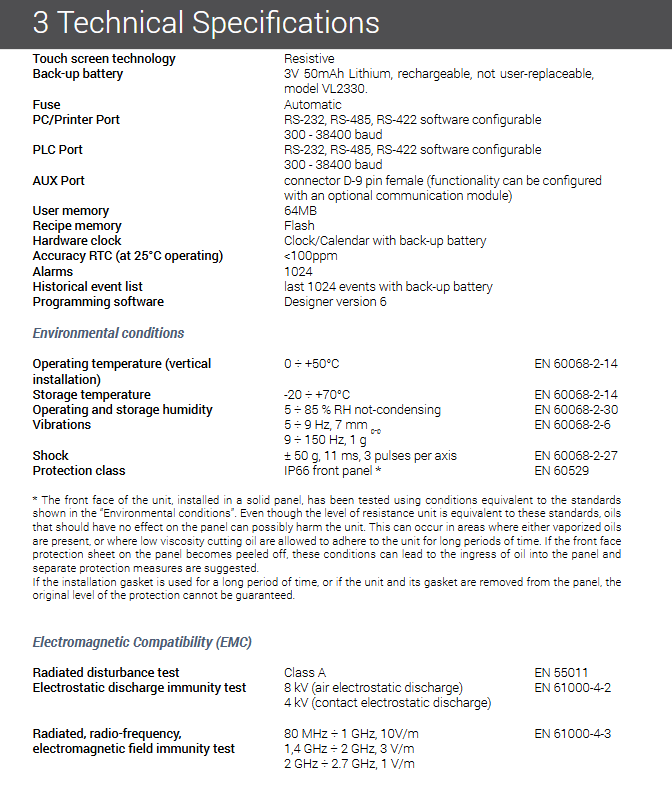
Touch technology resistive, with a lifespan of over 1 million operations
Backlight type LED (306/307/313), CCFL (308/310/312/315)
Backlight lifespan LED: ≥ 40000 hours; CCFL: ≥ 50000 hours (continuous running time when brightness drops to 50% at 25 ℃)
The lifespan of the front film is 10 years without direct sunlight/UV exposure at 25 ℃. After 300 hours of indoor QUV aging testing, it slightly turns yellow/brittle
All display functions support brightness adjustment, and some models can choose video input
(2) Memory and Storage
User memory: 64MB Flash (unified for all models);
Formula memory: Flash storage, limited only by available memory, no fixed capacity;
Real time clock: clock/calendar with battery backup, accuracy<100ppm at 25 ℃;
Battery configuration: 3V 50mAh lithium rechargeable battery (VL2330), non user replaceable, backup RTC and event list data.
(3) Ports and Communication
Standard port:
Serial port: PC/Printer port, PLC port, both support RS-232/RS-422/RS-485, software configurable, baud rate 300-38400;
Ethernet port: 10/100 Mbit, supports device communication, remote programming, and data upload;
USB port: USB 1.1 host port, can be connected to a USB flash drive, used for program/firmware upgrades and recipe copying;
AUX port: D-9 pin female port, requires optional communication module, supports fieldbus/Ethernet expansion, compatible with TCM/SCM module;
Communication capability: Supports communication drivers for over 150 industrial devices, dual driver communication, and optional fieldbus modules (such as Profibus DP).
(4) Power Supply and Protection
Power supply voltage: 18-30VDC (uniform for all models);
Working current: 0.55A-1.1A at 24VDC (depending on the model, 0.55A for 306/307 and 1.1A for 315);
Protection level: Front panel IP66 (EN 60529), built-in automatic fuse;
Physical weight: 1Kg to 3.4Kg (depending on the model, the lightest weight is 1Kg for 306/307, and the heaviest weight is 3.4Kg for 315).
Core functional characteristics
Data processing and display: supports display in numerical, text, bar chart, analog instrument, graphic and image formats, and supports dynamic object attributes; Equipped with data collection and trend display functions, trend data can be transmitted to the host through Ethernet;
Graphics capability: Vector graphics function, supports multi-layer display, object transparency, compatible with various graphics and image formats;
Formula and alarm management:
Recipe: Flash storage, can be transferred to the host via Ethernet or copied to a USB flash drive;
Alarm: Supports 1024 alarms, retaining a list of 1024 historical events backed up by the battery. Alarm/event information can be printed or uploaded to the host;
Security and permissions: 8-level password protection mechanism to prevent unauthorized operations; Support serial port report printing, reports can be freely configured through Designer 6;
Network and Multilingualism:
Network: UniNet network based on Ethernet, supporting data sharing between HMIs, providing data services to the outside world through UniNet OPC Server, supporting master/slave mode;
Multilingual: Supports Far Eastern languages, the number of languages at runtime is limited by memory, and all texts can be exported in Unicode format for easy translation;
Custom editing: a powerful macro editor that can configure touch screen operation logic; All system commands (except for configuration mode) can be customized, modified, deleted, or expanded.
Environmental adaptation and industrial certification
environmental parameters
Working temperature: 0 ÷+50 ℃ (vertical installation, EN 60068-2-14);
Storage temperature: -20 ÷+70 ℃ (EN 60068-2-14);
Temperature and humidity: 5 ÷ 85% RH (non condensing, EN 60068-2-30);
Anti vibration/impact: 5~9Hz (7mm p-p), 9~150Hz (1g); ± 50g impact (11ms, 3 times per axis);
Industrial certification
Electromagnetic compatibility: compliant with the 2014/30/EU EMC directive, compatible with EN 61000-6-4/6-2, EN 55011 Class A and other standards;
Environmental Protection: Compliant with RoHS 2011/65/EU directive, the product comes with CE certification;
Installation restrictions: Cannot be continuously exposed to sunlight, cannot come into contact with corrosive compounds, IP66 protection must meet the requirements of installation flatness, panel thickness (1.5-6mm), etc.
Installation and connection specifications
Installation dimensions: 7 models are divided into 3 groups for installation dimensions. The panel dimensions are 187x147mm-392x307mm, and the opening dimensions are 176x136mm-381x296mm. The installation gasket needs to be attached to the back of the frame, and the fixing screws need to be tightened to make contact with the frame and panel;
Mandatory grounding: The equipment must be grounded, with the grounding terminal located near the power terminal and can be grounded through screws/quick terminals to suppress electromagnetic interference. The power supply must be double/reinforced insulated;
Port connection:
Serial port: PLC port supports RS232/422/485 pin definition, and communication cables need to be matched with connected devices;
Ethernet port: standard RJ45, 1/TX+, 2/TX -, 3/RX+, 6/RX -, indicator light off indicates detection of a valid link;
AUX port: The module needs to be powered off when inserting or unplugging, and all four corners should be pressed simultaneously for insertion. The pin definitions can be found in the module manual.
Special operating mode
This series of products offers three special modes: calibration, configuration, and safety, supporting fault recovery and personalized configuration. The core operations are as follows:
Touch screen calibration
Standard calibration: Enter configuration mode, long press CLEAR key, and follow the on-screen prompts to complete calibration;
Emergency calibration: After power failure, turn on the device and click on the middle of the screen at a frequency of 0.5 seconds to enter calibration mode. Follow the standard procedure for operation;
configuration mode
Normal entry: Long press the touch free area on the screen for 2 seconds (duration can be modified through Designer);
Emergency access: After power failure, press the left middle of the screen with your left hand. After turning on the device, click the right middle with your right hand at a frequency of 0.5 seconds until you enter;
Core functions: View driver/firmware version, return to operating mode, update firmware, clear RAM (reset password/recipe), modify IP address, etc;
safe mode
Activation: After power off, long press the upper part of the screen. After turning on, click the lower part at a frequency of 0.5 seconds until the system LED flashes and the screen goes black;
Purpose: Reset panel contrast parameters and perform other special operations.
Maintenance and usage instructions
Battery maintenance: The first installation requires 48 hours of charging, and at full charge at 25 ℃, it can back up 3 months of data (RTC+event list). Battery scrapping must be handled in accordance with local regulations;
Cleaning requirements: Only use a soft cloth and neutral soap to clean the panel, and do not use solvents (the front film is resistant to solvents such as acetone and isopropanol for half an hour without any effect);
Programming operation: Connect the computer and HMI using CA253 cable. The HMI needs to enter configuration mode with communication parameters of 9600 baud rate, no checksum, and 1 stop bit; The Designer software version needs to be compatible with the HMI firmware version;
Key operation: The touch keyboard on the screen is pop-up, and the numeric keypad is automatically displayed for data input. All keyboards can be customized; The key label "2s" indicates that the function needs to be activated by long pressing for 2 seconds.
- YOKOGAWA
- Reliance
- ADVANCED
- SEW
- ProSoft
- WATLOW
- Kongsberg
- FANUC
- VSD
- DCS
- PLC
- man-machine
- Covid-19
- Energy and Gender
- Energy Access
- Renewable Integration
- Energy Subsidies
- Energy and Water
- Net zero emission
- Energy Security
- Critical Minerals
- A-B
- petroleum
- Mine scale
- Sewage treatment
- cement
- architecture
- Industrial information
- New energy
- Automobile market
- electricity
- Construction site
- HIMA
- ABB
- Rockwell
- Schneider Modicon
- Siemens
- xYCOM
- Yaskawa
- Woodward
- BOSCH Rexroth
- MOOG
- General Electric
- American NI
- Rolls-Royce
- CTI
- Honeywell
- EMERSON
- MAN
- GE
- TRICONEX
- Control Wave
- ALSTOM
- AMAT
- STUDER
- KONGSBERG
- MOTOROLA
- DANAHER MOTION
- Bentley
- Galil
- EATON
- MOLEX
- Triconex
- DEIF
- B&W
- ZYGO
- Aerotech
- DANFOSS
- KOLLMORGEN
- Beijer
- Endress+Hauser
- schneider
- Foxboro
- KB
- REXROTH
- YAMAHA
- Johnson
- Westinghouse
- WAGO
- TOSHIBA
- TEKTRONIX
- BENDER
- BMCM
- SMC
- HITACHI
- HIRSCHMANN
- XP POWER
- Baldor
- Meggitt
- SHINKAWA
- Other Brands
- UniOP
- KUKA
- IBA
- Beckhoff
- ADLINK
-
FANUC A06B-0169-B088 - AC Servo Motor Alpha M40 3000 3 KW
-
ALPHA WIRE 1299C-SLATE-1000 - Multi-Conductor Cable Wire
-
alpha / Wittenstein SK+180S-MF1-10-1M1-1K - Hypoid Gearbox i=10
-
ALPHA WIRE 1181/40C SL005 - Multi-Conductor Cable Wire
-
Generic / DSI Straight Anatomic Plastic Adapter Head + Screw Hex - Dental Implant Fixture
-
Alpha II-650 MV6500526A - Power Supply Unit
-
ALPHA WIRE 7036 WH001 - Hook-Up Wire
-
FANUC RDCGM00000004O / TP 050-MF1-7-061-000 - Gear Reducer / Alpha Gearbox
-
Alpha II-650 MV6500436A - TDK-Lambda Power Supply Unit
-
Alpha S-Alpha600 J60033 - 600W Switching Power Supply Unit
-
Alpha 1500W J00032 - Power Supply Unit
-
Alpha 600W H60638 - Switching Power Supply Unit
-
Alpha 650 MV6500314A - Power Supply Unit
-
Aloka UST-5413 - Linear Probe for Prosound Alpha 6
-
ALPHA WIRE TFT25015 NA002 - High Temperature Heat Shrink Tubing Wire Sleeving
-
JAVAD ALPHA2 / GrAnt-G3 - GPS Receiver
-
Alpha 400W H47318 - Switching Power Supply Unit
-
Alpha SG-ALPHA-202-001 / Q1001-010-001 - Circuit Board Module
-
Antlia Dual ERF H-Alpha & Cak/CaH - Density Astronomical Accessory
-
ALPHA WIRE 5100C SL033 - Multi-Conductor Cable Wire
-
ALPHA WIRE 5098C-SL033 - Multi-Conductor Cable Wire
-
Fanuc A06B-6290-H105 - Alpha Sv 80hv-B Module Servo Amplifier
-
FANUC A06B-6240-H105 - Aux Axis Alpha aiSV 80 Servo Amplifier
-
Endress+Hauser Alpha-Log RSA10-61B1S / 42974737/0130 - Data Logger Measurement Instrument
-
ALPHA WIRE 6363-SL002 - Multi-Conductor Cable Wire
-
Alpha SP100S-MF1-7-1K1-2S - Gear Reducer
-
Alpha SP 100G-MF1-4-0H1-2S-PGG - Planetary Gear Reducer
-
FANUC A06B-0143-B175 #0275 - Alpha 12/3000 AC Servo Motor
-
James Burn Alpha Doc P33 / GBC PDI - Automatic Punch DocuPunch
-
Titus HVAC 105383-01 - ALPHA BAC Controller and Actuator
-
Wittenstein Alpha SP 100S-MF2-20-0E0-2S - Planetary Gearbox i=20
-
Kashiyama Alpha-85-ZV / SP-8026G - Pump Controller
-
Christ Alpha 2-4 LDplus - Freeze Drier Part N/ 101542
-
Lambda / Alpha H40896 - 400W Power Supply Unit
-
Wittenstein Alpha LP-070S-MF1-3-1E1-38 - Planetary Gearbox
-
Matrox / EXO-2480 133-D06-3 / 398-17962-1 - Alpha Numeric PCB Board
-
Fanuc A06B-6096-H204 - Dual Axis Alpha Servo Amplifier Module
-
Alpha Wire 5002C-SL001 - Multi-Conductor Cable 2 Conductors 22AWG 300VAC
-
Alpha 600W H60638 - Switching Power Supply Unit
-
Alpha Scientific Spin Precession Dual Electro Magnet Beam Line Chamber - Electro Magnet Beam Line Chamber
-
ALPHA WIRE 6017C SL005 - Multi-Conductor Cable Wire
-
ALPHA WIRE 65804 SL002 - Multi-Conductor Cable Wire
-
Fanuc A06B-0152-B010 - AC Servo Motor Alpha A30/2000 with Brake
-
ALPHA WIRE 5856-VI001 - Hook-Up Wire
-
ALPHA WIRE M13142-SL001 - Multi-Conductor Cable Wire
-
Alpha & Omega AOZ1017 - 8-Pin SOIC SMD Buck Switching Regulator IC
-
Alpha 600W H67027 CA600 - 600W Switching Power Supply Unit
-
ALPHA WIRE 2845/7-RD001 - Hook-Up Wire
-
Wittenstein Alpha VH+063S-MF1-10-6H1-1K-0C2 - Worm Gear Reducer i=10
-
ALPHA WIRE 2414C SL022 - Multi-Conductor Cable Wire
-
ALPHA WIRE 5672-SL005 - Multi-Conductor Cable Wire
-
BECKHOFF / Alpha AM8021-0B10-0000 + CP 040-MO1-10 - Servo Motor with Planetary Gearbox
-
ALPHA Systems Lab Inc MBA-WV1-F / PCB-WV1-F - PCB Board
-
FANUC A06B-0826-B201 - Alpha P12 AC Spindle Motor
-
WF & HC / Alpha-E 10045 - Tiller Bar Flat Flange Inlet 3150LB 3X 2.5 Inch
-
Seiler Alpha Air 3 - Dental Microscope
-
Alpha 400W H47223 - Switching Power Supply Unit
-
Wittenstein Alpha SP 180S-MC1-5-1M0-2K - Planetary Gearbox
-
FANUC A06B-6117-H211 - Servo Amplifier Module Alpha iSV 160/160 Amp
-
Alpha S-Alpha600 J60033 - 600W Switching Power Supply Unit
-
Adaptive Alpha Eclipse StreetSmart Model 17X - Master Slave LED Sign 44 x 44 Inch
-
ALPHA WIRE 391697-WH005 / 391697WH005 - Hook-Up Wire
-
Generic 22W Laser Engraver Cutter - Smart Air Pump APP Control CNC Dual-core CPU DIY Tools
-
FANUC A06B-6102-H226 / A06B6102H226 - Spindle Amplifier Module
-
FANUC A06B-6090-H006 / A06B6090H006 - Servo Power Supply Module
-
Alpha Wire Apr-19 - High Low Temperature Cable 75 FT
-
Wittenstein Alpha HG+ 075S-MF2-28-6E1-1S10 - Hypoid Gearbox Reducer i=28
-
Alpha J00032 - 1500W Power Supply Unit
-
Alpha H47038 - 400W Power Supply Unit
-
FANUC A06B-6096-H204 - Dual Axis Alpha Servo Amplifier Module
-
Wittenstein Alpha LPB090-MO1-10-111-00 - Alpha Planetary Gearbox
-
ALPHA WIRE 2842/19-YL001 - Hook-Up Wire
-
WITTENSTEIN ALPHA HG+060S-MF1-56C1-1K00 - Planetary Gearbox
-
Basler A102K Alpha VIS - Black and White CCD Industrial Camera
-
Alpha H40935 - 400W Power Supply Unit
-
FANUC A06B-6114-H207 - 2-Axis Servo Amplifier Module SVM20/40i Alpha i Series
-
TDK-Lambda / Alpha H47318 - 400W Switching Power Supply Unit
-
HITACHI Aloka Prosound Alpha 7 Premier - Diagnostic Ultrasound System
-
Alpha SP100S-MF1-4-1E1-2S - Precision Gear Reducer
-
FANUC A20B-2001-0950 - Control Circuit Board PCB
-
ALPHA WIRE 2855/1-GR001 - Hook-Up Wire
-
FANUC A06B-6096-H204 - Dual Axis Alpha Servo Amplifier Module
-
Wittenstein Alpha LPB090-MO1-10-111-00 - Alpha Planetary Gearbox
-
ALPHA WIRE 2842/19-YL001 - Hook-Up Wire
-
Basler A102K Alpha VIS - Black and White CCD Industrial Camera
-
Wittenstein Alpha LP 090-M01-7-111-000 / Schneider - Gear Box i:7 Schneider Electric Servo Motor
-
LAMBDA ALPHA 600W H60554 - Switching Power Supply Unit
-
Fanuc A06B-0238-B100 / A860-2000-T301 - AC Servo Motor with Encoder
-
FANUC A06B-6290-H322 - ALPHA iSV 10/10/10HV-B 3-Axis Servo Drive
-
Polymotor Italiana 9919 121 90332 / Alpha SP75-M1-3 - D.C. Permanent Magnet Motor with Gearbox
-
MJ Research PTC-200 - PCR DNA Engine Thermal Cycler with Dual 48-Well Alpha Block
-
ALPHA WIRE 5002C-SL002 - Multi-Conductor Cable Wire
-
Fluke / Victoreen ASM 990 / 489-110D - Biomedical Radiation Detector Probe with Pelican Case
-
ALPHA WIRE 5855-BK001 - Hook-Up Wire 22AWG Silver Plated Copper
-
Tetra / Alpha 600W H60552 - Switching Power Supply Unit
-
Bruker Alpha FTIR Spectrometer / Alpha-P ATR - Infrared Spectrometer FTIR Instrument
-
Simagic AlphaM-FX-C 290mm FX-C - Formula Steering Wheel with Alpha Mini Wheel Base
-
Alpha Wire 5152C 20/2C - XtraGuard High Performance Instrumentation/Control Cable
-
ALPHA WIRE 1219/40C SL005 - Multi-Conductor Cable Wire
-
ALPHA WIRE 3131441 TN005 - Multi-Conductor Cable Wire
-
ALPHA WIRE 2172-SV005 - Multi-Conductor Cable Wire
-
FANUC A20B-2100-0742 - ALPHA ia Servo Control Board
-
Olympus Endo Alpha Cart TI-A1 - Medical Equipment Cart with Accessories
-
ALPHA WIRE 74010-BK002 - Multi-Conductor Cable Wire
-
Fanuc A06B-6110-H026#N - ALPHA i Power Supply Module PSM-26i
-
Alpha Laval SX2/013 - Rotary Lobe Pump
-
Alpha II-450P MV4500007B - Switching Power Supply Unit
-
TDK-Lambda / Alpha 400W - Switching Power Supply Unit
-
ALPHA ALPHA6000E-3015GB/3018PB - Frequency Inverter Drive Power Converter
-
ALPHA WIRE 391245-WH005 - Hook-Up Wire
-
Alpha H60562 CA600 - 600W Switching Power Supply Unit
-
Fanuc A06B-0147-B675 - Alpha 22/2000 3.8kW 2000rpm AC Servo Motor
-
ALPHA WIRE 9821 - Twinaxial Cable 1PR 25AWG Poly Insulation
-
Fanuc / Alpha A16B-2203-0820 - ALPHA i Spindle Wiring PCB
-
FANUC A20B-2100-0742 - ALPHA ia Servo Control Board
-
Fanuc A06B-6096-H104 - Alpha Servo Module
-
Fuji Electric RYT202D5-VV2 / Faldic Alpha5 - Servo Amplifier
-
ALPHA WIRE 2817/6 20 AWG - PTFE High Temperature Cable
-
Aloka Prosound Alpha 10 / EU-6031C / JB-274D - High Voltage Power Supply for Ultrasound
-
Wittenstein Alpha SP 140S-MF1-5-01F-2S - Planetary Gearbox
-
FANUC A06B-6124-H205 - Alpha iSV Servo Amplifier Module
-
TDK-Lambda / Alpha MV6500314A - 650W Power Supply Unit
-
TDK-Lambda / Alpha H47318 - 400W Switching Power Supply Unit
-
Alpha H47318 - 400W Switching Power Supply Unit
-
CNC Bearing / Alpha AR090-S1-300-20-N - Robotics Bearing Component
-
Alpha CA400 5A,3.3Q,5B,12/12E / DXH47037 - 400W Power Supply Unit
-
FANUC A20B-2100-0742 - ALPHA ia Servo Control Board
-
Fanuc / Amada A04B-0810-C403 / LC1212 alpha II - Pressure Regulator

K-JIANG

Add: Jimei North Road, Jimei District, Xiamen, Fujian, China
Tell:+86-15305925923