

K-WANG
+086-15305925923
Service expert in industrial control field!


Product
Article
NameDescriptionContent
Adequate Inventory, Timely Service
pursuit of excellence


Ship control system
Equipment control system
Power monitoring system
Current position:
新闻动态
newS
Brand
HIMatrix F30 01 Safety-Related Controller
The safety-related F30 controller is a compact system in a metal housing with 20 digital inputs and 8 digital outputs.
The controller is available in various model variants for SILworX and ELOP II Factory.
The device is suitable for mounting in Ex-zone 2.
The device is TÜV-certified for safety-related applications up to SIL 3 (IEC 61508, IEC 61511 and IEC 62061), Cat. 4 and PL e (EN ISO 13849-1) and SIL 4 (EN 50126, EN 50128 and EN 50129).
Further safety standards, application standards and test standards are specified in the certificates available on the HIMA website.
The controller is available in various model variants for SILworX and ELOP II Factory.
The device is suitable for mounting in Ex-zone 2.
The device is TÜV-certified for safety-related applications up to SIL 3 (IEC 61508, IEC 61511 and IEC 62061), Cat. 4 and PL e (EN ISO 13849-1) and SIL 4 (EN 50126, EN 50128 and EN 50129).
Further safety standards, application standards and test standards are specified in the certificates available on the HIMA website.
HIMatrix F30 01 Safety-Related Controller
Product Description
The safety-related F30 controller is a compact system in a metal housing with 20 digital inputs and 8 digital outputs.
The controller is available in various model variants for SILworX and ELOP II Factory.
The device is suitable for mounting in Ex-zone 2.
The device is TÜV-certified for safety-related applications up to SIL 3 (IEC 61508, IEC 61511 and IEC 62061), Cat. 4 and PL e (EN ISO 13849-1) and SIL 4 (EN 50126, EN 50128 and EN 50129).
Further safety standards, application standards and test standards are specified in the certificates available on the HIMA website.
Safety Function
The controller is equipped with safety-related digital inputs and outputs.
Safety-Related Digital Inputs
The controller is equipped with 20 digital inputs. The state (HIGH, LOW) of each input is signaled by an individual LED.
Mechanical contacts without own power supply or signal power source can be connected to the inputs.
Potential-free mechanical contacts without own power supply are fed via an internal short circuit-proof 24 V power source (LS+). Each of them supply a group of 4 mechanical contacts.
With signal voltage sources, the corresponding ground must be connected to the input (L-)
For the external wiring and the connection of sensors, apply the de-energized-to-trip principle.
Thus, if a fault occurs, the input signals adopt a de-energized, safe state (low level).
If an external wire is not monitored, an open-circuit is considered as safe low level.
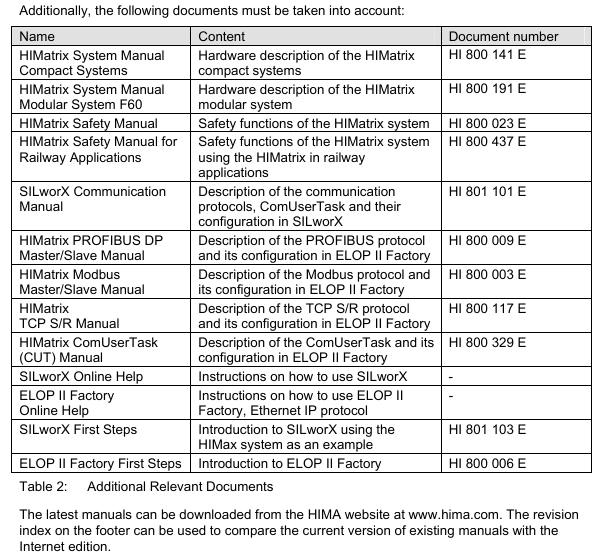
Reaction in the Event of a Fault
If the device detects a fault on a digital input, the user program processes a low level in accordance with the de-energized to trip principle.
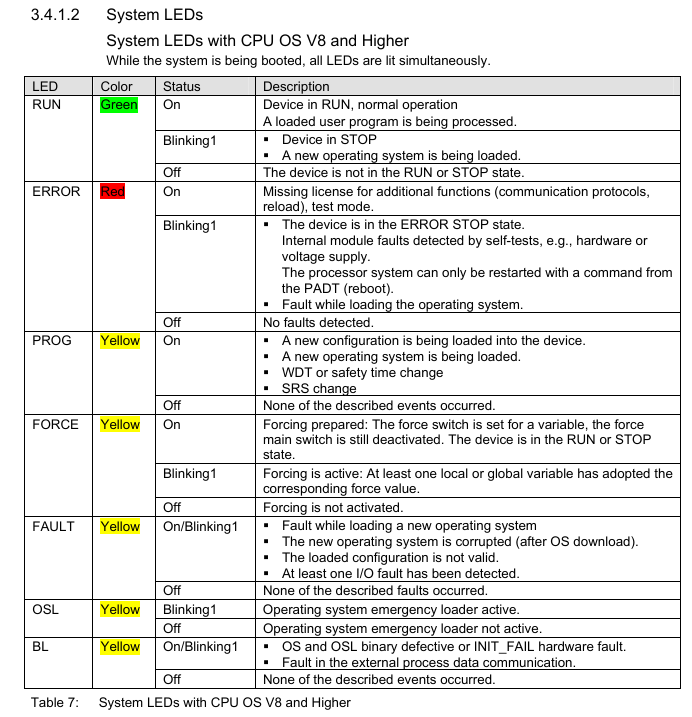
The device activates the FAULT LED.
In addition to the channel signal value, the user program must also consider the corresponding error code.
The error code allows the user to configure additional fault reactions in the user program.
Line Control
Line control is used to detect short-circuits or open-circuits and can be configured for the F30 system, e.g., on EMERGENCY STOP inputs complying with Cat. 4 and PL e in accordance with EN ISO 13849-1.
To this end, connect the digital outputs DO 1 through DO 8 of the system to the digital inputs DI of the same system as follows:
The controller pulses the digital outputs to detect short-circuits and open-circuits on the lines connected to the digital inputs.
To do so, configure the Value [BOOL] -> system variable in SILworX or the DO[0x].Value system signal in ELOP II Factory.
The variables for the pulsed outputs must begin with channel 1 and reside in direct sequence, one after the other.
If the following faults occur, the FAULT LED located on the front plate of the controller blinks,the inputs are set to low level and an (evaluable) error code is created:
Cross-circuit between two parallel wires.
Invalid connections of two lines (e.g., DO 2 to DI 3),
Earth fault on one wire (with earthed ground only).
Open-circuit or open contacts, i.e., including when one of the two EMERGENCY STOP
switches mentioned above has been engaged, the FAULT LED blinks and the error code is created.
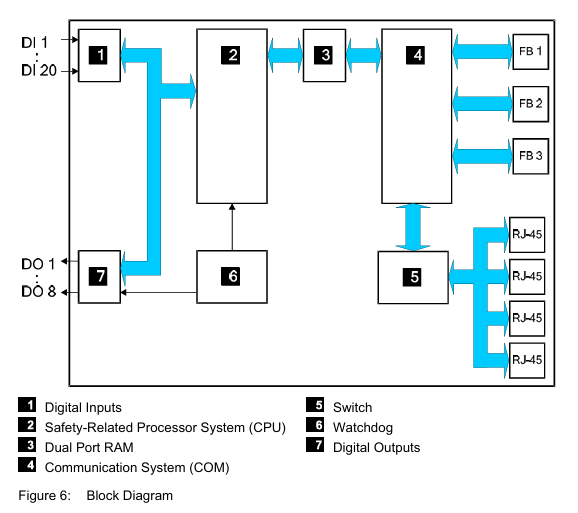
Equipment, Scope of Delivery
The following table specifies the available controller variants:
F30 01:Controller (20 digital inputs, 8 digital outputs), Operating temperature: 0...+60 °C, for ELOP II Factory programming tool.
F30 011 (-20 °C) :Controller (20 digital inputs, 8 digital outputs), Operating temperature: -20...+60 °C, for ELOP II Factory programming tool
F30 014:Controller (20 digital inputs, 8 digital outputs), Operating temperature: -25...+70 °C (temperature class T1), Vibration and shock tested according to EN 50125-3 and EN 50155,
class 1B according to IEC 61373, for ELOP II Factory programming tool
F30 01 SILworX:Controller (20 digital inputs, 8 digital outputs), Operating temperature: 0...+60 °C, for SILworX programming tool
F30 011 SILworX (-20 °C):Controller (20 digital inputs, 8 digital outputs), Operating temperature: -20...+60 °C, for SILworX programming tool
F30 014 SILworX:Controller (20 digital inputs, 8 digital outputs), Operating temperature: -25...+70 °C (temperature class T1), Vibration and shock tested according to EN 50125-3 and EN 50155, class 1B according to IEC 61373, for SILworX programming tool
Type Label
The type plate contains the following details:
Product name
Bar code (1D or 2D code)
Part no.
Production year
Hardware revision index (HW Rev.)
Firmware revision index (FW Rev.)
Operating voltage
Mark of conformity
Mounting the F30 in Zone 2
(EC Directive 94/9/EC, ATEX)
The controller is suitable for mounting in zone 2. Refer to the corresponding declaration of conformity available on the HIMA website.
When mounting the device, observe the special conditions specified in the following section.
Specific Conditions X
1. Mount the HIMatrix F30 controller in an enclosure that meets the EN 60079-15 requirements and achieves a type of protection of at least IP54, in accordance with EN 60529. Provide the enclosure with the following label:
Work is only permitted in the de-energized state Exception:
If a potentially explosive atmosphere has been precluded, work can also performed when the controller is under voltage.
2. The enclosure in use must be able to safely dissipate the generated heat. Depending on the output load and supply voltage, the HIMatrix F30 has a power dissipation ranging between 12 W and 33 W.
3. Protect the HIMatrix F30 with a 10 A time-lag fuse.
The 24 VDC power must come from a power supply unit with safe isolation. Use power supply units of type PELV or SELV only.
4. Applicable standards:
VDE 0170/0171 Part 16, DIN EN 60079-15: 2004-5
VDE 0165 Part 1, DIN EN 60079-14: 1998-08
Configuration with SILworX
In the Hardware Editor, the controller is represented like a base plate equipped with the following modules:
Processor module (CPU)
Communication module (COM)
Input module (DI 20)
Output module (DO 8)
Double-click the module to open the Detail View with the corresponding tabs. The tabs are used to assign the global variables configured in the user program to the system variables.
Parameters and Error Codes for the Inputs and Outputs
The following tables specify the system parameters that can be read and set for the inputs and outputs, including the corresponding error codes.
In the user program, the error codes can be read using the variables assigned within the logic.
The error codes can also be displayed in SILworX.
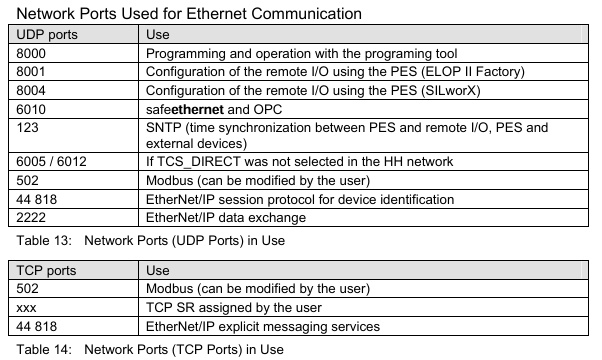
Configuration with ELOP II Factory
Configuring the Inputs and Outputs
The signals previously defined in the Signal Editor (Hardware Management) are assigned to the individual channels (inputs and outputs) using ELOP II Factory. Refer to the system manual for compact systems or the online help for more details.
The following chapter describes the system signals used for assigning signals in the controller.
Signals and Error Codes for the Inputs and Outputs
The following tables specify the system signals that can be read and set for the inputs and outputs, including the corresponding error codes.
In the user program, the error codes can be read using the signals assigned within the logic.
The error codes can also be displayed in ELOP II Factory.
Operation
The controller F30 is ready for operation. No specific monitoring is required for the controller.
Handling
Handling of the controller during operation is not required.
Diagnosis
A first diagnosis results from evaluating the LEDs, see Chapter 3.4.1.
The device diagnostic history can also be read using the programming tool.
Maintenance
No maintenance measures are required during normal operation.
If a failure occurs, the defective module or device must be replaced with a module or device of the same type or with a replacement model approved by HIMA.
Only the manufacturer is authorized to repair the device/module.
Faults
If the test harnesses detect safety-critical faults, the module enters the STOP_INVALID state and will remain in this state. This means that the input signals are no longer processed by the device and the outputs switch to the de-energized, safe state. The evaluation of diagnostics provides information on the fault cause.
Maintenance Measures
The following measures are required for the device:
Loading the operating system, if a new version is required
Executing the proof test
Loading the Operating System
HIMA is continuously improving the operating system of the devices.
HIMA recommends to use system downtimes to load a current version of the operating system into the devices.
Refer to the release list to check the consequences of the new operation system version on the system!
The operating system is loaded using the programming tool.
Prior to loading the operating system, the device must be in STOP (displayed in the programming tool). Otherwise, stop the device.
For more information, refer to the programming tool documentation.
Proof Test
HIMatrix devices and modules must be subjected to a proof test in intervals of 10 years.
Decommissioning
Remove the supply voltage to decommission the device. Afterwards pull out the pluggable screw terminal connector blocks for inputs and outputs and the Ethernet cables.
Transport
To avoid mechanical damage, HIMatrix components must be transported in packaging.
Always store HIMatrix components in their original product packaging. This packaging also provides protection against electrostatic discharge. Note that the product packaging alone is not suitable for transport.
Disposal
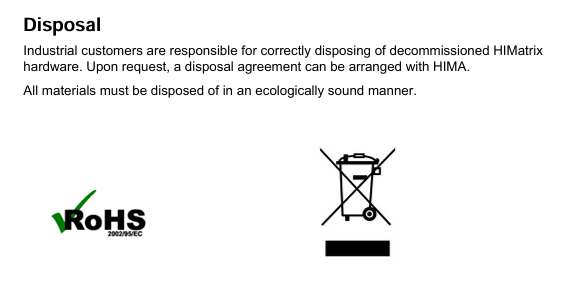
Industrial customers are responsible for correctly disposing of decommissioned HIMatrix hardware. Upon request, a disposal agreement can be arranged with HIMA.
All materials must be disposed of in an ecologically sound manner.
- YOKOGAWA
- Reliance
- ADVANCED
- SEW
- ProSoft
- WATLOW
- Kongsberg
- FANUC
- VSD
- DCS
- PLC
- man-machine
- Covid-19
- Energy and Gender
- Energy Access
- Renewable Integration
- Energy Subsidies
- Energy and Water
- Net zero emission
- Energy Security
- Critical Minerals
- A-B
- petroleum
- Mine scale
- Sewage treatment
- cement
- architecture
- Industrial information
- New energy
- Automobile market
- electricity
- Construction site
- HIMA
- ABB
- Rockwell
- Schneider Modicon
- Siemens
- xYCOM
- Yaskawa
- Woodward
- BOSCH Rexroth
- MOOG
- General Electric
- American NI
- Rolls-Royce
- CTI
- Honeywell
- EMERSON
- MAN
- GE
- TRICONEX
- Control Wave
- ALSTOM
- AMAT
- STUDER
- KONGSBERG
- MOTOROLA
- DANAHER MOTION
- Bentley
- Galil
- EATON
- MOLEX
- Triconex
- DEIF
- B&W
- ZYGO
- Aerotech
- DANFOSS
- KOLLMORGEN
- Beijer
- Endress+Hauser
- schneider
- Foxboro
- KB
- REXROTH
- YAMAHA
- Johnson
- Westinghouse
- WAGO
- TOSHIBA
- TEKTRONIX
- BENDER
- BMCM
- SMC
- HITACHI
- HIRSCHMANN
- XP POWER
- Baldor
- Meggitt
- SHINKAWA
- Other Brands
- UniOP
- KUKA
- IBA
- Beckhoff
- ADLINK
52
-
ALPHA WIRE 1636-RD001 - Hook-Up Wire
-
FANUC A06B-6078-H211#H501 / A06B6078H211H501 - Servo Amplifier Module
-
Alpha H47016 / CA400 - 400W Switching Power Supply Unit
-
Alpha Wire 2821/2 WH001 - Multi-Conductor Communication Control Cable
-
Wittenstein Alpha SP 100S-MF2-25-1E1-2S - Planetary Gearbox Reducer
-
FANUC A06B-6090-H008 / A06B6090H008 - Servo Power Supply Module
-
Alpha Wire 2821/2 WH001 - Multi-Conductor Communication Control Cable
-
NOVOTRON / Alpha NBL2-0080-45-3-320 T0B + SP075-MF1-3-031-000 - Servo Motor with Planetary Gearbox
-
Alpha 0100044-001 CXRF 48/4.6KW - Rectifier Module
-
Lambada-TDK / Alpha YM-00-470B / AMAT 50513215200 - 600W Power Supply Unit
-
FANUC A06B-6290-H122 - Alpha iSV 10HV-B 3-Axis Servo Amplifier Drive
-
Alpha SP 140S-MF1-5-1/1-2S - Planetary Gearbox Reducer
-
Wittenstein Alpha SP 100S-MF1-5-1K1-2S - Planetary Gearbox Reducer
-
Wittenstein Alpha LP 120Z-MF1-10-1/1-3S-INF - LP Series Planetary Gearbox
-
Wittenstein Alpha LP 090-M01-7-111-000 / Schneider - Planetary Gearbox with Servo Motor
-
Alpha TP 050-MX1-7-450-000 - Gearbox Reducer
-
Fanuc A06B-0377-B577#7000 - AC Servo Motor Alpha M2.5/3000
-
ALPHA WIRE 1705-SL001 - Hook-Up Wire
-
ALPHA WIRE 1953/3T-BK003 - Hook-Up Wire
-
ALPHA WIRE 5855/7-SL001 - Hook-Up Wire
-
ALPHA WIRE 2158-NA005 - Hook-Up Wire
-
Wittenstein Alpha TP 025S-MF1-7-0G0-2S - Planetary Gearbox
-
ALPHA WIRE 5356C - 37 Conductor 20AWG Foil & Braid Shield Cable
-
Wittenstein Alpha NP 025S-MF1-5-1G1-1S - Planetary Gearbox
-
Allen Bradley / Alpha N-3412-2-H00AA / LP 120-M02-100-111-000 - Servo Motor with Planetary Gearbox
-
FANUC A06B-6089-H204 - Alpha Series Servo Amplifier Module
-
Man Diesel & Turbo 3157168-7 - Alpha Lubricator Sbu
-
FANUC A20B-2100-0742 - ALPHA ia Servo Control Board
-
ALPHA ALPHA6000E-31R5GB - Frequency Inverter Drive Power Converter
-
Alpha Industries G287775-1 / 5985-01-341-9652 - Variable Attenuator
-
FANUC A06B-6124-H206 - Alpha iSV Servo Amplifier Module
-
Wittenstein Alpha NP 025S-MF1-5-1G1-1S - Planetary Gearbox
-
NOVOTRON / Alpha NBL2-0080-45-0-320-B-S-A + SK060-MF1-3-031-000 - Servo Motor with Alpha Gearbox
-
FANUC A20B-2100-0742 - ALPHA ia Servo Control Board
-
Honeywell CK65-L0N-BLC210F / CK65 - Mobile Computer Barcode Scanner
-
Wittenstein Alpha TK+ 004S-MF2-12-5B1-1S10 - Right Angle Gearbox
-
FANUC A20B-2100-0742 - ALPHA ia Servo Control Board
-
Rexroth MSK071E-0450-NN-M1-UG1-NNNN - 3-Phase AC Motor with Alpha Reducer
-
JAVAD ALPHA2 - GPS Receiver GrAnt G3
-
GROSCHOPP / Alpha WK 1621309 / EK 66-45 NR + TP 010-MF2-61-030-000 - Motor with Alpha Gearbox Construction
-
ALPHA WIRE 5060C-SL005 - Multi-Conductor Cable Wire
-
ALPHA B10 K X 2 T80887 - Potentiometer
-
Alpha 400W J40005 - Switching Power Supply Unit
-
FANUC A20B-1007-0650 - ALPHA Power Supply Module Board
-
Eberline HP-100B - Gas Proportional Alpha Beta Probe GM Geiger Counter
-
ALPHA WIRE 5858-BK001 - Single Conductor Hook-Up Wire
-
FANUC A06B-6127-H103 - Alpha I AiSV-20HV Servo Amplifier Module
-
VIASYS / CareFusion SOMNOSTAR CEPHALO PRO - Portable EEG Neurodiagnostic Sleep System
-
DSI Surgical Instruments Universal - Dental Implant Abutment Surgical Instruments Kit
-
FANUC A06B-6078-H211#H501 / A06B6078H211H501 - Servo Amplifier Module
-
Fanuc A06B-6089-H209 - Alpha Series Servo Amplifier Module
-
Generic / DSI Straight Anatomic Plastic Adapter Head + Screw Hex - Dental Implant Fixture
-
FANUC A20B-1006-0680 - ALPHA Power Supply Module Board
-
B&L Biotech Alpha II - Endodontic Starter Kit
-
FANUC A06B-0166-B088 C009A5653 - AC Servo Motor
-
ALPHA WIRE 74010-BK002 - Multi-Conductor Cable Wire
-
Wittenstein Alpha SPK 100-MF2-10-041-000 - Gear Box Reducer Ratio 10:1
-
Alpha Getriebebau 10-FL-M1-5 - 10:1 Ratio 7/8 Inch Shaft Gear Reducer
-
ALPHA WIRE 2172-SV005 - Multi-Conductor Cable Wire
-
Aloka UST-5410 - Linear Array Probe Compatible Transducer
-
Alpha Xtra-Guard 1 SupraShield - Multiconductor Cable 16 AWG 2 Conductor
-
ALPHA ALPHA7000E-37R5GB/3011PB - Frequency Inverter Drive Power Converter
-
SIEMENS / Alpha 1FT5066 / SP 100 ROD 426B - Servo Motor with Actuator
-
FANUC A06B-6089-H210 / A06B6089H210 - Servo Amplifier Module
-
LAMBDA ALPHA 600W H60553 - Switching Power Supply Unit
-
Alpha 400W J40071A - Switching Power Supply Unit
-
Hyva Alpha Series FC A4.5-3-98-K6-1DA-HC / 70593139 - Dump Body Hydraulic Cylinder
-
ALPHA WIRE 1293C-SL001 - Multi-Conductor Cable Wire
-
NSS Galaxy / Alpha 20 and 16 - Floor Strip and Wax Slow Speed Buffer and Wet Vac
-
Alpha Xtra-Guard 1 SupraShield - Multiconductor Cable 16 AWG 2 Conductor
-
ALPHA ALPHA6000-3015JB - Frequency Inverter Drive Power Converter
-
Densei-Lambda MA4000591A/ME Alpha 400 / MV6500271A Alpha II-650 - Power Supply Unit
-
Wittenstein Alpha SP 140G-MF2-28-0E1-2S-PGG - Planetary Gear Reducer
-
FANUC ROBOCUT ALPHA-1iC - CNC Wire EDM Machine
-
Fanuc A06B-6081-H101 - Alpha Series Power Supply Module PSMR-1
-
ALPHA WIRE 5855-BL001 - Hook-Up Wire
-
Wittenstein Alpha SPK 100-MF2-20-141-000 - Right Angle Gear Reducer 20:1 Ratio
-
LNS ALPHA SL65-S - Bar Feed System
-
ALPHA WIRE 5356C - 37 Conductor 20AWG Foil & Braided Shield TC Shield Cable
-
TDK-Lambda / Alpha H60552 - 600W Switching Power Supply Unit
-
Bruker Alpha - Infrared Spectrometer FTIR Instrument
-
Wittenstein Alpha SP 060S-MF1-7-0B1-2S - Planetary Gearbox Reducer
-
Digital Alpha VME 5/480 - VME SBC Motherboard CPU Board
-
Glentek Alpha Series - Digital Brushless Servo Amplifier Drive
-
Wittenstein Alpha TPM 004S-021M-6KB1-053B-G6 - Rotary Servo Actuator
-
Wittenstein Alpha TP 110-MF2-61-031-000 / 20009377 - Planetary Gearbox Reducer
-
Emerson Alpha 1800 24 60 / 5070800001 - Rectifier Power Module
-
Fanuc A06B-0377-B577#7000 - AC Servo Motor Alpha M2.5/3000
-
Novotron / Alpha NBL2-0080-45-3-320 T0B + SP075 - Servo Motor with Alpha Gearbox
-
Alpha & Omega Semiconductor AOD442 - N-Channel MOSFET Reel Surface Mount
-
Alpha Wire 2156-NA005 - Hook-Up Wire Cable
-
Sankyo 15AD-04277R-LR3VW1 - Rotary Indexer with Motor
-
Wittenstein Alpha TP025S-MF1-7-0G0-2S - Planetary Gearbox i=7
-
Fanuc A20B-2001-0950 - Control Circuit Board PCB
-
TDK-Lambda / Alpha H60553 - 600W Switching Power Supply Unit
-
Alpha Wire 391845-WH001 - Hook-Up Wire Cable
-
Wittenstein Alpha SPK 100-MF2-10-041-000 - Gear Box Reducer Ratio 10:1
-
Novotron / Alpha NBL2-0080-45-0-320-B-S-A + SK060 - Servo Motor with Alpha Gearhead
-
Wittenstein Alpha TP050S-MA2-27.5-0G1-2S - Planetary Gearbox Reducer
-
Fanuc A06B-6096-H305 - Alpha Servo Amplifier Module
-
TDK-Lambda / Alpha H47006 / CA400 - 400W Switching Power Supply
-
Wittenstein Alpha SPK140 MF2-10-051-000 - Bevel Planetary Gearbox Reducer
-
Fanuc A06B-6117-H205 - Alpha iSV Servo Amplifier Module
-
Fanuc A20B-1007-0650 - Alpha Power Supply Module Board PCB
-
Alpha Wire 2248C-SL005 - Multi-Conductor Cable Wire
-
Alpha Wire 6829-BK001 - Hook-Up Wire Cable
-
Wittenstein Alpha SPK+100S-MF2-25-1E1-1K01 - Right Angle Planetary Gearbox Reducer
-
MAN B&W 99100724 - Maintenance Tools Set for Alpha Lubricator
-
Tokyo Electron (TEL) A3619-9215E / Vexta - Carrier Transfer Assembly
-
Tokyo Electron (TEL) Alpha 8 Auto Shutter 200mm - Diffusion Furnace Auto Shutter Assembly
-
Fanuc A06B-6089-H105 - Alpha Series Servo Amplifier Module
-
Aikoku Alpha EZ Amplifier Type Z - Servo Amplifier Drive
-
Fanuc A06B-6096-H204 - Dual Axis Alpha Servo Amplifier Module
-
Ferrocontrol / Alpha Getriebebau FMR063-04-60-RMK-B0 - Servo Controller with Gear Reducer
-
Fanuc A20B-1006-0680 - Alpha Power Supply Module Board PCB
-
Wittenstein Alpha SP 140S-MF1-5-0I1-2S / 20027211 - Servo Speed Reducer Gearbox
-
Stanley / Alpha 21A108721 - QMP Controller Unit
-
TDK-Lambda / Alpha J40071A - 400W Switching Power Supply Unit
-
Fanuc A06B-0235-B300 - AC Servo Motor Alpha iFS 8/4000
-
Tokyo Electron (TEL) Alpha 8s Manifold Flange Plenum - Right Side Ports Manifold Flange
-
Fuji Frontier 570 PS1 / Alpha 650II - Power Supply Assembly
-
Tokyo Electron (TEL) WCIF-01A - T-Bawl Control Unit PCB Assembly
-
Fanuc A06B-6079-H106 - Alpha Servo Drive Amplifier Module
-
Fanuc A06B-6096-H204 - Dual Axis Alpha Servo Amplifier Module
-
Fanuc A06B-6114-H302 - Triple Axis Servo Drive Amplifier Module
-
Fanuc A06B-6110-H015 - Alpha Servo Amplifier Module
-
Hitachi Aloka Prosound Alpha 7 Premier - Diagnostic Ultrasound System
-
Alpha BC35 - Canning Line for Carbonated Beverages Beer RTD

K-JIANG

Add: Jimei North Road, Jimei District, Xiamen, Fujian, China
Tell:+86-15305925923