

K-WANG


YOKOGAWA STARDOM FCN-100/FCJ Migration Technology
YOKOGAWA STARDOM FCN-100/FCJ Migration Technology
Migration core process
1. Data migration (general process)
Step operation command/tool key instructions
Backup and export NFCP100/NFJT100 data, FcxBackup all - u<username>- p<password><IP/hostname>, generate a "ACKUP" folder containing resource configuration, DUONUS.PRP, etc
Convert to NFCP500 format FcxConvert - t<NFCP501/NFCP502>- i<source folder>- o<destination folder>NFJT100 backup file cannot be converted, I/O needs to be reset
Before restoring the import of NFCP500 FcxRestore<IP/hostname>, the target folder needs to be renamed to "ACKUP" and the SRAM cleared to preserve data
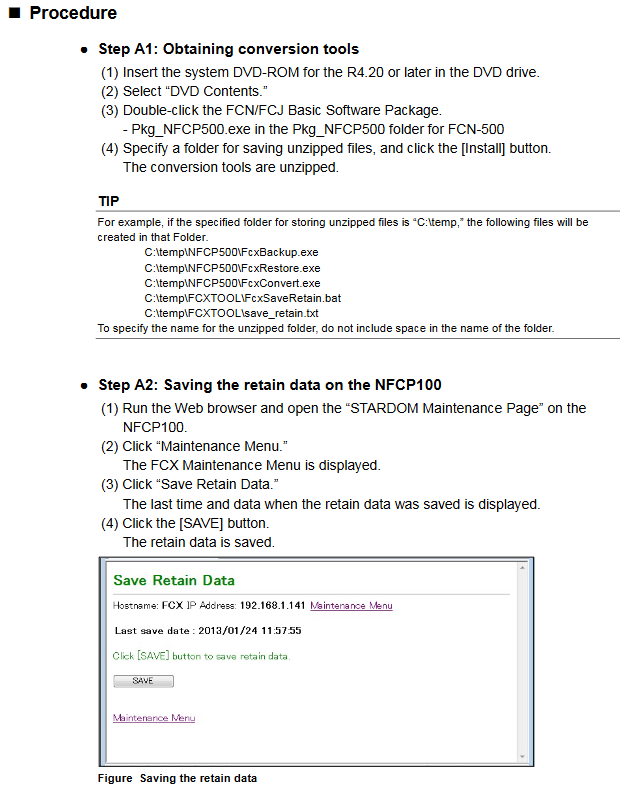
Assist in clearing and holding data FcxSaveRetain-c<IP/hostname>to ensure that the backed up data is correctly mapped to SRAM
2. Control application migration
Project upgrade: R1-R3 format project automatically converts to R4 format after opening, R4 project is not backward compatible
Resource reconstruction rules (by PLC type):
Notes on PLC type processor type migration operation
IPC_40 FCX/FCX_A can be recompiled directly without modifying the project
IPC40 FCX_B/FCX_C reconstruction resources (IPC40+FCX_B/FCX_C)+compilation extension to maintain data area usage
IPC_32/IPC_33- Rebuilding resources (PLC type changed to IPC_40)+Definition of tasks/variables/labels to be copied for compilation
SH_40- Rebuilding resources (changing PLC type to IPC_40)+compiling compatible with existing functions
Download requirements: Offline download of the control application is required, and the startup project and source files should be downloaded as needed
3. Comparison of two migration modes
Advantages of core steps in applicable scenarios
Directly migrating to the on-site environment is simple and does not require pre validation of A1 (acquisition tool) - A10 (APC execution). The 10 step process is concise and does not require internal device support
The pre migration site environment is complex, and it is necessary to verify the site (B1-B3) → internal (B4-B10) → site (B11-B16) in advance, with a total of 16 steps to reduce the risk of on-site downtime and identify problems in advance
Special configuration migration
1. New feature settings (exclusive to NFCP500)
Need to configure through Resource Configurator: CPU dual machine hot standby, SNTP server, 3/4 Ethernet port of NFCP502, SD card, Duolet function
NFJT100 migration requires additional I/O definition settings
2. Field bus migration (NFLF111/NFLP121/NFLC121 modules)
Need to copy and import configuration files: FOUNDATION field bus (CF/DD file), PROFIBUS (GSD file), CANopen (EDS file)
Original project PC → New project PC: Export resource configuration → Import configuration → Download to NFCP500
3. Duolet (Java) application migration
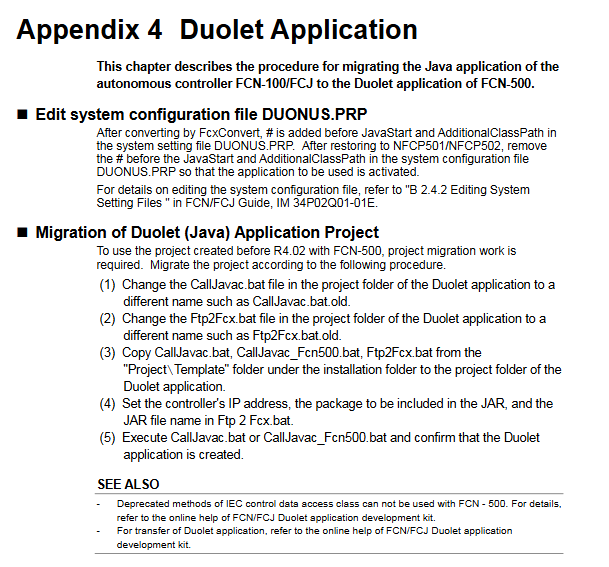
Edit DUONUS.PRP: Remove the "#" comment before JavaStart and AdditionalClassPath
Replace batch files: CallJavac.bat, Ftp2Fcx.bat (copied from installation directory template)
Configuration parameters: Set controller IP, JAR package information, perform compilation validation
Key Limitations and Precautions
License: Cannot be migrated from the original device, NFCP500 CPU module with pre bundled required license must be used
Keep data: When expanding the hold data area, the hold data saved by the original NFCP100 is unavailable
Port adaptation: The COM2 of FCJ needs to be migrated to the RS-232C communication module, and the port name in the program needs to be changed to "RS02", etc
Dual machine hot standby: The control side and standby side CPUs must be of the same model and have the same basic software version. After migration, APC must be executed
Key issues
Question 1: What are the differences in core operations for different PLC types (IPC32/33/40) when controlling application migration?
answer:
IPC40 (processors FCX/FCX_A): No project modification required, simply recompile to adapt to NFCP500; If you need to expand and maintain the data area, you need to rebuild the resources as "IPC40+FCX_B/FCX_C" and compile them.
IPC32/IPC33: It is necessary to rebuild the resources (change the PLC type to IPC40), and copy the task definitions, global variables, device labels, software wiring, and other configurations of the original project before compiling and downloading.
The core difference lies in whether resources need to be rebuilt. The root cause is that NFCP500 is only compatible with IPC40 and above PLC types, and lower version PLC types need to be upgraded and adapted.
Question 2: What are the applicable scenarios and core differences between the two migration modes (direct migration vs pre migration)?
answer:
Applicable scenarios: Direct migration is suitable for scenarios where on-site downtime is allowed and the environment is simple (without complex field buses or special applications); Pre migration is suitable for complex on-site environments (including field buses and Duolet applications) that require minimizing downtime risks.
Core difference: Pre migration adds an "internal device verification" step (steps B4-B10), which allows for early completion of data conversion, application compilation, and functional testing. On site, only CPU replacement, data recovery, and application download need to be performed; Direct migration means that all operations are completed on the target device on site without pre validation, resulting in a simpler process but higher risks.
Question 3: How to migrate the configuration of the field bus module (NFLF111/NFLP121/NFLC121) during the migration process? What should I pay attention to?
answer:
Migration steps: ① Export field bus definition information from the original project PC (NFCP100); ② Copy the configuration files (CF/DD/GSD/EDS) to the new project PC (NFCP500); ③ Import definition information and download it to NFCP500; ④ Verify the field bus communication function.
Attention: ① If using FF engineering tools before R2.20, the configuration needs to be converted to FF configurator format first; ② The field bus definition information is bound to the controller IP, and when replacing the project PC, "export import" must be performed. Upgrading the same PC does not require any operation; ③ After migration, it is necessary to focus on verifying the communication connectivity of field bus devices to avoid configuration omissions.
- YOKOGAWA
- Reliance
- ADVANCED
- SEW
- ProSoft
- WATLOW
- Kongsberg
- FANUC
- VSD
- DCS
- PLC
- man-machine
- Covid-19
- Energy and Gender
- Energy Access
- Renewable Integration
- Energy Subsidies
- Energy and Water
- Net zero emission
- Energy Security
- Critical Minerals
- A-B
- petroleum
- Mine scale
- Sewage treatment
- cement
- architecture
- Industrial information
- New energy
- Automobile market
- electricity
- Construction site
- HIMA
- ABB
- Rockwell
- Schneider Modicon
- Siemens
- xYCOM
- Yaskawa
- Woodward
- BOSCH Rexroth
- MOOG
- General Electric
- American NI
- Rolls-Royce
- CTI
- Honeywell
- EMERSON
- MAN
- GE
- TRICONEX
- Control Wave
- ALSTOM
- AMAT
- STUDER
- KONGSBERG
- MOTOROLA
- DANAHER MOTION
- Bentley
- Galil
- EATON
- MOLEX
- Triconex
- DEIF
- B&W
- ZYGO
- Aerotech
- DANFOSS
- KOLLMORGEN
- Beijer
- Endress+Hauser
- schneider
- Foxboro
- KB
- REXROTH
- YAMAHA
- Johnson
- Westinghouse
- WAGO
- TOSHIBA
- TEKTRONIX
- BENDER
- BMCM
- SMC
- HITACHI
- HIRSCHMANN
- XP POWER
- Baldor
- Meggitt
- SHINKAWA
- Other Brands
- UniOP
- KUKA
- IBA
- Beckhoff
- ADLINK
-
SHINKAWA FRP 360A - BOARD
-
SHINKAWA IBP-43AM - PCB Board
-
SHINKAWA IBP-42-M - PCB Board
-
SHINKAWA DSP-11C - PCB Board
-
SHINKAWA FRP-341E - BOARD
-
SHINKAWA CPP-111 - PCB Board
-
SHINKAWA FRP-342A - BOARD
-
SHINKAWA FRP-341D - BOARD
-
SHINKAWA MDP-X MDP-135 - PCB Board
-
SHINKAWA MGP-57 - BOARD
-
SHINKAWA FRP-226A - PCB Board
-
SHINKAWA MDP-141 - PCB Board
-
SHINKAWA IOP-188 - BOARD
-
SHINKAWA FRP-341C - BOARD
-
SHINKAWA MDP-90 - PCB Board
-
SHINKAWA CPP-107A - PCB Board
-
SHINKAWA FRP-227A - PCB Board
-
SHINKAWA FRP-249A - PCB Board
-
SHINKAWA MDP-74 - PCB Board
-
SHINKAWA FRP-270 FRP-268 - PCB Board
-
SHINKAWA FRP-386 - PCB Board
-
SHINKAWA ZUP-02C - BOARD
-
SHINKAWA MDP-136A - PCB Board
-
SHINKAWA FRP-259 - PCB Board
-
SHINKAWA JBP-470 - BOARD
-
SHINKAWA MDP-82 - BOARD
-
SHINKAWA FCP-07A - PCB Board
-
SHINKAWA DSP-09A - PCB Board
-
SHINKAWA IOP-178 - PCB Board
-
Nemic-Lambda / Shinkawa VS15C-15 CCB010A UTC-1000 - Power Supply Board
-
SHINKAWA IOP-176A - PCB Board
-
SHINKAWA VM-5C SST-2194-001-P001G - ECCENTRICITY MONITOR
-
SHINKAWA VM-5K SST-2194-001-P001G - VIBRATION MONITOR
-
THK / Shinkawa SRS9M UTC-1000 - Linear Block w/ Rail 26cm
-
Shinkawa JBP-316 P-26-73B-1 P-26-73A-1 UTC-1000 - Board
-
SHINKAWA IOP-215 - BOARD
-
SHINKAWA JBP-268 - PCB Board
-
SHINKAWA ZUP-08 - PCB Board
-
SHINKAWA BCP-05A - BOARD
-
SHINKAWA DSP-15 - PCB Board
-
SHINKAWA FRP-289 - PCB Board
-
SHINKAWA FCP-01 - BOARD
-
SHINKAWA MDP-84 - BOARD
-
SHINKAWA CMU-13A - CAMERA MOTION CONTROLLER
-
SHINKAWA BCP-05D - PCB Board
-
SHINKAWA MDP-FF MDP-87 - Stage Control Board
-
SHINKAWA FRP-342 - BOARD
-
SHINKAWA BCP-05C - BOARD
-
Shinkawa CMU-26A - Camera Control unit
-
SHINKAWA PSP-30 - Welding Machine Control Board
-
SHINKAWA EFU-24 - Spark Generator
-
Shinkawa CMU-27A - Camera Control unit
-
SHINKAWA CMU-44 - Camera Control Unit
-
THK / Shinkawa SRS9M UTC-1000 - Linear Block w/ Rail 21cm
-
TDK-Lambda / Shinkawa VS100B-24 VS100B24 UTC-1000 - Power Supply Board
-
SHINKAWA CMU-34 - Camera Control Unit
-
SHINKAWA FDP-06A - PCB Board
-
SHINKAWA BCP-06A - BOARD
-
SHINKAWA CMU-13A - Camera Control Unit
-
SHINKAWA CMU-31A - Camera Control Unit
-
SHINKAWA VM-5Y1-02/GEM 1594-005-P001G - ECCENTRICITY MONITOR
-
Shinkawa JBP-331 P-26-101B P-26-101A P26101A UTC-1000 - Board
-
SHINKAWA CMU-26 - Camera Control Unit
-
Shinkawa ACB-3000 ACB3000 - Industrial-Grade Automated Friction Bonder
-
Shinkawa SBB-1100 SBB1100 - Stud Bump Bonder Machine
-
Shinkawa ACB-1000 ACB1000 - Super Automated Wire Bonder Machine
-
CKD / Shinkawa FCS500-H6H6 FCS500H6H6 UTC-1000 - Precision Air Source Filter
-
SHINKAWA VM-5H3 1596-001-P002B VM-5Z1 3595-001-P003C - Power Supply Monitor Rack
-
SHINKAWA VM-5H3 2194-001-F004B - Dual Vibration Dual Thrust Monitor Rack
-
Shinkawa EFU-10 - Wire Bonder Spark Generator EFO Box
-
SHINKAWA MP-2S - Overspeed Unit Instruction
-
Shinkawa PK-167B-3 PK-167A-3 10P-10 - PCB Board
-
SHINKAWA VM-3D VM-3E VL VM-3D2 - Vibration Sensor Mit Verlangerungskabel
-
shinkawa FKP-452F2-3 - Sensor
-
shinkawa UTC-1000 ZUP-02B - PCB BOARD
-
SHINKAWA VM-3D VM-3E VL VM-3D2 - VIBRATION SENSOR WITH EXTENSION CABLE
-
Shinkawa E194236-0003 AWM 2464 UTC-1000 - Cable 6&4 Pins Female-Female
-
TDK-Lambda / Shinkawa VS100B-15 VS100B15 UTC-1000 - Power Supply Board
-
Shinkawa FK-202F2-2-1 - Electric Vortex Sensor
-
Marubeni Shinkawa S038493 - Rotary Encoder
-
Shinkawa E194236-0003 AWM 2586 UTC-1000 - Cable 10 & 8 Pins Male-Female
-
National / Shinkawa CAT5E NR3160 UTC-1000 - Ethernet Receptacle Connector Cable
-
Shinkawa LLS2902 E69157 UTC-1000 - Cable 3 Pins Male-Female
-
Shinkawa AWG16 600V UTC-1000 - 5 Pins Cable Female-Female
-
SHINKAWA WK-142K2-2 - Vibration sensors
-
Shinkawa DA-C8-J10 DAC8J10 UTC-1000 - Connector Cable
-
Shinkawa P-27-67B P2767B P-27-67A P2767A UTC-1000 - Circuit Board
-
Taiyo / Shinkawa E67647-WH E67647WH UTC-1000 - Computer Power Cable
-
Shinkawa E66085-H 20276 UTC-1000 - Connector Cable 15 Pins Male-Male
-
Shinkawa P-28-49B JBP-380C P-28-49A BEJ240619A UTC-1000 - Board w/
-
Shinkawa WKN-142K2-2 - 2-Wire vibration transmitter
-
SHINKAWA VM-741 VM-741B - MONITORING SYSTEM
-
Shinkawa FL-202F08R-U2-02-12-10 - Extension probe
-
Shinkawa FK-202F-1-3 FK-202F-2-3 - module
-
Shinkawa CMU-13A CMU13A - Camera Motion Control Unit Cut Cable
-
SHINKAWA VM-5J - DUAL DIFFERENTIAL EXPANSION MONITOR
-
Ebrain / Shinkawa 650-VME08IS-S N6071085 UTC-1000 - Backplane Panel Board
-
Yaskawa Electric / SHINKAWA UGQMEM-06-SW12 MD-11 - Minertia Motor w/ 30 day warranty
-
Shinkawa FL-202F08R-U2-02-12-10 - Extension probe
-
Shinkawa WT-650-16 SP-256A UTC-1000 - Power Source Power Supply AC100V 50/60Hz
-
SMC C96ST80-600 - Pneumatic Cylinder 80mm Bore 600 Stroke
-
MOORE INDUSTRIES AIM/IO/AI4/IP - Analog Input Module
-
IMAI ELECTRIC NBS-200S-2XSET - SMALL TRANSFORMER
-
FCI OEM-019469-04-02 - Flanged Inline Flow Transmitter
-
FAGOR EC-9PA-DQ1-M - CABLES NEW
-
FAGOR EC-9AM-MB - CABLES NEW
-
ATLAS COPCO LUM22 SR4 - Pneumatic Screwdriver
-
REXROTH HE751863 - VALVE NEW
-
SANYO SDNM-MCA - SERVO DRIVE
-
EGS WTC 303-1761 - TRANSFORMER
-
SQUARE D H362 - Heavy Duty Safety Switch
-
ALLEN BRADLEY 140G-J-FCX04 - Operating Mechanism 250A J Frame
-
GRACO 24E451 - Teach Pendant 120VDC NEW
-
RITTAL SK3125 - AIR/WATER HEAT EXCHANGER 5120BTU 115V/230V
-
FESTO DF00A - Guided Pneumatic Cylinder
-
SMC CDG1BA20-4050-H7B3-XC10 - Pneumatic Cylinder
-
FUJI FKCT33U5AXCYYAA - Differential Pressure Transmitter NEW
-
Allen Bradley 440E-A13082 - Guardmaster Rope Pull Accessory Kit (20m) NEW
-
LECO RT-120-A 1986 - Hardness Test Block Kit AS-IS
-
BALLUFF BCC A313-A313-30-345-VX43W6-300 - Industrial Connecting Cable BCC0HZ8 NEW
-
SIEMENS 6SN1162-0BA02-0AA2 - SINAMICS Cooling Fan Motor Assembly
-
GC VALVES S211YF02N1GJ5 - Solenoid Valve NEW
-
BALLUFF BNI EIP-302-105-R015 - DIGITAL I/O
-
STI RM-3-HA1 - MUTE MODULE
-
ALLEN BRADLEY 284-PWRM29A-M4 - ArmorConnect 3PH Pwr Media Shld Mtr Cbl NEW
-
BALLUFF BNI008A - LED STACK LIGHT
-
Grossenbacher LG-NR.50 70 73 - CIRCUIT BOARD NEW
-
Keyence XG-H1XA V3.1 - Vision System Software DVD NEW

K-JIANG

Add: Jimei North Road, Jimei District, Xiamen, Fujian, China
Tell:+86-15305925923