

K-WANG


HIMA HIMax X-SB 01 System Bus Module
ESD protection: Only personnel with knowledge of electrostatic protection are allowed to operate. ESD wristbands should be worn during work, and when idle, they should be stored in anti-static packaging to avoid damage to the module caused by static electricity.
Residual risk and emergency response
Residual risk sources: engineering design defects, user program errors, wiring faults, which need to be avoided through compliant configuration and regular testing;
HIMA HIMax X-SB 01 System Bus Module
Safety regulations and environmental requirements
(1) Core security requirements
Expected use and protective measures
The module is used to assemble safety related controller systems and must comply with SELV/PELV safety ultra-low voltage standards. Additional explosion-proof measures must be taken for use in Ex areas;
ESD protection: Only personnel with knowledge of electrostatic protection are allowed to operate. ESD wristbands should be worn during work, and when idle, they should be stored in anti-static packaging to avoid damage to the module caused by static electricity.
Residual risk and emergency response
Residual risk sources: engineering design defects, user program errors, wiring faults, which need to be avoided through compliant configuration and regular testing;
Emergency principle: The module is a component of the safety system, and in the event of a malfunction, the system must enter a safe state (such as emergency shutdown). It is prohibited to perform operations that obstruct the safe operation of the system in emergency situations.
(2) Environment and installation conditions
Specific parameter specifications for the required type
The protection level IP20 (IEC 60529) needs to be installed inside the control cabinet to prevent dust and condensation water
If the working temperature exceeds 0...+60 ° C, it needs to be downgraded to avoid module overheating
Storage temperature -40...+85 ° C must meet this range during transportation or idle use
Pollution level II (IEC/EN 61131-2) is applicable to non-conductive dust environments
Evaluation of heat dissipation and insulation performance is required in high-altitude areas with an altitude of less than 2000 meters
Supply voltage 24 VDC (-15%...+20%) ripple factor ≤ 5%, requires independent power supply
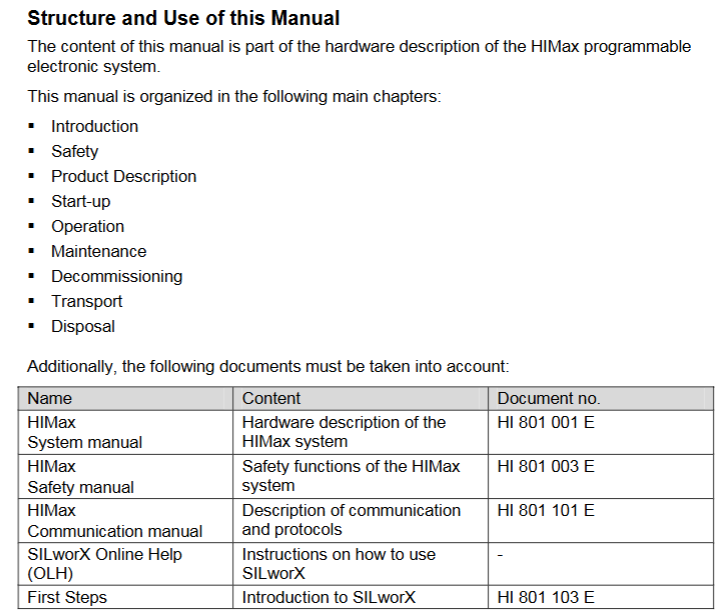
Product Description and Core Features
(1) Basic characteristics of module
Functional positioning and compatibility
Slot 1 and Slot 2 can only be inserted into the HIMax motherboard, supporting two operating modes:
Single module (Mono mode): Only one system bus works;
Dual module (Redundancy mode, recommended default): 2 redundant system buses to improve availability;
Safety certification: certified by T Ü V, supporting SIL 3(IEC 61508/61511/62061)、Cat. 4(EN 954-1)、PL e(EN ISO 13849-1), Data transmission adopts security related protocols.
Fault response mechanism
If a system bus fails, the redundant bus will automatically take over communication (dual modules need to be pre configured) to ensure uninterrupted data transmission; The module has built-in self detection function, which can identify hardware/software faults and power supply abnormalities. Fault information is displayed through LED indicator lights and SILworX diagnostic interface.
(2) Hardware Structure and Interface
core component
Security related processor system: 1oo2 architecture (1 out of 2), controls and monitors a single system bus (Slot 1 corresponds to bus A, Slot 2 corresponds to bus B), the operating system and fault logs are stored in non-volatile memory and can be read through SILworX;
Interface configuration:
Number of Interface Types, Functions, and Parameters
PADT service interface 1 connects to programming and debugging tools (10/100 Base-T, does not support automatic crossover, point-to-point requires crossover, IP address can be configured)
System bus interface (Up/Down) 2 connects to other baseboards (supports automatic crossover, requires CAT 5e or above Ethernet cable, RJ-45 interface)
Diagnostic interface (Diag) 1 reserved for future expansion use
Grouping and meaning of LED indicator lights
There are a total of 6 sets of LEDs on the front end of the module, and a full light test will be conducted when powered on. The status meanings of each indicator light are as follows:
Module status indicator lights (Run/Error/Stop/Init):
Run (green): Constant light indicates normal operation (RUN state), slow flashing (600ms on/600ms off) indicates STOP/OS_SOWNLOAD state;
Error (red): Constant light/slow flashing indicates detection of internal faults (such as hardware failure, power supply abnormality);
Stop (yellow): Constant light indicates STOP/valid configuration, slow flashing indicates STOP/invalid configuration;
Init (yellow): Constant light indicates Initiate initialization, slow flashing indicates LOCKED locked state.
Redundant indicator lights (Ess/Red):
Ess (yellow): Always on indicates single bus operation (removing modules can cause system failure), slow flashing indicates redundant configuration but backup modules are unavailable;
Red (yellow): Always on indicates redundant operation (bus ID synchronization successful), off indicates no redundancy.
Other indicator lights: Rack connection light (Up/Down, green/yellow indicates physical/logical connection status), Slot light (3-18, green indicates slot has module and connection is normal), Ethernet light (PADT/Up/Down/Diag, green flashing indicates data transmission, yellow indicates speed/duplex mode).
(3) Key technical parameters
Category parameter values
Maximum power supply current 0.65 A
Dimensions (H × W × D) 310 × 29.2 × 230 mm
Weight approximately 1.2 kg
Maximum relative humidity of 95% (without condensation)
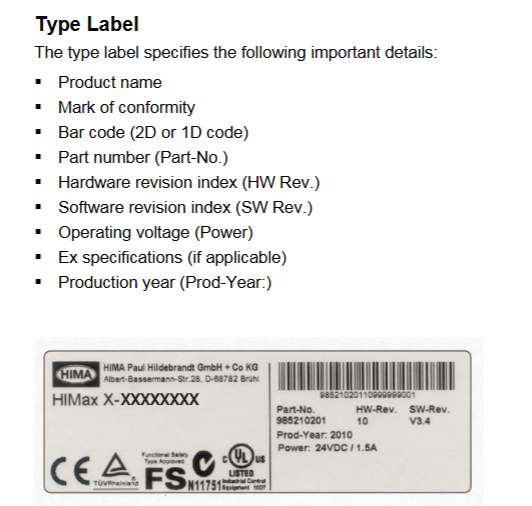
Installation and configuration process
(1) Module installation and removal
Installation prerequisites
It is necessary to cooperate with the dedicated connector board on the motherboard (slot 1 on the left board and slot 2 on the right board), and label the number of supported slots (10/15/18 slots) and slot IDs on the connector board;
It is necessary to install matching fan components to ensure forced heat dissipation (refer to the HIMax system manual). The time to open the fan bracket cover during operation should be less than 10 minutes to avoid heat dissipation failure.
Operation steps
Installation: Open the fan bracket cover → Insert the top of the module into the hook guide → Rotate the module downwards until it locks into place → Tighten the fixing screws → Close the cover and lock it;
Disassembly: Open the cover plate → Loosen the screws → Rotate the module upwards to detach from the guide rail → Remove the module → Close the cover plate.
(2) SILworX configuration configuration
Core Parameters (Module tab)
Network parameters: configure IP address, subnet mask, default gateway, rate mode (recommended automatic negotiation), flow control mode (recommended automatic negotiation);
Safety related parameters:
MAC Learning: Default "Conservative" (ARP cache locking for at least one aging cycle to prevent ARP spoofing), "Tolerance" mode is suitable for scenarios that require fast updates of MAC addresses;
ICMP mode: default "Echo Response" (supports ping testing, balancing security and diagnosis), "No ICMP Responses" has the highest security but cannot ping detect.
Routing Configuration (Routing tab)
Supports up to 8 routing entries, requiring configuration of destination IP address, subnet mask, and gateway for cross network communication (such as connecting to other baseboards or external devices).
Operation, Maintenance, and Lifecycle Management
(1) Daily operation and diagnosis
operation monitoring
The module does not require direct operation and can be remotely controlled through the PADT tool. The running status can be viewed in real-time through the LED (such as the Run green light indicating normal), and detailed fault information (such as IP address conflicts and bus interruptions) can be read on the SILworX diagnostic interface.
Fault handling
Common faults: IP address conflict (PADT and H/F/Col lights flashing slowly at the same time) → Reconfigure IP; Bus transient interference (Up/Down lights flashing slowly) → Check cable connection or replace CAT 5e cable;
Initialization phase fault: If the fault still reports after initialization (such as the Error light being constantly on), it is necessary to check the module power supply, configuration parameters, or replace the module.
(2) Maintenance and scrapping
regular maintenance
Operating system update: Load the latest version of the operating system during system downtime (modules need to be in STOP state, refer to SILworX online help);
Proof Test: It needs to be performed every 10 years to ensure that the module's safety functions are functioning properly (see HIMax Safety Manual HI 801 003 E for detailed procedures).
Transportation, storage, and scrapping
Transportation/Storage: Original factory packaging (anti-static and flame-retardant) is required to avoid mechanical impact and static electricity;
Scrap: Industrial users need to dispose of modules containing electronic components in accordance with environmental protection requirements. They can contact HIMA to sign a scrap agreement, which prohibits the arbitrary disposal of modules containing electronic components.

- YOKOGAWA
- Reliance
- ADVANCED
- SEW
- ProSoft
- WATLOW
- Kongsberg
- FANUC
- VSD
- DCS
- PLC
- man-machine
- Covid-19
- Energy and Gender
- Energy Access
- Renewable Integration
- Energy Subsidies
- Energy and Water
- Net zero emission
- Energy Security
- Critical Minerals
- A-B
- petroleum
- Mine scale
- Sewage treatment
- cement
- architecture
- Industrial information
- New energy
- Automobile market
- electricity
- Construction site
- HIMA
- ABB
- Rockwell
- Schneider Modicon
- Siemens
- xYCOM
- Yaskawa
- Woodward
- BOSCH Rexroth
- MOOG
- General Electric
- American NI
- Rolls-Royce
- CTI
- Honeywell
- EMERSON
- MAN
- GE
- TRICONEX
- Control Wave
- ALSTOM
- AMAT
- STUDER
- KONGSBERG
- MOTOROLA
- DANAHER MOTION
- Bentley
- Galil
- EATON
- MOLEX
- Triconex
- DEIF
- B&W
- ZYGO
- Aerotech
- DANFOSS
- KOLLMORGEN
- Beijer
- Endress+Hauser
- schneider
- Foxboro
- KB
- REXROTH
- YAMAHA
- Johnson
- Westinghouse
- WAGO
- TOSHIBA
- TEKTRONIX
- BENDER
- BMCM
- SMC
- HITACHI
- HIRSCHMANN
- XP POWER
- Baldor
- Meggitt
- SHINKAWA
- Other Brands
- UniOP
- KUKA
- IBA
- Beckhoff
- ADLINK
-
TRICONEX 3723X 32-Channel TMR Analog Input Module with HART for Tricon CX
-
GE 151X1233DB02SA02 Rev A Pitch Converter 30 Nm DC Pitch Conversion Module
-
GE 151X1207CK02SA02 77MM DE Excitation Module for Mark VI Turbine Control Systems
-
HIMA H6200A Analogue Isolator Power Supply for HIMax Safety Systems
-
ABB SACO 64D4 Digital Annunciator Unit with 64 Alarm Channels
-
Allen-Bradley 5069-L306ER - SER A CompactLogix Controller PLC
-
Omron CJ1W-CORT21 - CANopen Master Unit PLC Module
-
Danfoss 131B9523 / FC-102P5K5T4E20H1 - 5.5kW VLT HVAC Drive Inverter
-
Schneider Electric LXM32MU90M2 - Lexium 32 Servo Drive Controller
-
Danfoss AKD102P15KT4P21H1 - 15kW 131L2413 ADAP-KOOL Drive Inverter
-
Kollmorgen S70602-NANANA - Servo Drive Controller
-
Allen-Bradley 6189-PS2 - Power Supply Industrial Computer PS
-
Beijer E900T / 03010F - Operator Panel IFC ETTP HMI
-
Schneider Electric LMC20 - PacDrive Motion Controller PLC
-
Sartorius CAW2S1-3DC-NCE - COMBICS 2 Industrial Scale Terminal
-
Kollmorgen / Danaher S30301-NA / S300 - SERVOSTAR343 Servo Drive Controller
-
Siemens A5E00159503 - 12 INCH TFT Touch Panel HMI
-
Siemens 3UF5021-3AB00-1 - SIMOCODE DP Basic Unit Control Module
-
Danfoss 131B8872 / FC-202PK37T4E20H1 - 0.37kW VLT AQUA Drive Inverter
-
Atlas Copco ICB421-2003D / VSK001001 - W9139 ICM431-0025C ICM431-0025D Controller
-
Lenze EV82EV751_4C - Version 4A39 Frequency Inverter Drive
-
Atlas Copco / ABB 3HAB8101-19/07B - Robot Cable Assembly Harness
-
Beijer X2 Pro7-B2 - Operator Panel HMI Touch Screen
-
Honeywell CDW45L - Damper Actuator
-
B&R X67DM9331.L12 - Rev. I0 Digital Mixed Module
-
B&R X67DM9331.L12 - Rev. H0 Digital Mixed Module
-
Sanyo Denki PMM-BA-5604-1 - Pentasyn Stepper Motor Driver
-
SICK AWS1-113 / 1008900 - Evaluation Unit
-
Siemens 1TF6064-1AF71-3AH1 - SIMOTICS Synchronous Servo Motor
-
Heidenhain ERN680.P003-4096 / 29416004 - Rotary Encoder
-
Schneider Electric LC1G185EHEA - TeSys Control Contactor
-
Parker SBC HPD5N - High Performance Drive Electronics SPA
-
Advantech UNO-2170-CE11BE - Embedded Automation Computer IPC
-
Siemens 6AG1231-4HF32-4XB0 - SIPLUS S7-1200 SM 1231 Analog Input Module
-
Advantech UNO-2170-BTO - Embedded Automation Computer IPC
-
Jumo SR-96/4-001.0.0.00.111 - Solid State Relay Power Controller
-
Pepperl+Fuchs FC-21-V - FC-20P Safety Barrier Module
-
Emerson SP1404 - Unidrive AC Drive Inverter
-
B&R X67AI1233 - Rev.C0 Analog Input Module
-
Mitsubishi FR-F740-00250-EC - Frequency Inverter AC Drive
-
Allen-Bradley 2711P-T7C21D8S - PANELVIEW PLUS 7 SERIES B Touch Screen HMI
-
Pilz PMCprotego D.03/000/0/0/2/208-480VAC / 8176101 - Servo Amplifier Drive
-
Reliance Electric 57C414 / 57414-1N - Modbus Interface Module
-
Mitsubishi FR-F740-00250-EC - Frequency Inverter AC Drive
-
Siemens 6SN1123-1AA00-0EA2 - Version A 160A SIMODRIVE Power Module
-
Siemens 1TF6064-1AF71-3AH1 - SIMOTICS Synchronous Servo Motor
-
AEG ALU202 / DAP216 / DEP216 / DAU202 - SIM216 SIM203 DNP205 ADU205 PLC Controller KIT
-
Atlas Copco / ABB 3HAB8101-19/07B - Robot Cable Assembly Harness
-
Hitachi CPU22-02HB - Micro-EHV Programmable Controller PLC
-
Parker SBC HPD5N - High Performance Drive Electronics SPA
-
Jetter JX3-THI2-RTD - JX3-BP Temperature Input Module
-
Eaton DC1-34014FB-A20N - 5.5kW Inverter Variable Frequency Drive
-
Eaton DS7-34DSX041N0-D - Soft Starter
-
Reliance Electric 57C422B / 57422-2E - 2-Axis Servo Controller
-
Hitachi CPU22-02HB - Micro-EHV Programmable Controller PLC
-
Eaton DC1-34014FB-A20N - 5.5kW Frequency Inverter Variable Frequency Drive
-
Siemens 6SN1123-1AA00-0EA2 - Version A 160A SIMODRIVE Power Module
-
Reliance Electric 57C414 / 57414-1N - Modbus Interface Module
-
Eaton DS7-34DSX041N0-D - Soft Starter
-
Reliance Electric 57C422B / 57422-2E - 2-Axis Servo Controller
-
Johnson Controls DX-9120-8454 - Digital Controller
-
Jetter JX3-THI2-RTD - JX3-BP Temperature Input Module
-
Siemens 6SL3210-1KE21-7AP1 - SINAMICS G120C DP 7.5kW BOP-2 Inverter Drive
-
Siemens 1FK7042-2AF21-1QG0 - SIMOTICS S Synchronous Servo Motor
-
Mettler Toledo IND570 - Harsh Analog Weighing Terminal Controller
-
Schneider Electric TM238LDA24DR - Modicon M238 Programmable Logic Controller PLC
-
Hitachi EH-CPU548 - EH-150 PLC CPU Module
-
Honeywell Q7750A2003 - Excel 10 Zone Controller
-
Ferag 584.002.V003 - Control Panel HMI
-
Danfoss AK-SM 720 / 080Z8511 - ADAP-KOOL System Manager Controller
-
Ferag 584.002.V003 - Control Panel HMI
-
Kern 3210001.001 / LOP-KS 2903440.001 - PRT.205A.0000.V001.02341 Servo Controller Board
-
Reliance Electric 57C424 - Maxpak III High Speed Link Module
-
Telemecanique XBTA70101PA - Compact Terminal HMI Panel
-
Reliance Electric 57C424 - Maxpak III High Speed Link Module
-
Reliance Electric 57C422B - 2-Axis Servo Controller
-
Honeywell Q7750A2003 - Excel 10 Zone Controller
-
Telemecanique XBTN400 - Magelis Small Panel HMI
-
Schneider Electric TM172PDG42S - Modicon Programmable Logic Controller PLC
-
Fanuc HE693THM884M - Thermocouple Input Module
-
Selectron PMC22BAEZD / 220735 - Selecontrol PMC 22 ABEZD Controller Module
-
Baumuller BUS21-22/45-31-020 - Servo Drive Inverter
-
Schneider Electric TM172PDG42S - Modicon Programmable Logic Controller PLC
-
Schneider Electric ATV32HD11N4 - Altivar Variable Frequency Drive Inverter
-
Lenze 494_E.4B - DC Speed Controller
-
NORD SK300E-111-340-B - SKDA130E-111-340-IBS-AAA Frequency Inverter
-
Reliance Electric GMI-S02 - AC/AC Converter 380/400V 50/60Hz 2.3/2.8A Drive
-
Hakko / Monitouch V710CD - Operator Panel HMI Touch Screen
-
B&R 5PC910.SX01-00 / 5YZCAA00700000-005 - Automation PC Industrial Computer
-
Hitachi EH-CPU548 - EH-150 PLC CPU Module
-
Tecnau / Fortec FORTEC-04/UL / 10117 - PCB Circuit Board
-
Bosch PSS 2037 10B - Power Supply Module
-
Newall B602000 - Digital Readout Scale
-
ELCON PC Controller - Industrial PC Controller
-
Siemens 3UF5100-0AB00 - SIMOCODE-DP Control Module
-
Omron NS8-TV00B-V2 - Touch Screen HMI Panel
-
Siemens 6ES5264-8MA12 / IP264 - CAM Controller Module
-
Allen-Bradley 1756-L72S - SER B GuardLogix Safety Controller
-
Schneider Electric SXWMPC15A10001 - SmartX Controller Automation Server
-
Telemecanique LC1F265F7 - TeSys F Contactor
-
Siemens 6ES7314-6CH04-0AB0 - SIMATIC S7-300 CPU 314C-2 DP PLC
-
Allen-Bradley 1734-EI4S - POINT I/O Safety Module
-
Allen-Bradley 2711P-T7C4D8 / 2711P-RP8D - PanelView Plus HMI Touch Screen Logic Module
-
Ropex UPT-640-V - Resistron Temperature Controller
-
KEB 07.F5.B3A-0A00 - VERSION 1.1 Combivert Frequency Inverter
-
Sensopart V50-OB-A3-IW-M2-L - VISOR Vision Sensor Camera
-
SICK AFM60A-S1NB018X12 / 1059040 - Absolute Rotary Encoder
-
Kern AG KMC600 / 2903436.001 - Servo Drive Controller
-
Lenze E82EV302_4C200 / 13015655 - VERSION 3D35 Frequency Inverter Drive
-
Schneider Electric XBTOT2210 - Magelis Touch Screen HMI Panel
-
Baumuller BM5-O-SAF-000-000-000-001-202 - Parameter Safety Module
-
SICK UE4470-22EE690 - Safety Relay Controller
-
Hitachi EH-CPU448 / EH-150 - PLC CPU Module
-
Rexroth VT5005-13 - R5 00010592 Proportional Valve Amplifier Board
-
Siemens 6ES7510-1DJ00-0AB0 - SIMATIC ET 200SP CPU PLC
-
Beckhoff CX5120-0121 - 2GB Embedded PC Controller
-
Priva BlueiD S10 / 5010002 - SN3t 5020004 5010101 Building Automation Controller
-
Sigmatek DM161 - S-DIAS Digital Mix I/O Module
-
Telemecanique LC3D50P7A64 - Star Delta Starter Contactor
-
Siemens 6SN1123-1AA00-0BA2 - SIMODRIVE 611 Power Module
-
Siemens 6SN1124-1AA00-0CA1 - SIMODRIVE 611 Power Module
-
Dixell XC1015D-1C01F / XC1000D - Compressor Controller
-
Siemens A5E02184619 / 19T 577B - Industrial Touch Screen HMI Panel
-
Siemens 6SE6420-2AD27-5CA1 - Filter 6SE6400-2FS03-8CD0 Micromaster Inverter
-
Schneider Electric LC1G400LSEN - TeSys Control Contactor
-
Baldor BPS10-200-20-P - Servo Drive Motor Controller
-
Ingersoll Rand X4I / Y06IR03.00 - Air Compressor Controller
-
NORD SK 530P-221-340-A - Frequency Inverter

K-JIANG

Add: Jimei North Road, Jimei District, Xiamen, Fujian, China
Tell:+86-15305925923