

K-WANG


Kongsberg C-series Cutting System: Operation, Maintenance, and Tool Technical Guide
Kongsberg C-series Cutting System: Operation, Maintenance, and Tool Technical Guide
The Kongsberg C-series cutting system represents an integrated model of modern digital cutting and milling technology. Its user manual is not only an operational guide, but also a systematic technical blueprint for achieving efficient, safe, and precise production. This article will conduct an in-depth technical review of the Kongsberg C series from five dimensions: system architecture, security core, operation process, tool system, and maintenance strategy. The aim is to provide equipment operators, maintenance engineers, and production managers with a professional reference that goes beyond basic operations and combines theory and practice.
System architecture and core components: the cornerstone of precision manufacturing
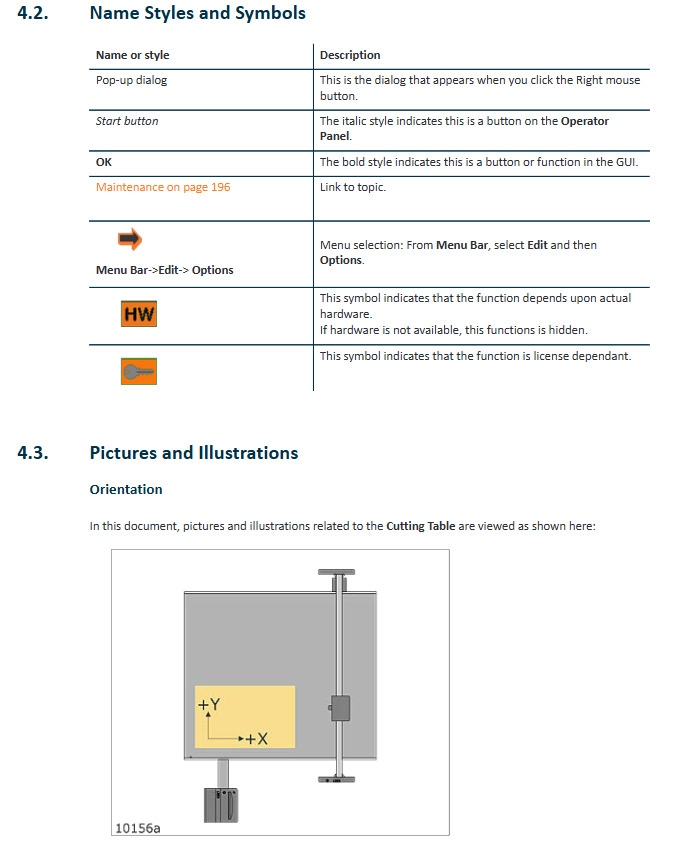
The design of Kongsberg C-series cutting system integrates multiple technologies including mechanical, electrical, pneumatic, and software control. Its main structure is clear and definite: the sturdy cutting table is the work platform; The crossbeam is erected on the platform, carrying the Y-direction sliding seat to move along the X-axis; A tool head is installed on the Y-axis slide to achieve movement in the Y-axis direction and lifting in the Z-axis direction. This three-axis linkage architecture constitutes the core of system motion.
The operation interface is driven by the front-end PC and i-cut Production Console (iPC) software, integrating full process control from job creation, path planning to production execution. The operation station is the core of human-computer interaction, integrating the main power switch, emergency stop button, joystick, operation panel, and optional foot switch. The operation panel buttons such as "servo power", "start", "pause", "vacuum switch", etc. provide direct and fast physical control access. For models equipped with multifunctional extensions, such as systems with conveyor belts, their control logic (such as conveyor belt feeding and vacuum partition control) has been deeply integrated into iPC software and hardware interaction. The pneumatic system of the system provides stable and clean compressed air for pneumatic tools such as fixtures and blowing air. Pressure setting and monitoring are prerequisites for ensuring the normal operation of the tools.
Safety regulations: unbreakable operating red lines
Safety is the primary consideration in the design of Kongsberg C-series, and the detailed safety regulations in the manual constitute an insurmountable red line for operation. The system adopts multi-level protection: the emergency stop button is distributed and can instantly cut off the servo power supply; Yellow/black warning tape delineates hazardous areas and restricts unauthorized personnel from entering; The DynaGuard safety light curtain system constitutes an active protective barrier, and any action that crosses the light curtain will trigger emergency braking. For high-speed rotating milling units, the warning lights equipped not only indicate the operating status, but also continuously flash until the spindle comes to a complete stop after shutdown, forcing the operator to wait for a safe shutdown time of more than 4 seconds.
Safety responsibilities are clearly defined: manufacturers are responsible for the compliance of the equipment itself; Owners need to ensure personnel training, compliant use, and regular maintenance; The operator must follow the regulations and ensure that the machine is in good condition. Potential risks are clearly marked, such as high-pressure areas, laser radiation points, moving parts compression areas, and sharp tool areas, and corresponding symbols such as "Do not touch", "Wear goggles", "Beware of cuts", etc. Special risks such as debris splashing, tool breakage, tool ejection during milling operations, and residual risks of embedded materials after V-shaped or long tool breakage require operators to wear protective goggles throughout the entire process. The recommended use of personal protective equipment such as reflective clothing highlights the importance placed on comprehensive occupational health risks such as noise and dust. Any use that bypasses security systems, operates with defects, or has unintended purposes is clearly defined as improper operation and may result in serious consequences.
Operation process: Standardized path from startup to efficient production
The operation of the system follows a rigorous standardized process to ensure the reliability and repeatability of each production start-up. The startup sequence has been slightly adjusted due to software version updates, but the core logic remains the same: first, start the front-end PC and iPC software; Next, turn on the main power supply of the cutting table; Subsequently, reset the safety system and enable the servo power supply through the operation panel; Finally, perform the 'zeroing' operation to return all axes of the machine to the mechanical origin and complete initialization. Homework preparation is the key to successful production, including: creating homework through iPC, setting layers and tool paths, configuring production parameters (such as number of copies, quality priority), selecting reference points and positioning, setting step repetition, configuring registration methods (such as using positioning rulers or cameras), setting material handling plans and tool head parking positions. The selection of vacuum zone directly affects the material fixation effect, and requires precise configuration according to the material size. If necessary, intelligent vacuum control or physical shielding plates can be used to optimize the adsorption force. Before executing the task, it is necessary to confirm again that the safety system has been reset, and perform bench benchmark calibration as needed to update the tool height measurement value. During the production process, monitoring the system status (such as servo power indicators, warning lights) and standard recovery steps for responding to safety interruptions constitute essential skills for operators.
Tool System: The Essence of Configuration, Adjustment, and Application of Diversified Tools
The strong adaptability of Kongsberg C series comes from its modular and multifunctional tool system. The tools are mainly installed in positions P1 and P2, while some specialized tools such as laser pointers, measuring feet, and cameras have fixed installation positions.
Tool configuration and adjustment are core skills. Each tool needs to undergo systematic calibration: adjusting the tool hysteresis ensures that the direction of the rotating tool tip is tangential to the direction of motion; The height of the tool is automatically measured by the measuring station, but bias values can be added based on material properties. For tools such as perforation wheels, attention should be paid to their directional influence on the measuring station; Adjust the rotation angle to ensure precise cutting of the blade into the material; Center offset adjustment ensures that the center of the tool coincides with the center of the motion path; The tool bias unifies the spatial coordinates of the laser pointer, camera, and actual cutting point. These adjustments can be completed through software guided wizard programs or manually fine tuned based on experience.
The types of tools and specialized application technologies reflect the professionalism of the system:
V-shaped cutter and variable angle unit: used for making folding notches or V-shaped incisions. The key parameters include incision depth, width offset (used to adjust the distance between the bottom of two incisions to optimize the folding angle), and waste cutting (used to clean the uncut material in the middle). The variable angle unit can achieve dynamic angle adjustment from 0 ° to 60 °, expanding its application range. However, its working area may be limited due to tool extension and angle, and the system will automatically calculate and prompt.
Heavy duty unit and its derivatives: integrates various tools such as high-pressure indentation wheel (diameter 150mm), V-knife, heavy-duty cutter, perforation wheel, chamfering knife, etc. The dual type unit can simultaneously install two tools (such as indentation wheel and perforation wheel), significantly improving efficiency. Its installation adopts a new fixing method of pins and locking pins, which has higher reliability.
High power milling unit: equipped with a high-speed spindle (up to 60000 RPM) for milling hard materials. Its operation involves spindle preheating, speed limitation (especially for unbalanced tools), cooling system monitoring, vacuum hood cleaning and height adjustment, as well as strict procedures for tool clamping and replacement. The coolant system (such as LubriCool) can improve lubrication and chip removal for specific materials.
Special cutting tools: including vibration cutting knives, high-frequency vibration cutting knives, RM knives, high force knives, etching knives, cutting knives, rolling cutting knives, braille point cutting knives, corrugated special knives, etc., each with its own material adaptability, cutting depth, and operating precautions. For example, the rolling cutter needs to be cleaned regularly to prevent dust from entering; The braille dot tool needs to be coordinated with the milling unit to complete the two processes of drilling and embedding the sphere.
Measurement and positioning tools: measuring feet are used to automatically measure material thickness and calibrate measurement stations; Laser indicators are used for positioning and auxiliary adjustment; The tool head camera is used for high-precision registration, especially when combined with the bottom camera to achieve double-sided processing.
Maintenance and upkeep: the lifeline for ensuring long-term stable operation
A comprehensive maintenance plan is the lifeline for extending equipment lifespan and ensuring machining accuracy. Daily maintenance focuses on cleaning and visual inspection: cleaning cutting pads, checking the vacuum system, and paying attention to the status of cutting tools and vacuum hoods. Weekly maintenance requires cleaning the guide rails and bearings, lightly applying lubricating oil, checking the cleanliness of the safety light curtain lens, and verifying the automatic drainage function of the air-water separator. Monthly maintenance involves deeper mechanical maintenance: applying lubricating grease to the gears through a dedicated oil gun; Apply lubricating grease to the rack with a soft brush. For systems equipped with conveyor belts, attention should also be paid to adjusting the tension of the conveyor belt. All maintenance work must be carried out with the main power disconnected, strictly following safety regulations.
- YOKOGAWA
- Reliance
- ADVANCED
- SEW
- ProSoft
- WATLOW
- Kongsberg
- FANUC
- VSD
- DCS
- PLC
- man-machine
- Covid-19
- Energy and Gender
- Energy Access
- Renewable Integration
- Energy Subsidies
- Energy and Water
- Net zero emission
- Energy Security
- Critical Minerals
- A-B
- petroleum
- Mine scale
- Sewage treatment
- cement
- architecture
- Industrial information
- New energy
- Automobile market
- electricity
- Construction site
- HIMA
- ABB
- Rockwell
- Schneider Modicon
- Siemens
- xYCOM
- Yaskawa
- Woodward
- BOSCH Rexroth
- MOOG
- General Electric
- American NI
- Rolls-Royce
- CTI
- Honeywell
- EMERSON
- MAN
- GE
- TRICONEX
- Control Wave
- ALSTOM
- AMAT
- STUDER
- KONGSBERG
- MOTOROLA
- DANAHER MOTION
- Bentley
- Galil
- EATON
- MOLEX
- Triconex
- DEIF
- B&W
- ZYGO
- Aerotech
- DANFOSS
- KOLLMORGEN
- Beijer
- Endress+Hauser
- schneider
- Foxboro
- KB
- REXROTH
- YAMAHA
- Johnson
- Westinghouse
- WAGO
- TOSHIBA
- TEKTRONIX
- BENDER
- BMCM
- SMC
- HITACHI
- HIRSCHMANN
- XP POWER
- Baldor
- Meggitt
- SHINKAWA
- Other Brands
- UniOP
- KUKA
- IBA
- Beckhoff
- ADLINK
-
Siemens 6SL3244-0SA01-1AA0 - SINAMICS G120 Control Unit
-
DANFOSS 175Z2688 - COATEDE CONTROLUNIT VLT5000
-
SIEMENS 6FM1721-3AA20 - Positioning Module
-
REXORTH VTS0605 PVAR S21 - Drive Module
-
BECKHOFF 2915-0000 - Control Module
-
COOPER EATON CGLine 400 40071347901 - CEAG CG Controller
-
SIEMENS 3UF5031-3AN00-1 - SIMOCODE DP Basic Unit
-
SIGMATEK DNC305 05-011-305 - Drive Controller
-
Multivac MV1 10249768 - Control Module
-
SCHNEIDER ELECTRIC MES114 59646 & 59645 - Circuit Breaker Accessory
-
CAMILLE BAUER CAPAX 44-580-0012 - Transmitter
-
HENGSTLER VT360P LS1/TOK - Encoder
-
BURKERT 8792 - 24V DC IP65 / IP67 Positioner
-
SENSOPART V10-OB-A1-W6 - Vision Sensor
-
ALLEN-BRADLEY 1762-L40BXB SER.C REV.J - MicroLogix 1200 Controller
-
HITACHI CPU22-02HC 33025801-2 - CPU Module
-
HITACHI AGH-0 33034810-2 - Control Board
-
PHILIPS AIH110 VER 1.0 - Control Module
-
BAUMULLER DO8000 - Drive Controller
-
B&R PS477 3PS477.9 Rev.C0 - Power Supply
-
ABB ALFA LAVAL 200-CISB - Communication Interface 2 x SatBus
-
Moeller MI4-570-TA1 - HMI Operator Panel
-
ABB ACH550-01-06A9-4+B055 - Variable Frequency Drive
-
ABB TPU2 3HNE00313-1 REV 12 - Teach Pendant Unit
-
Schneider Electric BRS368H130ABA - Stepper Motor
-
Foxboro FCM100E P0972ZA - I/A Series Communication Module
-
Siemens 6ES7 450-1AP00-0AE0 6ES7450-1AP00-0AE0 - Simatic S7 Version:04 Counter Module
-
Schneider Electric ATV320U07N4W - Altivar Machine Drive
-
Priva TouchPoint Flush V06:02 5060002 - Control Panel
-
Lenze ESMD402L4TXA - 4kW SMD Inverter Drive
-
Lenze ESMD402L4TXA - 4kW SMD Inverter Drive
-
Schneider Electric PM210 PM210MG - Powerlogic Power Meter
-
ASCOM U982-DB/1C U982 - Power Supply / Communication Module
-
DYADIC SYSTEMS SCN5-010-050-S03-NA - Servo Cylinder
-
Reliance Electric GMI-S04 - AC/AC CONVERTER 380/400V 50/60Hz 3.9/5.2A
-
Pro-Face GLC150-BG41-XY32KF-24V 3080060 PFXGLC150BDBP - Touch Screen HMI
-
ROFIN RSL TERMINAL V2 0185.01/03 - TERMINAL
-
HONEYWELL R7241E1077 - Burner Control / Amplifier
-
SEW MM22C-503-00 8241201 - 2.2kW Movimot Drive
-
Brand Digital III 50mL - Burette
-
Danfoss 195N0039 VLT2811PS2B20STR1DBF00A00C0 - 2.4kVA VLT Drive
-
SONY LG10-2 EK1 - Digital Gauge Indicator
-
EMERSON SKD3400750 - 7.5kW AC Drive
-
SIEMENS 6AV6 542-0AG10-0AX0 - MULTIPANEL HMI
-
TELEMECANIQUE ATV21HU55N4 - ALTIVAR21 5.5KW Variable Speed Drive
-
MITSUBISHI A985GOT-TBA-EU - GOT900 Touch Screen HMI
-
SCHNEIDER LXM32AD30N4 - Lexium 32 Servo Drive
-
SICK PSR01-1501 M20Z-02550A122 - Safety Laser Scanner
-
GECMA CHALLENGER 15-2-FMO - LITE TOUCH Monitor
-
Uniop EK02 6ZA982 - HMI Operator Panel
-
TELEMECANIQUE ATV18U54M2 - SQUARE D ALTIVAR 18 3kW Drive
-
Schneider Electric ATV312HU75S6 - 7.5kW Altivar 312 Drive
-
Siemens 6GK7243-5DX30-0XE0 6GK7 243-5DX30-0XE0 - Communications Processor
-
Schneider Electric LV432455 VIGI630 - 3POLE Earth Leakage Module
-
Rexroth PSI 6100.750 L1 R911170694-107 - frequency inverter / inverter
-
SWEDISH MICROWAVE AB Ku-Band BDC 138010-45-D0 - Block Downconverter
-
METTLER TOLEDO IND429 IND429-BB30 - Weighing Terminal
-
Siemens 6SL3210-5HE10-4UF0 - Sinamics V90 Servo Drive
-
B&R X20CP0482 Rev.D0 - X20 CPU Module
-
Mitsubishi FR-E720S-110SC-EC FRE720S110SCEC - 31A~11A Drive With Filter
-
ABB ACH580-01-026A-4 - Variable Frequency Drive
-
Siemens 6SL3210-1KE13-2AP1 - SINAMIC G120CDP 1.1kw Drive
-
Schneider Electric TM250D 4P3D LV431440 - Compact NSX250 Circuit Breaker
-
RELIANCE ELECTRIC GD.722.81.00-A 802288-74C - MAXITRON Servo Control Card
-
Uniop EK02 6ZA982 - HMI Operator Panel
-
Siemens 6SE9113-7JA13 - MICRO MASTER Junior 1.5kW Inverter
-
Mitsubishi FR-E720S-110SC-EC FRE720S110SCEC - 31A~11A Drive with Filter
-
Johnson Controls FEC2621 MS-FEC2621-0 - Field Equipment Controller
-
BENDER IR475LYT-429 - A-ISOMETER Insulation Monitor
-
Berger lahr D550 RS15 22.550-00-30b - Stepper Drive
-
Rexroth PSI 6100.750 L1 R911170694-107 - Frequency Inverter / INVERTER
-
KOYO 205 D2-06B-1 D2-240 H2-ECOM D2-08ND3 F2-08TRS - DIRECT LOGIC PLC WITH MODULE
-
TELEMECANIQUE ATV18U54M2 ATV18U54M - SQUARE D ALTIVAR 18 3kW Drive
-
Lenze 471-E1.D - Board / Controller Speed
-
Mitsubishi FR-A740-00038-EC - Frequency Inverter
-
Johnson Controls IOM3723 MS-IOM3723-0 - Input/Output Module
-
CURTIS 1238-5602 - AC Motor Controller
-
FOXBORO P0912XX REV.A - 220VAC Power Supply
-
Siemens 6SE9113-7JA13 - MICRO MASTER Junior 1.5kW Inverter
-
Mitsubishi FR-A740-00038-EC - Frequency Inverter
-
KOYO 205 D2-06B-1 D2-240 H2-ECOM D2-08ND3 F2-08TRS - DIRECT LOGIC PLC WITH MODULE
-
AUTZ M406D-00101 - Servo Motor
-
Lauer PCS095 PG095.508.BB - Operator Panel
-
ABB SCOP45SB/DX232 - SattCon OP45 SB Operator Panel
-
SEW Eurodrive MCH42A0030-5A3-4-00 MDX60A0030-5A3-4-00 - 4.8kVA Movidrive Inverter
-
BENDER IR475LYT-429 - A-ISOMETER Insulation Monitor
-
Johnson Controls FEC2621 MS-FEC2621-0 - Field Equipment Controller
-
Johnson Controls IOM3723 MS-IOM3723-0 - Input/Output Module
-
Berger lahr D550 RS15 22550-00-30b - Stepper Drive
-
SIEMENS 6FX1120-4BD03 6FX11204BD03 5702049304.00 E-Stand: A - Sinumerik Module
-
Allen-Bradley 1771-NIV B - HIGH RESOLUTION ISOLATED ANALOG SERIES Module
-
HONEYWELL XFC2D06001 - Flow Computer / Controller
-
Contraves Varidyn Compact ADB 380.90M - DC Drive 380v - 400v 90A 50kVA
-
Red Lion Control GEM52000 - Control Module
-
Siemens 6ES5 955-3NC13 - modular power supply TYPE:DIN41752
-
Danfoss ICV50 G20Mn50T / 027H5200 - Valve zaw
-
Eberle PLS508 P-814 / 2X EA-88 / A-812 / MT-81 / S-11 - PLC with Modules
-
Siemens 6ES7 314-6CF01-0AB0 6ES7314-6CF01-0AB0 - SIMATIC CPU314C-2 DP
-
EBERLE EM-525-87 EM52487 - ICE DETECTOR BASE UNIT
-
Telemecanique / Schneider TSXRKZ02 - TSX Micro automation plus 7module
-
B&R 5DLSDL.1001-00 - Display Link Receiver
-
Siemens 6FX1120-4BD03 6FX11204BD03 5702049304.00 E-Stand: A - Sinumerik Module
-
ALLEN-BRADLEY 1771-NIV A - HIGH RESOLUTION ISOLATED ANALOG SERIES Module
-
ALLEN-BRADLEY 1771-NIV B - HIGH RESOLUTION ISOLATED ANALOG SERIES Module
-
Contraves Varidyn Compact ADB 380.90M - DC Drive 380V - 400V 90A 50kVA
-
Contraves Varidyn Compact ADB 380.90M - DC Drive 380V - 400V 90A 50kVA
-
Ropex RES-202 - Resistron Temperature Controller
-
HONEYWELL XFC2D06001 - Flow Computer / Controller
-
Telemechanics ATV452U40 - DIMMER ALTIVAR5 SERIES 452 4kW 5HP Frequency Inverter
-
VEGA VEGAPLUS61 PS61.XXAGPHAMAX - Radar Level Sensor
-
BRANSON ULTRASONIC TRANSDUCER - Ultrasonic Transducer
-
Danfoss ICV50 G20Mn50T / 027H5200 - Valve Valvola Zaw
-
Schneider Electric 2001549/1 GALAXY PW 5102851200 NT07 - panler card
-
REXROTH VT3006-36 A - Proportional Valve Amplifier
-
Allen-Bradley 1746-OBP16 SERIES:C - SLC 500 OUTPUT MODULE
-
SCHNEIDER LXM32MD12N4 - Lexium 32 Servo Drive
-
Schneider Electric ATV630U22N4 - 2.2KW Altivar Process Drive
-
Allen-Bradley 1746-OBP16 SERIES:C - SLC 500 OUTPUT MODULE
-
Vanderlande 0E2550-00002... - Bagtrax Integrated Power Module 400V 32A
-
B&R X20CP0410 Rev.D0 - X20 CPU Module
-
VANDERLANDE 0E2550-00002 02EDD2B0100 - BAGTRAX Integrated Power Module 400V 32A
-
Rexroth R061205010 - Linear Bushing / Bearing
-
INDRAMAT TVM1.2-50-220/300-W0-220/380 - Power Supply Module
-
Vanderlande 0E2550-00002... - Bagtrax Integrated Power Module 400V 32A
-
HOMAG KEB 07F5S1A-YA00 09E5T60-1001 - Combivert Inverter WITH KEYPAID AND FILTER
-
Siemens 3RW3047-1BB14 - Soft Starter
-
Sumitomo AF-500 AF502-A40 - 0.4kW Transistor Inverter
-
Sumitomo AF-500 AF502-A40 - 0.4kW Transistor Inverter

K-JIANG

Add: Jimei North Road, Jimei District, Xiamen, Fujian, China
Tell:+86-15305925923