

K-WANG


Yokogawa WTB10-DO Series Dissolved Oxygen Measurement System Terminal Box
Yokogawa WTB10-DO Series Dissolved Oxygen Measurement System Terminal Box
Product basic information and positioning
1. Core functions and application scenarios
Product positioning: The WTB10-DO series terminal box is a supporting equipment for dissolved oxygen measurement systems, used for signal conversion when dissolved oxygen sensors and converters (such as FLXA402, FLXA202, FLXA21) are installed separately. It supports outdoor installation (in accordance with JIS C0920 rainproof structure standard).
System association: It needs to be used in conjunction with specific models of dissolved oxygen sensors (such as DO30G), converters, and installation brackets (such as PH8HG, PB350G, DOX8HS) from Yokogawa. Different models of terminal boxes correspond to different converters. The specific association manual is shown in the table below:
Associated device model, device name, corresponding manual number
FLXA402 4-wire converter IM 12A01F05-01eN
FLXA202, FLXA21 2-wire liquid analyzer IM 12A01A02-01E
DO30G dissolved oxygen sensor IM 12J5B3-01E
PH8HG guide bracket IM 12B7M2-01E
PB350G floating bracket IM 19H1E1-01E
DOX8HS diving bracket IM 19H1D2-01E
Product specifications and model description
1. Core specification parameters
Structural type: Outdoor type, JIS C0920 rainproof structure
Shell material: Glass fiber reinforced polycarbonate resin
Shell color gray green (Munsell color card 2.5 GY 5.0/1.0 or equivalent color)
Installation methods: bracket installation (no additional bracket required), pipeline installation (requires/P option bracket), wall installation (requires/W option bracket)
Weight: Terminal box body 0.5kg; Pipe installation bracket about 0.7kg; Wall installation bracket about 0.3kg
Working temperature -10~50 ℃
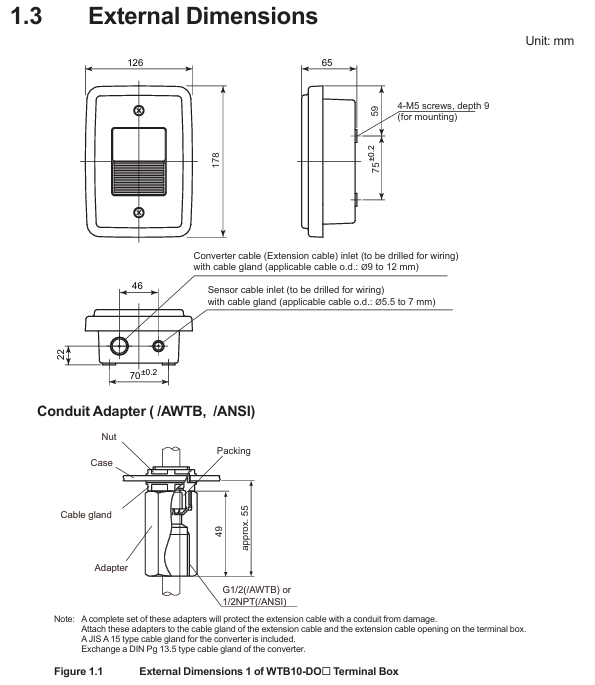
Cable entrance sensor cable: diameter 13mm, equipped with JIS A8 grade cable sealing sleeve (suitable for cable outer diameter 5.5-7mm); Special extension cable: diameter 21mm, equipped with JIS A15 grade cable sealing sleeve (suitable for cable outer diameter 9-12mm)
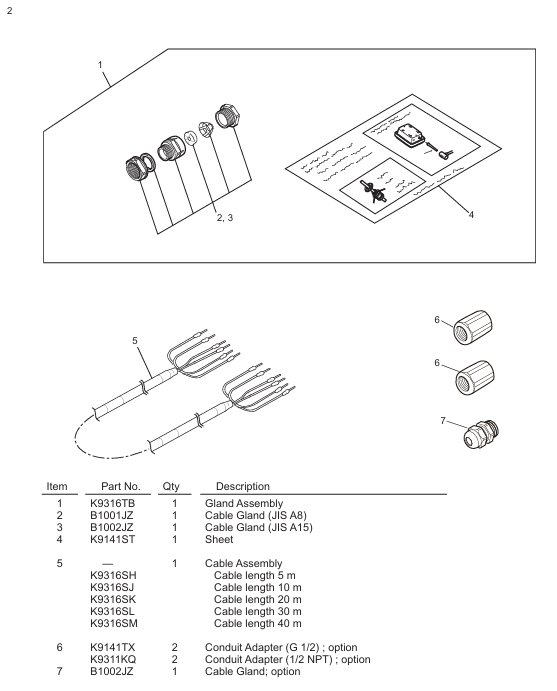
The length of the dedicated extension cable can be selected from 5m, 10m, 20m, 30m, and 40m, and the end has been pre treated; When installing/AWTB (G1/2 internal thread) or/ANSI (1/2 NPT) conduit adapters, a sealing sleeve and adapter will be included
2. Model and suffix code rules
Model structure: WTB10- [Applicable system code] - [Fixed suffix] - [Cable length code]+[Option code], the meanings of each part are as follows:
Meaning of Component Code Examples
Applicable System - DO3 compatible with FLXA402, FLXA202, FLXA21 (pin terminal, cable with pin terminal)
-DO4 compatible with FLXA202, FLXA21 (M4 threaded terminal, with M4 ring terminal cable)
-DO5 compatible with FLXA402 (M3 threaded terminal, with M3 ring terminal cable)
Fixed suffix - NN is used for all models
Cable length -00 without extension cable
-05/-10/-20/-30/-40 Extension cable length 5m/10m/20m/30m/40m
Option code/P includes pipeline installation bracket
/W includes wall installation bracket
/AWTB includes G1/2 internal thread conduit adapter
/ANSI includes 1/2 NPT conduit adapter
Accessories List: Different models of terminal boxes come with different standard accessories. Taking WTB10-DO3 as an example, the standard accessories include sensor cable sealing sleeve (B1001JZ), extension cable sealing sleeve (B1002JZ), and corresponding length extension cable (K9316S □ series). Corresponding brackets are included when installing/P or/W, and conduit adapters are included when installing/AWTB or/ANSI.
Installation process and requirements
1. Preparation before installation
Installation environment:
Outdoor rainproof, sensors should be installed as close as possible to the terminal box;
Avoid high humidity and corrosive gas environments (to prevent contact failures caused by cable breakage, poor insulation, or corrosion);
The terminal box cover is equipped with a silicone desiccant (about 30g), and its moisture absorption status needs to be checked regularly.
Installation tools and accessories: Prepare M5 screws (bracket installation, length=bracket thickness+5mm), M8 screws (wall installation, 3 pieces), U-bolts (pipeline installation, suitable for pipes with an outer diameter of 60.5mm), as well as standard accessories such as cable glands and extension cables according to the installation method.
2. Detailed explanation of installation method
(1) Bracket installation
Drill holes on the bracket according to the installation hole size of the terminal box (4 holes with a diameter of 5.5mm, hole spacing of 75 ± 0.2mm × 70 ± 0.2mm);
Fix the terminal box on the bracket with 4 M5 screws, and the screw depth should cover the thickness of the bracket before penetrating 5mm to ensure firmness.
(2) Pipeline installation (requires/P option support)
Fix the pipeline installation bracket (K9141SA) onto a sturdy pipeline with an outer diameter of 60.5mm (nominal 50A) using U-bolts, washers, and nuts;
Fix the terminal box on the bracket with 4 M5 screws, which can be installed vertically or horizontally.
(3) Wall installation (requires/W option bracket)
Drill holes on the wall according to the size (3 M8 screw holes, with a hole spacing that meets the positioning requirements of the terminal box center);
Fix the wall mounting bracket (K9141SC) to the wall with 3 M8 screws, and then secure the terminal box to the bracket with 4 M5 screws.
3. Cable entrance opening
The cable entrance at the bottom of the terminal box is a pre designed groove (not opened), which needs to be opened with a tool before wiring: align the tip of a cross screwdriver or other tool with the center of the groove, lightly tap the tool head with a hammer, and break the entrance hole along the groove (the sensor cable entrance and the extension cable entrance need to be opened separately).

Wiring operation specifications
1. Sensor cable connection
Dismantling the terminal box cover: Loosen the 2 screws on the front panel and remove the cover;
Installation of cable sealing sleeve: Remove the nut of JIS A8 grade cable sealing sleeve (B1001JZ) and assemble it to the sensor cable inlet in the order of "nut → gasket → main body → cap", ensuring that the sealing sleeve is in contact with the box body;
Cable insertion: Remove the cap, clamping claw, and rubber gasket from the sealing sleeve, place it on the sensor cable, and insert the front end of the cable into the terminal box;
Wiring: Connect the sensor cable core wires according to the terminal numbers (refer to the correspondence between "core wire color terminal number": brown -16, white -12, black -11, green -14, yellow -15, red -13), ensuring correct and secure wiring;
Sealing fixation: Install the rubber gasket and clamping claw back into the sealing sleeve, tighten the cap to prevent water ingress, and be careful not to overtighten and damage the cable.
2. Extend cable connection (terminal box converter)
Preparation work: The two ends of the extension cable have been pre treated (with no directional difference). If conduit protection is required, the DIN Pg13.5 sealing sleeve at the inlet of the converter sensor cable needs to be replaced with a JIS A15 level sealing sleeve (standard);
Install sealing sleeve/adapter:
No conduit: Install the JIS A15 grade sealing sleeve (B1002JZ) onto the extension cable in the order of "cap → clamping claw → rubber gasket → main body → gasket → nut", and fix the nut after the cable enters the terminal box;
With conduit: Replace the cap of the sealing sleeve with the optional/AWTB (G1/2) or/ANSI (1/2 NPT) adapter, tighten the adapter, and connect the conduit union;
Wiring: Connect the extension cable core wires according to the terminal numbers to ensure consistency with the terminal correspondence of the sensor cable;
Cover the box: After checking the wiring is correct, install the front panel cover back into the terminal box and tighten the screws to ensure sealing.
3. Wiring diagram
WTB10-DO3/- DO4 terminal box: The sensor cable and extension cable are connected to terminals 11 (T1, black), 12 (T2, white), 13 (IE, red), 14 (S, green), 15 (RE, yellow), 16 (SE, brown). The converter (FLXA402/FLXA202/FLXA21) receives signals through the extension cable;
WTB10-DO5 terminal box: only compatible with FLXA402 converter, wiring logic is consistent with - DO3/- DO4, please note that the terminal thread specification is M3 (- DO3 is pin type, - DO4 is M4).
Inspection and maintenance
1. Regular inspection (recommended once a year or every two years, with early inspection in case of abnormalities)
**Moisture inspection * *: Remove the terminal box cover and check if the interior is damp. If it is damp, use a hair dryer to dry it; Several desiccants (silica gel) are saturated with moisture, replace with spare desiccants (30g/part, part number K9020XR);
Corrosion inspection: Check whether the terminals and wires have corroded due to the invasion of corrosive gases. If there is a risk of poor contact or wire breakage, the corroded parts need to be replaced; When replacing the core wire crimping terminal, it is necessary to keep the wiring number label (ribbon) to avoid wiring errors.
2. Maintain parts list
The commonly used maintenance parts for terminal boxes include seals, fasteners, desiccants, etc. Different models correspond to slightly different part numbers. Taking WTB10-DO3 as an example:
Part name, part number, quantity, and purpose
O-ring G9303NB 2 sealing box gap
Desiccant (30g) K9020XR 1 absorbs moisture inside the box
Panel screws (M3 × 4) Y9304LB 2 fix the front panel
Install screws (M5 × 8) Y9508JU 4 to fix the terminal box and bracket
Cable sealing sleeve (JIS A8) B1001JZ 1 sensor cable sealing
Cable sealing sleeve (JIS A15) B1002JZ 1 extension cable sealing
Key precautions
Installation sealing: All cable entrances and box covers must be sealed to prevent rainwater and moisture from entering; When adapting the conduit, the flexible joint should be tightened to avoid cable protection failure;
Wiring specifications: strictly follow the corresponding wiring of "core wire color terminal number", incorrect wiring may cause measurement abnormalities or equipment damage; The length of the extended cable must be consistent with the selection and cannot be cut or spliced arbitrarily;
Environmental protection: Although it is an outdoor type, it is still necessary to avoid long-term exposure to strong corrosion and high humidity environments, and regularly check the condition of desiccants and seals;
Parts replacement: Only spare parts certified by Yokogawa (such as sealing sleeves, brackets, desiccants) can be used. Non certified parts may affect equipment performance and safety.
- YOKOGAWA
- Reliance
- ADVANCED
- SEW
- ProSoft
- WATLOW
- Kongsberg
- FANUC
- VSD
- DCS
- PLC
- man-machine
- Covid-19
- Energy and Gender
- Energy Access
- Renewable Integration
- Energy Subsidies
- Energy and Water
- Net zero emission
- Energy Security
- Critical Minerals
- A-B
- petroleum
- Mine scale
- Sewage treatment
- cement
- architecture
- Industrial information
- New energy
- Automobile market
- electricity
- Construction site
- HIMA
- ABB
- Rockwell
- Schneider Modicon
- Siemens
- xYCOM
- Yaskawa
- Woodward
- BOSCH Rexroth
- MOOG
- General Electric
- American NI
- Rolls-Royce
- CTI
- Honeywell
- EMERSON
- MAN
- GE
- TRICONEX
- Control Wave
- ALSTOM
- AMAT
- STUDER
- KONGSBERG
- MOTOROLA
- DANAHER MOTION
- Bentley
- Galil
- EATON
- MOLEX
- Triconex
- DEIF
- B&W
- ZYGO
- Aerotech
- DANFOSS
- KOLLMORGEN
- Beijer
- Endress+Hauser
- schneider
- Foxboro
- KB
- REXROTH
- YAMAHA
- Johnson
- Westinghouse
- WAGO
- TOSHIBA
- TEKTRONIX
- BENDER
- BMCM
- SMC
- HITACHI
- HIRSCHMANN
- XP POWER
- Baldor
- Meggitt
- SHINKAWA
- Other Brands
- UniOP
- KUKA
- IBA
- Beckhoff
- ADLINK
-
FANUC A06B-0169-B088 - AC Servo Motor Alpha M40 3000 3 KW
-
ALPHA WIRE 1299C-SLATE-1000 - Multi-Conductor Cable Wire
-
alpha / Wittenstein SK+180S-MF1-10-1M1-1K - Hypoid Gearbox i=10
-
ALPHA WIRE 1181/40C SL005 - Multi-Conductor Cable Wire
-
Generic / DSI Straight Anatomic Plastic Adapter Head + Screw Hex - Dental Implant Fixture
-
Alpha II-650 MV6500526A - Power Supply Unit
-
ALPHA WIRE 7036 WH001 - Hook-Up Wire
-
FANUC RDCGM00000004O / TP 050-MF1-7-061-000 - Gear Reducer / Alpha Gearbox
-
Alpha II-650 MV6500436A - TDK-Lambda Power Supply Unit
-
Alpha S-Alpha600 J60033 - 600W Switching Power Supply Unit
-
Alpha 1500W J00032 - Power Supply Unit
-
Alpha 600W H60638 - Switching Power Supply Unit
-
Alpha 650 MV6500314A - Power Supply Unit
-
Aloka UST-5413 - Linear Probe for Prosound Alpha 6
-
ALPHA WIRE TFT25015 NA002 - High Temperature Heat Shrink Tubing Wire Sleeving
-
JAVAD ALPHA2 / GrAnt-G3 - GPS Receiver
-
Alpha 400W H47318 - Switching Power Supply Unit
-
Alpha SG-ALPHA-202-001 / Q1001-010-001 - Circuit Board Module
-
Antlia Dual ERF H-Alpha & Cak/CaH - Density Astronomical Accessory
-
ALPHA WIRE 5100C SL033 - Multi-Conductor Cable Wire
-
ALPHA WIRE 5098C-SL033 - Multi-Conductor Cable Wire
-
Fanuc A06B-6290-H105 - Alpha Sv 80hv-B Module Servo Amplifier
-
FANUC A06B-6240-H105 - Aux Axis Alpha aiSV 80 Servo Amplifier
-
Endress+Hauser Alpha-Log RSA10-61B1S / 42974737/0130 - Data Logger Measurement Instrument
-
ALPHA WIRE 6363-SL002 - Multi-Conductor Cable Wire
-
Alpha SP100S-MF1-7-1K1-2S - Gear Reducer
-
Alpha SP 100G-MF1-4-0H1-2S-PGG - Planetary Gear Reducer
-
FANUC A06B-0143-B175 #0275 - Alpha 12/3000 AC Servo Motor
-
James Burn Alpha Doc P33 / GBC PDI - Automatic Punch DocuPunch
-
Titus HVAC 105383-01 - ALPHA BAC Controller and Actuator
-
Wittenstein Alpha SP 100S-MF2-20-0E0-2S - Planetary Gearbox i=20
-
Kashiyama Alpha-85-ZV / SP-8026G - Pump Controller
-
Christ Alpha 2-4 LDplus - Freeze Drier Part N/ 101542
-
Lambda / Alpha H40896 - 400W Power Supply Unit
-
Wittenstein Alpha LP-070S-MF1-3-1E1-38 - Planetary Gearbox
-
Matrox / EXO-2480 133-D06-3 / 398-17962-1 - Alpha Numeric PCB Board
-
Fanuc A06B-6096-H204 - Dual Axis Alpha Servo Amplifier Module
-
Alpha Wire 5002C-SL001 - Multi-Conductor Cable 2 Conductors 22AWG 300VAC
-
Alpha 600W H60638 - Switching Power Supply Unit
-
Alpha Scientific Spin Precession Dual Electro Magnet Beam Line Chamber - Electro Magnet Beam Line Chamber
-
ALPHA WIRE 6017C SL005 - Multi-Conductor Cable Wire
-
ALPHA WIRE 65804 SL002 - Multi-Conductor Cable Wire
-
Fanuc A06B-0152-B010 - AC Servo Motor Alpha A30/2000 with Brake
-
ALPHA WIRE 5856-VI001 - Hook-Up Wire
-
ALPHA WIRE M13142-SL001 - Multi-Conductor Cable Wire
-
Alpha & Omega AOZ1017 - 8-Pin SOIC SMD Buck Switching Regulator IC
-
Alpha 600W H67027 CA600 - 600W Switching Power Supply Unit
-
ALPHA WIRE 2845/7-RD001 - Hook-Up Wire
-
Wittenstein Alpha VH+063S-MF1-10-6H1-1K-0C2 - Worm Gear Reducer i=10
-
ALPHA WIRE 2414C SL022 - Multi-Conductor Cable Wire
-
ALPHA WIRE 5672-SL005 - Multi-Conductor Cable Wire
-
BECKHOFF / Alpha AM8021-0B10-0000 + CP 040-MO1-10 - Servo Motor with Planetary Gearbox
-
ALPHA Systems Lab Inc MBA-WV1-F / PCB-WV1-F - PCB Board
-
FANUC A06B-0826-B201 - Alpha P12 AC Spindle Motor
-
WF & HC / Alpha-E 10045 - Tiller Bar Flat Flange Inlet 3150LB 3X 2.5 Inch
-
Seiler Alpha Air 3 - Dental Microscope
-
Alpha 400W H47223 - Switching Power Supply Unit
-
Wittenstein Alpha SP 180S-MC1-5-1M0-2K - Planetary Gearbox
-
FANUC A06B-6117-H211 - Servo Amplifier Module Alpha iSV 160/160 Amp
-
Alpha S-Alpha600 J60033 - 600W Switching Power Supply Unit
-
Adaptive Alpha Eclipse StreetSmart Model 17X - Master Slave LED Sign 44 x 44 Inch
-
ALPHA WIRE 391697-WH005 / 391697WH005 - Hook-Up Wire
-
Generic 22W Laser Engraver Cutter - Smart Air Pump APP Control CNC Dual-core CPU DIY Tools
-
FANUC A06B-6102-H226 / A06B6102H226 - Spindle Amplifier Module
-
FANUC A06B-6090-H006 / A06B6090H006 - Servo Power Supply Module
-
Alpha Wire Apr-19 - High Low Temperature Cable 75 FT
-
Wittenstein Alpha HG+ 075S-MF2-28-6E1-1S10 - Hypoid Gearbox Reducer i=28
-
Alpha J00032 - 1500W Power Supply Unit
-
Alpha H47038 - 400W Power Supply Unit
-
FANUC A06B-6096-H204 - Dual Axis Alpha Servo Amplifier Module
-
Wittenstein Alpha LPB090-MO1-10-111-00 - Alpha Planetary Gearbox
-
ALPHA WIRE 2842/19-YL001 - Hook-Up Wire
-
WITTENSTEIN ALPHA HG+060S-MF1-56C1-1K00 - Planetary Gearbox
-
Basler A102K Alpha VIS - Black and White CCD Industrial Camera
-
Alpha H40935 - 400W Power Supply Unit
-
FANUC A06B-6114-H207 - 2-Axis Servo Amplifier Module SVM20/40i Alpha i Series
-
TDK-Lambda / Alpha H47318 - 400W Switching Power Supply Unit
-
HITACHI Aloka Prosound Alpha 7 Premier - Diagnostic Ultrasound System
-
Alpha SP100S-MF1-4-1E1-2S - Precision Gear Reducer
-
FANUC A20B-2001-0950 - Control Circuit Board PCB
-
ALPHA WIRE 2855/1-GR001 - Hook-Up Wire
-
FANUC A06B-6096-H204 - Dual Axis Alpha Servo Amplifier Module
-
Wittenstein Alpha LPB090-MO1-10-111-00 - Alpha Planetary Gearbox
-
ALPHA WIRE 2842/19-YL001 - Hook-Up Wire
-
Basler A102K Alpha VIS - Black and White CCD Industrial Camera
-
Wittenstein Alpha LP 090-M01-7-111-000 / Schneider - Gear Box i:7 Schneider Electric Servo Motor
-
LAMBDA ALPHA 600W H60554 - Switching Power Supply Unit
-
Fanuc A06B-0238-B100 / A860-2000-T301 - AC Servo Motor with Encoder
-
FANUC A06B-6290-H322 - ALPHA iSV 10/10/10HV-B 3-Axis Servo Drive
-
Polymotor Italiana 9919 121 90332 / Alpha SP75-M1-3 - D.C. Permanent Magnet Motor with Gearbox
-
MJ Research PTC-200 - PCR DNA Engine Thermal Cycler with Dual 48-Well Alpha Block
-
ALPHA WIRE 5002C-SL002 - Multi-Conductor Cable Wire
-
Fluke / Victoreen ASM 990 / 489-110D - Biomedical Radiation Detector Probe with Pelican Case
-
ALPHA WIRE 5855-BK001 - Hook-Up Wire 22AWG Silver Plated Copper
-
Tetra / Alpha 600W H60552 - Switching Power Supply Unit
-
Bruker Alpha FTIR Spectrometer / Alpha-P ATR - Infrared Spectrometer FTIR Instrument
-
Simagic AlphaM-FX-C 290mm FX-C - Formula Steering Wheel with Alpha Mini Wheel Base
-
Alpha Wire 5152C 20/2C - XtraGuard High Performance Instrumentation/Control Cable
-
ALPHA WIRE 1219/40C SL005 - Multi-Conductor Cable Wire
-
ALPHA WIRE 3131441 TN005 - Multi-Conductor Cable Wire
-
ALPHA WIRE 2172-SV005 - Multi-Conductor Cable Wire
-
FANUC A20B-2100-0742 - ALPHA ia Servo Control Board
-
Olympus Endo Alpha Cart TI-A1 - Medical Equipment Cart with Accessories
-
ALPHA WIRE 74010-BK002 - Multi-Conductor Cable Wire
-
Fanuc A06B-6110-H026#N - ALPHA i Power Supply Module PSM-26i
-
Alpha Laval SX2/013 - Rotary Lobe Pump
-
Alpha II-450P MV4500007B - Switching Power Supply Unit
-
TDK-Lambda / Alpha 400W - Switching Power Supply Unit
-
ALPHA ALPHA6000E-3015GB/3018PB - Frequency Inverter Drive Power Converter
-
ALPHA WIRE 391245-WH005 - Hook-Up Wire
-
Alpha H60562 CA600 - 600W Switching Power Supply Unit
-
Fanuc A06B-0147-B675 - Alpha 22/2000 3.8kW 2000rpm AC Servo Motor
-
ALPHA WIRE 9821 - Twinaxial Cable 1PR 25AWG Poly Insulation
-
Fanuc / Alpha A16B-2203-0820 - ALPHA i Spindle Wiring PCB
-
FANUC A20B-2100-0742 - ALPHA ia Servo Control Board
-
Fanuc A06B-6096-H104 - Alpha Servo Module
-
Fuji Electric RYT202D5-VV2 / Faldic Alpha5 - Servo Amplifier
-
ALPHA WIRE 2817/6 20 AWG - PTFE High Temperature Cable
-
Aloka Prosound Alpha 10 / EU-6031C / JB-274D - High Voltage Power Supply for Ultrasound
-
Wittenstein Alpha SP 140S-MF1-5-01F-2S - Planetary Gearbox
-
FANUC A06B-6124-H205 - Alpha iSV Servo Amplifier Module
-
TDK-Lambda / Alpha MV6500314A - 650W Power Supply Unit
-
TDK-Lambda / Alpha H47318 - 400W Switching Power Supply Unit
-
Alpha H47318 - 400W Switching Power Supply Unit
-
CNC Bearing / Alpha AR090-S1-300-20-N - Robotics Bearing Component
-
Alpha CA400 5A,3.3Q,5B,12/12E / DXH47037 - 400W Power Supply Unit
-
FANUC A20B-2100-0742 - ALPHA ia Servo Control Board
-
Fanuc / Amada A04B-0810-C403 / LC1212 alpha II - Pressure Regulator

K-JIANG

Add: Jimei North Road, Jimei District, Xiamen, Fujian, China
Tell:+86-15305925923