

K-WANG


The Woodward easyYview series is an HMI solution designed for users such as switchgear manufacturers
The Woodward easyYview series (including easyYview-07-030, 10-150, 15-150 models) is an HMI solution designed for switch equipment manufacturers and other users. It supports Remote HMI mode (single device remote control visualization) and mini SCADA mode (multi device centralized monitoring, up to 3 units for 7-inch and up to 18 units for 10/15 inch), and is connected to easyYgen-3000XT/LS-6XT series devices via Ethernet. It features touch operation, personalized customization, IP66 protection, and is suitable for scenarios such as hospitals and data centers. It needs to be installed and configured by qualified personnel according to the manual to ensure safe operation.
The Woodward easyYview series is an HMI solution designed for users such as switchgear manufacturers
Product Overview
Product positioning: Provide remote control, monitoring, and visualization HMI solutions for switchgear manufacturers, generator set packaging companies, and others
Model classification: Three core models, with the following key parameters:
|Model | Screen size | Maximum number of connected devices (mini SCADA) | Resolution | Weight|
|EasyYview-07-030 | 7 inches | 3 units | 1024 × 600 | Approximately 2kg|
|EasyYview-10-150 | 10.1 inches | 18 units | 1280 × 800 | Approximately 3.9kg|
|EasyYview-15-150 | 15.6 inches | 18 units | 1920 × 1080 | Approximately 6.9kg|
Applicable scenarios: hospitals, data centers, offshore drilling platforms, landfill sites, biogas power generation, etc
Core functions and working modes
working mode
Remote HMI mode: Connect 1 easyYgen-3000XT/LS-6XT via VNC technology, supporting simultaneous display of 1-4 screens (7-inch 1 screen, 10 inch 2 screens, 15 inch/PC 4 screens)
Mini SCADA mode: connects multiple devices through Modbus/TCP protocol, provides system level visualization, and supports customized topology
Key Features
Support device cascading: Master/Slave configuration, enabling multiple easyYviews to share remote screens
Personalized customization: can modify logo, adjust bus color, configure main power data source, etc
Safety protection: IP66 dustproof and waterproof (front), in compliance with UL, CE and other certification standards
Installation and Configuration
Installation requirements
Installation personnel: must be qualified electricians and comply with 5 electrical safety rules
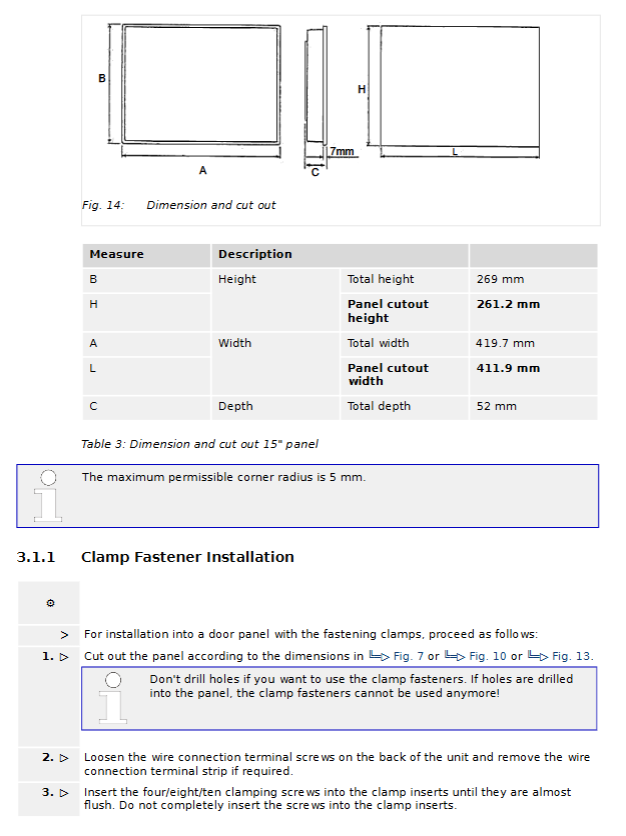
Hole size: 7 inches (192.4 × 139.0mm), 10 inches (274.1 × 193.3mm), 15 inches (411.9 × 261.2mm)
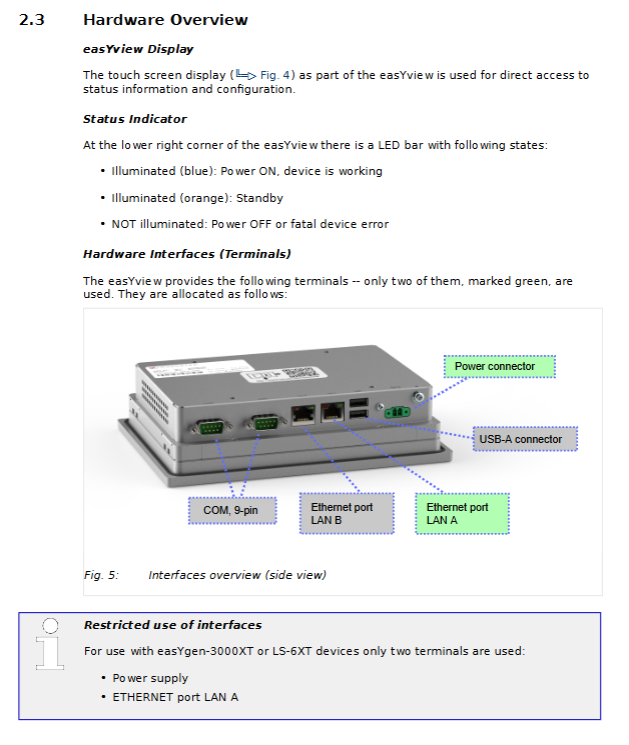
Connection interface: Only use LAN A Ethernet port and 24V DC power interface (± 20% voltage fluctuation)
configuration process
First setup: Connect to the network → Configure IP address (same subnet) → Select working mode → Set password (default user/user, recommended to modify)
Mode switching: Select mini SCADA/Remote HMI through the settings page, click "Apply" to take effect
Device connection: Mini SCADA mode requires configuration of Modbus slave ID (parameter 3188) and protocol (5016)
Technical specifications
Hardware specifications
Processor: NXP ARM Cortex-A53 i.MX 8M Mini (4-core 1.6GHz)
Storage: 2GB DDR4 RAM+16GB eMMC
Touch screen: Projection capacitive, 10 point touch, light transmittance ≥ 85%
Working environment: Temperature -20~60 ℃, vibration protection 2 Grms (5-500Hz)
software configuration
Operating System: Linux Yocto 3.3 (Woodward Custom Edition)
Third party software: atvisa builder 3.9.1, WebVNCServer, etc
License restrictions: 7-inch supports 30 CCDs, 10/15 inch supports 150 CCDs
Troubleshooting and Safety Guidelines
Common faults and solutions
|Fault phenomenon | Cause | Solution|
|The screen is black but the blue LED is on | Display malfunction | Contact Woodward service partner|
|Mini SCADA page element flashing yellow | Device connection failure | Check IP address and Modbus configuration|
|CCD exceeded! "Pop-up window | Number of data connections exceeded | Switch to PC mode and close unnecessary browsers|
|Remote connection interruption | Network conflict or VNC port occupation | Check for IP conflicts and release occupied ports|
Safety Rules
Unauthorized personnel are prohibited from operating or modifying the equipment
Cut off the power before operation to avoid electrostatic discharge
Prohibit the use of non certified spare parts or unauthorized modification of equipment
Key issue
Question: What is the core difference between the two working modes of the easyYview series (Remote HMI and mini SCADA)?
Answer: The core difference lies in the connection method and application scenario. Remote HMI mode connects one easyYgen-3000XT/LS-6XT through VNC technology, focusing on detailed control and parameter viewing of a single device; The mini SCADA mode connects multiple devices (up to 3 for 7-inch and up to 18 for 10/15 inch) through Modbus/TCP protocol, focusing on system level overall monitoring and topology visualization, and supporting parallel status display of multiple devices.
Question: What are the key requirements to pay attention to when installing the easyYview device?
Answer: Three core requirements need to be considered. One is personnel qualification, which must be operated by qualified electricians and comply with electrical safety rules; The second is hardware connection, using only LAN A Ethernet port and 24V DC power interface to avoid electrostatic discharge; The third is the installation size, which needs to be drilled according to the corresponding model (such as 192.4 × 139.0mm for 7 inches), and after tightening, ensure the IP66 protection level.
Question: What are the possible causes and solutions when the "CCD exceeded!" pop-up appears in easyYview?
Answer: The reason is that the number of data connections (CCD) in mini SCADA mode exceeds the license limit, mostly due to opening the visualization page in both easyYview and PC browser simultaneously. Solution: One is to switch to PC mode on easyYview (only using 1 CCD); Secondly, close any unnecessary browsers on the PC or refresh the page to reconnect; Thirdly, if the issue persists, close the PC browser and restart the easyYview device.
- YOKOGAWA
- Reliance
- ADVANCED
- SEW
- ProSoft
- WATLOW
- Kongsberg
- FANUC
- VSD
- DCS
- PLC
- man-machine
- Covid-19
- Energy and Gender
- Energy Access
- Renewable Integration
- Energy Subsidies
- Energy and Water
- Net zero emission
- Energy Security
- Critical Minerals
- A-B
- petroleum
- Mine scale
- Sewage treatment
- cement
- architecture
- Industrial information
- New energy
- Automobile market
- electricity
- Construction site
- HIMA
- ABB
- Rockwell
- Schneider Modicon
- Siemens
- xYCOM
- Yaskawa
- Woodward
- BOSCH Rexroth
- MOOG
- General Electric
- American NI
- Rolls-Royce
- CTI
- Honeywell
- EMERSON
- MAN
- GE
- TRICONEX
- Control Wave
- ALSTOM
- AMAT
- STUDER
- KONGSBERG
- MOTOROLA
- DANAHER MOTION
- Bentley
- Galil
- EATON
- MOLEX
- Triconex
- DEIF
- B&W
- ZYGO
- Aerotech
- DANFOSS
- KOLLMORGEN
- Beijer
- Endress+Hauser
- schneider
- Foxboro
- KB
- REXROTH
- YAMAHA
- Johnson
- Westinghouse
- WAGO
- TOSHIBA
- TEKTRONIX
- BENDER
- BMCM
- SMC
- HITACHI
- HIRSCHMANN
- XP POWER
- Baldor
- Meggitt
- SHINKAWA
- Other Brands
- UniOP
- KUKA
- IBA
- Beckhoff
- ADLINK
-
ENOTEC OXITEC 5000 SME-53310000 InSitu O2 Gas Analyzer System
-
TRICONEX 3723X 32-Channel TMR Analog Input Module with HART for Tricon CX
-
GE 151X1233DB02SA02 Rev A Pitch Converter 30 Nm DC Pitch Conversion Module
-
GE 151X1207CK02SA02 77MM DE Excitation Module for Mark VI Turbine Control Systems
-
HIMA H6200A Analogue Isolator Power Supply for HIMax Safety Systems
-
ABB SACO 64D4 Digital Annunciator Unit with 64 Alarm Channels
-
Allen-Bradley 5069-L306ER - SER A CompactLogix Controller PLC
-
Omron CJ1W-CORT21 - CANopen Master Unit PLC Module
-
Danfoss 131B9523 / FC-102P5K5T4E20H1 - 5.5kW VLT HVAC Drive Inverter
-
Schneider Electric LXM32MU90M2 - Lexium 32 Servo Drive Controller
-
Danfoss AKD102P15KT4P21H1 - 15kW 131L2413 ADAP-KOOL Drive Inverter
-
Kollmorgen S70602-NANANA - Servo Drive Controller
-
Allen-Bradley 6189-PS2 - Power Supply Industrial Computer PS
-
Beijer E900T / 03010F - Operator Panel IFC ETTP HMI
-
Schneider Electric LMC20 - PacDrive Motion Controller PLC
-
Sartorius CAW2S1-3DC-NCE - COMBICS 2 Industrial Scale Terminal
-
Kollmorgen / Danaher S30301-NA / S300 - SERVOSTAR343 Servo Drive Controller
-
Siemens A5E00159503 - 12 INCH TFT Touch Panel HMI
-
Siemens 3UF5021-3AB00-1 - SIMOCODE DP Basic Unit Control Module
-
Danfoss 131B8872 / FC-202PK37T4E20H1 - 0.37kW VLT AQUA Drive Inverter
-
Atlas Copco ICB421-2003D / VSK001001 - W9139 ICM431-0025C ICM431-0025D Controller
-
Lenze EV82EV751_4C - Version 4A39 Frequency Inverter Drive
-
Atlas Copco / ABB 3HAB8101-19/07B - Robot Cable Assembly Harness
-
Beijer X2 Pro7-B2 - Operator Panel HMI Touch Screen
-
Honeywell CDW45L - Damper Actuator
-
B&R X67DM9331.L12 - Rev. I0 Digital Mixed Module
-
B&R X67DM9331.L12 - Rev. H0 Digital Mixed Module
-
Sanyo Denki PMM-BA-5604-1 - Pentasyn Stepper Motor Driver
-
SICK AWS1-113 / 1008900 - Evaluation Unit
-
Siemens 1TF6064-1AF71-3AH1 - SIMOTICS Synchronous Servo Motor
-
Heidenhain ERN680.P003-4096 / 29416004 - Rotary Encoder
-
Schneider Electric LC1G185EHEA - TeSys Control Contactor
-
Parker SBC HPD5N - High Performance Drive Electronics SPA
-
Advantech UNO-2170-CE11BE - Embedded Automation Computer IPC
-
Siemens 6AG1231-4HF32-4XB0 - SIPLUS S7-1200 SM 1231 Analog Input Module
-
Advantech UNO-2170-BTO - Embedded Automation Computer IPC
-
Jumo SR-96/4-001.0.0.00.111 - Solid State Relay Power Controller
-
Pepperl+Fuchs FC-21-V - FC-20P Safety Barrier Module
-
Emerson SP1404 - Unidrive AC Drive Inverter
-
B&R X67AI1233 - Rev.C0 Analog Input Module
-
Mitsubishi FR-F740-00250-EC - Frequency Inverter AC Drive
-
Allen-Bradley 2711P-T7C21D8S - PANELVIEW PLUS 7 SERIES B Touch Screen HMI
-
Pilz PMCprotego D.03/000/0/0/2/208-480VAC / 8176101 - Servo Amplifier Drive
-
Reliance Electric 57C414 / 57414-1N - Modbus Interface Module
-
Mitsubishi FR-F740-00250-EC - Frequency Inverter AC Drive
-
Siemens 6SN1123-1AA00-0EA2 - Version A 160A SIMODRIVE Power Module
-
Siemens 1TF6064-1AF71-3AH1 - SIMOTICS Synchronous Servo Motor
-
AEG ALU202 / DAP216 / DEP216 / DAU202 - SIM216 SIM203 DNP205 ADU205 PLC Controller KIT
-
Atlas Copco / ABB 3HAB8101-19/07B - Robot Cable Assembly Harness
-
Hitachi CPU22-02HB - Micro-EHV Programmable Controller PLC
-
Parker SBC HPD5N - High Performance Drive Electronics SPA
-
Jetter JX3-THI2-RTD - JX3-BP Temperature Input Module
-
Eaton DC1-34014FB-A20N - 5.5kW Inverter Variable Frequency Drive
-
Eaton DS7-34DSX041N0-D - Soft Starter
-
Reliance Electric 57C422B / 57422-2E - 2-Axis Servo Controller
-
Hitachi CPU22-02HB - Micro-EHV Programmable Controller PLC
-
Eaton DC1-34014FB-A20N - 5.5kW Frequency Inverter Variable Frequency Drive
-
Siemens 6SN1123-1AA00-0EA2 - Version A 160A SIMODRIVE Power Module
-
Reliance Electric 57C414 / 57414-1N - Modbus Interface Module
-
Eaton DS7-34DSX041N0-D - Soft Starter
-
Reliance Electric 57C422B / 57422-2E - 2-Axis Servo Controller
-
Johnson Controls DX-9120-8454 - Digital Controller
-
Jetter JX3-THI2-RTD - JX3-BP Temperature Input Module
-
Siemens 6SL3210-1KE21-7AP1 - SINAMICS G120C DP 7.5kW BOP-2 Inverter Drive
-
Siemens 1FK7042-2AF21-1QG0 - SIMOTICS S Synchronous Servo Motor
-
Mettler Toledo IND570 - Harsh Analog Weighing Terminal Controller
-
Schneider Electric TM238LDA24DR - Modicon M238 Programmable Logic Controller PLC
-
Hitachi EH-CPU548 - EH-150 PLC CPU Module
-
Honeywell Q7750A2003 - Excel 10 Zone Controller
-
Ferag 584.002.V003 - Control Panel HMI
-
Danfoss AK-SM 720 / 080Z8511 - ADAP-KOOL System Manager Controller
-
Ferag 584.002.V003 - Control Panel HMI
-
Kern 3210001.001 / LOP-KS 2903440.001 - PRT.205A.0000.V001.02341 Servo Controller Board
-
Reliance Electric 57C424 - Maxpak III High Speed Link Module
-
Telemecanique XBTA70101PA - Compact Terminal HMI Panel
-
Reliance Electric 57C424 - Maxpak III High Speed Link Module
-
Reliance Electric 57C422B - 2-Axis Servo Controller
-
Honeywell Q7750A2003 - Excel 10 Zone Controller
-
Telemecanique XBTN400 - Magelis Small Panel HMI
-
Schneider Electric TM172PDG42S - Modicon Programmable Logic Controller PLC
-
Fanuc HE693THM884M - Thermocouple Input Module
-
Selectron PMC22BAEZD / 220735 - Selecontrol PMC 22 ABEZD Controller Module
-
Baumuller BUS21-22/45-31-020 - Servo Drive Inverter
-
Schneider Electric TM172PDG42S - Modicon Programmable Logic Controller PLC
-
Schneider Electric ATV32HD11N4 - Altivar Variable Frequency Drive Inverter
-
Lenze 494_E.4B - DC Speed Controller
-
NORD SK300E-111-340-B - SKDA130E-111-340-IBS-AAA Frequency Inverter
-
Reliance Electric GMI-S02 - AC/AC Converter 380/400V 50/60Hz 2.3/2.8A Drive
-
Hakko / Monitouch V710CD - Operator Panel HMI Touch Screen
-
B&R 5PC910.SX01-00 / 5YZCAA00700000-005 - Automation PC Industrial Computer
-
Hitachi EH-CPU548 - EH-150 PLC CPU Module
-
Tecnau / Fortec FORTEC-04/UL / 10117 - PCB Circuit Board
-
Bosch PSS 2037 10B - Power Supply Module
-
Newall B602000 - Digital Readout Scale
-
ELCON PC Controller - Industrial PC Controller
-
Siemens 3UF5100-0AB00 - SIMOCODE-DP Control Module
-
Omron NS8-TV00B-V2 - Touch Screen HMI Panel
-
Siemens 6ES5264-8MA12 / IP264 - CAM Controller Module
-
Allen-Bradley 1756-L72S - SER B GuardLogix Safety Controller
-
Schneider Electric SXWMPC15A10001 - SmartX Controller Automation Server
-
Telemecanique LC1F265F7 - TeSys F Contactor
-
Siemens 6ES7314-6CH04-0AB0 - SIMATIC S7-300 CPU 314C-2 DP PLC
-
Allen-Bradley 1734-EI4S - POINT I/O Safety Module
-
Allen-Bradley 2711P-T7C4D8 / 2711P-RP8D - PanelView Plus HMI Touch Screen Logic Module
-
Ropex UPT-640-V - Resistron Temperature Controller
-
KEB 07.F5.B3A-0A00 - VERSION 1.1 Combivert Frequency Inverter
-
Sensopart V50-OB-A3-IW-M2-L - VISOR Vision Sensor Camera
-
SICK AFM60A-S1NB018X12 / 1059040 - Absolute Rotary Encoder
-
Kern AG KMC600 / 2903436.001 - Servo Drive Controller
-
Lenze E82EV302_4C200 / 13015655 - VERSION 3D35 Frequency Inverter Drive
-
Schneider Electric XBTOT2210 - Magelis Touch Screen HMI Panel
-
Baumuller BM5-O-SAF-000-000-000-001-202 - Parameter Safety Module
-
SICK UE4470-22EE690 - Safety Relay Controller
-
Hitachi EH-CPU448 / EH-150 - PLC CPU Module
-
Rexroth VT5005-13 - R5 00010592 Proportional Valve Amplifier Board
-
Siemens 6ES7510-1DJ00-0AB0 - SIMATIC ET 200SP CPU PLC
-
Beckhoff CX5120-0121 - 2GB Embedded PC Controller
-
Priva BlueiD S10 / 5010002 - SN3t 5020004 5010101 Building Automation Controller
-
Sigmatek DM161 - S-DIAS Digital Mix I/O Module
-
Telemecanique LC3D50P7A64 - Star Delta Starter Contactor
-
Siemens 6SN1123-1AA00-0BA2 - SIMODRIVE 611 Power Module
-
Siemens 6SN1124-1AA00-0CA1 - SIMODRIVE 611 Power Module
-
Dixell XC1015D-1C01F / XC1000D - Compressor Controller
-
Siemens A5E02184619 / 19T 577B - Industrial Touch Screen HMI Panel
-
Siemens 6SE6420-2AD27-5CA1 - Filter 6SE6400-2FS03-8CD0 Micromaster Inverter
-
Schneider Electric LC1G400LSEN - TeSys Control Contactor
-
Baldor BPS10-200-20-P - Servo Drive Motor Controller
-
Ingersoll Rand X4I / Y06IR03.00 - Air Compressor Controller

K-JIANG

Add: Jimei North Road, Jimei District, Xiamen, Fujian, China
Tell:+86-15305925923