

K-WANG


Allen Bradley 1336 IMPACT AC Inverter
Allen Bradley 1336 IMPACT AC Inverter
Product Overview and Core Features
1. Product positioning and applicable scenarios
1336 IMPACT frequency converter is a microprocessor based field oriented control (FOC) AC frequency converter using Force technologies ™ Technology, focusing on low-cost independent applications, suitable for scenarios such as machine tools, production lines, and material handling that require precise speed regulation, supports speed and torque control of asynchronous motors, and is compatible with multiple feedback devices and communication protocols.
2. Core standard features
Performance and Control:
High precision digital speed loop and current loop, supporting 0-250Hz constant torque output, some configurations can achieve 400% motor current (short-term overload).
Supports multiple braking methods: dynamic braking, DC braking, magnetic flux braking, and bus voltage regulation, adapting to different load deceleration requirements.
Feedback and Interface:
Standard configuration includes 2 ± 10V analog inputs, 2 ± 10V analog outputs, and 1 4-20mA input/output. The 12 bit resolution ensures signal accuracy.
Support encoder feedback (requires L Option board), compatible with 12V/5V differential output encoder, up to 100kHz pulse input, achieving high-precision speed/position control.
Protection and reliability:
Built in motor overload protection (I ² T), inverter overload protection, overcurrent, overvoltage, undervoltage, ground fault, overheating and other multiple protections.
32 fault queues and 32 warning queues, with timestamps and fault markers for easy problem tracing; Non volatile memory (EE) stores parameters and configurations without loss during power outages.
Communication and Expansion:
Supports SCANPort communication and can connect to HIM (Human Interface Module), GPT (Graphics Programming Terminal), and 1203 series gateway modules (such as DeviceNet, RS-232/485).
Optional L Option board extension control input, supports TTL/24V AC/DC/115V AC interfaces, and some models come with encoder feedback interfaces.
Model Interpretation and Framework Classification
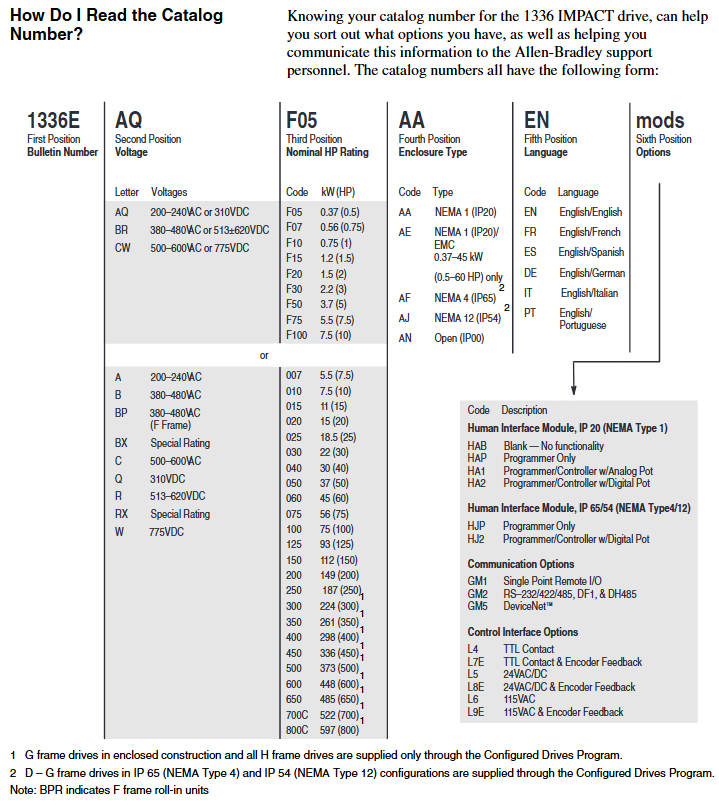
1. Model coding rules (taking 1336E-AQF05-AA-EN as an example)
Explanation of the meaning of digit codes
1-4 Position 1336E Product Series 1336 IMPACT AC Inverter
Position 5-6 AQ voltage level AQ=200-240VAC/310VDC; BR=380-480VAC/513-620VDC; CW=500-600VAC/775VDC
The rated power of F05 in positions 7-9 is 0.37kW (0.5HP); F07=0.56kW (0.75HP); F10=0.75kW (1HP), Repeat this process until 800C=597kW (800HP)
AA protection level AA=NEMA 1 (IP20) for positions 10-11; AE=NEMA 1 (IP20)/EMC (0.37-45kW dedicated); AF=NEMA 4 (IP65); AJ=NEMA 12 (IP54)
The 12th and 13th digits of EN language are English/English; FR=English/French; ES=English/Spanish; DE=English/German, etc
Subsequent mod options include HIM type (such as HA1 with analog potentiometer), communication module (such as GM5=DeviceNet), and L Option board (such as L8E=24V AC/DC+encoder)
2. Frame classification and power correspondence
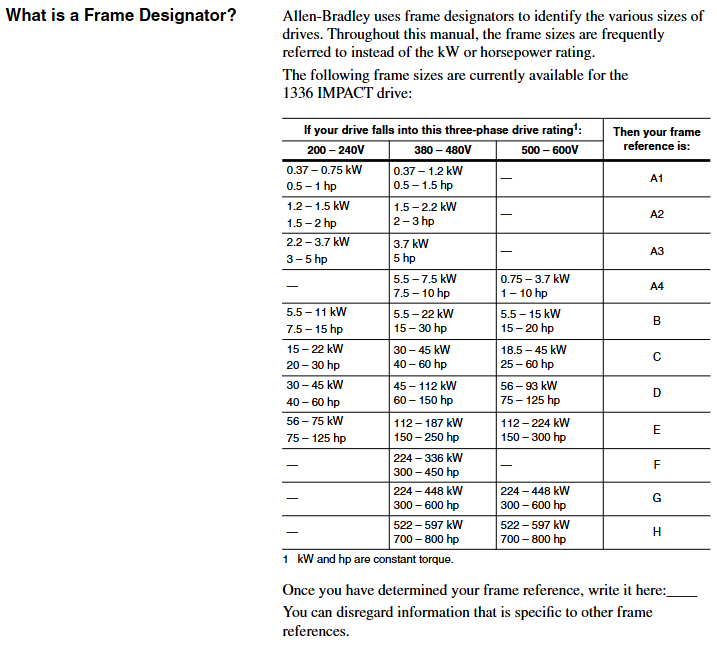
The framework is divided by size and power, and the installation and wiring requirements for different frameworks are different. The core correspondence is as follows:
Framework Model 200-240V Power Range 380-480V Power Range 500-600V Power Range Key Features
A1 0.37-0.75kW (0.5-1HP) 0.37-1.2kW (0.5-1.5HP) - miniaturization, suitable for light loads
A2 1.2-1.5kW (1.5-2HP) 1.5-2.2kW (2-3HP) - Compact, supporting basic analog control
A3 2.2-3.7kW (3-5HP) 3.7kW (5HP) - Medium load, optional encoder feedback
A4-5.5-7.5kW (7.5-10HP) 0.75-7.5kW (1-10HP) with cooling fan, supporting dynamic braking
B 5.5-11kW (7.5-15HP) 15-22kW (20-30HP) 11-15kW (15-20HP) modular design, supporting multiple communication interfaces
C-H 30-75kW (40-100HP) 45-597kW (60-800HP) high power, requiring external reactors, H frame with independent cooling system
Installation and wiring specifications
1. General safety requirements
Static protection: The module contains ESD sensitive components, and a grounding wristband should be worn during operation. Refer to Rockwell document 8000-4.5.2 "Guidelines for Preventing Static Damage".
Power off operation: Before installation, all power sources of the frequency converter (including AC input, DC bus, control power) must be disconnected to avoid electric shock or component damage.
Cable requirements: Power cables must comply with NEC/VDE standards, and it is recommended to use shielded twisted pair cables (such as Belden 8760) for control cables to avoid parallel laying with high-power cables and reduce interference.
2. Key points for exclusive installation of the framework
(1) A1-A4 frame (low power)
Rail installation: Suitable for 35 × 7.5mm DIN rails, with hooks inserted and locked by rotation. The grounding resistance should be ≤ 2 Ω (detected through the metal shell of the RS-232 port).
Wiring terminal: TB1 is the power terminal (R/L1, S/L2, T/L3 input; U/T1, V/T2, W/T3 outputs), TB4/TB7/TB10 are control terminals, supporting analog I/O, pulse input, and relay output.
Input protection: Users need to provide their own fuses. For example, models with 200-240V/0.37kW require 6A Class CC fuses (North America) or 6A gG fuses (Europe).
(2) B-H framework (high power)
Fixed method: B-C frame can be installed on rails, D-H frame needs to be fixed with bolts, and reserved heat dissipation space (top/sides ≥ 152.4mm, bottom ≥ 101.6mm).
Wiring requirements: The D-H frame adopts bolt type terminals and requires dedicated wiring terminals (such as T&B COLOR KEYED) ®), The maximum wire diameter supported is 600MCM (253mm ²), and the torque must comply with the specifications (such as 23N · m for the H frame).
Cooling system: F-H frame with forced cooling fan, fan voltage needs to be confirmed (200-240V/380-480V), H frame needs independent air duct, air volume ≥ 2600CFM.
3. Key wiring specifications
Power wiring:
AC input: R/L1, S/L2, T/L3, requiring input fuses/circuit breakers (such as 140-MN-0250 circuit breaker for 380-480V/0.37kW).
Motor output: U/T1, V/T2, W/T3, cable length must meet the requirements (e.g. maximum 500m at 125Kbps, 100m at 500Kbps), and output reactors need to be added for long distances.
Control wiring:
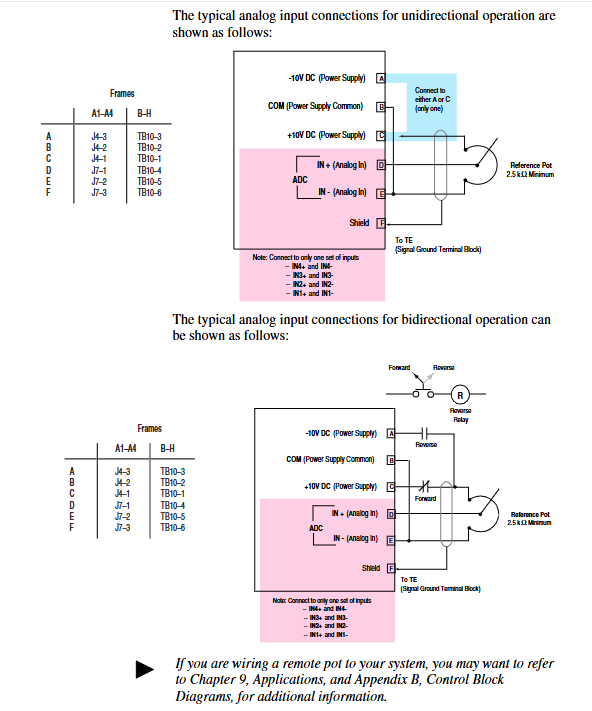
Analog input: ± 10V input requires differential wiring, and the shielding layer is grounded at one end (TE terminal); 4-20mA input impedance of 130 Ω, maximum load of 750 Ω.
Encoder wiring (L Option board): A/A non, B/B non signal differential access,+12V power supply (maximum 200mA), shielding layer grounded.
Grounding requirements:
The safety grounding (PE terminal) requires copper wire with a wire diameter of ≥ 1.5mm ² (16AWG) and a grounding impedance of ≤ 4 Ω.
The control signal grounding (TE terminal) is independent of the power grounding to avoid common ground interference.
System startup and parameter configuration
1. Preparation before startup
Hardware inspection: Confirm correct wiring (no AC input/output terminals, no short circuits), clean fan/heat sink, and securely install encoder (if any).
Tool preparation: HIM module (default connection to SCANPort 1), digital multimeter (measuring input voltage, within ± 10% of rated value), insulation resistance meter (measuring motor insulation, ≥ 1M Ω).
Parameter recording: Record the frequency converter model, motor nameplate data (power, voltage, current, speed, number of poles), and encoder PPR value for rapid debugging in the future.
2. Quick start process (via HIM)
(1) Power on and HIM operation
After powering on, the HIM displays the startup interface. Press any key to enter "Choose Mode" and select "Start Up".
Quick Motor Tune:
Select 'Enter Nameplate Motor Data' and enter the motor HP, voltage, current, etc Hz、 Speed and number of poles.
If using an encoder, select "Encoder" and enter the PPR value; Choose the braking method (dynamic braking/magnetic flux braking, etc.).
Press the START button to test the direction of motor rotation. If it is reversed, adjust the motor phase sequence; Run self-tuning (inductance, resistance, flux current, inertia test), and display "Tune Complete" after completion.
Config Digital Section:
Configure relay output (such as setting Relay 1 to "At Speed" and threshold to 95% rated speed).
Configure L Option mode (such as mode 5 supporting MOP manual potentiometer control) and stop type (coasting/ramp/current limit stop).
Configure Analog Section:
Link speed reference (e.g. Analog In1 link Speed Ref 1, Scale set to 2.0 to achieve ± 10V corresponding to ± 100% speed).
Configure analog output (such as Analog Out1 linked to Motor Speed, Scale set to 0.5 to achieve ± 100% speed corresponding to ± 5V output).
3. Core parameter description
Parameter classification, key parameter functions, and default values
Motor nameplate Nameplate HP (2) The rated power of the motor should be consistent with the nameplate
Motor Poles (7) motor pole count, default 4 poles
Speed control Speed Ref 1 (29) Main speed reference, default 0rpm
Accel Time 1 (42) acceleration time, default 5.0 seconds
Decel Time 1 (44) Deceleration time, default 5.0 seconds
Feedback and Protection Fdbk Device Type (64) Feedback Device Type, 0=No Encoder, 2=Encoder
Motor Overload% (26) motor overload threshold, default 115%
Communication and Expansion L Option Mode (116) L Option Working Mode, default 1 (disabled)
SP An In1 Select (133) SCANPort analog input selection, default 1 (HIM)
Functional applications and advanced controls
1. Basic control functions
Start stop and speed regulation:
Local control: Use the START/STOP button on HIM to start and stop, and the Up/Down button to adjust the speed; Remote control: Speed regulation through analog input (such as 4-20mA) or SCANPort signal.
Jog Speed 1 (38) is set to 10% rated speed, triggering Jog input to achieve jog control.
Braking control:
Dynamic braking: An external braking resistor is required, with Bus/Brake Options (13) set to bit10=1 and Regen Power Lim (76) set to 50% (adjusted according to the resistor capacity).
DC Braking: The DC Brake Current (79) is set to 30% of the rated current, and the DC Brake Time (80) is set to 2 seconds, suitable for rapid shutdown.
2. Advanced functional applications
(1) Speed Profiling
Function: Implement multi-stage speed control through 16 programmable steps, supporting switching between time, encoder counting, and digital input trigger steps.
Configuration: L Option mode 31/32 is required, with Step Speed (e.g. Step 1=400rpm), Step Type (1=time triggered, 3=encoder triggered), Step Value (e.g. 10 seconds/1000 counts) set, and End Action set to "loop" or "zero".
(2) Torque control
Function: Switch to torque mode (Spd/Trq Mode Sel (68)=1), set torque reference (0-100% rated torque) through Torque Ref 1 (69).
Application: Suitable for winding and tension control scenarios, requiring encoder feedback to ensure torque accuracy, Pos/Neg Torque Lim (74/75) limits maximum torque.
(3) Flying Start
Function: Start the frequency converter when the motor rotates to avoid current shock, suitable for restarting fans and pumps after sudden power failure.
Configuration: FStart Select (216)=2, FStart Speed (217) is set to the estimated speed (such as 800rpm), and the frequency converter automatically searches and synchronizes the speed after startup.
3. Communication configuration (SCAnport/DeviceNet)
SCAnport communication:
Supports up to 6 SCAnport devices, with HIM default to SCAnport 1 and gateway modules (such as 1203-GM5) connected to SCAnport 6.
Configure SP Enable Mask (124) to allow device control permissions, such as allowing SCANPort 2 to send start stop signals.
DeviceNet communication:
The 1203-GM5 card needs to be installed, and the node address (SW2-1~6, binary encoding) and baud rate (SW2-7~8, default 125Kbps) need to be set.
Create an EDS file through DeviceNet Manager, map I/O data (such as input=motor status, output=speed reference), and set the polling rate to 50ms.
- YOKOGAWA
- Reliance
- ADVANCED
- SEW
- ProSoft
- WATLOW
- Kongsberg
- FANUC
- VSD
- DCS
- PLC
- man-machine
- Covid-19
- Energy and Gender
- Energy Access
- Renewable Integration
- Energy Subsidies
- Energy and Water
- Net zero emission
- Energy Security
- Critical Minerals
- A-B
- petroleum
- Mine scale
- Sewage treatment
- cement
- architecture
- Industrial information
- New energy
- Automobile market
- electricity
- Construction site
- HIMA
- ABB
- Rockwell
- Schneider Modicon
- Siemens
- xYCOM
- Yaskawa
- Woodward
- BOSCH Rexroth
- MOOG
- General Electric
- American NI
- Rolls-Royce
- CTI
- Honeywell
- EMERSON
- MAN
- GE
- TRICONEX
- Control Wave
- ALSTOM
- AMAT
- STUDER
- KONGSBERG
- MOTOROLA
- DANAHER MOTION
- Bentley
- Galil
- EATON
- MOLEX
- Triconex
- DEIF
- B&W
- ZYGO
- Aerotech
- DANFOSS
- KOLLMORGEN
- Beijer
- Endress+Hauser
- schneider
- Foxboro
- KB
- REXROTH
- YAMAHA
- Johnson
- Westinghouse
- WAGO
- TOSHIBA
- TEKTRONIX
- BENDER
- BMCM
- SMC
- HITACHI
- HIRSCHMANN
- XP POWER
- Baldor
- Meggitt
- SHINKAWA
- Other Brands
- UniOP
- KUKA
- IBA
- Beckhoff
- ADLINK
-
Allen-Bradley 5069-L306ER - SER A CompactLogix Controller PLC
-
Omron CJ1W-CORT21 - CANopen Master Unit PLC Module
-
Danfoss 131B9523 / FC-102P5K5T4E20H1 - 5.5kW VLT HVAC Drive Inverter
-
Schneider Electric LXM32MU90M2 - Lexium 32 Servo Drive Controller
-
Danfoss AKD102P15KT4P21H1 - 15kW 131L2413 ADAP-KOOL Drive Inverter
-
Kollmorgen S70602-NANANA - Servo Drive Controller
-
Allen-Bradley 6189-PS2 - Power Supply Industrial Computer PS
-
Beijer E900T / 03010F - Operator Panel IFC ETTP HMI
-
Schneider Electric LMC20 - PacDrive Motion Controller PLC
-
Sartorius CAW2S1-3DC-NCE - COMBICS 2 Industrial Scale Terminal
-
Kollmorgen / Danaher S30301-NA / S300 - SERVOSTAR343 Servo Drive Controller
-
Siemens A5E00159503 - 12 INCH TFT Touch Panel HMI
-
Siemens 3UF5021-3AB00-1 - SIMOCODE DP Basic Unit Control Module
-
Danfoss 131B8872 / FC-202PK37T4E20H1 - 0.37kW VLT AQUA Drive Inverter
-
Atlas Copco ICB421-2003D / VSK001001 - W9139 ICM431-0025C ICM431-0025D Controller
-
Lenze EV82EV751_4C - Version 4A39 Frequency Inverter Drive
-
Atlas Copco / ABB 3HAB8101-19/07B - Robot Cable Assembly Harness
-
Beijer X2 Pro7-B2 - Operator Panel HMI Touch Screen
-
Honeywell CDW45L - Damper Actuator
-
B&R X67DM9331.L12 - Rev. I0 Digital Mixed Module
-
B&R X67DM9331.L12 - Rev. H0 Digital Mixed Module
-
Sanyo Denki PMM-BA-5604-1 - Pentasyn Stepper Motor Driver
-
SICK AWS1-113 / 1008900 - Evaluation Unit
-
Siemens 1TF6064-1AF71-3AH1 - SIMOTICS Synchronous Servo Motor
-
Heidenhain ERN680.P003-4096 / 29416004 - Rotary Encoder
-
Schneider Electric LC1G185EHEA - TeSys Control Contactor
-
Parker SBC HPD5N - High Performance Drive Electronics SPA
-
Advantech UNO-2170-CE11BE - Embedded Automation Computer IPC
-
Siemens 6AG1231-4HF32-4XB0 - SIPLUS S7-1200 SM 1231 Analog Input Module
-
Advantech UNO-2170-BTO - Embedded Automation Computer IPC
-
Jumo SR-96/4-001.0.0.00.111 - Solid State Relay Power Controller
-
Pepperl+Fuchs FC-21-V - FC-20P Safety Barrier Module
-
Emerson SP1404 - Unidrive AC Drive Inverter
-
B&R X67AI1233 - Rev.C0 Analog Input Module
-
Mitsubishi FR-F740-00250-EC - Frequency Inverter AC Drive
-
Allen-Bradley 2711P-T7C21D8S - PANELVIEW PLUS 7 SERIES B Touch Screen HMI
-
Pilz PMCprotego D.03/000/0/0/2/208-480VAC / 8176101 - Servo Amplifier Drive
-
Reliance Electric 57C414 / 57414-1N - Modbus Interface Module
-
Mitsubishi FR-F740-00250-EC - Frequency Inverter AC Drive
-
Siemens 6SN1123-1AA00-0EA2 - Version A 160A SIMODRIVE Power Module
-
Siemens 1TF6064-1AF71-3AH1 - SIMOTICS Synchronous Servo Motor
-
AEG ALU202 / DAP216 / DEP216 / DAU202 - SIM216 SIM203 DNP205 ADU205 PLC Controller KIT
-
Atlas Copco / ABB 3HAB8101-19/07B - Robot Cable Assembly Harness
-
Hitachi CPU22-02HB - Micro-EHV Programmable Controller PLC
-
Parker SBC HPD5N - High Performance Drive Electronics SPA
-
Jetter JX3-THI2-RTD - JX3-BP Temperature Input Module
-
Eaton DC1-34014FB-A20N - 5.5kW Inverter Variable Frequency Drive
-
Eaton DS7-34DSX041N0-D - Soft Starter
-
Reliance Electric 57C422B / 57422-2E - 2-Axis Servo Controller
-
Hitachi CPU22-02HB - Micro-EHV Programmable Controller PLC
-
Eaton DC1-34014FB-A20N - 5.5kW Frequency Inverter Variable Frequency Drive
-
Siemens 6SN1123-1AA00-0EA2 - Version A 160A SIMODRIVE Power Module
-
Reliance Electric 57C414 / 57414-1N - Modbus Interface Module
-
Eaton DS7-34DSX041N0-D - Soft Starter
-
Reliance Electric 57C422B / 57422-2E - 2-Axis Servo Controller
-
Johnson Controls DX-9120-8454 - Digital Controller
-
Jetter JX3-THI2-RTD - JX3-BP Temperature Input Module
-
Siemens 6SL3210-1KE21-7AP1 - SINAMICS G120C DP 7.5kW BOP-2 Inverter Drive
-
Siemens 1FK7042-2AF21-1QG0 - SIMOTICS S Synchronous Servo Motor
-
Mettler Toledo IND570 - Harsh Analog Weighing Terminal Controller
-
Schneider Electric TM238LDA24DR - Modicon M238 Programmable Logic Controller PLC
-
Hitachi EH-CPU548 - EH-150 PLC CPU Module
-
Honeywell Q7750A2003 - Excel 10 Zone Controller
-
Ferag 584.002.V003 - Control Panel HMI
-
Danfoss AK-SM 720 / 080Z8511 - ADAP-KOOL System Manager Controller
-
Ferag 584.002.V003 - Control Panel HMI
-
Kern 3210001.001 / LOP-KS 2903440.001 - PRT.205A.0000.V001.02341 Servo Controller Board
-
Reliance Electric 57C424 - Maxpak III High Speed Link Module
-
Telemecanique XBTA70101PA - Compact Terminal HMI Panel
-
Reliance Electric 57C424 - Maxpak III High Speed Link Module
-
Reliance Electric 57C422B - 2-Axis Servo Controller
-
Honeywell Q7750A2003 - Excel 10 Zone Controller
-
Telemecanique XBTN400 - Magelis Small Panel HMI
-
Schneider Electric TM172PDG42S - Modicon Programmable Logic Controller PLC
-
Fanuc HE693THM884M - Thermocouple Input Module
-
Selectron PMC22BAEZD / 220735 - Selecontrol PMC 22 ABEZD Controller Module
-
Baumuller BUS21-22/45-31-020 - Servo Drive Inverter
-
Schneider Electric TM172PDG42S - Modicon Programmable Logic Controller PLC
-
Schneider Electric ATV32HD11N4 - Altivar Variable Frequency Drive Inverter
-
Lenze 494_E.4B - DC Speed Controller
-
NORD SK300E-111-340-B - SKDA130E-111-340-IBS-AAA Frequency Inverter
-
Reliance Electric GMI-S02 - AC/AC Converter 380/400V 50/60Hz 2.3/2.8A Drive
-
Hakko / Monitouch V710CD - Operator Panel HMI Touch Screen
-
B&R 5PC910.SX01-00 / 5YZCAA00700000-005 - Automation PC Industrial Computer
-
Hitachi EH-CPU548 - EH-150 PLC CPU Module
-
Tecnau / Fortec FORTEC-04/UL / 10117 - PCB Circuit Board
-
Bosch PSS 2037 10B - Power Supply Module
-
Newall B602000 - Digital Readout Scale
-
ELCON PC Controller - Industrial PC Controller
-
Siemens 3UF5100-0AB00 - SIMOCODE-DP Control Module
-
Omron NS8-TV00B-V2 - Touch Screen HMI Panel
-
Siemens 6ES5264-8MA12 / IP264 - CAM Controller Module
-
Allen-Bradley 1756-L72S - SER B GuardLogix Safety Controller
-
Schneider Electric SXWMPC15A10001 - SmartX Controller Automation Server
-
Telemecanique LC1F265F7 - TeSys F Contactor
-
Siemens 6ES7314-6CH04-0AB0 - SIMATIC S7-300 CPU 314C-2 DP PLC
-
Allen-Bradley 1734-EI4S - POINT I/O Safety Module
-
Allen-Bradley 2711P-T7C4D8 / 2711P-RP8D - PanelView Plus HMI Touch Screen Logic Module
-
Ropex UPT-640-V - Resistron Temperature Controller
-
KEB 07.F5.B3A-0A00 - VERSION 1.1 Combivert Frequency Inverter
-
Sensopart V50-OB-A3-IW-M2-L - VISOR Vision Sensor Camera
-
SICK AFM60A-S1NB018X12 / 1059040 - Absolute Rotary Encoder
-
Kern AG KMC600 / 2903436.001 - Servo Drive Controller
-
Lenze E82EV302_4C200 / 13015655 - VERSION 3D35 Frequency Inverter Drive
-
Schneider Electric XBTOT2210 - Magelis Touch Screen HMI Panel
-
Baumuller BM5-O-SAF-000-000-000-001-202 - Parameter Safety Module
-
SICK UE4470-22EE690 - Safety Relay Controller
-
Hitachi EH-CPU448 / EH-150 - PLC CPU Module
-
Rexroth VT5005-13 - R5 00010592 Proportional Valve Amplifier Board
-
Siemens 6ES7510-1DJ00-0AB0 - SIMATIC ET 200SP CPU PLC
-
Beckhoff CX5120-0121 - 2GB Embedded PC Controller
-
Priva BlueiD S10 / 5010002 - SN3t 5020004 5010101 Building Automation Controller
-
Sigmatek DM161 - S-DIAS Digital Mix I/O Module
-
Telemecanique LC3D50P7A64 - Star Delta Starter Contactor
-
Siemens 6SN1123-1AA00-0BA2 - SIMODRIVE 611 Power Module
-
Siemens 6SN1124-1AA00-0CA1 - SIMODRIVE 611 Power Module
-
Dixell XC1015D-1C01F / XC1000D - Compressor Controller
-
Siemens A5E02184619 / 19T 577B - Industrial Touch Screen HMI Panel
-
Siemens 6SE6420-2AD27-5CA1 - Filter 6SE6400-2FS03-8CD0 Micromaster Inverter
-
Schneider Electric LC1G400LSEN - TeSys Control Contactor
-
Baldor BPS10-200-20-P - Servo Drive Motor Controller
-
Ingersoll Rand X4I / Y06IR03.00 - Air Compressor Controller
-
NORD SK 530P-221-340-A - Frequency Inverter
-
Gelma Hennecke MMI-T.1 / MMB - RS485 Interface Panel HMI Touch Screen
-
Siemens 7SJ6025-2BB00-1FA0 - SIPROTEC Overcurrent Protection Relay
-
Lenze EVS9321-EP - Servo Drive Inverter
-
ABB ACS60100253 - AC Drive Frequency Inverter
-
Microwave Laboratory Systems FAM-40/2 - Fiber Optic Temperature Measurement

K-JIANG

Add: Jimei North Road, Jimei District, Xiamen, Fujian, China
Tell:+86-15305925923