

K-WANG


YOKOGAWA AQ6360 Optical Spectrum Analyzer
YOKOGAWA AQ6360 Optical Spectrum Analyzer
Overview
The Introduction Guide to YOKOGAWA AQ6360 Optical Spectrum Analyzer (7th Edition, document number IM AQ6360-02EN) introduces the core functions of the instrument (high-speed measurement of optical characteristics of LD, LED light source, optical amplifier and other equipment), preparation before use (packaging content inspection, instrument installation, power connection and power on/off process), basic operations (touch screen/mouse/keyboard operation, menu and parameter settings), maintenance points (firmware update, wavelength/level accuracy calibration, daily cleaning and component replacement), and key specifications (wavelength range 1200-1650nm, maximum input power+20dBm) At the same time, it emphasizes safety precautions (such as avoiding direct exposure to infrared light, correctly grounding to prevent electric shock), and provides user registration, technical support contact information, and access to relevant manuals.
Preparation before use
1. Packaging content inspection
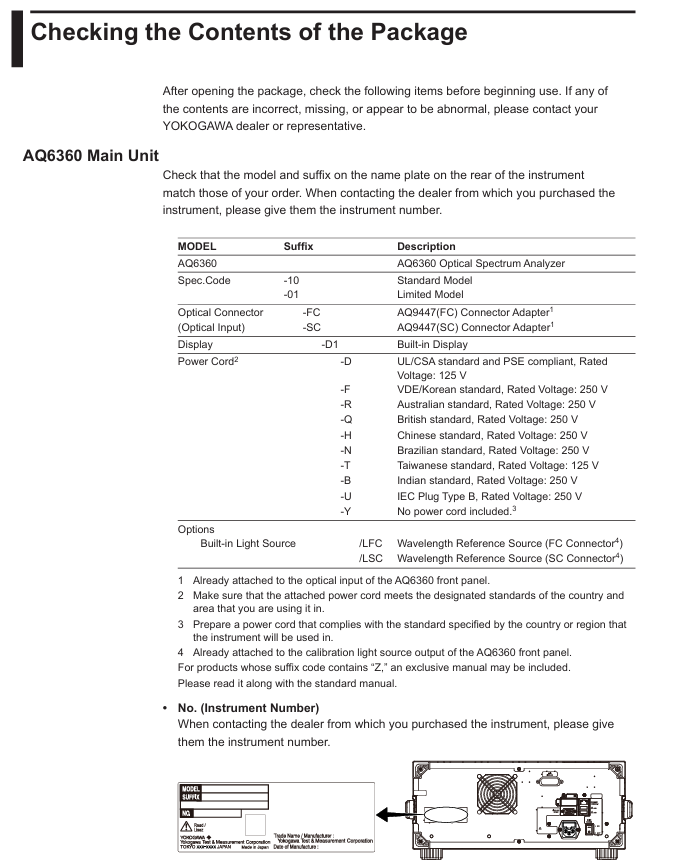
After unboxing, it is necessary to confirm that the host, standard accessories, and optional accessories are complete. The standard accessories are listed in the table below (optional accessories need to be purchased separately):
Category, Part Name, Model/Part Number, Quantity, Key Explanation
Host AQ6360 Host -1 Confirm that the back nameplate model is consistent with the order, and record the instrument number (to be provided when contacting the dealer)
Standard Attachment - Power Supply Cord A1006WD (UL/CSA) 1 needs to be matched with regional standards, such as A1064WD for China and A1009WD for Europe; Suffix - Y without power cord
Standard attachment - Other rubber foot pads A9088ZM 2 sheets A9088ZM includes 2 foot pads for fixing instruments to prevent sliding
Standard Attachment - Handbook Beginner's Guide IM AQ6360-02EN 1 Must Read Basic Document
Optional accessories - connector AQ9447 connector adapter (FC) AQ9447-FC - for optical input interface, also available in SC model (AQ9447-SC)
Optional accessories - connector AQ9441 connector adapter (FC) AQ9441-FC - for calibrating light source output interface, also available in SC model (AQ9441-SC)
2. Instrument installation requirements
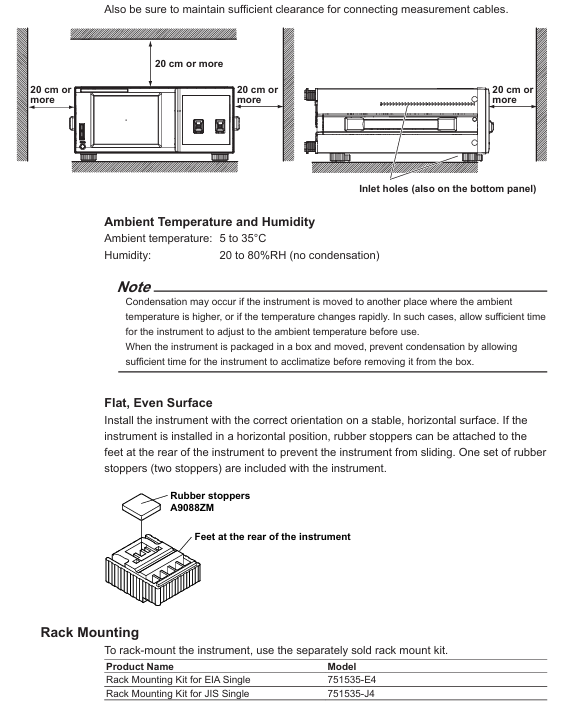
Installation environment: For indoor use only, avoid direct sunlight, flammable and explosive environments, high vibration/high dust areas
Placement requirements: Horizontal and stable tabletop, anti tilt; Ventilation gap ≥ 200mm (side/back ventilation holes) to prevent internal overheating
Anti impact: Avoid falling (dropping ≥ 2cm may damage the internal monochromator), use original factory grade cushioning packaging during transportation
Rack installation: A separate rack kit (such as EIA standard 751535-E4, JIS standard 751535-J4) needs to be purchased, and the bottom should be supported and not obstruct the ventilation holes during installation
3. Power connection and power on/off
Power specifications: Rated voltage 100-240V AC, frequency 50/60Hz, maximum power consumption ≈ 100VA; allowable voltage range 90-264V AC, frequency 48-63Hz
Power on/off process:
Connect the power cord in the shutdown state (grounded, using a three pin socket);
Turn on the back MAIN POWER switch, and the front POWER light will turn orange;
After waiting for a few seconds, press the front POWER switch, the light turns green, and the instrument starts initialization (displaying STEP 1/9 to STEP 9/9);
To shut down, first press the front POWER switch, confirm the pop-up window, and then click "Yes". After the POWER light turns orange, turn off the MAIN POWER switch.
Basic Operations
1. Control method
Touch screen operation:
Click (select menu/input parameters), drag (move waveform/marker), pinch and zoom (enlarge/shrink waveform);
During waveform operation, a "Operation Tool Window" will pop up, supporting functions such as restoring the initial state and peak alignment.
Mouse/keyboard operation:
Mouse: Left click=Touch screen click, right-click on waveform area to pop up menu, drag to zoom in and out of waveform;
External keyboard: Supports shortcut key operations (such as [SHIFT]+[F1] to start scanning, [ALT]+[F6] to enter system settings). Please refer to the table on page 3-15 of the document for specific mappings.
2. Core operating procedures
Menu operation: Click on the "Three Menu" in the upper right corner of the screen to open the Main Menu window, select a function (such as SWEEP/SETUP/MARKER), switch submenus through "More", and click on the corresponding item to perform the operation.
Parameter input:
Numerical input: Click on the parameter value to pop up the "Parameter Input Window", and adjust it through the numeric keypad or arrow keys (COARSE/FINE switch step size);
String input: When entering a label/file name, a on-screen keyboard pops up, supporting cursor movement and character insertion/deletion.
DUT connection:
Clean the end face of the optical connector (using NTT-AT specialized cleaning agent, press and rotate to wipe);
Connect the optical fiber to the "Optical INPUT" interface of the instrument, and set "NORM" (regular PC) or "ANGLED" (APC) through Main Menu → SETUP → Fiber Connector.
Maintenance and Calibration
1. Firmware update
Update purpose: To enhance the functionality and usability of the instrument, the latest firmware needs to be downloaded from the Yokogawa official website;
Update method:
USB update: Create an "Update" folder in the USB root directory, place the. upd firmware file, and execute it through System → Version → Update (USB);
Network update: Connect to the PC via Ethernet, copy the firmware to the internal Update directory of the instrument, and execute it through Update (NETWORK);
Attention: Do not turn off the power during the update. The instrument will automatically restart after the update, and the settings data will be initialized (backup is required in advance).
2. Accuracy calibration
Wavelength calibration:
Applicable scenario: After 1 hour of preheating and before measurement, ensure wavelength accuracy (±) 0.02nm@1520-1580nm );
Tools: Use built-in reference light sources (/LFC/LSC options) or gas lasers with known wavelength accuracy;
Exception handling: If the error is greater than ± 5nm, contact the dealer for adjustment.
Level calibration:
Tools: 1310/1550nm light source, optical power meter;
Process: Connect the light source to the instrument, measure the peak level, and then connect the light source to the optical power meter to confirm that the difference between the two is within ± 0.5dB (meeting the level accuracy requirements).
3. Daily maintenance and component replacement
Daily cleaning:
External: Wipe with a dry cloth after power failure, and prohibit volatile chemicals;
Optical interface: Clean the connector end face with an alcohol swab and disable compressed air blowing (to prevent dust from entering the monochromator).
Component replacement cycle:
Key Explanation of Component Name Replacement Cycle
LCD backlight ≈ 70000 hours lifespan reference value under normal usage conditions
It is recommended to replace the cooling fan regularly for 3 years to prevent overheating
Backup battery (lithium battery) for 5 years to store settings data, needs to be replaced if expired
Safety and Compliance
1. Safety Warning
Warning (risk of fatal/serious injury):
Cannot directly view the optical output interface (built-in reference light source continuously outputs infrared light, which may cause blindness);
Grounding must be used, and ungrounded extension cords are prohibited;
Do not use in flammable and explosive environments, and do not disassemble the instrument by yourself (there is high pressure inside).
CAUTION (Minor Injury/Equipment Damage Risk):
The instrument is a Class A industrial equipment, which may cause radio interference when used in residential areas and needs to be resolved by the user themselves;
To avoid strong light input (which may damage optical components), initialization must be completed before connecting the DUT.
2. Compliance requirements
Environmental compliance: compliant with the EU WEEE Directive (must not be mixed with household waste for disposal) and the Battery Directive (lithium batteries must be separately recycled);
Laser compliance: The built-in laser light source is Class 1 (compliant with IEC 60825-1:2014, 21 CFR 1040.10/11), with a wavelength of 1.53 μ m and a maximum output power of 0.04mW;
Regional compliance: Taiwan region needs to inquire about restricted substance information for power cord (A1100WD) (official website) https://tmi.yokogawa.com/support/... ).
Key specification parameters
The core specifications of AQ6360 are shown in the following table (limited models should refer to IM AQ6360-51EN):
Specification category specific parameters
Suitable for fiber optic SM (9.5/125 μ m), GI (50/125 μ m, 62.5/125 μ m)
Wavelength range 1200-1650nm
Wavelength accuracy ± 0.02nm (1520-1580nm), ± 0.04nm (1580-1620nm), ± 0.10nm (1200-1650nm)
Wavelength resolution of 0.1/0.2/0.5/1/2nm (setting options), accuracy of ± 5%
Level sensitivity -80dBm (1300-1620nm, resolution 0.1nm, HIGH2 level)
Maximum input power+20dBm (single wavelength resolution input power), maximum safe input power+25dBm (total input power)
Level accuracy ± 0.5dB (1310/1550nm, input -20dBm, MID/HIGH1/HIGH2 levels)
Dynamic range 55dB (peak ± 0.4nm), 40dB (peak ± 0.2nm), resolution 0.1nm
Interface GP-IB, Ethernet, USB (2 each), SVGA output
Display 8.4-inch color LCD (touch screen, resolution 800 × 600 pixels)
Physical dimensions 426 (W) × 177 (H) × 459 (D) mm (excluding protective cover/handle)
Weight ≈ 15.5kg
The working environment temperature is 5-35 ℃, and the humidity is 20-80% RH (without condensation); Performance guarantee temperature 18-28 ℃
- YOKOGAWA
- Reliance
- ADVANCED
- SEW
- ProSoft
- WATLOW
- Kongsberg
- FANUC
- VSD
- DCS
- PLC
- man-machine
- Covid-19
- Energy and Gender
- Energy Access
- Renewable Integration
- Energy Subsidies
- Energy and Water
- Net zero emission
- Energy Security
- Critical Minerals
- A-B
- petroleum
- Mine scale
- Sewage treatment
- cement
- architecture
- Industrial information
- New energy
- Automobile market
- electricity
- Construction site
- HIMA
- ABB
- Rockwell
- Schneider Modicon
- Siemens
- xYCOM
- Yaskawa
- Woodward
- BOSCH Rexroth
- MOOG
- General Electric
- American NI
- Rolls-Royce
- CTI
- Honeywell
- EMERSON
- MAN
- GE
- TRICONEX
- Control Wave
- ALSTOM
- AMAT
- STUDER
- KONGSBERG
- MOTOROLA
- DANAHER MOTION
- Bentley
- Galil
- EATON
- MOLEX
- Triconex
- DEIF
- B&W
- ZYGO
- Aerotech
- DANFOSS
- KOLLMORGEN
- Beijer
- Endress+Hauser
- schneider
- Foxboro
- KB
- REXROTH
- YAMAHA
- Johnson
- Westinghouse
- WAGO
- TOSHIBA
- TEKTRONIX
- BENDER
- BMCM
- SMC
- HITACHI
- HIRSCHMANN
- XP POWER
- Baldor
- Meggitt
- SHINKAWA
- Other Brands
- UniOP
- KUKA
- IBA
- Beckhoff
- ADLINK
-
FANUC A06B-0169-B088 - AC Servo Motor Alpha M40 3000 3 KW
-
ALPHA WIRE 1299C-SLATE-1000 - Multi-Conductor Cable Wire
-
alpha / Wittenstein SK+180S-MF1-10-1M1-1K - Hypoid Gearbox i=10
-
ALPHA WIRE 1181/40C SL005 - Multi-Conductor Cable Wire
-
Generic / DSI Straight Anatomic Plastic Adapter Head + Screw Hex - Dental Implant Fixture
-
Alpha II-650 MV6500526A - Power Supply Unit
-
ALPHA WIRE 7036 WH001 - Hook-Up Wire
-
FANUC RDCGM00000004O / TP 050-MF1-7-061-000 - Gear Reducer / Alpha Gearbox
-
Alpha II-650 MV6500436A - TDK-Lambda Power Supply Unit
-
Alpha S-Alpha600 J60033 - 600W Switching Power Supply Unit
-
Alpha 1500W J00032 - Power Supply Unit
-
Alpha 600W H60638 - Switching Power Supply Unit
-
Alpha 650 MV6500314A - Power Supply Unit
-
Aloka UST-5413 - Linear Probe for Prosound Alpha 6
-
ALPHA WIRE TFT25015 NA002 - High Temperature Heat Shrink Tubing Wire Sleeving
-
JAVAD ALPHA2 / GrAnt-G3 - GPS Receiver
-
Alpha 400W H47318 - Switching Power Supply Unit
-
Alpha SG-ALPHA-202-001 / Q1001-010-001 - Circuit Board Module
-
Antlia Dual ERF H-Alpha & Cak/CaH - Density Astronomical Accessory
-
ALPHA WIRE 5100C SL033 - Multi-Conductor Cable Wire
-
ALPHA WIRE 5098C-SL033 - Multi-Conductor Cable Wire
-
Fanuc A06B-6290-H105 - Alpha Sv 80hv-B Module Servo Amplifier
-
FANUC A06B-6240-H105 - Aux Axis Alpha aiSV 80 Servo Amplifier
-
Endress+Hauser Alpha-Log RSA10-61B1S / 42974737/0130 - Data Logger Measurement Instrument
-
ALPHA WIRE 6363-SL002 - Multi-Conductor Cable Wire
-
Alpha SP100S-MF1-7-1K1-2S - Gear Reducer
-
Alpha SP 100G-MF1-4-0H1-2S-PGG - Planetary Gear Reducer
-
FANUC A06B-0143-B175 #0275 - Alpha 12/3000 AC Servo Motor
-
James Burn Alpha Doc P33 / GBC PDI - Automatic Punch DocuPunch
-
Titus HVAC 105383-01 - ALPHA BAC Controller and Actuator
-
Wittenstein Alpha SP 100S-MF2-20-0E0-2S - Planetary Gearbox i=20
-
Kashiyama Alpha-85-ZV / SP-8026G - Pump Controller
-
Christ Alpha 2-4 LDplus - Freeze Drier Part N/ 101542
-
Lambda / Alpha H40896 - 400W Power Supply Unit
-
Wittenstein Alpha LP-070S-MF1-3-1E1-38 - Planetary Gearbox
-
Matrox / EXO-2480 133-D06-3 / 398-17962-1 - Alpha Numeric PCB Board
-
Fanuc A06B-6096-H204 - Dual Axis Alpha Servo Amplifier Module
-
Alpha Wire 5002C-SL001 - Multi-Conductor Cable 2 Conductors 22AWG 300VAC
-
Alpha 600W H60638 - Switching Power Supply Unit
-
Alpha Scientific Spin Precession Dual Electro Magnet Beam Line Chamber - Electro Magnet Beam Line Chamber
-
ALPHA WIRE 6017C SL005 - Multi-Conductor Cable Wire
-
ALPHA WIRE 65804 SL002 - Multi-Conductor Cable Wire
-
Fanuc A06B-0152-B010 - AC Servo Motor Alpha A30/2000 with Brake
-
ALPHA WIRE 5856-VI001 - Hook-Up Wire
-
ALPHA WIRE M13142-SL001 - Multi-Conductor Cable Wire
-
Alpha & Omega AOZ1017 - 8-Pin SOIC SMD Buck Switching Regulator IC
-
Alpha 600W H67027 CA600 - 600W Switching Power Supply Unit
-
ALPHA WIRE 2845/7-RD001 - Hook-Up Wire
-
Wittenstein Alpha VH+063S-MF1-10-6H1-1K-0C2 - Worm Gear Reducer i=10
-
ALPHA WIRE 2414C SL022 - Multi-Conductor Cable Wire
-
ALPHA WIRE 5672-SL005 - Multi-Conductor Cable Wire
-
BECKHOFF / Alpha AM8021-0B10-0000 + CP 040-MO1-10 - Servo Motor with Planetary Gearbox
-
ALPHA Systems Lab Inc MBA-WV1-F / PCB-WV1-F - PCB Board
-
FANUC A06B-0826-B201 - Alpha P12 AC Spindle Motor
-
WF & HC / Alpha-E 10045 - Tiller Bar Flat Flange Inlet 3150LB 3X 2.5 Inch
-
Seiler Alpha Air 3 - Dental Microscope
-
Alpha 400W H47223 - Switching Power Supply Unit
-
Wittenstein Alpha SP 180S-MC1-5-1M0-2K - Planetary Gearbox
-
FANUC A06B-6117-H211 - Servo Amplifier Module Alpha iSV 160/160 Amp
-
Alpha S-Alpha600 J60033 - 600W Switching Power Supply Unit
-
Adaptive Alpha Eclipse StreetSmart Model 17X - Master Slave LED Sign 44 x 44 Inch
-
ALPHA WIRE 391697-WH005 / 391697WH005 - Hook-Up Wire
-
Generic 22W Laser Engraver Cutter - Smart Air Pump APP Control CNC Dual-core CPU DIY Tools
-
FANUC A06B-6102-H226 / A06B6102H226 - Spindle Amplifier Module
-
FANUC A06B-6090-H006 / A06B6090H006 - Servo Power Supply Module
-
Alpha Wire Apr-19 - High Low Temperature Cable 75 FT
-
Wittenstein Alpha HG+ 075S-MF2-28-6E1-1S10 - Hypoid Gearbox Reducer i=28
-
Alpha J00032 - 1500W Power Supply Unit
-
Alpha H47038 - 400W Power Supply Unit
-
FANUC A06B-6096-H204 - Dual Axis Alpha Servo Amplifier Module
-
Wittenstein Alpha LPB090-MO1-10-111-00 - Alpha Planetary Gearbox
-
ALPHA WIRE 2842/19-YL001 - Hook-Up Wire
-
WITTENSTEIN ALPHA HG+060S-MF1-56C1-1K00 - Planetary Gearbox
-
Basler A102K Alpha VIS - Black and White CCD Industrial Camera
-
Alpha H40935 - 400W Power Supply Unit
-
FANUC A06B-6114-H207 - 2-Axis Servo Amplifier Module SVM20/40i Alpha i Series
-
TDK-Lambda / Alpha H47318 - 400W Switching Power Supply Unit
-
HITACHI Aloka Prosound Alpha 7 Premier - Diagnostic Ultrasound System
-
Alpha SP100S-MF1-4-1E1-2S - Precision Gear Reducer
-
FANUC A20B-2001-0950 - Control Circuit Board PCB
-
ALPHA WIRE 2855/1-GR001 - Hook-Up Wire
-
FANUC A06B-6096-H204 - Dual Axis Alpha Servo Amplifier Module
-
Wittenstein Alpha LPB090-MO1-10-111-00 - Alpha Planetary Gearbox
-
ALPHA WIRE 2842/19-YL001 - Hook-Up Wire
-
Basler A102K Alpha VIS - Black and White CCD Industrial Camera
-
Wittenstein Alpha LP 090-M01-7-111-000 / Schneider - Gear Box i:7 Schneider Electric Servo Motor
-
LAMBDA ALPHA 600W H60554 - Switching Power Supply Unit
-
Fanuc A06B-0238-B100 / A860-2000-T301 - AC Servo Motor with Encoder
-
FANUC A06B-6290-H322 - ALPHA iSV 10/10/10HV-B 3-Axis Servo Drive
-
Polymotor Italiana 9919 121 90332 / Alpha SP75-M1-3 - D.C. Permanent Magnet Motor with Gearbox
-
MJ Research PTC-200 - PCR DNA Engine Thermal Cycler with Dual 48-Well Alpha Block
-
ALPHA WIRE 5002C-SL002 - Multi-Conductor Cable Wire
-
Fluke / Victoreen ASM 990 / 489-110D - Biomedical Radiation Detector Probe with Pelican Case
-
ALPHA WIRE 5855-BK001 - Hook-Up Wire 22AWG Silver Plated Copper
-
Tetra / Alpha 600W H60552 - Switching Power Supply Unit
-
Bruker Alpha FTIR Spectrometer / Alpha-P ATR - Infrared Spectrometer FTIR Instrument
-
Simagic AlphaM-FX-C 290mm FX-C - Formula Steering Wheel with Alpha Mini Wheel Base
-
Alpha Wire 5152C 20/2C - XtraGuard High Performance Instrumentation/Control Cable
-
ALPHA WIRE 1219/40C SL005 - Multi-Conductor Cable Wire
-
ALPHA WIRE 3131441 TN005 - Multi-Conductor Cable Wire
-
ALPHA WIRE 2172-SV005 - Multi-Conductor Cable Wire
-
FANUC A20B-2100-0742 - ALPHA ia Servo Control Board
-
Olympus Endo Alpha Cart TI-A1 - Medical Equipment Cart with Accessories
-
ALPHA WIRE 74010-BK002 - Multi-Conductor Cable Wire
-
Fanuc A06B-6110-H026#N - ALPHA i Power Supply Module PSM-26i
-
Alpha Laval SX2/013 - Rotary Lobe Pump
-
Alpha II-450P MV4500007B - Switching Power Supply Unit
-
TDK-Lambda / Alpha 400W - Switching Power Supply Unit
-
ALPHA ALPHA6000E-3015GB/3018PB - Frequency Inverter Drive Power Converter
-
ALPHA WIRE 391245-WH005 - Hook-Up Wire
-
Alpha H60562 CA600 - 600W Switching Power Supply Unit
-
Fanuc A06B-0147-B675 - Alpha 22/2000 3.8kW 2000rpm AC Servo Motor
-
ALPHA WIRE 9821 - Twinaxial Cable 1PR 25AWG Poly Insulation
-
Fanuc / Alpha A16B-2203-0820 - ALPHA i Spindle Wiring PCB
-
FANUC A20B-2100-0742 - ALPHA ia Servo Control Board
-
Fanuc A06B-6096-H104 - Alpha Servo Module
-
Fuji Electric RYT202D5-VV2 / Faldic Alpha5 - Servo Amplifier
-
ALPHA WIRE 2817/6 20 AWG - PTFE High Temperature Cable
-
Aloka Prosound Alpha 10 / EU-6031C / JB-274D - High Voltage Power Supply for Ultrasound
-
Wittenstein Alpha SP 140S-MF1-5-01F-2S - Planetary Gearbox
-
FANUC A06B-6124-H205 - Alpha iSV Servo Amplifier Module
-
TDK-Lambda / Alpha MV6500314A - 650W Power Supply Unit
-
TDK-Lambda / Alpha H47318 - 400W Switching Power Supply Unit
-
Alpha H47318 - 400W Switching Power Supply Unit
-
CNC Bearing / Alpha AR090-S1-300-20-N - Robotics Bearing Component
-
Alpha CA400 5A,3.3Q,5B,12/12E / DXH47037 - 400W Power Supply Unit
-
FANUC A20B-2100-0742 - ALPHA ia Servo Control Board
-
Fanuc / Amada A04B-0810-C403 / LC1212 alpha II - Pressure Regulator

K-JIANG

Add: Jimei North Road, Jimei District, Xiamen, Fujian, China
Tell:+86-15305925923