

K-WANG


YOKOGAWA DO30G Dissolved Oxygen Sensor
YOKOGAWA DO30G Dissolved Oxygen Sensor
Equipment Overview and Adaptation System
The core positioning of DO30G dissolved oxygen sensor is based on the principle of primary battery method, used for continuous measurement of dissolved oxygen concentration in water, suitable for environmental protection, water treatment and other scenarios. It needs to be combined with a supporting analyzer/converter to form a complete system and cannot be used alone.
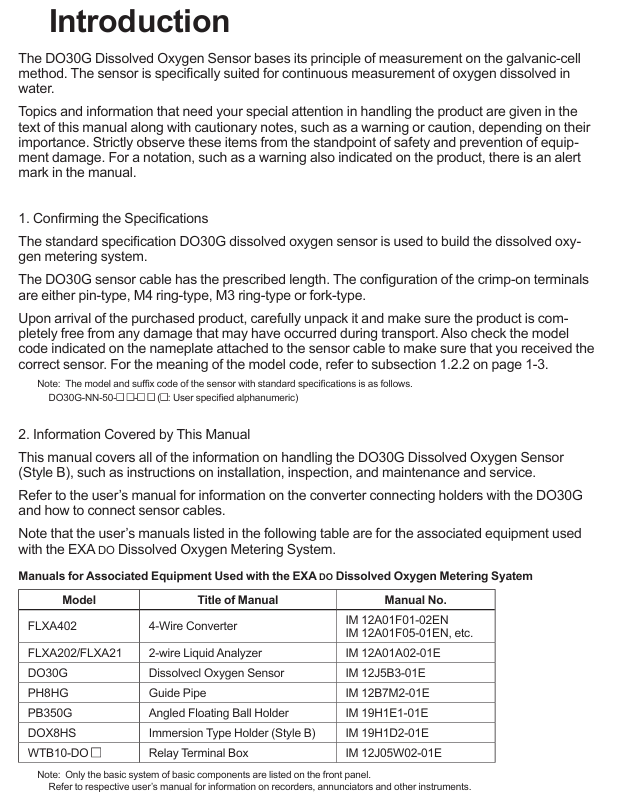
Model coding rules
Standard model format: DO30G-NN-50-XX-YY, the meanings of each part are as follows:
-NN: Fixed suffix, no special meaning
-50: Permeable membrane thickness, fixed at 50 μ m
-XX: Cable length, optional -03 (3m), -05 (5m), -10 (10m), -15 (15m), -20 (20m)
-YY: Cable terminal types, - PN (pin type), - FK (fork type), - FL (M4 ring type), - FM (M3 ring type)
Key technical specifications
Specification category specific parameter remarks
Measurement parameter measurement range: 0-20 ppm, 0-20 mg/L, 0-100% (saturation). Specific ranges need to be set in the converter
Repeatability: 0.1 mg/L or 3% FS (whichever is greater) with sensor error included
Temperature compensation error: ± 3% FS (± 5 ℃ variation within 0-40 ℃) including sensor error
Response time: ≤ 2 minutes (90% response) including sensor error
Environmental requirements for measuring solution temperature: 0-40 ℃ (maximum value) Exceeding the range affects accuracy
Measure solution pressure: conventional 0-30 kPa, maximum 100 kPa, depth not exceeding 3m
Measure solution flow rate: ≥ 20 cm/s to prevent errors caused by bubble retention
Structural Material Sensor Unit: Hard PVC, Stainless Steel Resistant to Conventional Corrosion
Permeable membrane: Fluororesin (FEP) with a thickness of 50 μ m, requiring regular inspection
O-ring: Nitrile rubber sealing function, it needs to be replaced synchronously when replacing the membrane
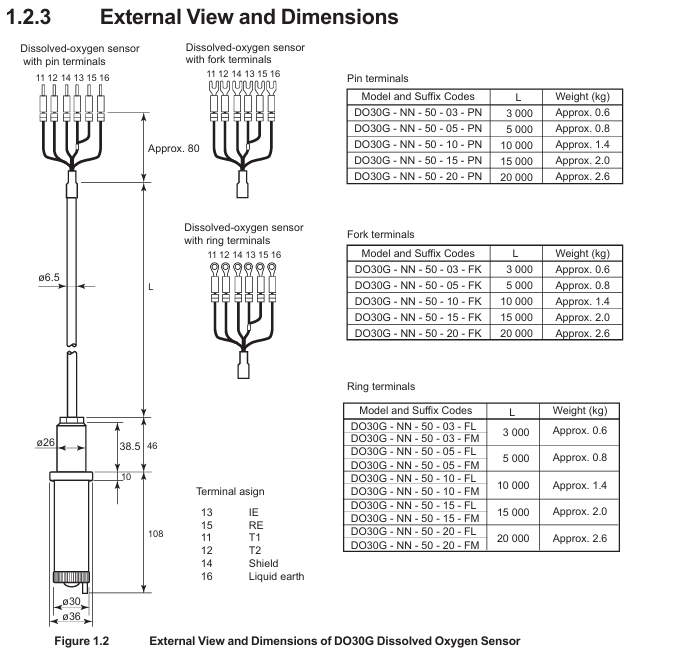
Cable: heat-resistant flexible PVC, shielding design length 3-20m, terminal type selected according to requirements
Temperature compensation built-in RTD: PT1000 has a resistance of approximately 1097 Ω at 25 ℃, used to correct the effect of temperature on dissolved oxygen
The basic weight is 0.3 kg+0.12 × N kg (N is the length of the cable), and the total weight of a 5m cable is approximately 0.9 kg
Installation process and precautions
Pre-installation preparation
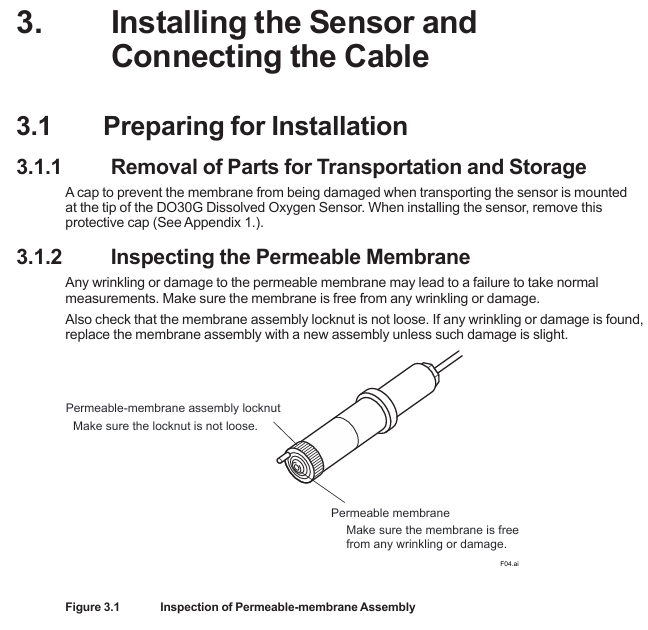
Remove protective cap: There is a black rubber protective cap on the tip of the sensor. It is forbidden to forcefully pull or twist it to remove it (which may cause the film to stretch/break). The correct way is to insert a 0.1-0.2mm thin rod and leave an air gap before pulling it out, or slowly rotate it clockwise to remove it (see Appendix 1 for details).
Check the permeable membrane: visually confirm that the membrane is not wrinkled or damaged, and that the membrane component lock nut is not loose (looseness can cause electrolyte leakage and affect measurement).
Principles for selecting measurement points
Uniform solution composition: avoid areas with frequent bubbles and stagnant water (to prevent fluctuations in measurement values).
Stay away from high velocity sand containing solutions: prevent sand particles from wearing down the permeable membrane.
Depth ≤ 3m: meets the pressure tolerance range (maximum 100 kPa).
Bracket selection and installation | Bracket type | Material/structure | Applicable scenarios | Installation points |
| Sensor tilted installation (anti bubble attachment), cleaning tube connected to water/air source for automatic cleaning|
cable connection
Match the converter according to the terminal number, taking FLXA402 as an example:
Temperature sensor (Pt1000): Connect terminal 11 (T1) and terminal 12 (T2) of the cable to the corresponding temperature terminals of the converter.
Electrode signal: Connect the 13 terminal (IE, anode) and 15 terminal (RE, cathode) of the cable to the corresponding electrode terminals of the converter.
Shielded wire: Connect to the shielded terminal of the converter to reduce interference.
Attention: Cable terminals must not be contaminated with water, and protection should be taken when not connected temporarily.
Maintenance and troubleshooting
Daily maintenance (regular inspection)
Permeation membrane cleaning: During each calibration, rinse the membrane surface with clean water, and wipe stubborn dirt with neutral detergent (do not scrape with hard objects to avoid membrane damage).
Membrane module lock nut inspection: Each calibration confirms that the lock nut is not loose, and if it is loose, it needs to be tightened; If there is still an abnormal display after tightening (such as extremely low measurement values), the electrolyte needs to be replaced.
Fault handling process
Troubleshooting steps and solutions
Abnormal measurement values (low/fluctuating) 1. Check if the membrane is damaged/wrinkled; 2. Check if the lock nut is loose; 3. Check if the electrolyte has deteriorated. 1. Replace the membrane module and electrolyte; 2. Tighten the nut lock; 3. Replace the electrolyte
If the temperature compensation fails and the resistance between terminals 11-12 of the measurement cable (standard value of 1097 Ω at 25 ℃) is abnormal, replace the sensor
Unable to zero/span 1. Replace membrane module+electrolyte and retry; 2. If the corrosion of the lead electrode is still ineffective, replace the sensor (lead electrode has a lifespan of 3-4 years)
Steps for replacing electrolyte and membrane components
Safety reminder: The electrolyte is KOH alkaline solution. If it comes into contact with the skin/eyes, rinse immediately with water and do not leave any residue in the syringe.
Steps:
Remove the sensor and clean the wet area;
Release the lock nut and remove the membrane component and old O-ring;
Empty the old electrolyte (tilt sensor, use a syringe to blow air from the injection port to assist in emptying);
Polishing silver electrode: Dip a damp gauze into aluminum oxide powder and gently wipe it (to avoid excessive polishing and prevent damage to the epoxy material), then clean the remaining powder;
Install a new O-ring, inject 8ml of new electrolyte (Yokogawa specific, model K9171DN), and reserve 1ml of air;
Install a new membrane component: Drop 1 drop of electrolyte on the surface of the silver electrode to prevent bubbles, lightly press the membrane component and tighten the locking nut (do not rotate the membrane component);
Rest: After replacement, it is necessary to rest for more than half a day before adjusting the zero/span (negative values may be displayed in the initial 10 minutes, which is a normal phenomenon).
Core spare parts list
DOX8A Maintenance Kit (Style B): Designed specifically for DO30G, it includes the following items:
Item Name Specification/Quantity Usage
Replace 50mL of electrolyte (model K9171DN) with 8ml each time
Replace damaged/contaminated membranes with 3 sets of membrane components and O-rings (model K9171HM)
500g of zero calibration reagent (sodium sulfite) (model L9920BR) is used to prepare a zero calibration solution (50g is required for 1L)
Inject 5ml (with needle, model L9827NH/L9827NG) of electrolyte into the syringe
200mL beaker (model L9825AF) for draining electrolyte/calibration purposes
30g of silver electrode polishing powder (model K9088PE) is used to polish silver electrodes, with approximately 0.5g used each time
Spare parts: membrane module lock nut (model K9171CH), spare sensor (to avoid measurement interruption caused by sudden failure).
Key issue
Question 1: How long does it take to replace the permeation membrane and electrolyte of DO30G sensor? What safety and operational details should be paid attention to when replacing?
answer:
Replacement cycle: It is recommended to replace the electrolyte every 6-8 months or immediately when the sensor cannot be adjusted for span; The permeable membrane and electrolyte should be replaced synchronously. If the membrane is damaged, wrinkled, or severely contaminated, it needs to be replaced in advance.
Safety details: The electrolyte is KOH alkaline solution. If it comes into contact with the skin, rinse immediately with clean water. If it enters the eyes, rinse and seek medical attention. Do not leave any residue in the syringe;
Operation details: When injecting electrolyte, add 8ml (Yokogawa specific model K9171DN) and reserve 1ml of air to prevent abnormal pressure; Before installing the membrane module, one drop of electrolyte should be dropped on the surface of the silver electrode to avoid the formation of bubbles between the membrane and the electrode; Do not rotate the membrane component when tightening the nut to prevent membrane wrinkling.
Question 2: There are three commonly used mounting brackets for DO30G sensors (PH8HG, PB350G, DOX8HS). How to choose according to the actual scenario? What are the core advantages and installation requirements of each bracket?
answer:
Selection of bracket type scene based on core advantages and installation requirements
PH8HG catheter measurement solution has no bubbles or pollutants (such as clear water tank), PVC material is corrosion-resistant, simple structure, low cost, and needs to be fixed on a pipeline with an outer diameter of 60.5mm. The sensor is suspended in a 2m long catheter
The PB350G floating ball bracket measures the solution level with large fluctuations and a small amount of flocculent substances (such as sedimentation tanks). The floating ball changes with the liquid level, and the sensor is always immersed in the solution; The wet part is smooth and not easy to hang flocs. The bracket is fixed on the 50A pipeline (outer diameter 60.5mm) or horizontal plane, and the float does not deviate from the measurement point
The DOX8HS immersion bracket measurement solution is prone to contamination (such as industrial wastewater) and needs to be regularly cleaned and installed at a 45 ° angle to prevent bubble adhesion; Support automatic cleaning with water/air spray to reduce the need for manual maintenance by connecting to a clean water/air source. The sensor is tilted and fixed to ensure that the cleaning spray port is aligned with the membrane surface
Question 3: When the DO30G sensor displays abnormal measurement values (such as continuous low or large fluctuations), how to gradually investigate the cause of the fault and solve it?
Answer: Troubleshooting should be carried out according to the following steps, with priority given to handling simple faults:
Check the condition of the permeable membrane: visually inspect the membrane for any damage, wrinkles, or severe contamination (such as oil stains or sediment). If there is, replace the membrane module (model K9171HM)+electrolyte; If the pollution is minor, clean with clean water and neutral detergent and try again;
Check the locking nut of the membrane module: confirm whether the locking nut is loose (looseness can cause electrolyte leakage, and the measured value is low). If it is loose, tighten it. If it is still abnormal after tightening, replace the electrolyte;
Check the status of the electrolyte: observe whether the electrolyte is turbid or discolored (normally clear), and replace it if it deteriorates;
Check temperature compensation: Use a multimeter to measure the resistance between terminals 11-12 of the cable (standard value of 1097 Ω at 25 ℃). If the resistance is abnormal, the sensor RTD is faulty and needs to be replaced;
Check the lead electrode: If the above steps are ineffective, it may be due to long-term corrosion failure of the lead electrode (with a lifespan of 3-4 years), and the sensor needs to be replaced as a whole.

- YOKOGAWA
- Reliance
- ADVANCED
- SEW
- ProSoft
- WATLOW
- Kongsberg
- FANUC
- VSD
- DCS
- PLC
- man-machine
- Covid-19
- Energy and Gender
- Energy Access
- Renewable Integration
- Energy Subsidies
- Energy and Water
- Net zero emission
- Energy Security
- Critical Minerals
- A-B
- petroleum
- Mine scale
- Sewage treatment
- cement
- architecture
- Industrial information
- New energy
- Automobile market
- electricity
- Construction site
- HIMA
- ABB
- Rockwell
- Schneider Modicon
- Siemens
- xYCOM
- Yaskawa
- Woodward
- BOSCH Rexroth
- MOOG
- General Electric
- American NI
- Rolls-Royce
- CTI
- Honeywell
- EMERSON
- MAN
- GE
- TRICONEX
- Control Wave
- ALSTOM
- AMAT
- STUDER
- KONGSBERG
- MOTOROLA
- DANAHER MOTION
- Bentley
- Galil
- EATON
- MOLEX
- Triconex
- DEIF
- B&W
- ZYGO
- Aerotech
- DANFOSS
- KOLLMORGEN
- Beijer
- Endress+Hauser
- schneider
- Foxboro
- KB
- REXROTH
- YAMAHA
- Johnson
- Westinghouse
- WAGO
- TOSHIBA
- TEKTRONIX
- BENDER
- BMCM
- SMC
- HITACHI
- HIRSCHMANN
- XP POWER
- Baldor
- Meggitt
- SHINKAWA
- Other Brands
- UniOP
- KUKA
- IBA
- Beckhoff
- ADLINK
-
FANUC A06B-0169-B088 - AC Servo Motor Alpha M40 3000 3 KW
-
ALPHA WIRE 1299C-SLATE-1000 - Multi-Conductor Cable Wire
-
alpha / Wittenstein SK+180S-MF1-10-1M1-1K - Hypoid Gearbox i=10
-
ALPHA WIRE 1181/40C SL005 - Multi-Conductor Cable Wire
-
Generic / DSI Straight Anatomic Plastic Adapter Head + Screw Hex - Dental Implant Fixture
-
Alpha II-650 MV6500526A - Power Supply Unit
-
ALPHA WIRE 7036 WH001 - Hook-Up Wire
-
FANUC RDCGM00000004O / TP 050-MF1-7-061-000 - Gear Reducer / Alpha Gearbox
-
Alpha II-650 MV6500436A - TDK-Lambda Power Supply Unit
-
Alpha S-Alpha600 J60033 - 600W Switching Power Supply Unit
-
Alpha 1500W J00032 - Power Supply Unit
-
Alpha 600W H60638 - Switching Power Supply Unit
-
Alpha 650 MV6500314A - Power Supply Unit
-
Aloka UST-5413 - Linear Probe for Prosound Alpha 6
-
ALPHA WIRE TFT25015 NA002 - High Temperature Heat Shrink Tubing Wire Sleeving
-
JAVAD ALPHA2 / GrAnt-G3 - GPS Receiver
-
Alpha 400W H47318 - Switching Power Supply Unit
-
Alpha SG-ALPHA-202-001 / Q1001-010-001 - Circuit Board Module
-
Antlia Dual ERF H-Alpha & Cak/CaH - Density Astronomical Accessory
-
ALPHA WIRE 5100C SL033 - Multi-Conductor Cable Wire
-
ALPHA WIRE 5098C-SL033 - Multi-Conductor Cable Wire
-
Fanuc A06B-6290-H105 - Alpha Sv 80hv-B Module Servo Amplifier
-
FANUC A06B-6240-H105 - Aux Axis Alpha aiSV 80 Servo Amplifier
-
Endress+Hauser Alpha-Log RSA10-61B1S / 42974737/0130 - Data Logger Measurement Instrument
-
ALPHA WIRE 6363-SL002 - Multi-Conductor Cable Wire
-
Alpha SP100S-MF1-7-1K1-2S - Gear Reducer
-
Alpha SP 100G-MF1-4-0H1-2S-PGG - Planetary Gear Reducer
-
FANUC A06B-0143-B175 #0275 - Alpha 12/3000 AC Servo Motor
-
James Burn Alpha Doc P33 / GBC PDI - Automatic Punch DocuPunch
-
Titus HVAC 105383-01 - ALPHA BAC Controller and Actuator
-
Wittenstein Alpha SP 100S-MF2-20-0E0-2S - Planetary Gearbox i=20
-
Kashiyama Alpha-85-ZV / SP-8026G - Pump Controller
-
Christ Alpha 2-4 LDplus - Freeze Drier Part N/ 101542
-
Lambda / Alpha H40896 - 400W Power Supply Unit
-
Wittenstein Alpha LP-070S-MF1-3-1E1-38 - Planetary Gearbox
-
Matrox / EXO-2480 133-D06-3 / 398-17962-1 - Alpha Numeric PCB Board
-
Fanuc A06B-6096-H204 - Dual Axis Alpha Servo Amplifier Module
-
Alpha Wire 5002C-SL001 - Multi-Conductor Cable 2 Conductors 22AWG 300VAC
-
Alpha 600W H60638 - Switching Power Supply Unit
-
Alpha Scientific Spin Precession Dual Electro Magnet Beam Line Chamber - Electro Magnet Beam Line Chamber
-
ALPHA WIRE 6017C SL005 - Multi-Conductor Cable Wire
-
ALPHA WIRE 65804 SL002 - Multi-Conductor Cable Wire
-
Fanuc A06B-0152-B010 - AC Servo Motor Alpha A30/2000 with Brake
-
ALPHA WIRE 5856-VI001 - Hook-Up Wire
-
ALPHA WIRE M13142-SL001 - Multi-Conductor Cable Wire
-
Alpha & Omega AOZ1017 - 8-Pin SOIC SMD Buck Switching Regulator IC
-
Alpha 600W H67027 CA600 - 600W Switching Power Supply Unit
-
ALPHA WIRE 2845/7-RD001 - Hook-Up Wire
-
Wittenstein Alpha VH+063S-MF1-10-6H1-1K-0C2 - Worm Gear Reducer i=10
-
ALPHA WIRE 2414C SL022 - Multi-Conductor Cable Wire
-
ALPHA WIRE 5672-SL005 - Multi-Conductor Cable Wire
-
BECKHOFF / Alpha AM8021-0B10-0000 + CP 040-MO1-10 - Servo Motor with Planetary Gearbox
-
ALPHA Systems Lab Inc MBA-WV1-F / PCB-WV1-F - PCB Board
-
FANUC A06B-0826-B201 - Alpha P12 AC Spindle Motor
-
WF & HC / Alpha-E 10045 - Tiller Bar Flat Flange Inlet 3150LB 3X 2.5 Inch
-
Seiler Alpha Air 3 - Dental Microscope
-
Alpha 400W H47223 - Switching Power Supply Unit
-
Wittenstein Alpha SP 180S-MC1-5-1M0-2K - Planetary Gearbox
-
FANUC A06B-6117-H211 - Servo Amplifier Module Alpha iSV 160/160 Amp
-
Alpha S-Alpha600 J60033 - 600W Switching Power Supply Unit
-
Adaptive Alpha Eclipse StreetSmart Model 17X - Master Slave LED Sign 44 x 44 Inch
-
ALPHA WIRE 391697-WH005 / 391697WH005 - Hook-Up Wire
-
Generic 22W Laser Engraver Cutter - Smart Air Pump APP Control CNC Dual-core CPU DIY Tools
-
FANUC A06B-6102-H226 / A06B6102H226 - Spindle Amplifier Module
-
FANUC A06B-6090-H006 / A06B6090H006 - Servo Power Supply Module
-
Alpha Wire Apr-19 - High Low Temperature Cable 75 FT
-
Wittenstein Alpha HG+ 075S-MF2-28-6E1-1S10 - Hypoid Gearbox Reducer i=28
-
Alpha J00032 - 1500W Power Supply Unit
-
Alpha H47038 - 400W Power Supply Unit
-
FANUC A06B-6096-H204 - Dual Axis Alpha Servo Amplifier Module
-
Wittenstein Alpha LPB090-MO1-10-111-00 - Alpha Planetary Gearbox
-
ALPHA WIRE 2842/19-YL001 - Hook-Up Wire
-
WITTENSTEIN ALPHA HG+060S-MF1-56C1-1K00 - Planetary Gearbox
-
Basler A102K Alpha VIS - Black and White CCD Industrial Camera
-
Alpha H40935 - 400W Power Supply Unit
-
FANUC A06B-6114-H207 - 2-Axis Servo Amplifier Module SVM20/40i Alpha i Series
-
TDK-Lambda / Alpha H47318 - 400W Switching Power Supply Unit
-
HITACHI Aloka Prosound Alpha 7 Premier - Diagnostic Ultrasound System
-
Alpha SP100S-MF1-4-1E1-2S - Precision Gear Reducer
-
FANUC A20B-2001-0950 - Control Circuit Board PCB
-
ALPHA WIRE 2855/1-GR001 - Hook-Up Wire
-
FANUC A06B-6096-H204 - Dual Axis Alpha Servo Amplifier Module
-
Wittenstein Alpha LPB090-MO1-10-111-00 - Alpha Planetary Gearbox
-
ALPHA WIRE 2842/19-YL001 - Hook-Up Wire
-
Basler A102K Alpha VIS - Black and White CCD Industrial Camera
-
Wittenstein Alpha LP 090-M01-7-111-000 / Schneider - Gear Box i:7 Schneider Electric Servo Motor
-
LAMBDA ALPHA 600W H60554 - Switching Power Supply Unit
-
Fanuc A06B-0238-B100 / A860-2000-T301 - AC Servo Motor with Encoder
-
FANUC A06B-6290-H322 - ALPHA iSV 10/10/10HV-B 3-Axis Servo Drive
-
Polymotor Italiana 9919 121 90332 / Alpha SP75-M1-3 - D.C. Permanent Magnet Motor with Gearbox
-
MJ Research PTC-200 - PCR DNA Engine Thermal Cycler with Dual 48-Well Alpha Block
-
ALPHA WIRE 5002C-SL002 - Multi-Conductor Cable Wire
-
Fluke / Victoreen ASM 990 / 489-110D - Biomedical Radiation Detector Probe with Pelican Case
-
ALPHA WIRE 5855-BK001 - Hook-Up Wire 22AWG Silver Plated Copper
-
Tetra / Alpha 600W H60552 - Switching Power Supply Unit
-
Bruker Alpha FTIR Spectrometer / Alpha-P ATR - Infrared Spectrometer FTIR Instrument
-
Simagic AlphaM-FX-C 290mm FX-C - Formula Steering Wheel with Alpha Mini Wheel Base
-
Alpha Wire 5152C 20/2C - XtraGuard High Performance Instrumentation/Control Cable
-
ALPHA WIRE 1219/40C SL005 - Multi-Conductor Cable Wire
-
ALPHA WIRE 3131441 TN005 - Multi-Conductor Cable Wire
-
ALPHA WIRE 2172-SV005 - Multi-Conductor Cable Wire
-
FANUC A20B-2100-0742 - ALPHA ia Servo Control Board
-
Olympus Endo Alpha Cart TI-A1 - Medical Equipment Cart with Accessories
-
ALPHA WIRE 74010-BK002 - Multi-Conductor Cable Wire
-
Fanuc A06B-6110-H026#N - ALPHA i Power Supply Module PSM-26i
-
Alpha Laval SX2/013 - Rotary Lobe Pump
-
Alpha II-450P MV4500007B - Switching Power Supply Unit
-
TDK-Lambda / Alpha 400W - Switching Power Supply Unit
-
ALPHA ALPHA6000E-3015GB/3018PB - Frequency Inverter Drive Power Converter
-
ALPHA WIRE 391245-WH005 - Hook-Up Wire
-
Alpha H60562 CA600 - 600W Switching Power Supply Unit
-
Fanuc A06B-0147-B675 - Alpha 22/2000 3.8kW 2000rpm AC Servo Motor
-
ALPHA WIRE 9821 - Twinaxial Cable 1PR 25AWG Poly Insulation
-
Fanuc / Alpha A16B-2203-0820 - ALPHA i Spindle Wiring PCB
-
FANUC A20B-2100-0742 - ALPHA ia Servo Control Board
-
Fanuc A06B-6096-H104 - Alpha Servo Module
-
Fuji Electric RYT202D5-VV2 / Faldic Alpha5 - Servo Amplifier
-
ALPHA WIRE 2817/6 20 AWG - PTFE High Temperature Cable
-
Aloka Prosound Alpha 10 / EU-6031C / JB-274D - High Voltage Power Supply for Ultrasound
-
Wittenstein Alpha SP 140S-MF1-5-01F-2S - Planetary Gearbox
-
FANUC A06B-6124-H205 - Alpha iSV Servo Amplifier Module
-
TDK-Lambda / Alpha MV6500314A - 650W Power Supply Unit
-
TDK-Lambda / Alpha H47318 - 400W Switching Power Supply Unit
-
Alpha H47318 - 400W Switching Power Supply Unit
-
CNC Bearing / Alpha AR090-S1-300-20-N - Robotics Bearing Component
-
Alpha CA400 5A,3.3Q,5B,12/12E / DXH47037 - 400W Power Supply Unit
-
FANUC A20B-2100-0742 - ALPHA ia Servo Control Board
-
Fanuc / Amada A04B-0810-C403 / LC1212 alpha II - Pressure Regulator

K-JIANG

Add: Jimei North Road, Jimei District, Xiamen, Fujian, China
Tell:+86-15305925923