

K-WANG


YOKOGAWA SC4AJ Conductivity Sensor
YOKOGAWA SC4AJ Conductivity Sensor
Equipment foundation and adaptation system
1. Core positioning and application scenarios
SC4AJ is a compact sensor designed specifically for low conductivity solutions, suitable for industries such as semiconductors, power, and pharmaceuticals that require high purity (such as ultrapure water detection). It needs to be paired with a specific analyzer/converter to form a complete detection system. The compatible equipment and corresponding manual information are as follows:
Corresponding manual number for supporting equipment type
FLXA202, FLXA21 2-wire analyzer IM 12A01A02-01E
FLXA402 4-wire converter IM 12A01F01-02EN, IM 12A01F03-01EN, etc
SC450G Conductivity Converter IM 12D08N05-01E
SA11 Smart Adapter IM 12A06S01-00EN-P
2. Equipment core classification and parameters
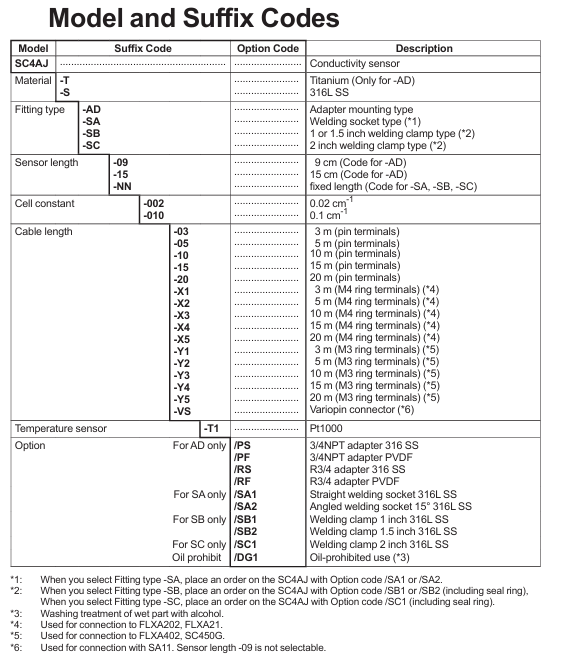
SC4AJ is classified into models based on electrode material, installation method, and battery constant. The core differences focus on adaptation scenarios and measurement ranges. The specific classifications are as follows:
Classification dimensions, specific types, key parameters/characteristics
Electrode material titanium (- T) is only suitable for adapter installation type (- AD), with strong corrosion resistance
316L stainless steel material (- S) is compatible with all installation methods and has strong universality
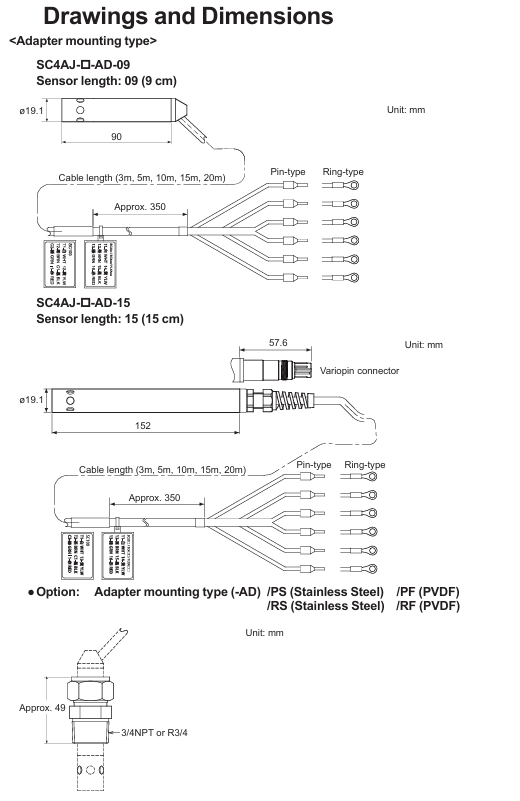
Installation method: Adapter installation type (- AD) with 3/4NPT or R3/4 adapter (stainless steel/PVDF material), sensor length 9cm/15cm
Welding socket type (- SA) requires straight type (/SA1) or 15 ° angle type (/SA2) welding socket, with fixed sensor length
Welding clip type (- SB/- SC) - SB compatible 1/1.5 inch clip (/SB1//SB2), - SC compatible 2-inch clip (/SC1), including sealing ring
Battery constant 0.02 cm ⁻¹ (-002) measurement range 0-0.5 μ S/cm to 0-200 μ S/cm, suitable for extremely low conductivity solutions
0.1 cm ⁻¹ (-010) measurement range 0-5 μ S/cm to 1 mS/cm, suitable for low conductivity solutions
Cable terminal pin type/M4 ring type/M3 ring type/Variopin pin type compatible with multiple devices; M4 ring adapter FLXA202/FLXA21; M3 ring adapter FLXA402/SC450G; Variopin compatible with SA11
3. General technical specifications
Temperature and pressure: The electrode has a conventional temperature of 0-110 ℃ (can be steam sterilized at 135 ℃ for 30 minutes) and a pressure of 0-1 MPa; The tolerance range of the bracket varies with the material (stainless steel 316L has higher temperature resistance, PVDF has lower temperature resistance, please refer to the temperature pressure curve for details)
Contact fluid material: main body (316L stainless steel/titanium), O-ring (FKM fluororubber, EPDM EPDM EPDM), adapter (PVDF or 316L stainless steel)
Temperature compensation: Built in Pt1000 temperature sensor to calibrate the effect of temperature on conductivity
Protection restriction: The sensor mold and metal joint are not waterproof and cannot be immersed in process water
Safety regulations and usage restrictions
1. Core security principles
Prohibited unauthorized operation: Only use according to the instructions in the manual, unauthorized modification of the device will result in loss of protective function; Repairs require Yokogawa certified spare parts, unauthorized modifications are prohibited
Static electricity and explosion prevention: The flow of ultrapure water in plastic pipes may generate static electricity, and it is necessary to avoid the sensor conducting static electricity and damaging the converter circuit; Must comply with explosion-proof standards such as IEC 60079-11 and GB 3836.4-2010 (TIIS certified models cannot be connected), and if necessary, affix a "simple equipment" label
Temperature limit: The maximum process temperature needs to be determined based on the supporting analyzer (FLXA202/FLXA21) and temperature level (T1-T6). For example, under T6 level, the maximum process temperature at 40 ℃/60 ℃ ambient temperature is 49 ℃; At T5 level, the ambient temperature is 95 ℃ at 40 ℃ (note that the upper limit of T5 level is 100 ℃)
2. Manual usage guidelines
It needs to be handed over to the end user and properly stored, and unauthorized copying/dissemination is prohibited; Yokogawa reserves the right to improve manuals and equipment without prior notice
The manual only describes the device functions and does not guarantee adaptation to specific user scenarios; The equipment is provided as is, and Yokogawa is not responsible for unforeseeable direct/indirect losses
Installation and Wiring Guide
1. Core installation requirements
Installation principle: Ensure uniform composition and no dead zone when the solution flows through the sensor; The sensor needs to be submerged above the outlet to ensure continuous liquid flow between the electrodes; Reserve maintenance space for easy disassembly and release of process pressure; Confirm that the pressure at the installation site is within the tolerance range of the sensor and adapter
Steps for different installation methods:
Adapter installation type (- AD): Assemble in the order of "nut → adapter support (stainless steel adapter) → adapter → sealing ring → sensor body", tighten the nut with a torque of about 190 N · m (tighten with fingers and then use a wrench to tighten 1.25 turns)
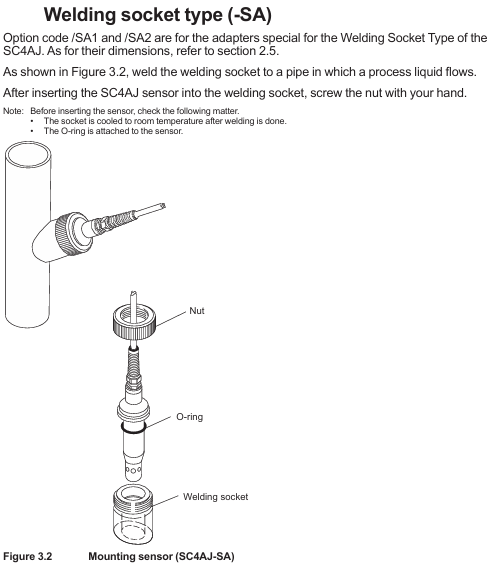
Welding socket type (- SA): First weld the welding socket to the process pipeline (cool to room temperature), insert the sensor into the socket after installing the O-ring, and fix it by hand tightening the nut
Welding clamp type (- SB/- SC): First weld the flange to the pipeline, insert the sensor into the flange after installing the sealing ring, and fix it with a special fixture
2. Wiring requirements
Wiring logic: Connect according to the cable end identification and the terminal number of the analyzer/converter, for example, connect the temperature sensor wire (brown/black/red) to the corresponding temperature terminal, and the electrode wire (green/yellow) to the corresponding electrode terminal; Variopin terminal (- VS) needs to be connected to SA11 adapter
Cable specifications: Cable length 3-20m (selected according to the order), avoid contact with high-temperature components, and ensure that the insulation resistance meets the requirements after wiring (such as 1000-1137 Ω between terminals 11-12 and>100 M Ω between terminals 11-13)
Operation and maintenance process
1. Preparation and calibration before operation
Pre operation inspection: Confirm that the cable connection is correct, the solution is leak free, the temperature/pressure is within the range, and the solution level reaches the outlet height
Battery constant setting: The factory calibrated battery constant on the cable label needs to be input into the matching analyzer/converter (refer to the corresponding equipment manual for operation steps)
Calibration requirements: Use a standard solution with known conductivity for calibration (the conductivity of the standard solution should be close to that of the test liquid). Before calibration, the sensor should be equilibrated with the temperature of the solution, and the temperature should be measured using a calibration thermometer
2. Core maintenance operations
(1) Sensor cleaning
Choose the cleaning method based on the type of pollutant, and prohibit mixing hydrochloric acid with chlorine containing solvents (to avoid producing toxic chlorine gas):
Scale and hydroxides: Clean with 5-10% hydrochloric acid solution
Organic dirt (oil, grease): Wipe with ethanol or acetone
Algae/bacteria: Clean with chlorine containing solution (household bleach)
Conventional pollution: cleaning with hot water and household detergent
After cleaning, visually inspect the sensor for any damage or deformation
(2) Abnormal judgment
After the sensor dries, measure the resistance between the terminals with a digital multimeter. If it exceeds the following range, it needs to be replaced:
Terminal combination (non VS) Variopin terminal combination (- VS) standard resistance at room temperature
11-12 E-F 1000-1137 Ω
11-13, 13-15, 12-15 E-C, C-A, F-A>100 M Ω
13-14, 15-16 C-D, A-B < 10 Ω
3. Spare parts information
Core spare parts need to be matched according to the installation method, and common spare parts are as follows:
Type description corresponding to spare part number
K9670MA SA (non VS) O-ring
K9670VY SA (- VS) O-ring set
K9670MK-SB sealing ring (compatible/SB1//SB2)
K9670MP SC sealing ring (compatible/SC1)
K9670MT/MU-AD 3/4NPT stainless steel/PVDF adapter
K9670ME/MD-SA straight/angle welding socket and installation nut
- YOKOGAWA
- Reliance
- ADVANCED
- SEW
- ProSoft
- WATLOW
- Kongsberg
- FANUC
- VSD
- DCS
- PLC
- man-machine
- Covid-19
- Energy and Gender
- Energy Access
- Renewable Integration
- Energy Subsidies
- Energy and Water
- Net zero emission
- Energy Security
- Critical Minerals
- A-B
- petroleum
- Mine scale
- Sewage treatment
- cement
- architecture
- Industrial information
- New energy
- Automobile market
- electricity
- Construction site
- HIMA
- ABB
- Rockwell
- Schneider Modicon
- Siemens
- xYCOM
- Yaskawa
- Woodward
- BOSCH Rexroth
- MOOG
- General Electric
- American NI
- Rolls-Royce
- CTI
- Honeywell
- EMERSON
- MAN
- GE
- TRICONEX
- Control Wave
- ALSTOM
- AMAT
- STUDER
- KONGSBERG
- MOTOROLA
- DANAHER MOTION
- Bentley
- Galil
- EATON
- MOLEX
- Triconex
- DEIF
- B&W
- ZYGO
- Aerotech
- DANFOSS
- KOLLMORGEN
- Beijer
- Endress+Hauser
- schneider
- Foxboro
- KB
- REXROTH
- YAMAHA
- Johnson
- Westinghouse
- WAGO
- TOSHIBA
- TEKTRONIX
- BENDER
- BMCM
- SMC
- HITACHI
- HIRSCHMANN
- XP POWER
- Baldor
- Meggitt
- SHINKAWA
- Other Brands
- UniOP
- KUKA
- IBA
- Beckhoff
- ADLINK
-
FANUC A06B-0169-B088 - AC Servo Motor Alpha M40 3000 3 KW
-
ALPHA WIRE 1299C-SLATE-1000 - Multi-Conductor Cable Wire
-
alpha / Wittenstein SK+180S-MF1-10-1M1-1K - Hypoid Gearbox i=10
-
ALPHA WIRE 1181/40C SL005 - Multi-Conductor Cable Wire
-
Generic / DSI Straight Anatomic Plastic Adapter Head + Screw Hex - Dental Implant Fixture
-
Alpha II-650 MV6500526A - Power Supply Unit
-
ALPHA WIRE 7036 WH001 - Hook-Up Wire
-
FANUC RDCGM00000004O / TP 050-MF1-7-061-000 - Gear Reducer / Alpha Gearbox
-
Alpha II-650 MV6500436A - TDK-Lambda Power Supply Unit
-
Alpha S-Alpha600 J60033 - 600W Switching Power Supply Unit
-
Alpha 1500W J00032 - Power Supply Unit
-
Alpha 600W H60638 - Switching Power Supply Unit
-
Alpha 650 MV6500314A - Power Supply Unit
-
Aloka UST-5413 - Linear Probe for Prosound Alpha 6
-
ALPHA WIRE TFT25015 NA002 - High Temperature Heat Shrink Tubing Wire Sleeving
-
JAVAD ALPHA2 / GrAnt-G3 - GPS Receiver
-
Alpha 400W H47318 - Switching Power Supply Unit
-
Alpha SG-ALPHA-202-001 / Q1001-010-001 - Circuit Board Module
-
Antlia Dual ERF H-Alpha & Cak/CaH - Density Astronomical Accessory
-
ALPHA WIRE 5100C SL033 - Multi-Conductor Cable Wire
-
ALPHA WIRE 5098C-SL033 - Multi-Conductor Cable Wire
-
Fanuc A06B-6290-H105 - Alpha Sv 80hv-B Module Servo Amplifier
-
FANUC A06B-6240-H105 - Aux Axis Alpha aiSV 80 Servo Amplifier
-
Endress+Hauser Alpha-Log RSA10-61B1S / 42974737/0130 - Data Logger Measurement Instrument
-
ALPHA WIRE 6363-SL002 - Multi-Conductor Cable Wire
-
Alpha SP100S-MF1-7-1K1-2S - Gear Reducer
-
Alpha SP 100G-MF1-4-0H1-2S-PGG - Planetary Gear Reducer
-
FANUC A06B-0143-B175 #0275 - Alpha 12/3000 AC Servo Motor
-
James Burn Alpha Doc P33 / GBC PDI - Automatic Punch DocuPunch
-
Titus HVAC 105383-01 - ALPHA BAC Controller and Actuator
-
Wittenstein Alpha SP 100S-MF2-20-0E0-2S - Planetary Gearbox i=20
-
Kashiyama Alpha-85-ZV / SP-8026G - Pump Controller
-
Christ Alpha 2-4 LDplus - Freeze Drier Part N/ 101542
-
Lambda / Alpha H40896 - 400W Power Supply Unit
-
Wittenstein Alpha LP-070S-MF1-3-1E1-38 - Planetary Gearbox
-
Matrox / EXO-2480 133-D06-3 / 398-17962-1 - Alpha Numeric PCB Board
-
Fanuc A06B-6096-H204 - Dual Axis Alpha Servo Amplifier Module
-
Alpha Wire 5002C-SL001 - Multi-Conductor Cable 2 Conductors 22AWG 300VAC
-
Alpha 600W H60638 - Switching Power Supply Unit
-
Alpha Scientific Spin Precession Dual Electro Magnet Beam Line Chamber - Electro Magnet Beam Line Chamber
-
ALPHA WIRE 6017C SL005 - Multi-Conductor Cable Wire
-
ALPHA WIRE 65804 SL002 - Multi-Conductor Cable Wire
-
Fanuc A06B-0152-B010 - AC Servo Motor Alpha A30/2000 with Brake
-
ALPHA WIRE 5856-VI001 - Hook-Up Wire
-
ALPHA WIRE M13142-SL001 - Multi-Conductor Cable Wire
-
Alpha & Omega AOZ1017 - 8-Pin SOIC SMD Buck Switching Regulator IC
-
Alpha 600W H67027 CA600 - 600W Switching Power Supply Unit
-
ALPHA WIRE 2845/7-RD001 - Hook-Up Wire
-
Wittenstein Alpha VH+063S-MF1-10-6H1-1K-0C2 - Worm Gear Reducer i=10
-
ALPHA WIRE 2414C SL022 - Multi-Conductor Cable Wire
-
ALPHA WIRE 5672-SL005 - Multi-Conductor Cable Wire
-
BECKHOFF / Alpha AM8021-0B10-0000 + CP 040-MO1-10 - Servo Motor with Planetary Gearbox
-
ALPHA Systems Lab Inc MBA-WV1-F / PCB-WV1-F - PCB Board
-
FANUC A06B-0826-B201 - Alpha P12 AC Spindle Motor
-
WF & HC / Alpha-E 10045 - Tiller Bar Flat Flange Inlet 3150LB 3X 2.5 Inch
-
Seiler Alpha Air 3 - Dental Microscope
-
Alpha 400W H47223 - Switching Power Supply Unit
-
Wittenstein Alpha SP 180S-MC1-5-1M0-2K - Planetary Gearbox
-
FANUC A06B-6117-H211 - Servo Amplifier Module Alpha iSV 160/160 Amp
-
Alpha S-Alpha600 J60033 - 600W Switching Power Supply Unit
-
Adaptive Alpha Eclipse StreetSmart Model 17X - Master Slave LED Sign 44 x 44 Inch
-
ALPHA WIRE 391697-WH005 / 391697WH005 - Hook-Up Wire
-
Generic 22W Laser Engraver Cutter - Smart Air Pump APP Control CNC Dual-core CPU DIY Tools
-
FANUC A06B-6102-H226 / A06B6102H226 - Spindle Amplifier Module
-
FANUC A06B-6090-H006 / A06B6090H006 - Servo Power Supply Module
-
Alpha Wire Apr-19 - High Low Temperature Cable 75 FT
-
Wittenstein Alpha HG+ 075S-MF2-28-6E1-1S10 - Hypoid Gearbox Reducer i=28
-
Alpha J00032 - 1500W Power Supply Unit
-
Alpha H47038 - 400W Power Supply Unit
-
FANUC A06B-6096-H204 - Dual Axis Alpha Servo Amplifier Module
-
Wittenstein Alpha LPB090-MO1-10-111-00 - Alpha Planetary Gearbox
-
ALPHA WIRE 2842/19-YL001 - Hook-Up Wire
-
WITTENSTEIN ALPHA HG+060S-MF1-56C1-1K00 - Planetary Gearbox
-
Basler A102K Alpha VIS - Black and White CCD Industrial Camera
-
Alpha H40935 - 400W Power Supply Unit
-
FANUC A06B-6114-H207 - 2-Axis Servo Amplifier Module SVM20/40i Alpha i Series
-
TDK-Lambda / Alpha H47318 - 400W Switching Power Supply Unit
-
HITACHI Aloka Prosound Alpha 7 Premier - Diagnostic Ultrasound System
-
Alpha SP100S-MF1-4-1E1-2S - Precision Gear Reducer
-
FANUC A20B-2001-0950 - Control Circuit Board PCB
-
ALPHA WIRE 2855/1-GR001 - Hook-Up Wire
-
FANUC A06B-6096-H204 - Dual Axis Alpha Servo Amplifier Module
-
Wittenstein Alpha LPB090-MO1-10-111-00 - Alpha Planetary Gearbox
-
ALPHA WIRE 2842/19-YL001 - Hook-Up Wire
-
Basler A102K Alpha VIS - Black and White CCD Industrial Camera
-
Wittenstein Alpha LP 090-M01-7-111-000 / Schneider - Gear Box i:7 Schneider Electric Servo Motor
-
LAMBDA ALPHA 600W H60554 - Switching Power Supply Unit
-
Fanuc A06B-0238-B100 / A860-2000-T301 - AC Servo Motor with Encoder
-
FANUC A06B-6290-H322 - ALPHA iSV 10/10/10HV-B 3-Axis Servo Drive
-
Polymotor Italiana 9919 121 90332 / Alpha SP75-M1-3 - D.C. Permanent Magnet Motor with Gearbox
-
MJ Research PTC-200 - PCR DNA Engine Thermal Cycler with Dual 48-Well Alpha Block
-
ALPHA WIRE 5002C-SL002 - Multi-Conductor Cable Wire
-
Fluke / Victoreen ASM 990 / 489-110D - Biomedical Radiation Detector Probe with Pelican Case
-
ALPHA WIRE 5855-BK001 - Hook-Up Wire 22AWG Silver Plated Copper
-
Tetra / Alpha 600W H60552 - Switching Power Supply Unit
-
Bruker Alpha FTIR Spectrometer / Alpha-P ATR - Infrared Spectrometer FTIR Instrument
-
Simagic AlphaM-FX-C 290mm FX-C - Formula Steering Wheel with Alpha Mini Wheel Base
-
Alpha Wire 5152C 20/2C - XtraGuard High Performance Instrumentation/Control Cable
-
ALPHA WIRE 1219/40C SL005 - Multi-Conductor Cable Wire
-
ALPHA WIRE 3131441 TN005 - Multi-Conductor Cable Wire
-
ALPHA WIRE 2172-SV005 - Multi-Conductor Cable Wire
-
FANUC A20B-2100-0742 - ALPHA ia Servo Control Board
-
Olympus Endo Alpha Cart TI-A1 - Medical Equipment Cart with Accessories
-
ALPHA WIRE 74010-BK002 - Multi-Conductor Cable Wire
-
Fanuc A06B-6110-H026#N - ALPHA i Power Supply Module PSM-26i
-
Alpha Laval SX2/013 - Rotary Lobe Pump
-
Alpha II-450P MV4500007B - Switching Power Supply Unit
-
TDK-Lambda / Alpha 400W - Switching Power Supply Unit
-
ALPHA ALPHA6000E-3015GB/3018PB - Frequency Inverter Drive Power Converter
-
ALPHA WIRE 391245-WH005 - Hook-Up Wire
-
Alpha H60562 CA600 - 600W Switching Power Supply Unit
-
Fanuc A06B-0147-B675 - Alpha 22/2000 3.8kW 2000rpm AC Servo Motor
-
ALPHA WIRE 9821 - Twinaxial Cable 1PR 25AWG Poly Insulation
-
Fanuc / Alpha A16B-2203-0820 - ALPHA i Spindle Wiring PCB
-
FANUC A20B-2100-0742 - ALPHA ia Servo Control Board
-
Fanuc A06B-6096-H104 - Alpha Servo Module
-
Fuji Electric RYT202D5-VV2 / Faldic Alpha5 - Servo Amplifier
-
ALPHA WIRE 2817/6 20 AWG - PTFE High Temperature Cable
-
Aloka Prosound Alpha 10 / EU-6031C / JB-274D - High Voltage Power Supply for Ultrasound
-
Wittenstein Alpha SP 140S-MF1-5-01F-2S - Planetary Gearbox
-
FANUC A06B-6124-H205 - Alpha iSV Servo Amplifier Module
-
TDK-Lambda / Alpha MV6500314A - 650W Power Supply Unit
-
TDK-Lambda / Alpha H47318 - 400W Switching Power Supply Unit
-
Alpha H47318 - 400W Switching Power Supply Unit
-
CNC Bearing / Alpha AR090-S1-300-20-N - Robotics Bearing Component
-
Alpha CA400 5A,3.3Q,5B,12/12E / DXH47037 - 400W Power Supply Unit
-
FANUC A20B-2100-0742 - ALPHA ia Servo Control Board
-
Fanuc / Amada A04B-0810-C403 / LC1212 alpha II - Pressure Regulator

K-JIANG

Add: Jimei North Road, Jimei District, Xiamen, Fujian, China
Tell:+86-15305925923