

K-WANG


KONGSBERG K-MASTER BRIDGE SOLUTIONS
KONGSBERG K-MASTER BRIDGE SOLUTIONS
The K-Master control console solution from Kongsberg is based on the core concept of "The Full Picture" and adheres to the philosophy of customer success as its own success. With the integration of technology in multiple fields such as positioning, acoustics, navigation, etc., it has created a highly integrated control console system that meets maritime safety standards. The system has a universal and intuitive touch based user interface, taking into account ergonomic design, and can adapt to various types of ships such as nearshore support ships, merchant ships, yachts, etc. It can dynamically adapt to operational needs and provide full lifecycle support, covering the entire stage from design, debugging, operation and maintenance to modernization upgrade. Combined with 7 × 24 hours of global customer support and modular training, the system is easy to upgrade and highly reliable through open distributed design, providing efficient and safe operation for ship operations. Environment.
Brand Core Mission and Philosophy
Mission: With the integration of technology and experience in positioning, underwater acoustics, communication, control, navigation, simulation, automation and other fields as the core, we aim to create innovative and reliable marine electronic equipment, provide customers with professional solutions and global services of "The Full Picture", ensure optimal operation of ships at sea, and help customers maintain competitive advantages.
philosophy
Core logic: Customer success is the success of Kongsberg, which requires active listening and understanding of customer needs, and transforming them into high-quality products and solutions.
Development cornerstone: Employees are the key to success. Through global knowledge network collaboration and guided by corporate values, innovation is stimulated to create value for customer operations.
Design concept: Due to the uniqueness of customer needs, continuous innovative thinking is required to transform employees' creativity and focus into technological achievements.
Core Principles and Advantages of K-Master System Design
Design core: Always guided by efficiency and safety, relying on the profound accumulation of Kongsberg in the design of the control panel system, meeting and exceeding maritime safety standards, focusing on functional integration and intuitive layout of ship machinery, navigation, and control system control and monitoring.
Core strengths
Unified user interface: The full functionality/subsystem adopts a universal, intuitive, and logical touch based user interface, created by a user centered design process, combined with high-quality graphic display, covering all core systems such as DP dynamic positioning, propulsion/side push control, alarm monitoring, ECDIS electronic chart, radar, and autonomous driving.
Ergonomics: All designs strictly follow ergonomics, taking into account the operability and layout rationality of workstations and instruments, and improving operational comfort.
Compliance: It can be integrated into the control panel system that complies with the maritime safety regulations of top classification societies, ensuring the compliance of ship operations.
System architecture: Adopting a distributed+open design, equipped with industry standard communication networks, using standardized hardware components to achieve three core values: high reliability, competitive lifecycle support, and simple upgrade solutions.
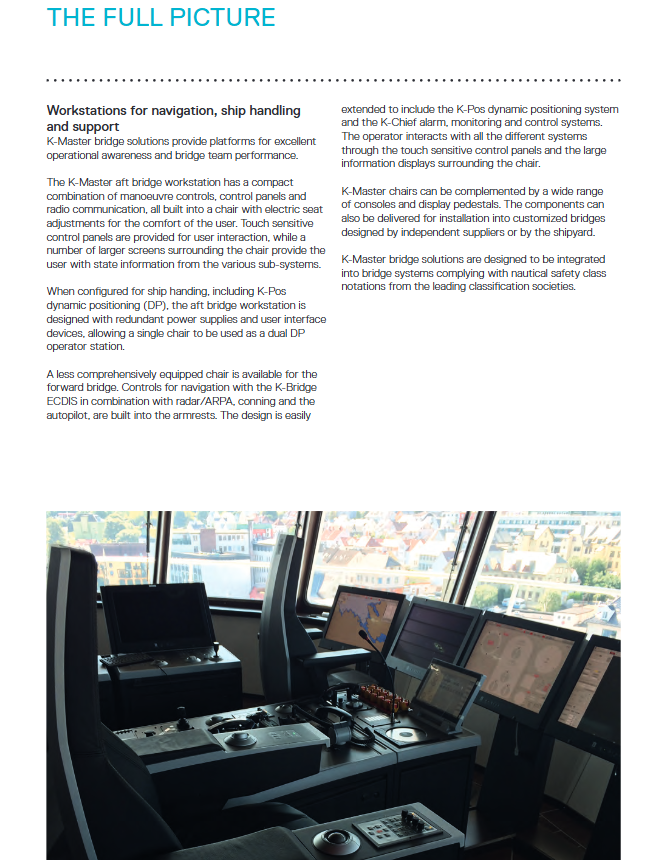
K-Master Workstation Types and Adaptation Scenarios
K-Master has created a driving console workstation that is suitable for different ships and operational needs. The core is divided into two categories and can be matched with various control consoles and display bases. Components can also be provided for customized driving console installation:
Workstation type design features, core functions, and adaptation scenarios
The compact design of the stern control console workstation integrates control, panel, and wireless communication into the chair with electric seats; Equipped with redundant power supply and user interface equipment, the single chair can be used as a dual DP operation station, including K-Pos dynamic positioning, full function ship maneuvering, communication, and other offshore support ship stern control consoles; Scenarios with high requirements for manipulation integration
The front control console workstation is streamlined, with navigation control integrated into the armrest, expandable DP positioning, K-Chief alarm monitoring system core consisting of K-Bridge ECDIS+radar/ARPA, autonomous driving, ship navigation, and offshore support for ships, merchant ships, and yachts
Overall adaptation: Initially designed for offshore support vessels, it was later expanded to commercial ships and yachts, especially suitable for multi-purpose vessels with limited cockpit space or dynamic adaptation operation requirements.
Key features of K-Master operation
Simplified operation: With "simplicity is the art of technology" as the core, the touch panel is paired with an information display screen, and hardware buttons are only reserved for key functions or backup operations; A single workstation can control multiple subsystems simultaneously, and operators can customize the content of the information display screen to display important system information in the most convenient location.
Human Machine Engineering Optimization: Designed in collaboration with users and industry experts for high demand ship operations, the joystick, controller, and display screen are all logically arranged in an intuitive manner, enhancing operational awareness while reducing operator fatigue.
Automation empowerment: automating complex operations such as ballast and fluid cargo loading and unloading to achieve faster and safer operations.
Task dynamic configuration: The system has unique flexibility to quickly access ship system information, allowing operators to focus on key performance indicators, grasp panoramic information, and make correct decisions regardless of the task they are performing.
Full lifecycle support services
K-Master provides customers with management services covering the entire life cycle of ships, from design to commissioning, and then to the entire operation stage. Based on the core competitiveness of internal system design and user capabilities, K-Master creates solutions that meet their needs and achieve operational efficiency improvement. The core coverage stages and corresponding services are shown in the table below:
Core support services for lifecycle stages
Planning&Design Technical Consultation
Project Engineering&Development Design, Software Engineering
Installation&Debugging Online Support, Technical Support
Operation&maintenance on-site service, spare parts repair, system optimization
Modernization upgrade system modernization upgrade, continuous software and hardware upgrade
Core value-added services
Evergreen Upgrade: The boundaries between each module and control section of the system are clear, and new functions/control sections can be added step by step. Through continuous hardware and software upgrades, the ship's operational efficiency is maximized.
Modular training: Provide full category modular training for crew members, covering operator training, technical training, and ensuring that crew members' professional abilities match equipment operation needs.
System advantages: The equipment design is easy to install and maintain, relying on on-site service or remote connection for professional support, ensuring optimal operational availability of the system, and reducing lifecycle expenses.
- YOKOGAWA
- Reliance
- ADVANCED
- SEW
- ProSoft
- WATLOW
- Kongsberg
- FANUC
- VSD
- DCS
- PLC
- man-machine
- Covid-19
- Energy and Gender
- Energy Access
- Renewable Integration
- Energy Subsidies
- Energy and Water
- Net zero emission
- Energy Security
- Critical Minerals
- A-B
- petroleum
- Mine scale
- Sewage treatment
- cement
- architecture
- Industrial information
- New energy
- Automobile market
- electricity
- Construction site
- HIMA
- ABB
- Rockwell
- Schneider Modicon
- Siemens
- xYCOM
- Yaskawa
- Woodward
- BOSCH Rexroth
- MOOG
- General Electric
- American NI
- Rolls-Royce
- CTI
- Honeywell
- EMERSON
- MAN
- GE
- TRICONEX
- Control Wave
- ALSTOM
- AMAT
- STUDER
- KONGSBERG
- MOTOROLA
- DANAHER MOTION
- Bentley
- Galil
- EATON
- MOLEX
- Triconex
- DEIF
- B&W
- ZYGO
- Aerotech
- DANFOSS
- KOLLMORGEN
- Beijer
- Endress+Hauser
- schneider
- Foxboro
- KB
- REXROTH
- YAMAHA
- Johnson
- Westinghouse
- WAGO
- TOSHIBA
- TEKTRONIX
- BENDER
- BMCM
- SMC
- HITACHI
- HIRSCHMANN
- XP POWER
- Baldor
- Meggitt
- SHINKAWA
- Other Brands
- UniOP
- KUKA
- IBA
- Beckhoff
- ADLINK
-
Siemens 6SL3244-0SA01-1AA0 - SINAMICS G120 Control Unit
-
DANFOSS 175Z2688 - COATEDE CONTROLUNIT VLT5000
-
SIEMENS 6FM1721-3AA20 - Positioning Module
-
REXORTH VTS0605 PVAR S21 - Drive Module
-
BECKHOFF 2915-0000 - Control Module
-
COOPER EATON CGLine 400 40071347901 - CEAG CG Controller
-
SIEMENS 3UF5031-3AN00-1 - SIMOCODE DP Basic Unit
-
SIGMATEK DNC305 05-011-305 - Drive Controller
-
Multivac MV1 10249768 - Control Module
-
SCHNEIDER ELECTRIC MES114 59646 & 59645 - Circuit Breaker Accessory
-
CAMILLE BAUER CAPAX 44-580-0012 - Transmitter
-
HENGSTLER VT360P LS1/TOK - Encoder
-
BURKERT 8792 - 24V DC IP65 / IP67 Positioner
-
SENSOPART V10-OB-A1-W6 - Vision Sensor
-
ALLEN-BRADLEY 1762-L40BXB SER.C REV.J - MicroLogix 1200 Controller
-
HITACHI CPU22-02HC 33025801-2 - CPU Module
-
HITACHI AGH-0 33034810-2 - Control Board
-
PHILIPS AIH110 VER 1.0 - Control Module
-
BAUMULLER DO8000 - Drive Controller
-
B&R PS477 3PS477.9 Rev.C0 - Power Supply
-
ABB ALFA LAVAL 200-CISB - Communication Interface 2 x SatBus
-
Moeller MI4-570-TA1 - HMI Operator Panel
-
ABB ACH550-01-06A9-4+B055 - Variable Frequency Drive
-
ABB TPU2 3HNE00313-1 REV 12 - Teach Pendant Unit
-
Schneider Electric BRS368H130ABA - Stepper Motor
-
Foxboro FCM100E P0972ZA - I/A Series Communication Module
-
Siemens 6ES7 450-1AP00-0AE0 6ES7450-1AP00-0AE0 - Simatic S7 Version:04 Counter Module
-
Schneider Electric ATV320U07N4W - Altivar Machine Drive
-
Priva TouchPoint Flush V06:02 5060002 - Control Panel
-
Lenze ESMD402L4TXA - 4kW SMD Inverter Drive
-
Lenze ESMD402L4TXA - 4kW SMD Inverter Drive
-
Schneider Electric PM210 PM210MG - Powerlogic Power Meter
-
ASCOM U982-DB/1C U982 - Power Supply / Communication Module
-
DYADIC SYSTEMS SCN5-010-050-S03-NA - Servo Cylinder
-
Reliance Electric GMI-S04 - AC/AC CONVERTER 380/400V 50/60Hz 3.9/5.2A
-
Pro-Face GLC150-BG41-XY32KF-24V 3080060 PFXGLC150BDBP - Touch Screen HMI
-
ROFIN RSL TERMINAL V2 0185.01/03 - TERMINAL
-
HONEYWELL R7241E1077 - Burner Control / Amplifier
-
SEW MM22C-503-00 8241201 - 2.2kW Movimot Drive
-
Brand Digital III 50mL - Burette
-
Danfoss 195N0039 VLT2811PS2B20STR1DBF00A00C0 - 2.4kVA VLT Drive
-
SONY LG10-2 EK1 - Digital Gauge Indicator
-
EMERSON SKD3400750 - 7.5kW AC Drive
-
SIEMENS 6AV6 542-0AG10-0AX0 - MULTIPANEL HMI
-
TELEMECANIQUE ATV21HU55N4 - ALTIVAR21 5.5KW Variable Speed Drive
-
MITSUBISHI A985GOT-TBA-EU - GOT900 Touch Screen HMI
-
SCHNEIDER LXM32AD30N4 - Lexium 32 Servo Drive
-
SICK PSR01-1501 M20Z-02550A122 - Safety Laser Scanner
-
GECMA CHALLENGER 15-2-FMO - LITE TOUCH Monitor
-
Uniop EK02 6ZA982 - HMI Operator Panel
-
TELEMECANIQUE ATV18U54M2 - SQUARE D ALTIVAR 18 3kW Drive
-
Schneider Electric ATV312HU75S6 - 7.5kW Altivar 312 Drive
-
Siemens 6GK7243-5DX30-0XE0 6GK7 243-5DX30-0XE0 - Communications Processor
-
Schneider Electric LV432455 VIGI630 - 3POLE Earth Leakage Module
-
Rexroth PSI 6100.750 L1 R911170694-107 - frequency inverter / inverter
-
SWEDISH MICROWAVE AB Ku-Band BDC 138010-45-D0 - Block Downconverter
-
METTLER TOLEDO IND429 IND429-BB30 - Weighing Terminal
-
Siemens 6SL3210-5HE10-4UF0 - Sinamics V90 Servo Drive
-
B&R X20CP0482 Rev.D0 - X20 CPU Module
-
Mitsubishi FR-E720S-110SC-EC FRE720S110SCEC - 31A~11A Drive With Filter
-
ABB ACH580-01-026A-4 - Variable Frequency Drive
-
Siemens 6SL3210-1KE13-2AP1 - SINAMIC G120CDP 1.1kw Drive
-
Schneider Electric TM250D 4P3D LV431440 - Compact NSX250 Circuit Breaker
-
RELIANCE ELECTRIC GD.722.81.00-A 802288-74C - MAXITRON Servo Control Card
-
Uniop EK02 6ZA982 - HMI Operator Panel
-
Siemens 6SE9113-7JA13 - MICRO MASTER Junior 1.5kW Inverter
-
Mitsubishi FR-E720S-110SC-EC FRE720S110SCEC - 31A~11A Drive with Filter
-
Johnson Controls FEC2621 MS-FEC2621-0 - Field Equipment Controller
-
BENDER IR475LYT-429 - A-ISOMETER Insulation Monitor
-
Berger lahr D550 RS15 22.550-00-30b - Stepper Drive
-
Rexroth PSI 6100.750 L1 R911170694-107 - Frequency Inverter / INVERTER
-
KOYO 205 D2-06B-1 D2-240 H2-ECOM D2-08ND3 F2-08TRS - DIRECT LOGIC PLC WITH MODULE
-
TELEMECANIQUE ATV18U54M2 ATV18U54M - SQUARE D ALTIVAR 18 3kW Drive
-
Lenze 471-E1.D - Board / Controller Speed
-
Mitsubishi FR-A740-00038-EC - Frequency Inverter
-
Johnson Controls IOM3723 MS-IOM3723-0 - Input/Output Module
-
CURTIS 1238-5602 - AC Motor Controller
-
FOXBORO P0912XX REV.A - 220VAC Power Supply
-
Siemens 6SE9113-7JA13 - MICRO MASTER Junior 1.5kW Inverter
-
Mitsubishi FR-A740-00038-EC - Frequency Inverter
-
KOYO 205 D2-06B-1 D2-240 H2-ECOM D2-08ND3 F2-08TRS - DIRECT LOGIC PLC WITH MODULE
-
AUTZ M406D-00101 - Servo Motor
-
Lauer PCS095 PG095.508.BB - Operator Panel
-
ABB SCOP45SB/DX232 - SattCon OP45 SB Operator Panel
-
SEW Eurodrive MCH42A0030-5A3-4-00 MDX60A0030-5A3-4-00 - 4.8kVA Movidrive Inverter
-
BENDER IR475LYT-429 - A-ISOMETER Insulation Monitor
-
Johnson Controls FEC2621 MS-FEC2621-0 - Field Equipment Controller
-
Johnson Controls IOM3723 MS-IOM3723-0 - Input/Output Module
-
Berger lahr D550 RS15 22550-00-30b - Stepper Drive
-
SIEMENS 6FX1120-4BD03 6FX11204BD03 5702049304.00 E-Stand: A - Sinumerik Module
-
Allen-Bradley 1771-NIV B - HIGH RESOLUTION ISOLATED ANALOG SERIES Module
-
HONEYWELL XFC2D06001 - Flow Computer / Controller
-
Contraves Varidyn Compact ADB 380.90M - DC Drive 380v - 400v 90A 50kVA
-
Red Lion Control GEM52000 - Control Module
-
Siemens 6ES5 955-3NC13 - modular power supply TYPE:DIN41752
-
Danfoss ICV50 G20Mn50T / 027H5200 - Valve zaw
-
Eberle PLS508 P-814 / 2X EA-88 / A-812 / MT-81 / S-11 - PLC with Modules
-
Siemens 6ES7 314-6CF01-0AB0 6ES7314-6CF01-0AB0 - SIMATIC CPU314C-2 DP
-
EBERLE EM-525-87 EM52487 - ICE DETECTOR BASE UNIT
-
Telemecanique / Schneider TSXRKZ02 - TSX Micro automation plus 7module
-
B&R 5DLSDL.1001-00 - Display Link Receiver
-
Siemens 6FX1120-4BD03 6FX11204BD03 5702049304.00 E-Stand: A - Sinumerik Module
-
ALLEN-BRADLEY 1771-NIV A - HIGH RESOLUTION ISOLATED ANALOG SERIES Module
-
ALLEN-BRADLEY 1771-NIV B - HIGH RESOLUTION ISOLATED ANALOG SERIES Module
-
Contraves Varidyn Compact ADB 380.90M - DC Drive 380V - 400V 90A 50kVA
-
Contraves Varidyn Compact ADB 380.90M - DC Drive 380V - 400V 90A 50kVA
-
Ropex RES-202 - Resistron Temperature Controller
-
HONEYWELL XFC2D06001 - Flow Computer / Controller
-
Telemechanics ATV452U40 - DIMMER ALTIVAR5 SERIES 452 4kW 5HP Frequency Inverter
-
VEGA VEGAPLUS61 PS61.XXAGPHAMAX - Radar Level Sensor
-
BRANSON ULTRASONIC TRANSDUCER - Ultrasonic Transducer
-
Danfoss ICV50 G20Mn50T / 027H5200 - Valve Valvola Zaw
-
Schneider Electric 2001549/1 GALAXY PW 5102851200 NT07 - panler card
-
REXROTH VT3006-36 A - Proportional Valve Amplifier
-
Allen-Bradley 1746-OBP16 SERIES:C - SLC 500 OUTPUT MODULE
-
SCHNEIDER LXM32MD12N4 - Lexium 32 Servo Drive
-
Schneider Electric ATV630U22N4 - 2.2KW Altivar Process Drive
-
Allen-Bradley 1746-OBP16 SERIES:C - SLC 500 OUTPUT MODULE
-
Vanderlande 0E2550-00002... - Bagtrax Integrated Power Module 400V 32A
-
B&R X20CP0410 Rev.D0 - X20 CPU Module
-
VANDERLANDE 0E2550-00002 02EDD2B0100 - BAGTRAX Integrated Power Module 400V 32A
-
Rexroth R061205010 - Linear Bushing / Bearing
-
INDRAMAT TVM1.2-50-220/300-W0-220/380 - Power Supply Module
-
Vanderlande 0E2550-00002... - Bagtrax Integrated Power Module 400V 32A
-
HOMAG KEB 07F5S1A-YA00 09E5T60-1001 - Combivert Inverter WITH KEYPAID AND FILTER
-
Siemens 3RW3047-1BB14 - Soft Starter
-
Sumitomo AF-500 AF502-A40 - 0.4kW Transistor Inverter
-
Sumitomo AF-500 AF502-A40 - 0.4kW Transistor Inverter

K-JIANG

Add: Jimei North Road, Jimei District, Xiamen, Fujian, China
Tell:+86-15305925923