

K-WANG


Thinklogical Velocity KVM-34 series KVM fiber extender
Thinklogical Velocity KVM-34 series KVM fiber extender
Product positioning and core values
1. Product positioning
The Velocitykvm-34 series is a four screen single link DVI KVM fiber optic extension system that uses a "transmitter receiver" architecture to achieve remote separation and control of computers and peripherals through single-mode/multi-mode fibers. It supports video, audio USB、 The synchronous transmission of multiple signals through serial ports solves the three major pain points of "long-distance signal attenuation, high-resolution uncompressed transmission, and compatibility with multiple peripherals".
2. Core values
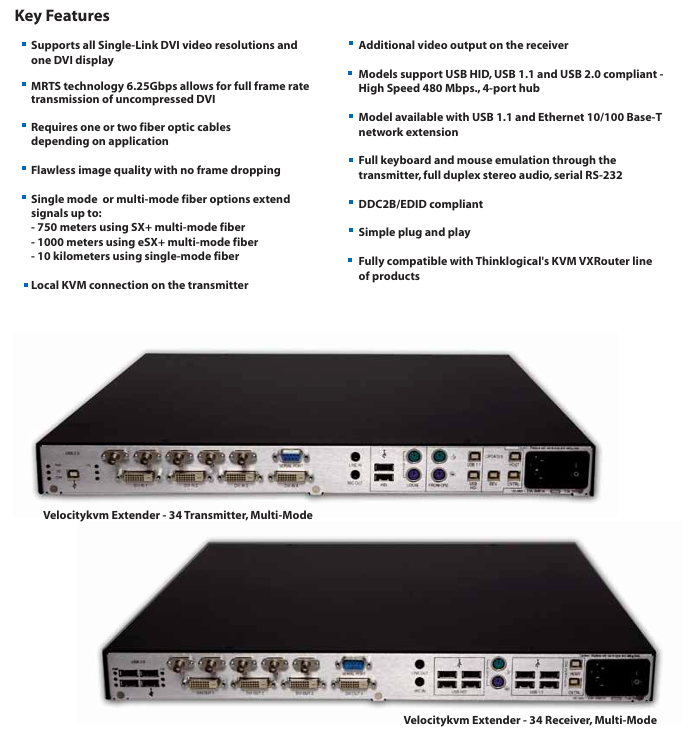
Uncompressed high-definition transmission: relying on patented MRTS (Multi Rate Transmission System) technology, 6.25Gbps bandwidth supports all single link DVI resolutions (such as 1920 × 1080) 1200@60Hz )No frame loss, no compression, zero image delay;
Ultra long distance coverage: Single mode fiber can transmit up to 10km, and multimode fiber (OM3 enhanced type) can transmit up to 1000m, meeting the deployment needs of large parks, cross buildings, and other long-distance environments;
Multi interface compatibility: integrated with USB (HID/1.1/2.0), PS2, RS-232 serial port, bidirectional stereo audio, compatible with keyboards, mice, USB drives, high-speed storage devices, microphones and other peripherals;
High security: Provides "HID only" models (with USB storage devices disabled) to meet the security control needs of classified scenarios such as command centers and financial data centers.
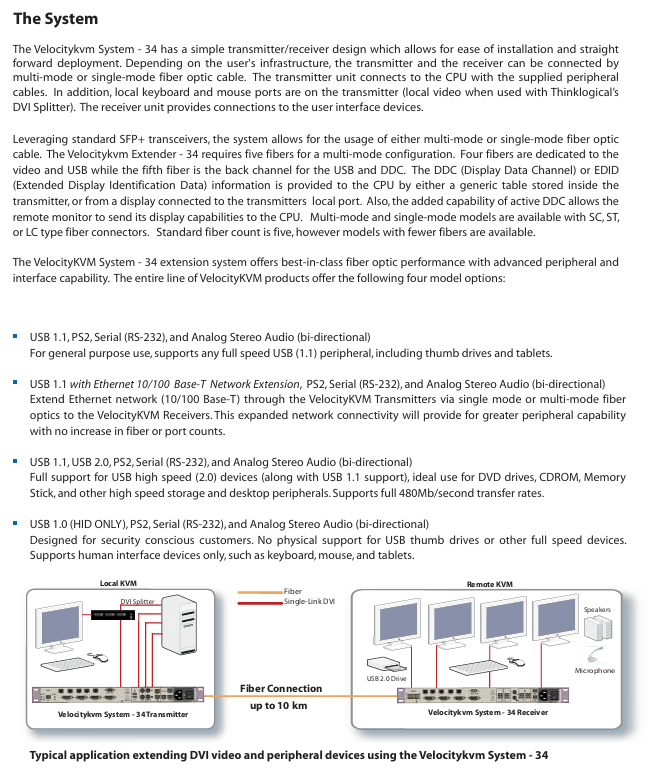
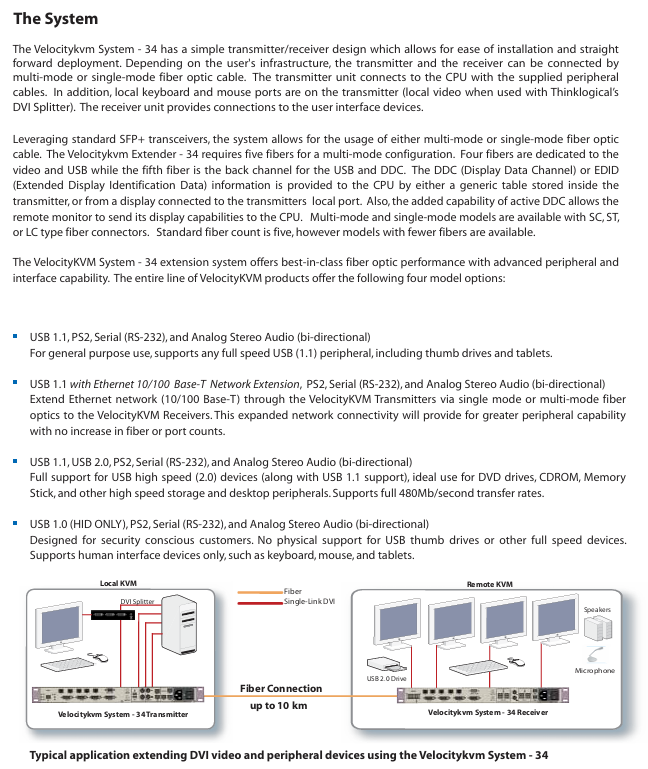
Product classification and core differences
The series includes four core models, all of which support four screen DVI output, PS2, RS-232 serial port, and bidirectional audio. The core difference lies in USB function and network expansion capability. The specific classifications are as follows:
Model Type Core Interface Configuration Transmission Rate Applicable Scenarios
USB 1.0 HID (only) supports USB ergonomic devices (keyboard, mouse, drawing board), disabled USB storage - classified scenarios (such as military command center, financial data center), to prevent data leakage
USB 1.1 supports USB 1.1 full speed peripherals (USB flash drives, tablets, low-speed printers) at 12Mbps for regular office scenarios, without the need for high-speed USB devices
USB 1.1+Ethernet (10/100Base-T) USB 1.1 functionality+Ethernet expansion, capable of transmitting network signals via fiber optic USB 12Mbps; Ethernet 100Mbps requires simultaneous extension of network and KVM signals in scenarios such as remote laboratories and distributed offices
USB 1.1+USB 2.0 compatible with USB 1.1 (low-speed) and USB 2.0 (high-speed) devices. USB 2.0 can reach 480Mbps and requires high-speed peripherals, such as DVD drives, high-speed portable hard drives, and professional scanners
In addition, all models offer single-mode/multi-mode fiber options, and fiber connectors support LC, SC, and ST types to adapt to different fiber infrastructure.
Key technical parameters
1. Transmission performance parameters
Parameter category specification details
Video signal single link DVI-D, supporting all resolutions (such as 1920 × 1080) 1080@60Hz 1920 × 1200@60Hz )
Transmission bandwidth of 6.25Gbps (MRTS technology), no compression, no frame loss
Fiber optic distance - multimode: OM1 (62.5/125 μ m) 50m; OM2(50/125μm)350m; OM3(50/125μm)750m; OM3 Enhanced 1000m
-Single mode: OS2 (9/125 μ m) 10km (for distances exceeding 10km, please contact the manufacturer for customization)
The standard number of optical fibers is 5 cores (4 cores for video/USB, 1 core for USB/DC feedback), supporting customized models with fewer cores
2. Physical and environmental parameters
Parameter category specification details
Size 19 inch rack mount (EIA standard), 1U height (4.40cm), width 44.5cm, depth 36.1cm
The weight of a single machine is 11lbs (4.99kg), and the transportation weight of the transmitter+receiver set is 27lbs (12.25kg)
Power supply wide voltage 100-240V AC (47-63Hz), single machine power consumption 40W
Working environment temperature 0-50 ℃ (32-122 ℉), humidity 5% -95% RH (non condensing)
Certified to comply with electrical safety standards in the United States, Canada, and the European Union (such as CE, FCC, cUL)
12 months warranty (expandable extended warranty)
3. Interface configuration (transmitter vs receiver)
Equipment interface type and quantity remarks
Transmitter - Video: DVI-D (4, connected to computer)
-USB: USB B (HID/1.1/2.0, depending on model), local USB A (keyboard/mouse, 2)
-PS2: MiniDIN 6 female head (keyboard/mouse, 1 each; local 1 each)
-Audio: 3.5mm interface (1 microphone, 1 line input)
-Serial port: DB9 female head (RS-232)
-Fiber optic: LC/SC/ST (single-mode SC/APC, multi-mode LC/SC/ST)
-Software upgrade: USB B (3) local interfaces support "near end control", which means that the computer can be directly operated with a keyboard and mouse
Receiver - Video: DVI-D (4, connected to monitor)
-USB: USB A (4, connected to peripherals)
-PS2: MiniDIN 6 female head (keyboard/mouse, 1 each)
-Audio: 3.5mm interface (1 microphone, 1 line output)
-Serial port: DB9 male (RS-232)
-Fiber optic: Same transmitter
-Software upgrade: USB B (2) supports bidirectional audio transmission, enabling sound synchronization between the near end microphone and the far end speaker
System architecture and deployment specifications
1. Core architecture
Adopting a "point-to-point" fiber optic transmission architecture, the signal flow direction is as follows:
Signal acquisition: The transmitter is connected to a computer to collect DVI video, USB/PS2 (keyboard and mouse), audio, and serial port signals;
Fiber optic transmission: The signal is transmitted uncompressed to the receiver through a 5-core fiber optic cable (single-mode/multi-mode optional);
Signal output: The receiver is connected to the display and peripherals (keyboard, mouse, USB flash drive, etc.) to restore the signal and drive the peripherals;
Local control: The transmitter is equipped with a local USB/PS2 interface, supporting direct operation from the computer and achieving dual control of "local+remote".
2. Key deployment requirements
Fiber selection: Strictly match single-mode/multi-mode models, prioritize OM3 (50/125 μ m) for multi-mode to extend transmission distance; Fiber optic cables must comply with TIA/EIA standards to avoid signal loss caused by the use of inferior fiber optic cables;
Interface connection: DVI cables require single link shielded cables (factory supplied 2-meter cables), and USB cables should not exceed 6 feet (approximately 1.8 meters) in length to avoid signal attenuation;
EDID/DDC configuration: The transmitter has a built-in universal EDID table and can also read the EDID of the local display; Support "Active DDC" to allow remote displays to provide resolution information feedback to the computer, ensuring display compatibility;
Power isolation: The transmitter and receiver need to be connected to independent power sources to avoid common ground interference (such as sharing sockets with high-power devices).

Selection method and ordering rules
1. Selection process
Confirm transmission distance and fiber type:
Short distance (≤ 1000m): Choose multi-mode model (suffix "M34");
Long distance (≤ 10km): menu model number (suffix "634");
Select interface function:
Confidential scenario: Select "USB 1.0 HID only" (model includes "H00");
Ordinary office: select "USB 1.1" (model includes "000");
Network expansion required: select "USB 1.1+Ethernet" (model includes "N00");
High speed peripheral: select "USB 1.1+2.0" (model includes "U00");
Determine the fiber optic connector:
Small scale deployment: choose LC interface (model including "LC");
Traditional computer room: select SC/ST interface (model includes "SC"/"ST");
Supporting selection: Select fiber optic modules according to requirements (such as VOP-M12 for multimode and VOP-S36 for single-mode).
2. Example of ordering code
Taking "multi-mode, USB 2.0, LC interface receiver" as an example: VEL-U00M34-LCRX
VEL: Product prefix;
U00: Function code (USB 1.1+2.0);
M34: Fiber type (multimode);
LC: connector type;
RX: Device type (receiver, TX is transmitter).
Typical application scenarios
Broadcasting and post production: The studio computer is separated from the control room monitor (500m away), and four DVI videos are transmitted through multi-mode fiber optic cables. USB 2.0 is connected to high-speed storage devices to achieve real-time editing of 4K materials;
Command Center: The server room (remote end) is separated from the command hall (near end) (3km away), with a menu model number and "HID only" configuration. USB storage is disabled to ensure data security, and an RS-232 serial port control switch is extended;
University laboratory: The teacher's computer (teaching building) is connected to the student's experimental equipment (laboratory, 800m away) through multimode fiber optic cable. The USB 1.1+Ethernet model supports extended network and KVM, and students can remotely operate the experimental equipment;
Large digital signage: The central control computer (computer room) in the shopping mall is connected to multiple digital screens (on different floors, at a distance of 300m) through multimode fiber optic cables, and four DVI screens are used to drive screens in different areas, achieving unified content control.
Precautions and maintenance suggestions
Signal interference prevention: Fiber optic cables should be kept away from strong electrical lines (≥ 1m), and USB/audio cables should be avoided from being laid in parallel with power lines to prevent electromagnetic interference from causing image snowflakes and audio noise;
Regular maintenance: Check the cleanliness of fiber optic connectors every quarter (wipe with specialized fiber optic cleaning paper) to avoid signal attenuation caused by dust; Annual testing of power supply voltage stability to prevent voltage fluctuations from damaging equipment;
Troubleshooting: If there is no signal in the video, priority should be given to checking the fiber optic link (using an optical power meter to measure light attenuation); When there is no response from the USB peripheral, confirm whether the model supports the device (e.g. "HID only" model does not support USB drives);
Software upgrade: Upgrade firmware through the USB B interface of the transmitter/receiver, and do not turn off the power during the upgrade process to avoid device damage.


- YOKOGAWA
- Reliance
- ADVANCED
- SEW
- ProSoft
- WATLOW
- Kongsberg
- FANUC
- VSD
- DCS
- PLC
- man-machine
- Covid-19
- Energy and Gender
- Energy Access
- Renewable Integration
- Energy Subsidies
- Energy and Water
- Net zero emission
- Energy Security
- Critical Minerals
- A-B
- petroleum
- Mine scale
- Sewage treatment
- cement
- architecture
- Industrial information
- New energy
- Automobile market
- electricity
- Construction site
- HIMA
- ABB
- Rockwell
- Schneider Modicon
- Siemens
- xYCOM
- Yaskawa
- Woodward
- BOSCH Rexroth
- MOOG
- General Electric
- American NI
- Rolls-Royce
- CTI
- Honeywell
- EMERSON
- MAN
- GE
- TRICONEX
- Control Wave
- ALSTOM
- AMAT
- STUDER
- KONGSBERG
- MOTOROLA
- DANAHER MOTION
- Bentley
- Galil
- EATON
- MOLEX
- Triconex
- DEIF
- B&W
- ZYGO
- Aerotech
- DANFOSS
- KOLLMORGEN
- Beijer
- Endress+Hauser
- schneider
- Foxboro
- KB
- REXROTH
- YAMAHA
- Johnson
- Westinghouse
- WAGO
- TOSHIBA
- TEKTRONIX
- BENDER
- BMCM
- SMC
- HITACHI
- HIRSCHMANN
- XP POWER
- Baldor
- Meggitt
- SHINKAWA
- Other Brands
- UniOP
- KUKA
- IBA
- Beckhoff
- ADLINK
-
FANUC A06B-0169-B088 - AC Servo Motor Alpha M40 3000 3 KW
-
ALPHA WIRE 1299C-SLATE-1000 - Multi-Conductor Cable Wire
-
alpha / Wittenstein SK+180S-MF1-10-1M1-1K - Hypoid Gearbox i=10
-
ALPHA WIRE 1181/40C SL005 - Multi-Conductor Cable Wire
-
Generic / DSI Straight Anatomic Plastic Adapter Head + Screw Hex - Dental Implant Fixture
-
Alpha II-650 MV6500526A - Power Supply Unit
-
ALPHA WIRE 7036 WH001 - Hook-Up Wire
-
FANUC RDCGM00000004O / TP 050-MF1-7-061-000 - Gear Reducer / Alpha Gearbox
-
Alpha II-650 MV6500436A - TDK-Lambda Power Supply Unit
-
Alpha S-Alpha600 J60033 - 600W Switching Power Supply Unit
-
Alpha 1500W J00032 - Power Supply Unit
-
Alpha 600W H60638 - Switching Power Supply Unit
-
Alpha 650 MV6500314A - Power Supply Unit
-
Aloka UST-5413 - Linear Probe for Prosound Alpha 6
-
ALPHA WIRE TFT25015 NA002 - High Temperature Heat Shrink Tubing Wire Sleeving
-
JAVAD ALPHA2 / GrAnt-G3 - GPS Receiver
-
Alpha 400W H47318 - Switching Power Supply Unit
-
Alpha SG-ALPHA-202-001 / Q1001-010-001 - Circuit Board Module
-
Antlia Dual ERF H-Alpha & Cak/CaH - Density Astronomical Accessory
-
ALPHA WIRE 5100C SL033 - Multi-Conductor Cable Wire
-
ALPHA WIRE 5098C-SL033 - Multi-Conductor Cable Wire
-
Fanuc A06B-6290-H105 - Alpha Sv 80hv-B Module Servo Amplifier
-
FANUC A06B-6240-H105 - Aux Axis Alpha aiSV 80 Servo Amplifier
-
Endress+Hauser Alpha-Log RSA10-61B1S / 42974737/0130 - Data Logger Measurement Instrument
-
ALPHA WIRE 6363-SL002 - Multi-Conductor Cable Wire
-
Alpha SP100S-MF1-7-1K1-2S - Gear Reducer
-
Alpha SP 100G-MF1-4-0H1-2S-PGG - Planetary Gear Reducer
-
FANUC A06B-0143-B175 #0275 - Alpha 12/3000 AC Servo Motor
-
James Burn Alpha Doc P33 / GBC PDI - Automatic Punch DocuPunch
-
Titus HVAC 105383-01 - ALPHA BAC Controller and Actuator
-
Wittenstein Alpha SP 100S-MF2-20-0E0-2S - Planetary Gearbox i=20
-
Kashiyama Alpha-85-ZV / SP-8026G - Pump Controller
-
Christ Alpha 2-4 LDplus - Freeze Drier Part N/ 101542
-
Lambda / Alpha H40896 - 400W Power Supply Unit
-
Wittenstein Alpha LP-070S-MF1-3-1E1-38 - Planetary Gearbox
-
Matrox / EXO-2480 133-D06-3 / 398-17962-1 - Alpha Numeric PCB Board
-
Fanuc A06B-6096-H204 - Dual Axis Alpha Servo Amplifier Module
-
Alpha Wire 5002C-SL001 - Multi-Conductor Cable 2 Conductors 22AWG 300VAC
-
Alpha 600W H60638 - Switching Power Supply Unit
-
Alpha Scientific Spin Precession Dual Electro Magnet Beam Line Chamber - Electro Magnet Beam Line Chamber
-
ALPHA WIRE 6017C SL005 - Multi-Conductor Cable Wire
-
ALPHA WIRE 65804 SL002 - Multi-Conductor Cable Wire
-
Fanuc A06B-0152-B010 - AC Servo Motor Alpha A30/2000 with Brake
-
ALPHA WIRE 5856-VI001 - Hook-Up Wire
-
ALPHA WIRE M13142-SL001 - Multi-Conductor Cable Wire
-
Alpha & Omega AOZ1017 - 8-Pin SOIC SMD Buck Switching Regulator IC
-
Alpha 600W H67027 CA600 - 600W Switching Power Supply Unit
-
ALPHA WIRE 2845/7-RD001 - Hook-Up Wire
-
Wittenstein Alpha VH+063S-MF1-10-6H1-1K-0C2 - Worm Gear Reducer i=10
-
ALPHA WIRE 2414C SL022 - Multi-Conductor Cable Wire
-
ALPHA WIRE 5672-SL005 - Multi-Conductor Cable Wire
-
BECKHOFF / Alpha AM8021-0B10-0000 + CP 040-MO1-10 - Servo Motor with Planetary Gearbox
-
ALPHA Systems Lab Inc MBA-WV1-F / PCB-WV1-F - PCB Board
-
FANUC A06B-0826-B201 - Alpha P12 AC Spindle Motor
-
WF & HC / Alpha-E 10045 - Tiller Bar Flat Flange Inlet 3150LB 3X 2.5 Inch
-
Seiler Alpha Air 3 - Dental Microscope
-
Alpha 400W H47223 - Switching Power Supply Unit
-
Wittenstein Alpha SP 180S-MC1-5-1M0-2K - Planetary Gearbox
-
FANUC A06B-6117-H211 - Servo Amplifier Module Alpha iSV 160/160 Amp
-
Alpha S-Alpha600 J60033 - 600W Switching Power Supply Unit
-
Adaptive Alpha Eclipse StreetSmart Model 17X - Master Slave LED Sign 44 x 44 Inch
-
ALPHA WIRE 391697-WH005 / 391697WH005 - Hook-Up Wire
-
Generic 22W Laser Engraver Cutter - Smart Air Pump APP Control CNC Dual-core CPU DIY Tools
-
FANUC A06B-6102-H226 / A06B6102H226 - Spindle Amplifier Module
-
FANUC A06B-6090-H006 / A06B6090H006 - Servo Power Supply Module
-
Alpha Wire Apr-19 - High Low Temperature Cable 75 FT
-
Wittenstein Alpha HG+ 075S-MF2-28-6E1-1S10 - Hypoid Gearbox Reducer i=28
-
Alpha J00032 - 1500W Power Supply Unit
-
Alpha H47038 - 400W Power Supply Unit
-
FANUC A06B-6096-H204 - Dual Axis Alpha Servo Amplifier Module
-
Wittenstein Alpha LPB090-MO1-10-111-00 - Alpha Planetary Gearbox
-
ALPHA WIRE 2842/19-YL001 - Hook-Up Wire
-
WITTENSTEIN ALPHA HG+060S-MF1-56C1-1K00 - Planetary Gearbox
-
Basler A102K Alpha VIS - Black and White CCD Industrial Camera
-
Alpha H40935 - 400W Power Supply Unit
-
FANUC A06B-6114-H207 - 2-Axis Servo Amplifier Module SVM20/40i Alpha i Series
-
TDK-Lambda / Alpha H47318 - 400W Switching Power Supply Unit
-
HITACHI Aloka Prosound Alpha 7 Premier - Diagnostic Ultrasound System
-
Alpha SP100S-MF1-4-1E1-2S - Precision Gear Reducer
-
FANUC A20B-2001-0950 - Control Circuit Board PCB
-
ALPHA WIRE 2855/1-GR001 - Hook-Up Wire
-
FANUC A06B-6096-H204 - Dual Axis Alpha Servo Amplifier Module
-
Wittenstein Alpha LPB090-MO1-10-111-00 - Alpha Planetary Gearbox
-
ALPHA WIRE 2842/19-YL001 - Hook-Up Wire
-
Basler A102K Alpha VIS - Black and White CCD Industrial Camera
-
Wittenstein Alpha LP 090-M01-7-111-000 / Schneider - Gear Box i:7 Schneider Electric Servo Motor
-
LAMBDA ALPHA 600W H60554 - Switching Power Supply Unit
-
Fanuc A06B-0238-B100 / A860-2000-T301 - AC Servo Motor with Encoder
-
FANUC A06B-6290-H322 - ALPHA iSV 10/10/10HV-B 3-Axis Servo Drive
-
Polymotor Italiana 9919 121 90332 / Alpha SP75-M1-3 - D.C. Permanent Magnet Motor with Gearbox
-
MJ Research PTC-200 - PCR DNA Engine Thermal Cycler with Dual 48-Well Alpha Block
-
ALPHA WIRE 5002C-SL002 - Multi-Conductor Cable Wire
-
Fluke / Victoreen ASM 990 / 489-110D - Biomedical Radiation Detector Probe with Pelican Case
-
ALPHA WIRE 5855-BK001 - Hook-Up Wire 22AWG Silver Plated Copper
-
Tetra / Alpha 600W H60552 - Switching Power Supply Unit
-
Bruker Alpha FTIR Spectrometer / Alpha-P ATR - Infrared Spectrometer FTIR Instrument
-
Simagic AlphaM-FX-C 290mm FX-C - Formula Steering Wheel with Alpha Mini Wheel Base
-
Alpha Wire 5152C 20/2C - XtraGuard High Performance Instrumentation/Control Cable
-
ALPHA WIRE 1219/40C SL005 - Multi-Conductor Cable Wire
-
ALPHA WIRE 3131441 TN005 - Multi-Conductor Cable Wire
-
ALPHA WIRE 2172-SV005 - Multi-Conductor Cable Wire
-
FANUC A20B-2100-0742 - ALPHA ia Servo Control Board
-
Olympus Endo Alpha Cart TI-A1 - Medical Equipment Cart with Accessories
-
ALPHA WIRE 74010-BK002 - Multi-Conductor Cable Wire
-
Fanuc A06B-6110-H026#N - ALPHA i Power Supply Module PSM-26i
-
Alpha Laval SX2/013 - Rotary Lobe Pump
-
Alpha II-450P MV4500007B - Switching Power Supply Unit
-
TDK-Lambda / Alpha 400W - Switching Power Supply Unit
-
ALPHA ALPHA6000E-3015GB/3018PB - Frequency Inverter Drive Power Converter
-
ALPHA WIRE 391245-WH005 - Hook-Up Wire
-
Alpha H60562 CA600 - 600W Switching Power Supply Unit
-
Fanuc A06B-0147-B675 - Alpha 22/2000 3.8kW 2000rpm AC Servo Motor
-
ALPHA WIRE 9821 - Twinaxial Cable 1PR 25AWG Poly Insulation
-
Fanuc / Alpha A16B-2203-0820 - ALPHA i Spindle Wiring PCB
-
FANUC A20B-2100-0742 - ALPHA ia Servo Control Board
-
Fanuc A06B-6096-H104 - Alpha Servo Module
-
Fuji Electric RYT202D5-VV2 / Faldic Alpha5 - Servo Amplifier
-
ALPHA WIRE 2817/6 20 AWG - PTFE High Temperature Cable
-
Aloka Prosound Alpha 10 / EU-6031C / JB-274D - High Voltage Power Supply for Ultrasound
-
Wittenstein Alpha SP 140S-MF1-5-01F-2S - Planetary Gearbox
-
FANUC A06B-6124-H205 - Alpha iSV Servo Amplifier Module
-
TDK-Lambda / Alpha MV6500314A - 650W Power Supply Unit
-
TDK-Lambda / Alpha H47318 - 400W Switching Power Supply Unit
-
Alpha H47318 - 400W Switching Power Supply Unit
-
CNC Bearing / Alpha AR090-S1-300-20-N - Robotics Bearing Component
-
Alpha CA400 5A,3.3Q,5B,12/12E / DXH47037 - 400W Power Supply Unit
-
FANUC A20B-2100-0742 - ALPHA ia Servo Control Board
-
Fanuc / Amada A04B-0810-C403 / LC1212 alpha II - Pressure Regulator

K-JIANG

Add: Jimei North Road, Jimei District, Xiamen, Fujian, China
Tell:+86-15305925923