

K-WANG


ABB Panel 800 Version 6 PP885 Hardware and Installation
ABB Panel 800 Version 6 PP885 Hardware and Installation
Product positioning: Panel 800 Version 6 PP885 is an operation panel designed for human-computer interaction scenarios, suitable for industrial control fields. It can be connected to automation equipment such as PLCs, servo systems, and drives to achieve functions such as text display and control, dynamic indication, time channel management, alarm processing, and formula management.
Safety precautions
(1) General safety requirements
Preparation: Installation personnel, equipment owners, and operators must read and understand this installation manual; Carefully read the safety precautions and check if there is any transportation damage to the delivered products. If there is any damage, immediately notify the supplier; Suppliers are not responsible for modified, altered, or modified equipment and are only allowed to use parts and accessories that meet the supplier's specifications.
Operation specifications: Before installing, using or repairing the operation panel, carefully read the installation and operation instructions; It is strictly prohibited for liquids, metal debris, or wiring debris to enter any opening of the operation panel to prevent fire or electric shock; Only qualified personnel are allowed to operate the control panel.
Storage and special case handling: The operation panel should be stored within the recommended temperature range. If the temperature is too low, it may cause the LCD display liquid to solidify, and if it is too high, it may cause isotopic phenomena; LCD display liquid contains highly irritating substances. If it comes into contact with the skin, immediately rinse with plenty of water. If it comes into contact with the eyes, open the eyes and rinse with plenty of water before seeking medical attention; The illustrations in the manual are only for illustration purposes. Due to the existence of multiple variables in the installation scenario, the supplier is not responsible for the actual use based on the illustrations; Suppliers do not guarantee that the operation panel is suitable for specific applications, nor are they responsible for product design, installation, or operation; It is recommended to perform at least one power on/off operation on the control panel before installing any components/cards or connecting external devices (such as serial devices).
(2) Disposal requirements under WEEE regulations
EU professional users: If you need to dispose of electrical and electronic equipment (EEE), you need to contact the distributor or supplier for further information.
Non EU country users: If you need to dispose of this product, you need to contact the local regulatory authority or distributor to understand the correct disposal method.
(3) UL and cUL installation requirements
Usage environment and power supply: The equipment is only suitable for Class 2 non hazardous locations; The combination of devices in the system must undergo inspection by the local regulatory authorities during installation; All devices must be powered by a Class 2 power supply, and disconnection is prohibited when powered on.
Expansion unit and battery: Only UL and cUL certified expansion units are allowed to be connected to ports labeled "EXPANSION", and there are currently no such evaluated or approved units for use; Before replacing the expansion unit, it is necessary to ensure that the power is turned off or that the area is non hazardous; The product contains batteries and can only be replaced in known non hazardous areas. BR 2032 batteries must be used, as using other types of batteries may pose a risk of fire or explosion; Improper handling of batteries may cause explosions. Charging, dismantling, or putting them into fire is prohibited.
Installation and wiring: can only be used on flat surfaces of Class 4 indoor enclosures; Only copper wires with a minimum temperature rating of 75 ° C are allowed to be used; The wiring connection of the power cord connector must comply with the cable and torque specifications (the torque corresponding to the wire size is 3.5 pounds per inch); These devices are Class 2 power supply programmable controllers (industrial PCs) suitable for industrial control equipment, intended for (front) panel installation (Class 1 and Class 4X, indoor use only); The protection level of the shell should be at least IP20, but it needs to reach IP54 when installed in the equipment.
(4) Safety requirements during installation
Installation environment: The operation panel is designed for fixed installation on a flat surface, and the installation environment must meet the conditions of no high explosion risk, no strong magnetic field, no direct sunlight, and no drastic temperature changes.
Installation operation specifications: Install the operation panel according to the attached installation instructions and perform grounding treatment; Only qualified personnel are allowed to install the operation panel; Separate the layout of high-voltage cables, signal cables, and power supply cables; Before connecting the power socket, it is necessary to confirm that the power voltage and polarity are correct; Peripheral devices need to be suitable for the application scenario and installation location.
Special area installation: In Zone 2 environment, the equipment needs to be installed in a casing with a protection level of not less than IP54 and not more than IP65 (in accordance with IEC/EN 600079-0 standard), and the IP level of the equipment is limited by the IP level of the installed casing; In the 22 zone environment, the equipment needs to be installed in an enclosure with a protection level of not less than IP64 and not more than IP65 (in accordance with IEC/EN 600079-0 standard), and the IP level of the equipment is also limited by the IP level of the enclosure.
(5) Safety requirements during use
Keep the operation panel clean; Emergency stop and other safety functions shall not be controlled through the operation panel; Do not use excessive force or sharp objects when operating the touch screen.
(6) Service and Maintenance Security Requirements
Only qualified personnel are allowed to carry out repairs; Follow the agreed warranty terms; Before performing any cleaning or maintenance operations, the power connection of the equipment must be disconnected; Clean the display screen and surrounding front cover with a soft cloth and mild cleaning agent; Improper battery replacement may result in explosion. Only use batteries recommended by the supplier. During the warranty period, batteries must be replaced by authorized ABB service centers.
(7) Dismantling and scrapping safety requirements
The operation panel or its components must be recycled and disposed of in accordance with local regulations; Components such as lithium batteries, electrolytic capacitors, and displays in the equipment contain substances that may be harmful to health and the environment.
(8) Air appears in the touch screen
The layered structure of the touch screen contains air, and in rare cases, bubbles may appear, which only affects the appearance and does not affect any function of the operation panel. This phenomenon may occur under specific environmental conditions such as temperature, humidity, and air pressure.
Installation related
(1) Space requirements
Installation plate thickness: The maximum installation plate thickness is 8mm.
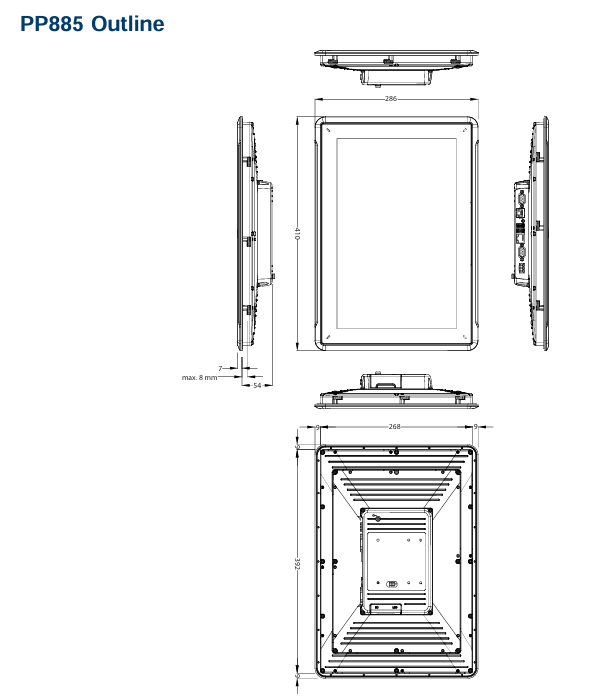
Size requirements: When installing the operation panel, the space requirements in all directions (unit: mm) are as follows: 100mm (partial area), 286mm (partial area), 50mm (both sides), 53mm (partial area), 410mm (overall relevant dimensions). Please refer to the outline drawing in the manual for accurate installation dimensions, which are not drawn to scale.
(2) Installation process
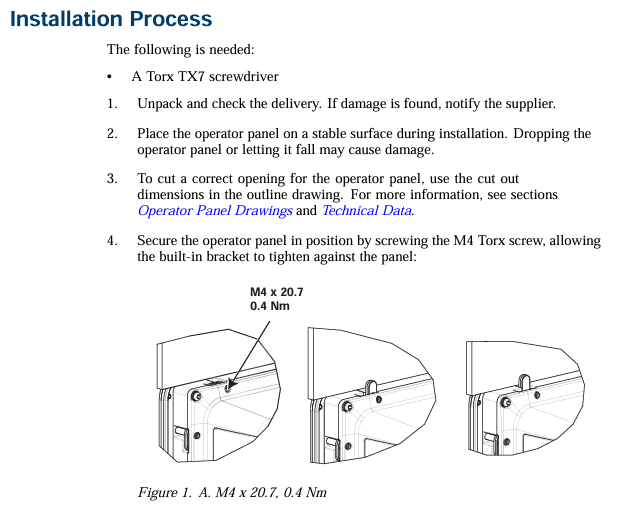
Preparation: Prepare Torx TX7 screwdriver; Unpack and inspect the delivered products. If any damage is found, notify the supplier; During installation, place the control panel on a stable surface to prevent it from falling and causing damage.
Cutting and fixing of openings: Cut suitable openings for the operation panel according to the opening size in the contour diagram (refer to the "Operation Panel Drawing" and "Technical Data" sections for detailed information); Use M4 Torx screws (specification M4 × 20.7, torque 0.4Nm) to secure the operation panel, ensuring that the built-in bracket is tightly attached to the panel.
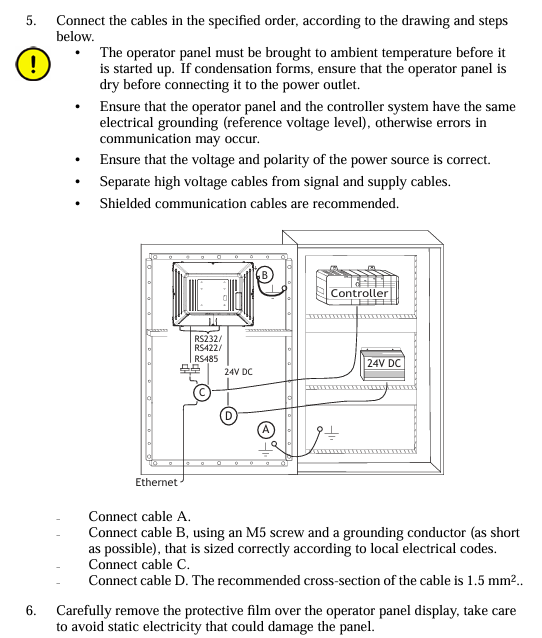
Cable connection: Connect the cables in the specified order according to the diagram and the following steps:
Before starting the operation panel, it is necessary to reach the ambient temperature. If condensation occurs, ensure that the operation panel is dry before connecting to the power outlet.
Ensure that the operation panel and controller system have the same electrical grounding (reference voltage level), otherwise communication errors may occur.
Confirm that the power supply voltage and polarity are correct; Separate high-voltage cables from signal cables and power supply cables; Suggest using shielded communication cables.
Connect cable A (24V DC); Connect cable B using M5 screws and grounding wire (as short as possible, with dimensions in accordance with local electrical regulations); Connect cable C (Ethernet); Connect cable D (RS232/RS422/RS485), with a recommended cable cross-section of 1.5mm ².
Removal of protective film: Carefully remove the protective film on the operation panel display screen, taking care to avoid static electricity damaging the panel.
(3) Connection with controller
For information on the cables used to connect the control panel to the controller, please refer to the help files of the relevant driver programs.
(4) Other connections and peripheral devices
Cables, peripheral devices, and accessories should be suitable for the application scenario and its environment. For detailed information or suggestions, please consult the supplier.
Technical data
Project parameters
Cover layer Autoflex EBA 180L (see "Chemical Resistance" section for details)
Shell material powder coated aluminum
Communication interface (1) 9-pin D-sub interface, supports RS232 RTS/CTS, chassis mounting female head, with standard locking screw (4-40 UNC)
Communication interface (2) 9-pin D-sub interface, supports RS232 RTS/CTS, chassis mounting female head, with standard locking screw (4-40 UNC)
Store 2GB SSD (NAND Flash) and support formats with a maximum storage capacity of 2GB
1GB of memory (DDR2)
One multi-color indicator light (on-chip integrated)
Lithium battery, model BR 2032 (or CR 2032)
Power consumption 24W
Power input 3.15A slow melting,+24V DC (18-32V DC)
Power compliance CE: The power supply must comply with the requirements of IEC 60950 and IEC 61558-2-4 standards; UL and cUL: The power supply must meet the requirements of Class 2 power supply
Display TFT-LCD with LED backlight, resolution 1280 × 800 pixels, 262k colors
Display performance: brightness of 450cd/m ², horizontal viewing angle of 160 °, vertical viewing angle of 140 °
Backlight lifespan of 50000 hours
Display screen size 331.2 × 207.0mm
Working temperature range -10 ° C to+50 ° C
Storage temperature range -20 ° C to+70 ° C
Working humidity range 5% -85% (no condensation)
CE certification complies with EMC Directive 2004/108/EC+A1:2011
Chemical resistance
(1) Metal casing
Powder coating has almost no or no resistance to the following chemicals at room temperature: concentrated acetic acid, toluene, 30% nitric acid, and 97 octane unleaded gasoline.
(2) Touch screen and covering material
Autoflex EBA 180L: Not tolerant to high-pressure steam above 100 ° C, nor to various chemical substances (specific substance and contact time requirements: some substances may have adverse effects after 10 minutes of contact, please refer to the detailed list in the manual).
Touch screen surface: After exposure to solvents such as toluene, there is no visible change on the touch screen surface of the operation panel (refer to the manual for a detailed solvent list).
Touch screen protective film: It is recommended to use Autoflex EBA 180L protective film (model RX885/893, can be ordered from ABB), and its chemical resistance is detailed in the "Autoflex EBA 180L" section; Like all polyester based films, Autoflex EBA 180L is not suitable for long-term exposure to direct sunlight; The layered structure of the touch screen contains air, and in rare cases, bubbles may appear, which only affect the appearance and not the function, and may occur under specific environmental conditions.
Operation panel drawing
(1) Connector
The drawings indicate the positions of connectors and related interfaces (such as COM1/2, LAN, USB, C LAN, COM3/4, etc.), but COM4 is not supported on TxB SoftControl and TxB SoftMotion that include EtherCAT functionality. For detailed interface layout and pin definitions, please refer to the illustrations in the manual.
(2) Communication port
Port function and connection: The communication port supports protocols such as RS232, RS422, RS485, etc. Some port pins are defined as follows (example): RS232 TxD, RS422 Rx+, GND, RS422 Tx -, RS485 Tx -/Rx -, etc. (detailed pin allocation reference manual diagram); COM4 is not supported on specific models.
Special connection requirements: If two communication ports need to be used on the same physical port, Y-shaped distribution cable TK860V001 (part number 3BSE069476R1) must be used.
(3) PP885 contour
The contour diagram indicates the key dimensions of the operation panel (unit: mm), such as 286mm (partial length), maximum 8mm (related to installation plate thickness), 54mm (partial height), 268mm (partial length), 392mm (partial length), 410mm (overall length), etc. For detailed dimensions, please refer to the contour diagram in the manual.
- YOKOGAWA
- Reliance
- ADVANCED
- SEW
- ProSoft
- WATLOW
- Kongsberg
- FANUC
- VSD
- DCS
- PLC
- man-machine
- Covid-19
- Energy and Gender
- Energy Access
- Renewable Integration
- Energy Subsidies
- Energy and Water
- Net zero emission
- Energy Security
- Critical Minerals
- A-B
- petroleum
- Mine scale
- Sewage treatment
- cement
- architecture
- Industrial information
- New energy
- Automobile market
- electricity
- Construction site
- HIMA
- ABB
- Rockwell
- Schneider Modicon
- Siemens
- xYCOM
- Yaskawa
- Woodward
- BOSCH Rexroth
- MOOG
- General Electric
- American NI
- Rolls-Royce
- CTI
- Honeywell
- EMERSON
- MAN
- GE
- TRICONEX
- Control Wave
- ALSTOM
- AMAT
- STUDER
- KONGSBERG
- MOTOROLA
- DANAHER MOTION
- Bentley
- Galil
- EATON
- MOLEX
- Triconex
- DEIF
- B&W
- ZYGO
- Aerotech
- DANFOSS
- KOLLMORGEN
- Beijer
- Endress+Hauser
- schneider
- Foxboro
- KB
- REXROTH
- YAMAHA
- Johnson
- Westinghouse
- WAGO
- TOSHIBA
- TEKTRONIX
- BENDER
- BMCM
- SMC
- HITACHI
- HIRSCHMANN
- XP POWER
- Baldor
- Meggitt
- SHINKAWA
- Other Brands
- UniOP
- KUKA
- IBA
- Beckhoff
- ADLINK
-
FANUC A06B-0169-B088 - AC Servo Motor Alpha M40 3000 3 KW
-
ALPHA WIRE 1299C-SLATE-1000 - Multi-Conductor Cable Wire
-
alpha / Wittenstein SK+180S-MF1-10-1M1-1K - Hypoid Gearbox i=10
-
ALPHA WIRE 1181/40C SL005 - Multi-Conductor Cable Wire
-
Generic / DSI Straight Anatomic Plastic Adapter Head + Screw Hex - Dental Implant Fixture
-
Alpha II-650 MV6500526A - Power Supply Unit
-
ALPHA WIRE 7036 WH001 - Hook-Up Wire
-
FANUC RDCGM00000004O / TP 050-MF1-7-061-000 - Gear Reducer / Alpha Gearbox
-
Alpha II-650 MV6500436A - TDK-Lambda Power Supply Unit
-
Alpha S-Alpha600 J60033 - 600W Switching Power Supply Unit
-
Alpha 1500W J00032 - Power Supply Unit
-
Alpha 600W H60638 - Switching Power Supply Unit
-
Alpha 650 MV6500314A - Power Supply Unit
-
Aloka UST-5413 - Linear Probe for Prosound Alpha 6
-
ALPHA WIRE TFT25015 NA002 - High Temperature Heat Shrink Tubing Wire Sleeving
-
JAVAD ALPHA2 / GrAnt-G3 - GPS Receiver
-
Alpha 400W H47318 - Switching Power Supply Unit
-
Alpha SG-ALPHA-202-001 / Q1001-010-001 - Circuit Board Module
-
Antlia Dual ERF H-Alpha & Cak/CaH - Density Astronomical Accessory
-
ALPHA WIRE 5100C SL033 - Multi-Conductor Cable Wire
-
ALPHA WIRE 5098C-SL033 - Multi-Conductor Cable Wire
-
Fanuc A06B-6290-H105 - Alpha Sv 80hv-B Module Servo Amplifier
-
FANUC A06B-6240-H105 - Aux Axis Alpha aiSV 80 Servo Amplifier
-
Endress+Hauser Alpha-Log RSA10-61B1S / 42974737/0130 - Data Logger Measurement Instrument
-
ALPHA WIRE 6363-SL002 - Multi-Conductor Cable Wire
-
Alpha SP100S-MF1-7-1K1-2S - Gear Reducer
-
Alpha SP 100G-MF1-4-0H1-2S-PGG - Planetary Gear Reducer
-
FANUC A06B-0143-B175 #0275 - Alpha 12/3000 AC Servo Motor
-
James Burn Alpha Doc P33 / GBC PDI - Automatic Punch DocuPunch
-
Titus HVAC 105383-01 - ALPHA BAC Controller and Actuator
-
Wittenstein Alpha SP 100S-MF2-20-0E0-2S - Planetary Gearbox i=20
-
Kashiyama Alpha-85-ZV / SP-8026G - Pump Controller
-
Christ Alpha 2-4 LDplus - Freeze Drier Part N/ 101542
-
Lambda / Alpha H40896 - 400W Power Supply Unit
-
Wittenstein Alpha LP-070S-MF1-3-1E1-38 - Planetary Gearbox
-
Matrox / EXO-2480 133-D06-3 / 398-17962-1 - Alpha Numeric PCB Board
-
Fanuc A06B-6096-H204 - Dual Axis Alpha Servo Amplifier Module
-
Alpha Wire 5002C-SL001 - Multi-Conductor Cable 2 Conductors 22AWG 300VAC
-
Alpha 600W H60638 - Switching Power Supply Unit
-
Alpha Scientific Spin Precession Dual Electro Magnet Beam Line Chamber - Electro Magnet Beam Line Chamber
-
ALPHA WIRE 6017C SL005 - Multi-Conductor Cable Wire
-
ALPHA WIRE 65804 SL002 - Multi-Conductor Cable Wire
-
Fanuc A06B-0152-B010 - AC Servo Motor Alpha A30/2000 with Brake
-
ALPHA WIRE 5856-VI001 - Hook-Up Wire
-
ALPHA WIRE M13142-SL001 - Multi-Conductor Cable Wire
-
Alpha & Omega AOZ1017 - 8-Pin SOIC SMD Buck Switching Regulator IC
-
Alpha 600W H67027 CA600 - 600W Switching Power Supply Unit
-
ALPHA WIRE 2845/7-RD001 - Hook-Up Wire
-
Wittenstein Alpha VH+063S-MF1-10-6H1-1K-0C2 - Worm Gear Reducer i=10
-
ALPHA WIRE 2414C SL022 - Multi-Conductor Cable Wire
-
ALPHA WIRE 5672-SL005 - Multi-Conductor Cable Wire
-
BECKHOFF / Alpha AM8021-0B10-0000 + CP 040-MO1-10 - Servo Motor with Planetary Gearbox
-
ALPHA Systems Lab Inc MBA-WV1-F / PCB-WV1-F - PCB Board
-
FANUC A06B-0826-B201 - Alpha P12 AC Spindle Motor
-
WF & HC / Alpha-E 10045 - Tiller Bar Flat Flange Inlet 3150LB 3X 2.5 Inch
-
Seiler Alpha Air 3 - Dental Microscope
-
Alpha 400W H47223 - Switching Power Supply Unit
-
Wittenstein Alpha SP 180S-MC1-5-1M0-2K - Planetary Gearbox
-
FANUC A06B-6117-H211 - Servo Amplifier Module Alpha iSV 160/160 Amp
-
Alpha S-Alpha600 J60033 - 600W Switching Power Supply Unit
-
Adaptive Alpha Eclipse StreetSmart Model 17X - Master Slave LED Sign 44 x 44 Inch
-
ALPHA WIRE 391697-WH005 / 391697WH005 - Hook-Up Wire
-
Generic 22W Laser Engraver Cutter - Smart Air Pump APP Control CNC Dual-core CPU DIY Tools
-
FANUC A06B-6102-H226 / A06B6102H226 - Spindle Amplifier Module
-
FANUC A06B-6090-H006 / A06B6090H006 - Servo Power Supply Module
-
Alpha Wire Apr-19 - High Low Temperature Cable 75 FT
-
Wittenstein Alpha HG+ 075S-MF2-28-6E1-1S10 - Hypoid Gearbox Reducer i=28
-
Alpha J00032 - 1500W Power Supply Unit
-
Alpha H47038 - 400W Power Supply Unit
-
FANUC A06B-6096-H204 - Dual Axis Alpha Servo Amplifier Module
-
Wittenstein Alpha LPB090-MO1-10-111-00 - Alpha Planetary Gearbox
-
ALPHA WIRE 2842/19-YL001 - Hook-Up Wire
-
WITTENSTEIN ALPHA HG+060S-MF1-56C1-1K00 - Planetary Gearbox
-
Basler A102K Alpha VIS - Black and White CCD Industrial Camera
-
Alpha H40935 - 400W Power Supply Unit
-
FANUC A06B-6114-H207 - 2-Axis Servo Amplifier Module SVM20/40i Alpha i Series
-
TDK-Lambda / Alpha H47318 - 400W Switching Power Supply Unit
-
HITACHI Aloka Prosound Alpha 7 Premier - Diagnostic Ultrasound System
-
Alpha SP100S-MF1-4-1E1-2S - Precision Gear Reducer
-
FANUC A20B-2001-0950 - Control Circuit Board PCB
-
ALPHA WIRE 2855/1-GR001 - Hook-Up Wire
-
FANUC A06B-6096-H204 - Dual Axis Alpha Servo Amplifier Module
-
Wittenstein Alpha LPB090-MO1-10-111-00 - Alpha Planetary Gearbox
-
ALPHA WIRE 2842/19-YL001 - Hook-Up Wire
-
Basler A102K Alpha VIS - Black and White CCD Industrial Camera
-
Wittenstein Alpha LP 090-M01-7-111-000 / Schneider - Gear Box i:7 Schneider Electric Servo Motor
-
LAMBDA ALPHA 600W H60554 - Switching Power Supply Unit
-
Fanuc A06B-0238-B100 / A860-2000-T301 - AC Servo Motor with Encoder
-
FANUC A06B-6290-H322 - ALPHA iSV 10/10/10HV-B 3-Axis Servo Drive
-
Polymotor Italiana 9919 121 90332 / Alpha SP75-M1-3 - D.C. Permanent Magnet Motor with Gearbox
-
MJ Research PTC-200 - PCR DNA Engine Thermal Cycler with Dual 48-Well Alpha Block
-
ALPHA WIRE 5002C-SL002 - Multi-Conductor Cable Wire
-
Fluke / Victoreen ASM 990 / 489-110D - Biomedical Radiation Detector Probe with Pelican Case
-
ALPHA WIRE 5855-BK001 - Hook-Up Wire 22AWG Silver Plated Copper
-
Tetra / Alpha 600W H60552 - Switching Power Supply Unit
-
Bruker Alpha FTIR Spectrometer / Alpha-P ATR - Infrared Spectrometer FTIR Instrument
-
Simagic AlphaM-FX-C 290mm FX-C - Formula Steering Wheel with Alpha Mini Wheel Base
-
Alpha Wire 5152C 20/2C - XtraGuard High Performance Instrumentation/Control Cable
-
ALPHA WIRE 1219/40C SL005 - Multi-Conductor Cable Wire
-
ALPHA WIRE 3131441 TN005 - Multi-Conductor Cable Wire
-
ALPHA WIRE 2172-SV005 - Multi-Conductor Cable Wire
-
FANUC A20B-2100-0742 - ALPHA ia Servo Control Board
-
Olympus Endo Alpha Cart TI-A1 - Medical Equipment Cart with Accessories
-
ALPHA WIRE 74010-BK002 - Multi-Conductor Cable Wire
-
Fanuc A06B-6110-H026#N - ALPHA i Power Supply Module PSM-26i
-
Alpha Laval SX2/013 - Rotary Lobe Pump
-
Alpha II-450P MV4500007B - Switching Power Supply Unit
-
TDK-Lambda / Alpha 400W - Switching Power Supply Unit
-
ALPHA ALPHA6000E-3015GB/3018PB - Frequency Inverter Drive Power Converter
-
ALPHA WIRE 391245-WH005 - Hook-Up Wire
-
Alpha H60562 CA600 - 600W Switching Power Supply Unit
-
Fanuc A06B-0147-B675 - Alpha 22/2000 3.8kW 2000rpm AC Servo Motor
-
ALPHA WIRE 9821 - Twinaxial Cable 1PR 25AWG Poly Insulation
-
Fanuc / Alpha A16B-2203-0820 - ALPHA i Spindle Wiring PCB
-
FANUC A20B-2100-0742 - ALPHA ia Servo Control Board
-
Fanuc A06B-6096-H104 - Alpha Servo Module
-
Fuji Electric RYT202D5-VV2 / Faldic Alpha5 - Servo Amplifier
-
ALPHA WIRE 2817/6 20 AWG - PTFE High Temperature Cable
-
Aloka Prosound Alpha 10 / EU-6031C / JB-274D - High Voltage Power Supply for Ultrasound
-
Wittenstein Alpha SP 140S-MF1-5-01F-2S - Planetary Gearbox
-
FANUC A06B-6124-H205 - Alpha iSV Servo Amplifier Module
-
TDK-Lambda / Alpha MV6500314A - 650W Power Supply Unit
-
TDK-Lambda / Alpha H47318 - 400W Switching Power Supply Unit
-
Alpha H47318 - 400W Switching Power Supply Unit
-
CNC Bearing / Alpha AR090-S1-300-20-N - Robotics Bearing Component
-
Alpha CA400 5A,3.3Q,5B,12/12E / DXH47037 - 400W Power Supply Unit
-
FANUC A20B-2100-0742 - ALPHA ia Servo Control Board
-
Fanuc / Amada A04B-0810-C403 / LC1212 alpha II - Pressure Regulator

K-JIANG

Add: Jimei North Road, Jimei District, Xiamen, Fujian, China
Tell:+86-15305925923