

K-WANG


YOKOGAWA SC210G Conductivity Detector
Corresponding manual number for supporting equipment type
FLXA202, FLXA21 2-wire liquid analyzer IM 12A01A02-01E
FLXA402 4-wire converter IM 12A01F01-02EN, IM 12A01F03-01EN, etc
FLXA402T turbidity and chlorine liquid analyzer IM 12A01G01-02EN, IM 12A01G03-01EN, etc
SC450G 4-wire conductivity converter IM 12D08N05-01E
YOKOGAWA SC210G Conductivity Detector
Equipment foundation and system composition
1. Core positioning and adaptation system
SC210G is a conductivity detection unit that needs to be used in conjunction with a specific analyzer/converter to form a complete detection system. The compatible equipment and corresponding manual information are as follows:
Corresponding manual number for supporting equipment type
FLXA202, FLXA21 2-wire liquid analyzer IM 12A01A02-01E
FLXA402 4-wire converter IM 12A01F01-02EN, IM 12A01F03-01EN, etc
FLXA402T turbidity and chlorine liquid analyzer IM 12A01G01-02EN, IM 12A01G03-01EN, etc
SC450G 4-wire conductivity converter IM 12D08N05-01E
2. Equipment core classification and parameters
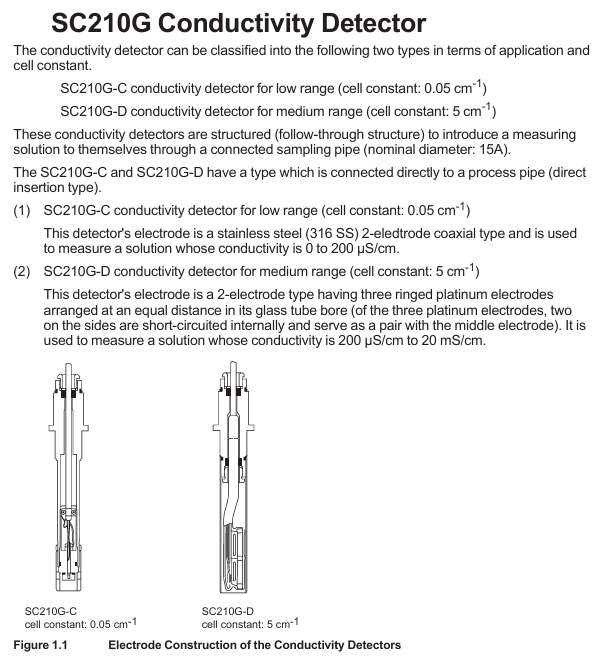
SC210G can be divided into two categories based on measurement range, with the core difference in electrode structure and conductivity range, suitable for different solution detection scenarios:
Model Measurement Type Electrode Structure Battery Constant Measurement Range Applicable Scenarios
SC210G-C low range 316 stainless steel 2-electrode coaxial type 0.05 cm ⁻¹ 0-200 µ S/cm low conductivity solution (such as ultrapure water)
SC210G-D medium range glass tube with equidistant 3-ring platinum electrodes (short circuited on both sides and forming a counter electrode in the middle) 5 cm ⁻¹ 200 µ S/cm-20 mS/cm medium high conductivity solution
3. General technical specifications
Temperature and pressure: Normal temperature 0-105 ℃ (polypropylene material bracket is limited to 0-100 ℃); Conventional pressure 0-1 MPa (polypropylene material support limit 0-500 kPa)
Contact fluid material: SC210G-C (sensor: 316 stainless steel, fluororubber O-ring, polytetrafluoroethylene; Main body: 316 stainless steel, polypropylene); SC210G-D (sensor: platinum, glass, fluororubber O-ring; Subject is the same as Type C)
Temperature compensation: Built in Pt1000 temperature sensor, used to calibrate the effect of temperature on conductivity
Protection level: JIS C0920 waterproof (equivalent to NEMA 4), suitable for humid environments in industrial sites
Safety regulations and usage restrictions
1. Core security principles
Prohibited unauthorized operation: Only use according to the instructions in the manual, unauthorized modification of the device will result in loss of protective function; Repairs require Yokogawa certified spare parts, unauthorized modifications are prohibited
Static electricity and explosion prevention: Non metallic components may carry static electricity, and it is necessary to avoid static electricity generation operations such as wiping with dry cloth; The junction box shell is made of aluminum, which can avoid impact, friction, and sparks; Must comply with explosion-proof standards such as IEC 60079-11 (TIIS certified models cannot be connected)
Temperature limit: The maximum process temperature needs to be determined based on the supporting analyzer (FLXA202/FLXA21/SC202S) and temperature level (T1-T6). For example, under T5 level, FLXA202/FLXA21 with SC210G-C has a maximum process temperature of 54 ℃ at an ambient temperature of 40 ℃, and with SC210G-D it is 95 ℃ (note that the upper limit of T5 level is 100 ℃)
2. Manual usage guidelines
It needs to be handed over to the end user and properly stored, and unauthorized copying/dissemination is prohibited; Yokogawa reserves the right to improve manuals and equipment without prior notice
The manual only describes the device functions and does not guarantee adaptation to specific user scenarios; The equipment is provided as is, and Yokogawa is not responsible for unforeseeable direct/indirect losses
Installation and Wiring Guide
1. Installation type and preparation
SC210G is divided into direct insertion type (installed in process pipelines) and flow type (sample introduced through sampling tubes). Before installation, it is necessary to:
Site selection requirements: easy maintenance, no bubbles in the solution (to avoid measurement deviation), stable liquid level, and away from high temperature (>50 ℃) pipelines
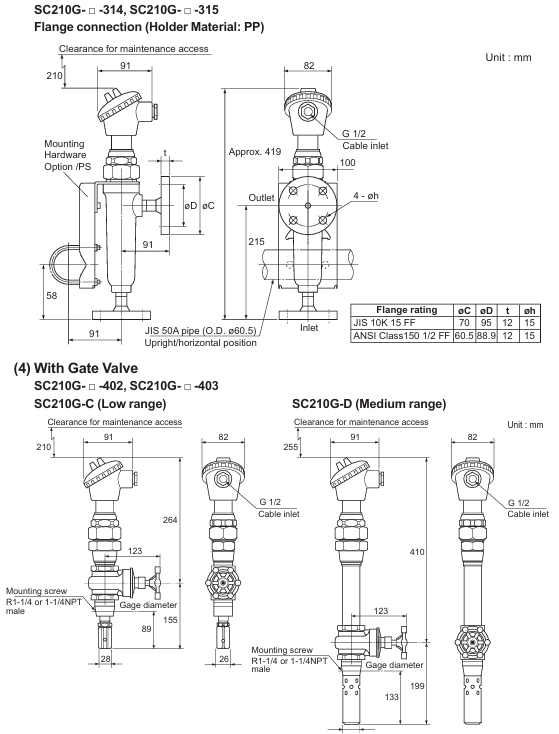
Preprocessing: For direct insertion type, corresponding thread holes (such as R1-1/2, 1-1/2 NPT) or flange holes (JIS 10K 50 RF, etc.) need to be reserved; The circulating polypropylene bracket needs to be equipped with a 50A pipe (outer diameter 60.5mm) and fixed with a bracket to prevent rupture
2. Installation steps
Direct insertion type: Threaded type requires sealing tape to be wrapped around the thread and screwed in; The flange type requires adding gaskets between the flange faces and evenly tightening 4 bolts
Flow type: fixed to the designated installation pipeline, adjustable solution inlet and outlet direction (stainless steel bracket can be adjusted horizontally, polypropylene bracket can be adjusted through the bracket direction)
Direction adjustment: Loosen the union nut of the junction box to rotate it for easy wiring (rotating without loosening the nut will damage the internal wiring)
3. Requirements for piping and wiring
Piping: Hard PVC pipes (JIS K9741, A16) for polypropylene supports, etc; 304/316 stainless steel pipes (JIS G3459, A15) are used for stainless steel brackets; Suggested flow rate<20 L/min (to prevent electrode wear caused by slurry solution), an overflow tank should be installed to remove bubbles, and a shut-off valve should be installed at the maintenance site to prevent leakage
Wiring: The cable length is provided according to the order (3/5/10/15/20m), and the terminals are divided into M4 ring type (compatible with FLXA202/FLXA21), M3 ring type (compatible with FLXA402/FLXA402T/SC450G), and pin type (compatible with multiple devices); The cable should avoid contact with high-temperature components, and the joint locking nut should be tightened for waterproofing after connection. The insulation resistance between the core wires should be ≥ 2 M Ω
Operation and maintenance process
1. Preparation before operation and steady-state operation
Inspection items: correctness of wiring, compatibility of piping materials, solution level (flow type needs to go to the outlet), no leakage; After startup, it is necessary to confirm that there is no bubble interference and no sudden temperature changes (to avoid affecting measurement accuracy)
Steady state maintenance: Conventional solutions (free of pollutants) can be maintained for 1 year without maintenance; Regular calibration with standard solution is required to ensure accuracy; If the analyzer outputs a FAIL signal, refer to the analyzer manual for troubleshooting
2. Core maintenance operations
(1) Electrode cleaning
Cleaning cycle: Low range (0.05 cm ⁻¹) electrodes require almost no cleaning due to minimal impurities in the solution; Medium range (5 cm ⁻¹) electrodes should be cleaned as needed (if the analyzer indicates abnormal electrode polarization)
Cleaning method: Type C (clean the inner and outer electrodes, only the inside of the hole needs to be cleaned externally); D-type (glass material requires a protective tube, gently wipe the platinum electrode on the inner wall of the glass tube with a thin rod wrapped in degreasing cotton)
(2) O-ring replacement
Replacement timing: O-ring damage can cause leakage, and regular inspections are required in high-temperature solution scenarios; Conventional O-ring (fluororubber, model K9050AT/K9050MR), with gate valve model requiring replacement with dedicated O-ring (K9050MS)
Replacement steps: For non gate valve types, simply loosen the union nut and remove the electrode to replace it; The gate valve type needs to first remove the external electrode and locking nut, remove the stop screw and replace the O-ring (recommended to replace in pairs), and calibrate the battery constant after reinstallation
(3) Electrode component replacement
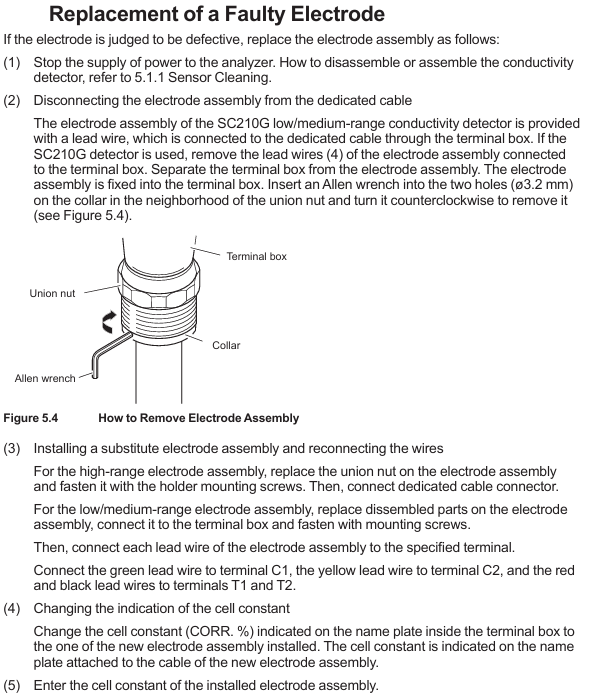
Replacement condition: When the electrode is judged to be faulty (if there is still a large deviation after calibration)
Step: Power off → Remove the connection between the junction box and the electrode (use an Allen wrench to unscrew the electrode assembly) → Install a new component and wire it according to the color (green → C1, yellow → C2, red/black → T1/T2) → Update the battery constant label in the junction box → Enter the new battery constant in the analyzer
- YOKOGAWA
- Reliance
- ADVANCED
- SEW
- ProSoft
- WATLOW
- Kongsberg
- FANUC
- VSD
- DCS
- PLC
- man-machine
- Covid-19
- Energy and Gender
- Energy Access
- Renewable Integration
- Energy Subsidies
- Energy and Water
- Net zero emission
- Energy Security
- Critical Minerals
- A-B
- petroleum
- Mine scale
- Sewage treatment
- cement
- architecture
- Industrial information
- New energy
- Automobile market
- electricity
- Construction site
- HIMA
- ABB
- Rockwell
- Schneider Modicon
- Siemens
- xYCOM
- Yaskawa
- Woodward
- BOSCH Rexroth
- MOOG
- General Electric
- American NI
- Rolls-Royce
- CTI
- Honeywell
- EMERSON
- MAN
- GE
- TRICONEX
- Control Wave
- ALSTOM
- AMAT
- STUDER
- KONGSBERG
- MOTOROLA
- DANAHER MOTION
- Bentley
- Galil
- EATON
- MOLEX
- Triconex
- DEIF
- B&W
- ZYGO
- Aerotech
- DANFOSS
- KOLLMORGEN
- Beijer
- Endress+Hauser
- schneider
- Foxboro
- KB
- REXROTH
- YAMAHA
- Johnson
- Westinghouse
- WAGO
- TOSHIBA
- TEKTRONIX
- BENDER
- BMCM
- SMC
- HITACHI
- HIRSCHMANN
- XP POWER
- Baldor
- Meggitt
- SHINKAWA
- Other Brands
- UniOP
- KUKA
- IBA
- Beckhoff
- ADLINK
-
FANUC A06B-0169-B088 - AC Servo Motor Alpha M40 3000 3 KW
-
ALPHA WIRE 1299C-SLATE-1000 - Multi-Conductor Cable Wire
-
alpha / Wittenstein SK+180S-MF1-10-1M1-1K - Hypoid Gearbox i=10
-
ALPHA WIRE 1181/40C SL005 - Multi-Conductor Cable Wire
-
Generic / DSI Straight Anatomic Plastic Adapter Head + Screw Hex - Dental Implant Fixture
-
Alpha II-650 MV6500526A - Power Supply Unit
-
ALPHA WIRE 7036 WH001 - Hook-Up Wire
-
FANUC RDCGM00000004O / TP 050-MF1-7-061-000 - Gear Reducer / Alpha Gearbox
-
Alpha II-650 MV6500436A - TDK-Lambda Power Supply Unit
-
Alpha S-Alpha600 J60033 - 600W Switching Power Supply Unit
-
Alpha 1500W J00032 - Power Supply Unit
-
Alpha 600W H60638 - Switching Power Supply Unit
-
Alpha 650 MV6500314A - Power Supply Unit
-
Aloka UST-5413 - Linear Probe for Prosound Alpha 6
-
ALPHA WIRE TFT25015 NA002 - High Temperature Heat Shrink Tubing Wire Sleeving
-
JAVAD ALPHA2 / GrAnt-G3 - GPS Receiver
-
Alpha 400W H47318 - Switching Power Supply Unit
-
Alpha SG-ALPHA-202-001 / Q1001-010-001 - Circuit Board Module
-
Antlia Dual ERF H-Alpha & Cak/CaH - Density Astronomical Accessory
-
ALPHA WIRE 5100C SL033 - Multi-Conductor Cable Wire
-
ALPHA WIRE 5098C-SL033 - Multi-Conductor Cable Wire
-
Fanuc A06B-6290-H105 - Alpha Sv 80hv-B Module Servo Amplifier
-
FANUC A06B-6240-H105 - Aux Axis Alpha aiSV 80 Servo Amplifier
-
Endress+Hauser Alpha-Log RSA10-61B1S / 42974737/0130 - Data Logger Measurement Instrument
-
ALPHA WIRE 6363-SL002 - Multi-Conductor Cable Wire
-
Alpha SP100S-MF1-7-1K1-2S - Gear Reducer
-
Alpha SP 100G-MF1-4-0H1-2S-PGG - Planetary Gear Reducer
-
FANUC A06B-0143-B175 #0275 - Alpha 12/3000 AC Servo Motor
-
James Burn Alpha Doc P33 / GBC PDI - Automatic Punch DocuPunch
-
Titus HVAC 105383-01 - ALPHA BAC Controller and Actuator
-
Wittenstein Alpha SP 100S-MF2-20-0E0-2S - Planetary Gearbox i=20
-
Kashiyama Alpha-85-ZV / SP-8026G - Pump Controller
-
Christ Alpha 2-4 LDplus - Freeze Drier Part N/ 101542
-
Lambda / Alpha H40896 - 400W Power Supply Unit
-
Wittenstein Alpha LP-070S-MF1-3-1E1-38 - Planetary Gearbox
-
Matrox / EXO-2480 133-D06-3 / 398-17962-1 - Alpha Numeric PCB Board
-
Fanuc A06B-6096-H204 - Dual Axis Alpha Servo Amplifier Module
-
Alpha Wire 5002C-SL001 - Multi-Conductor Cable 2 Conductors 22AWG 300VAC
-
Alpha 600W H60638 - Switching Power Supply Unit
-
Alpha Scientific Spin Precession Dual Electro Magnet Beam Line Chamber - Electro Magnet Beam Line Chamber
-
ALPHA WIRE 6017C SL005 - Multi-Conductor Cable Wire
-
ALPHA WIRE 65804 SL002 - Multi-Conductor Cable Wire
-
Fanuc A06B-0152-B010 - AC Servo Motor Alpha A30/2000 with Brake
-
ALPHA WIRE 5856-VI001 - Hook-Up Wire
-
ALPHA WIRE M13142-SL001 - Multi-Conductor Cable Wire
-
Alpha & Omega AOZ1017 - 8-Pin SOIC SMD Buck Switching Regulator IC
-
Alpha 600W H67027 CA600 - 600W Switching Power Supply Unit
-
ALPHA WIRE 2845/7-RD001 - Hook-Up Wire
-
Wittenstein Alpha VH+063S-MF1-10-6H1-1K-0C2 - Worm Gear Reducer i=10
-
ALPHA WIRE 2414C SL022 - Multi-Conductor Cable Wire
-
ALPHA WIRE 5672-SL005 - Multi-Conductor Cable Wire
-
BECKHOFF / Alpha AM8021-0B10-0000 + CP 040-MO1-10 - Servo Motor with Planetary Gearbox
-
ALPHA Systems Lab Inc MBA-WV1-F / PCB-WV1-F - PCB Board
-
FANUC A06B-0826-B201 - Alpha P12 AC Spindle Motor
-
WF & HC / Alpha-E 10045 - Tiller Bar Flat Flange Inlet 3150LB 3X 2.5 Inch
-
Seiler Alpha Air 3 - Dental Microscope
-
Alpha 400W H47223 - Switching Power Supply Unit
-
Wittenstein Alpha SP 180S-MC1-5-1M0-2K - Planetary Gearbox
-
FANUC A06B-6117-H211 - Servo Amplifier Module Alpha iSV 160/160 Amp
-
Alpha S-Alpha600 J60033 - 600W Switching Power Supply Unit
-
Adaptive Alpha Eclipse StreetSmart Model 17X - Master Slave LED Sign 44 x 44 Inch
-
ALPHA WIRE 391697-WH005 / 391697WH005 - Hook-Up Wire
-
Generic 22W Laser Engraver Cutter - Smart Air Pump APP Control CNC Dual-core CPU DIY Tools
-
FANUC A06B-6102-H226 / A06B6102H226 - Spindle Amplifier Module
-
FANUC A06B-6090-H006 / A06B6090H006 - Servo Power Supply Module
-
Alpha Wire Apr-19 - High Low Temperature Cable 75 FT
-
Wittenstein Alpha HG+ 075S-MF2-28-6E1-1S10 - Hypoid Gearbox Reducer i=28
-
Alpha J00032 - 1500W Power Supply Unit
-
Alpha H47038 - 400W Power Supply Unit
-
FANUC A06B-6096-H204 - Dual Axis Alpha Servo Amplifier Module
-
Wittenstein Alpha LPB090-MO1-10-111-00 - Alpha Planetary Gearbox
-
ALPHA WIRE 2842/19-YL001 - Hook-Up Wire
-
WITTENSTEIN ALPHA HG+060S-MF1-56C1-1K00 - Planetary Gearbox
-
Basler A102K Alpha VIS - Black and White CCD Industrial Camera
-
Alpha H40935 - 400W Power Supply Unit
-
FANUC A06B-6114-H207 - 2-Axis Servo Amplifier Module SVM20/40i Alpha i Series
-
TDK-Lambda / Alpha H47318 - 400W Switching Power Supply Unit
-
HITACHI Aloka Prosound Alpha 7 Premier - Diagnostic Ultrasound System
-
Alpha SP100S-MF1-4-1E1-2S - Precision Gear Reducer
-
FANUC A20B-2001-0950 - Control Circuit Board PCB
-
ALPHA WIRE 2855/1-GR001 - Hook-Up Wire
-
FANUC A06B-6096-H204 - Dual Axis Alpha Servo Amplifier Module
-
Wittenstein Alpha LPB090-MO1-10-111-00 - Alpha Planetary Gearbox
-
ALPHA WIRE 2842/19-YL001 - Hook-Up Wire
-
Basler A102K Alpha VIS - Black and White CCD Industrial Camera
-
Wittenstein Alpha LP 090-M01-7-111-000 / Schneider - Gear Box i:7 Schneider Electric Servo Motor
-
LAMBDA ALPHA 600W H60554 - Switching Power Supply Unit
-
Fanuc A06B-0238-B100 / A860-2000-T301 - AC Servo Motor with Encoder
-
FANUC A06B-6290-H322 - ALPHA iSV 10/10/10HV-B 3-Axis Servo Drive
-
Polymotor Italiana 9919 121 90332 / Alpha SP75-M1-3 - D.C. Permanent Magnet Motor with Gearbox
-
MJ Research PTC-200 - PCR DNA Engine Thermal Cycler with Dual 48-Well Alpha Block
-
ALPHA WIRE 5002C-SL002 - Multi-Conductor Cable Wire
-
Fluke / Victoreen ASM 990 / 489-110D - Biomedical Radiation Detector Probe with Pelican Case
-
ALPHA WIRE 5855-BK001 - Hook-Up Wire 22AWG Silver Plated Copper
-
Tetra / Alpha 600W H60552 - Switching Power Supply Unit
-
Bruker Alpha FTIR Spectrometer / Alpha-P ATR - Infrared Spectrometer FTIR Instrument
-
Simagic AlphaM-FX-C 290mm FX-C - Formula Steering Wheel with Alpha Mini Wheel Base
-
Alpha Wire 5152C 20/2C - XtraGuard High Performance Instrumentation/Control Cable
-
ALPHA WIRE 1219/40C SL005 - Multi-Conductor Cable Wire
-
ALPHA WIRE 3131441 TN005 - Multi-Conductor Cable Wire
-
ALPHA WIRE 2172-SV005 - Multi-Conductor Cable Wire
-
FANUC A20B-2100-0742 - ALPHA ia Servo Control Board
-
Olympus Endo Alpha Cart TI-A1 - Medical Equipment Cart with Accessories
-
ALPHA WIRE 74010-BK002 - Multi-Conductor Cable Wire
-
Fanuc A06B-6110-H026#N - ALPHA i Power Supply Module PSM-26i
-
Alpha Laval SX2/013 - Rotary Lobe Pump
-
Alpha II-450P MV4500007B - Switching Power Supply Unit
-
TDK-Lambda / Alpha 400W - Switching Power Supply Unit
-
ALPHA ALPHA6000E-3015GB/3018PB - Frequency Inverter Drive Power Converter
-
ALPHA WIRE 391245-WH005 - Hook-Up Wire
-
Alpha H60562 CA600 - 600W Switching Power Supply Unit
-
Fanuc A06B-0147-B675 - Alpha 22/2000 3.8kW 2000rpm AC Servo Motor
-
ALPHA WIRE 9821 - Twinaxial Cable 1PR 25AWG Poly Insulation
-
Fanuc / Alpha A16B-2203-0820 - ALPHA i Spindle Wiring PCB
-
FANUC A20B-2100-0742 - ALPHA ia Servo Control Board
-
Fanuc A06B-6096-H104 - Alpha Servo Module
-
Fuji Electric RYT202D5-VV2 / Faldic Alpha5 - Servo Amplifier
-
ALPHA WIRE 2817/6 20 AWG - PTFE High Temperature Cable
-
Aloka Prosound Alpha 10 / EU-6031C / JB-274D - High Voltage Power Supply for Ultrasound
-
Wittenstein Alpha SP 140S-MF1-5-01F-2S - Planetary Gearbox
-
FANUC A06B-6124-H205 - Alpha iSV Servo Amplifier Module
-
TDK-Lambda / Alpha MV6500314A - 650W Power Supply Unit
-
TDK-Lambda / Alpha H47318 - 400W Switching Power Supply Unit
-
Alpha H47318 - 400W Switching Power Supply Unit
-
CNC Bearing / Alpha AR090-S1-300-20-N - Robotics Bearing Component
-
Alpha CA400 5A,3.3Q,5B,12/12E / DXH47037 - 400W Power Supply Unit
-
FANUC A20B-2100-0742 - ALPHA ia Servo Control Board
-
Fanuc / Amada A04B-0810-C403 / LC1212 alpha II - Pressure Regulator

K-JIANG

Add: Jimei North Road, Jimei District, Xiamen, Fujian, China
Tell:+86-15305925923