

K-WANG


TOSHIBA TOSBERT VF-A3 frequency converter
Equipment specifications:
Voltage level, power range, core application scenarios
200V level 0.4-55kW small and medium-sized motor drive (such as conveyor, fan)
400V level 0.75-75kW medium and large motor drive (such as pumps and compressors)
TOSHIBA TOSBERT VF-A3 frequency converter
Overview and Basic Equipment Information
Positioning: The official user manual for Toshiba TOSBERT VF-A3 series high-performance frequency converters, used to guide users in installation, operation, maintenance, and troubleshooting.
Equipment specifications:
Voltage level, power range, core application scenarios
200V level 0.4-55kW small and medium-sized motor drive (such as conveyor, fan)
400V level 0.75-75kW medium and large motor drive (such as pumps and compressors)
Equipment features:
High reliability: Built in current limiting, retry, soft stop, and instantaneous power-off protection functions to reduce the probability of tripping.
Easy to operate: keyboard style operation panel, supports memory commands, basic settings do not require stopping the machine to consult the manual.
Compact design: The research body integrates multiple protection functions, saving installation space.
Model coding rules: Taking "VFA3-2150P" as an example, the meanings of each part are as follows:
VFA3: Series Code (VF-A3 Series)
2: Voltage level (2=200V level, 4=400V level)
15: Capacity (15kW)
0: Special configuration (0=Standard)
P: Panel configuration (P=equipped with operation panel)
Installation and wiring specifications
1. Installation requirements
Installation method: Only supports vertical wall mounted installation. For non vertical installation, please consult a Toshiba representative.
Ventilation gap (Figure 1.1):
Top/bottom: minimum 10cm
Left and right sides: minimum 5cm
Environmental restrictions:
Temperature: -10 ℃~40 ℃ (up to 50 ℃ without casing)
Humidity: ≤ 90%, no condensation
Altitude: ≤ 1000m (3300ft)
Vibration: Acceleration ≤ 0.5G (20-50Hz), amplitude ≤ 0.1mm (50-100Hz)
Special note: Models with 3.7kW and below have a built-in regenerative discharge resistor on the back. Frequent start stop cycles can cause the exhaust temperature to reach 150 ℃. It is recommended to install it on a metal surface for heat dissipation.
2. Wiring process and specifications
Preparation before wiring:
Disconnect the main switch of the distribution panel and confirm that the "CHARGE" light of the frequency converter is off (to avoid electric shock).
Open the front cover: Pull forward and lift up (Figure 1.2).
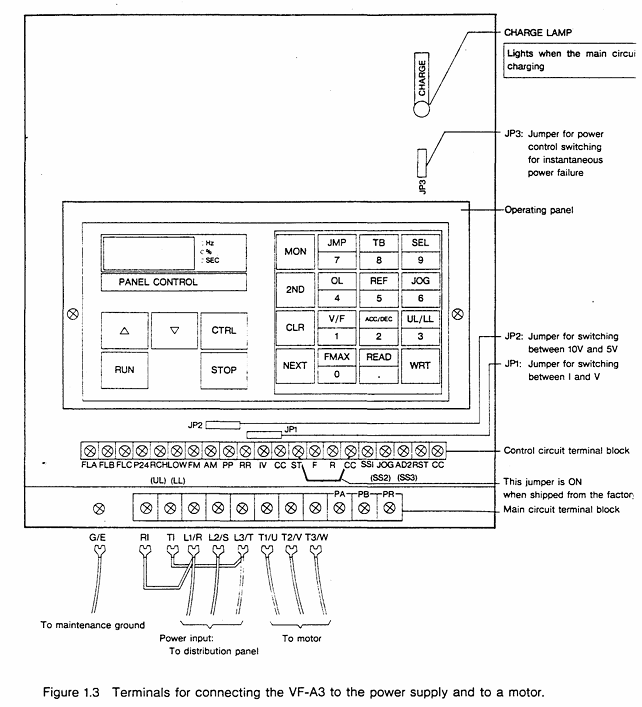
Main circuit wiring (Figure 1.3):
Terminal Name Connection Object Precautions
L1/R, L2/S, L3/T 3-phase power input cannot be reversed to the motor end (T1/U, etc.), otherwise the equipment will be damaged
T1/U, T2/V, T3/W 3-phase motors require corresponding motor U, V, and W terminals
The grounding wire of the G/E system complies with Class 3 grounding specifications
R1/T1 (200V level), R38/R41 (400V level) control circuit power supply single-phase signal, ensuring independent power supply for the control circuit
Control circuit wiring:
Frequency setting signal: PP (10Vdc reference) RR(0-10Vdc/0-5Vdc)、IV(0-5Vdc/4-20mAdc), The type needs to be switched through JP1/JP2 jumper (Table 6.1).
Operation control signals: ST (preparation for operation), F (forward rotation), R (reverse rotation), JOG (jog), short circuit the corresponding terminal to CC to achieve the function.
Taboo:
Do not connect power factor compensation capacitors on the power side or motor end.
The control circuit (excluding FLA/FLB/FLC) needs to be insulated from the main circuit to avoid interference.
Operation process and core function settings
1. Operation panel and basic operations
Panel layout (Figure 2.1): including "PANEL CON" LED, MON (monitoring/setting switch), RUN/STOP (run/stop), frequency ± key, parameter setting key (WRT/READ/NEXT, etc.).
Simplify the operation process (trial run, recommended low-frequency startup):
Power ON: When the MCCB is closed, the monitor flashes "OFF" first and then displays "0.0".
Switch panel control: Press the "CTRL" key, and the "PANEL Control" LED will light up.
Set frequency:
Numerical keys: If set to 10Hz, press "1", "0", and "WRT" to display "10" and "FC" alternately.
± key: Long press "△" (increase)/"▽" (decrease), if set to 5.5Hz, press "WRT" to save.
Start/Stop: Press "RUN" to accelerate to the set frequency; Press' STOP 'to slow down and stop.
2. Core Function Settings
(1) Frequency and voltage characteristic settings
Maximum frequency (FH): 30-400Hz (1Hz step size), default 50Hz for 50Hz models and 60Hz for 60Hz models, cannot be modified during operation (requires shutdown).
Torque boost (ub): 0-30% (1% step size), default 3%, used to boost starting torque, excessive can cause overcurrent during startup.
Automatic torque boost (Rub): 0=off, 1=on, automatically adjusts voltage based on load current (Figure 3.4).
Fundamental frequency (uL): 25-400Hz (1Hz step size), set 50Hz for 50Hz motors and 60Hz for 60Hz motors (Table 3.1).
V/f mode (Pt.): 0=constant torque (conveyor), 1=variable torque (fan/pump, energy-saving) (Figure 3.6).
(2) Acceleration, deceleration, and braking control
Acceleration and deceleration time (ACC/DEC):
Range: 0.1-6000 seconds, supports 2 sets of time (ACC1/ACC2, DEC1/DEC2).
Mode: 0=linear, 1=non-linear 1 (slow acceleration at low torque), 2=non-linear 2 (slow acceleration at high speed) (Figure 3.8).
DC injection braking (dbF/dbu/dbt):
Starting frequency (dbF): 0-10Hz, braking voltage (dbu): 0-20%, braking time (dbt): 0-5 seconds, used for precise positioning (Figure 3.27).
Regenerative braking (Pb):
Applicable scenarios for Pb setting function
0 normal load without regenerative braking (or using regenerative discharge unit)
1. There is regenerative braking, no resistance overload detection, and moderate inertia load
2. There is regenerative braking and resistance overload detection for large inertia loads (such as centrifuges)
(3) Multi speed and special operation
Multi speed operation (S1-S7): 7 speeds are achieved through the combination of SS1/SS2/SS3 terminals, with a frequency range from the lower limit frequency (LL) to the upper limit frequency (UL), and can be controlled by panel or external signals (Table 3.7).
Jog operation (JOG): frequency 0-20Hz (0.1Hz step size), only starts when stopped, press the "RUN" button to run, release to stop (Figure 3.21).
Frequency jump (FJ1-FJ3): 3 jump points, set the jump frequency and width to avoid load resonance (Figure 3.24).
3. Status monitoring and fault reset
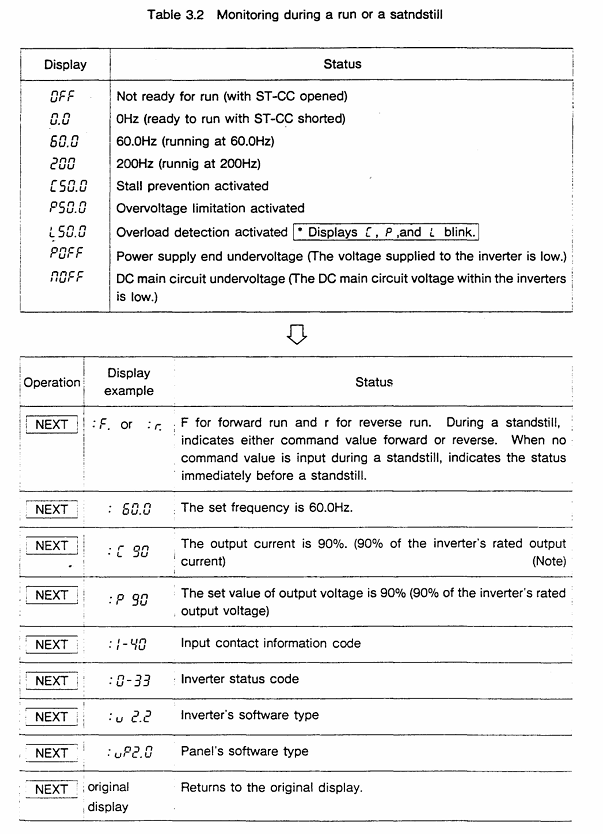
Operation/shutdown monitoring: Press the "NEXT" button to cycle through the status (Table 3.2), such as "60.0"=operating frequency 60Hz, "PSO. 0"=overvoltage limit activation, "OC"=overcurrent detection.
Fault monitoring: When tripping, press "NEXT" to check the fault status (such as frequency, current, voltage), and support tracing the last 4 faults (Table 3.4).
Fault reset:
Panel reset: Press "CLR"+"WRT".
External reset: Short circuit the RST-CC terminal (Figure 4.9).
Troubleshooting and Maintenance
1. Fault codes and solutions (Table 9.1)
Meaning of fault code and solution measures
OC1 acceleration overcurrent 1. Increase ACC time; 2. Reduce UB settings; 3. Check if there is a sudden change in the load
OH frequency converter overheating 1. Check the cooling fan; 2. Confirm that the ambient temperature is ≤ 40 ℃; 3. Clean the heat dissipation channel
EF load terminal grounding fault 1. Check the insulation of the motor and output circuit; 2. Check the grounding short circuit point
EEP EEPROM abnormality 1. Restart the power supply; 2. If ineffective, repair/replace EEPROM
2. Regular maintenance and storage
Regular inspection (every 3-6 months):
Terminal screws: Tighten loose screws to prevent poor contact.
Line inspection: Check if the wire crimping point is overheated (discolored) and if the insulation is damaged.
Dust removal: Use a vacuum cleaner to clean the ventilation openings and printed circuit board dust to avoid overheating.
Insulation test: Use a 500V megohmmeter to test the insulation of the main circuit. The motor needs to be tested after disconnecting the frequency converter.
Storage requirements:
Environment: Dry, dust-free, non corrosive gas, temperature -10-40 ℃.
Activation: Long term storage (>2 years) requires power on every 2 years; After removing the storage, the motor needs to be powered on for at least 5 hours before running.
Optional accessories and warranty terms
1. Optional accessories (Table 7.1/7.2)
Type Accessory Name Model Example Function
External installation of input reactor PFL2012-2100 improves power factor and suppresses harmonics
External installation of regenerative discharge resistor PBR3-2055 enhances braking effect, suitable for large inertia loads
Built in multi option printed circuit board VF3X-0888B supports RS-232C communication, BCD code input, etc
External installation of PANEL-KIT (1M/3M/5M) remote control panel, including 1/3/5 meter cable
2. Warranty terms
Warranty period: 12 months after delivery.
Warranty expiration situation:
Unauthorized maintenance/modification of equipment.
Damage caused by vibration/impact during transportation/installation.
Force majeure events such as fires, floods, lightning strikes, and abnormal power grid voltage.
Used for designated purposes of non industrial frequency converters.
Acceptance requirements: After opening the box, check that the equipment is undamaged and the model is consistent with the order. If there are any problems, immediately contact a Toshiba representative.
Key issues
Question 1: What are the space and environmental restrictions that must be followed when installing the TOSBERT VF-A3 frequency converter? What are the consequences of ignoring these restrictions?
Answer:
Restrictions that must be followed:
Installation method: Only supports vertical wall mounting, non vertical installation requires prior consultation with Toshiba representatives.
Ventilation gap: minimum 10cm at the top/bottom, and minimum 5cm on both sides to ensure smooth heat dissipation.
Environmental parameters: temperature -10 ℃~40 ℃ (≤ 50 ℃ without casing), humidity ≤ 90% (no condensation), altitude ≤ 1000m, vibration acceleration ≤ 0.5G (20-50Hz)/amplitude ≤ 0.1mm (50-100Hz).
Special models: Models with 3.7kW and below have regenerative discharge resistors on the back, and the exhaust temperature can reach 150 ℃. It is recommended to avoid installing on flammable surfaces and choose metal surfaces for heat dissipation.
The consequences of ignoring restrictions:
Insufficient ventilation can cause the frequency converter to overheat (fault code OH), triggering a protective shutdown and potentially damaging the power module in the long run.
Excessive humidity/condensation can cause a short circuit and ground fault (EF code) in the main circuit.
Excessive vibration may cause loose terminals, poor contact leading to overcurrent (OC code) or equipment shutdown.
Question 2: In the daily operation of VF-A3 frequency converter, how to set the "DC injection braking" function through the panel to achieve precise motor stop? It is necessary to clarify the setting range and default values of key parameters.
Answer: The steps and key parameters for setting "DC injection braking" through the panel are as follows:
Enter the second functional mode:
Press the "MON" button, and the display will show "no.0 →: t: JP"; Press the "2ND" key to switch to the "2nd" mode.
Select DC injection braking related parameters (function number 0, Table 3.1):
Parameter Name Function Setting Range Default Value Operation Instructions
When the DBF (DC injection braking start frequency) motor drops to this frequency, it triggers the braking 0-10Hz (0.1Hz step size) 0Hz. Press "READ" to read the current value, press "△/▽" or the numerical key to adjust, and press "WRT" to save
DBU (DC injection braking voltage) injects a DC voltage that accounts for 0-20% (1% step size) during braking. If the voltage is too high, it will cause the motor to overheat. It is recommended to adjust according to the inertia of the load (such as 10% -15%)
DBT (DC injection braking time) braking duration 0-5 seconds (0.1 second step) 0 seconds. It is necessary to ensure that the time is sufficient to stop the motor and avoid incomplete braking caused by too short a time
Confirm settings: Press the "MON" key to return to the original display (frequency/OFF), and the settings will take effect.
Attention: DC injection braking is only activated during deceleration and stopping process, and should be accompanied by appropriate deceleration time (DEC) to avoid triggering overcurrent protection due to excessive current during braking.
Question 3: What are the possible reasons when the VF-A3 frequency converter displays "OC1" (acceleration overcurrent) fault? What are the corresponding solutions? What safety precautions should be taken during troubleshooting?
Answer:
Reason for "OC1" fault: During acceleration, the main circuit current exceeds the protection threshold. Common reasons include:
The acceleration time (ACC) is set too short, and the motor speed cannot keep up with the frequency increase, resulting in excessive stalling current.
The torque boost (ub) is set too high, causing overcurrent due to high voltage during startup.
Sudden load changes in the motor (such as sudden blockage of the conveyor), and the load current exceeds the rated output of the frequency converter.
Poor wiring of the main circuit (such as loose wiring at the motor end) can cause current fluctuations.
Solution:
Extend acceleration time: Enter the first function ("MON" → select function number 2), adjust "ACC1/ACC2" to a longer time (such as changing from 1 second to 3 seconds), and press "WRT" to save.
Reduce torque boost: Enter the first function (function number 1), reduce the "ub" value (such as from 10% to 5%), and avoid starting overvoltage.
Check the load: Check if the mechanical load is stuck, clean up foreign objects or reduce the load to ensure that the load is within the rated range of the motor.
Check wiring: Disconnect the power supply (MCCB), confirm that the "CHARGE" light is off, tighten the terminal screws of the main circuit (L1/R, T1/U, etc.), and check the insulation of the circuit.
Check safety precautions:
Before checking all wiring, the main switch of the distribution panel must be disconnected and wait for the "CHARGE" light to turn off (to avoid electric shock caused by residual voltage of the capacitor).
When adjusting parameters, it is necessary to ensure that the frequency converter is in a stopped state. Modifying acceleration time/torque increase during operation may cause equipment instability.
If the fault still exists after multiple troubleshooting, it is necessary to check the motor insulation (using a 500V megohmmeter) to avoid overcurrent caused by internal short circuit of the motor.
- YOKOGAWA
- Reliance
- ADVANCED
- SEW
- ProSoft
- WATLOW
- Kongsberg
- FANUC
- VSD
- DCS
- PLC
- man-machine
- Covid-19
- Energy and Gender
- Energy Access
- Renewable Integration
- Energy Subsidies
- Energy and Water
- Net zero emission
- Energy Security
- Critical Minerals
- A-B
- petroleum
- Mine scale
- Sewage treatment
- cement
- architecture
- Industrial information
- New energy
- Automobile market
- electricity
- Construction site
- HIMA
- ABB
- Rockwell
- Schneider Modicon
- Siemens
- xYCOM
- Yaskawa
- Woodward
- BOSCH Rexroth
- MOOG
- General Electric
- American NI
- Rolls-Royce
- CTI
- Honeywell
- EMERSON
- MAN
- GE
- TRICONEX
- Control Wave
- ALSTOM
- AMAT
- STUDER
- KONGSBERG
- MOTOROLA
- DANAHER MOTION
- Bentley
- Galil
- EATON
- MOLEX
- Triconex
- DEIF
- B&W
- ZYGO
- Aerotech
- DANFOSS
- KOLLMORGEN
- Beijer
- Endress+Hauser
- schneider
- Foxboro
- KB
- REXROTH
- YAMAHA
- Johnson
- Westinghouse
- WAGO
- TOSHIBA
- TEKTRONIX
- BENDER
- BMCM
- SMC
- HITACHI
- HIRSCHMANN
- XP POWER
- Baldor
- Meggitt
- SHINKAWA
- Other Brands
- UniOP
- KUKA
- IBA
- Beckhoff
- ADLINK
-
ALPHA WIRE 1636-RD001 - Hook-Up Wire
-
FANUC A06B-6078-H211#H501 / A06B6078H211H501 - Servo Amplifier Module
-
Alpha H47016 / CA400 - 400W Switching Power Supply Unit
-
Alpha Wire 2821/2 WH001 - Multi-Conductor Communication Control Cable
-
Wittenstein Alpha SP 100S-MF2-25-1E1-2S - Planetary Gearbox Reducer
-
FANUC A06B-6090-H008 / A06B6090H008 - Servo Power Supply Module
-
Alpha Wire 2821/2 WH001 - Multi-Conductor Communication Control Cable
-
NOVOTRON / Alpha NBL2-0080-45-3-320 T0B + SP075-MF1-3-031-000 - Servo Motor with Planetary Gearbox
-
Alpha 0100044-001 CXRF 48/4.6KW - Rectifier Module
-
Lambada-TDK / Alpha YM-00-470B / AMAT 50513215200 - 600W Power Supply Unit
-
FANUC A06B-6290-H122 - Alpha iSV 10HV-B 3-Axis Servo Amplifier Drive
-
Alpha SP 140S-MF1-5-1/1-2S - Planetary Gearbox Reducer
-
Wittenstein Alpha SP 100S-MF1-5-1K1-2S - Planetary Gearbox Reducer
-
Wittenstein Alpha LP 120Z-MF1-10-1/1-3S-INF - LP Series Planetary Gearbox
-
Wittenstein Alpha LP 090-M01-7-111-000 / Schneider - Planetary Gearbox with Servo Motor
-
Alpha TP 050-MX1-7-450-000 - Gearbox Reducer
-
Fanuc A06B-0377-B577#7000 - AC Servo Motor Alpha M2.5/3000
-
ALPHA WIRE 1705-SL001 - Hook-Up Wire
-
ALPHA WIRE 1953/3T-BK003 - Hook-Up Wire
-
ALPHA WIRE 5855/7-SL001 - Hook-Up Wire
-
ALPHA WIRE 2158-NA005 - Hook-Up Wire
-
Wittenstein Alpha TP 025S-MF1-7-0G0-2S - Planetary Gearbox
-
ALPHA WIRE 5356C - 37 Conductor 20AWG Foil & Braid Shield Cable
-
Wittenstein Alpha NP 025S-MF1-5-1G1-1S - Planetary Gearbox
-
Allen Bradley / Alpha N-3412-2-H00AA / LP 120-M02-100-111-000 - Servo Motor with Planetary Gearbox
-
FANUC A06B-6089-H204 - Alpha Series Servo Amplifier Module
-
Man Diesel & Turbo 3157168-7 - Alpha Lubricator Sbu
-
FANUC A20B-2100-0742 - ALPHA ia Servo Control Board
-
ALPHA ALPHA6000E-31R5GB - Frequency Inverter Drive Power Converter
-
Alpha Industries G287775-1 / 5985-01-341-9652 - Variable Attenuator
-
FANUC A06B-6124-H206 - Alpha iSV Servo Amplifier Module
-
Wittenstein Alpha NP 025S-MF1-5-1G1-1S - Planetary Gearbox
-
NOVOTRON / Alpha NBL2-0080-45-0-320-B-S-A + SK060-MF1-3-031-000 - Servo Motor with Alpha Gearbox
-
FANUC A20B-2100-0742 - ALPHA ia Servo Control Board
-
Honeywell CK65-L0N-BLC210F / CK65 - Mobile Computer Barcode Scanner
-
Wittenstein Alpha TK+ 004S-MF2-12-5B1-1S10 - Right Angle Gearbox
-
FANUC A20B-2100-0742 - ALPHA ia Servo Control Board
-
Rexroth MSK071E-0450-NN-M1-UG1-NNNN - 3-Phase AC Motor with Alpha Reducer
-
JAVAD ALPHA2 - GPS Receiver GrAnt G3
-
GROSCHOPP / Alpha WK 1621309 / EK 66-45 NR + TP 010-MF2-61-030-000 - Motor with Alpha Gearbox Construction
-
ALPHA WIRE 5060C-SL005 - Multi-Conductor Cable Wire
-
ALPHA B10 K X 2 T80887 - Potentiometer
-
Alpha 400W J40005 - Switching Power Supply Unit
-
FANUC A20B-1007-0650 - ALPHA Power Supply Module Board
-
Eberline HP-100B - Gas Proportional Alpha Beta Probe GM Geiger Counter
-
ALPHA WIRE 5858-BK001 - Single Conductor Hook-Up Wire
-
FANUC A06B-6127-H103 - Alpha I AiSV-20HV Servo Amplifier Module
-
VIASYS / CareFusion SOMNOSTAR CEPHALO PRO - Portable EEG Neurodiagnostic Sleep System
-
DSI Surgical Instruments Universal - Dental Implant Abutment Surgical Instruments Kit
-
FANUC A06B-6078-H211#H501 / A06B6078H211H501 - Servo Amplifier Module
-
Fanuc A06B-6089-H209 - Alpha Series Servo Amplifier Module
-
Generic / DSI Straight Anatomic Plastic Adapter Head + Screw Hex - Dental Implant Fixture
-
FANUC A20B-1006-0680 - ALPHA Power Supply Module Board
-
B&L Biotech Alpha II - Endodontic Starter Kit
-
FANUC A06B-0166-B088 C009A5653 - AC Servo Motor
-
ALPHA WIRE 74010-BK002 - Multi-Conductor Cable Wire
-
Wittenstein Alpha SPK 100-MF2-10-041-000 - Gear Box Reducer Ratio 10:1
-
Alpha Getriebebau 10-FL-M1-5 - 10:1 Ratio 7/8 Inch Shaft Gear Reducer
-
ALPHA WIRE 2172-SV005 - Multi-Conductor Cable Wire
-
Aloka UST-5410 - Linear Array Probe Compatible Transducer
-
Alpha Xtra-Guard 1 SupraShield - Multiconductor Cable 16 AWG 2 Conductor
-
ALPHA ALPHA7000E-37R5GB/3011PB - Frequency Inverter Drive Power Converter
-
SIEMENS / Alpha 1FT5066 / SP 100 ROD 426B - Servo Motor with Actuator
-
FANUC A06B-6089-H210 / A06B6089H210 - Servo Amplifier Module
-
LAMBDA ALPHA 600W H60553 - Switching Power Supply Unit
-
Alpha 400W J40071A - Switching Power Supply Unit
-
Hyva Alpha Series FC A4.5-3-98-K6-1DA-HC / 70593139 - Dump Body Hydraulic Cylinder
-
ALPHA WIRE 1293C-SL001 - Multi-Conductor Cable Wire
-
NSS Galaxy / Alpha 20 and 16 - Floor Strip and Wax Slow Speed Buffer and Wet Vac
-
Alpha Xtra-Guard 1 SupraShield - Multiconductor Cable 16 AWG 2 Conductor
-
ALPHA ALPHA6000-3015JB - Frequency Inverter Drive Power Converter
-
Densei-Lambda MA4000591A/ME Alpha 400 / MV6500271A Alpha II-650 - Power Supply Unit
-
Wittenstein Alpha SP 140G-MF2-28-0E1-2S-PGG - Planetary Gear Reducer
-
FANUC ROBOCUT ALPHA-1iC - CNC Wire EDM Machine
-
Fanuc A06B-6081-H101 - Alpha Series Power Supply Module PSMR-1
-
ALPHA WIRE 5855-BL001 - Hook-Up Wire
-
Wittenstein Alpha SPK 100-MF2-20-141-000 - Right Angle Gear Reducer 20:1 Ratio
-
LNS ALPHA SL65-S - Bar Feed System
-
ALPHA WIRE 5356C - 37 Conductor 20AWG Foil & Braided Shield TC Shield Cable
-
TDK-Lambda / Alpha H60552 - 600W Switching Power Supply Unit
-
Bruker Alpha - Infrared Spectrometer FTIR Instrument
-
Wittenstein Alpha SP 060S-MF1-7-0B1-2S - Planetary Gearbox Reducer
-
Digital Alpha VME 5/480 - VME SBC Motherboard CPU Board
-
Glentek Alpha Series - Digital Brushless Servo Amplifier Drive
-
Wittenstein Alpha TPM 004S-021M-6KB1-053B-G6 - Rotary Servo Actuator
-
Wittenstein Alpha TP 110-MF2-61-031-000 / 20009377 - Planetary Gearbox Reducer
-
Emerson Alpha 1800 24 60 / 5070800001 - Rectifier Power Module
-
Fanuc A06B-0377-B577#7000 - AC Servo Motor Alpha M2.5/3000
-
Novotron / Alpha NBL2-0080-45-3-320 T0B + SP075 - Servo Motor with Alpha Gearbox
-
Alpha & Omega Semiconductor AOD442 - N-Channel MOSFET Reel Surface Mount
-
Alpha Wire 2156-NA005 - Hook-Up Wire Cable
-
Sankyo 15AD-04277R-LR3VW1 - Rotary Indexer with Motor
-
Wittenstein Alpha TP025S-MF1-7-0G0-2S - Planetary Gearbox i=7
-
Fanuc A20B-2001-0950 - Control Circuit Board PCB
-
TDK-Lambda / Alpha H60553 - 600W Switching Power Supply Unit
-
Alpha Wire 391845-WH001 - Hook-Up Wire Cable
-
Wittenstein Alpha SPK 100-MF2-10-041-000 - Gear Box Reducer Ratio 10:1
-
Novotron / Alpha NBL2-0080-45-0-320-B-S-A + SK060 - Servo Motor with Alpha Gearhead
-
Wittenstein Alpha TP050S-MA2-27.5-0G1-2S - Planetary Gearbox Reducer
-
Fanuc A06B-6096-H305 - Alpha Servo Amplifier Module
-
TDK-Lambda / Alpha H47006 / CA400 - 400W Switching Power Supply
-
Wittenstein Alpha SPK140 MF2-10-051-000 - Bevel Planetary Gearbox Reducer
-
Fanuc A06B-6117-H205 - Alpha iSV Servo Amplifier Module
-
Fanuc A20B-1007-0650 - Alpha Power Supply Module Board PCB
-
Alpha Wire 2248C-SL005 - Multi-Conductor Cable Wire
-
Alpha Wire 6829-BK001 - Hook-Up Wire Cable
-
Wittenstein Alpha SPK+100S-MF2-25-1E1-1K01 - Right Angle Planetary Gearbox Reducer
-
MAN B&W 99100724 - Maintenance Tools Set for Alpha Lubricator
-
Tokyo Electron (TEL) A3619-9215E / Vexta - Carrier Transfer Assembly
-
Tokyo Electron (TEL) Alpha 8 Auto Shutter 200mm - Diffusion Furnace Auto Shutter Assembly
-
Fanuc A06B-6089-H105 - Alpha Series Servo Amplifier Module
-
Aikoku Alpha EZ Amplifier Type Z - Servo Amplifier Drive
-
Fanuc A06B-6096-H204 - Dual Axis Alpha Servo Amplifier Module
-
Ferrocontrol / Alpha Getriebebau FMR063-04-60-RMK-B0 - Servo Controller with Gear Reducer
-
Fanuc A20B-1006-0680 - Alpha Power Supply Module Board PCB
-
Wittenstein Alpha SP 140S-MF1-5-0I1-2S / 20027211 - Servo Speed Reducer Gearbox
-
Stanley / Alpha 21A108721 - QMP Controller Unit
-
TDK-Lambda / Alpha J40071A - 400W Switching Power Supply Unit
-
Fanuc A06B-0235-B300 - AC Servo Motor Alpha iFS 8/4000
-
Tokyo Electron (TEL) Alpha 8s Manifold Flange Plenum - Right Side Ports Manifold Flange
-
Fuji Frontier 570 PS1 / Alpha 650II - Power Supply Assembly
-
Tokyo Electron (TEL) WCIF-01A - T-Bawl Control Unit PCB Assembly
-
Fanuc A06B-6079-H106 - Alpha Servo Drive Amplifier Module
-
Fanuc A06B-6096-H204 - Dual Axis Alpha Servo Amplifier Module
-
Fanuc A06B-6114-H302 - Triple Axis Servo Drive Amplifier Module
-
Fanuc A06B-6110-H015 - Alpha Servo Amplifier Module
-
Hitachi Aloka Prosound Alpha 7 Premier - Diagnostic Ultrasound System
-
Alpha BC35 - Canning Line for Carbonated Beverages Beer RTD

K-JIANG

Add: Jimei North Road, Jimei District, Xiamen, Fujian, China
Tell:+86-15305925923