

K-WANG


TOSHIBA V200 series programmable logic controller
Target audience: Qualified Person operators are required, who possess electrical equipment installation/maintenance skills and have received safety training (in compliance with NFPA 70E standards).
TOSHIBA V200 series programmable logic controller
Document Overview and Product Positioning
1.1 Core positioning of the document
Document number: UM-V200-E001, initial version released in January 2012, is a technical guide for the entire lifecycle of V200 series PLCs, covering the entire process from unboxing installation to fault maintenance.
Target audience: Qualified Person operators are required, who possess electrical equipment installation/maintenance skills and have received safety training (in compliance with NFPA 70E standards).
1.2 Core Product Parameters
The V200 series is divided into basic models and extended models. The core parameters of the basic models are compared as follows:
Basic model, local I/O configuration, expansion capability, communication interface, high-speed counting capability, size (mm), weight (gm)
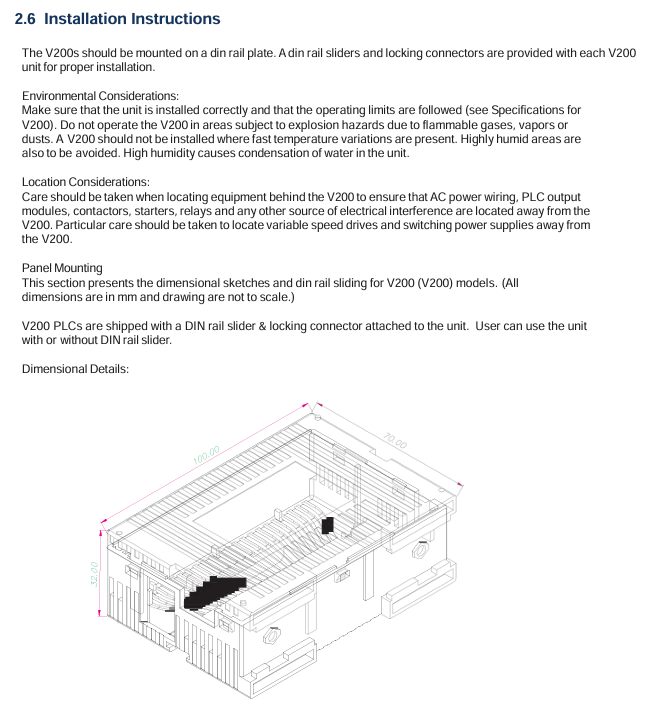
GPU288 * 3S 8-in (digital)/8-out (6 relays+2 transistors) supports 8 expansion modules COM1 (RS232/RS485), COM2 (RS485), USB 2-channel single-phase (50kHz), 1-channel orthogonal (5kHz) 100 × 35 × 70 200
GPU232 * 3S 16 in (digital)/16 out (digital) without expandability COM1 (RS232), COM2 (RS485), USB 2-channel single-phase (50kHz) 155 × 102 180
GPU200 * 3S without local I/O support 8 expansion modules COM1 (RS232/RS485), Ethernet, USB 2-channel single-phase (100kHz) 100 × 35 × 70 200
The expansion models include digital expansion (such as GDI216S: 16 digital inputs) and analog expansion (such as GAD208S: 8 analog inputs), supporting flexible configuration of I/O points.
Safety operation standards (top priority)
2.1 Definition of Warning Signs
The document specifies the risk level through "identification+text", and all identification is printed on the equipment body and key positions in the manual:
Core meaning of warning signs Typical scenarios
DANGER operational errors can result in death or serious injury (such as high-voltage electric shock, fire). Opening terminal covers and contacting high-voltage components when powered on
Incorrect operation of Warning may result in serious injury or equipment damage (such as device falling or burning). Handheld terminal cover handling or touching the heat sink
CAUTION operation errors can result in minor injuries or equipment malfunctions (such as loose terminals, electrostatic damage), ungrounded operations, and wiring errors
2.2 Core Security Rules
Prohibited operation list:
Do not open the power terminal cover (which contains 24VDC high-voltage components) when powered on.
Do not insert foreign objects such as wires, tools, dust, etc. into the ventilation openings or terminal slots of the equipment (to prevent short circuits).
It is prohibited to disassemble or modify hardware without authorization (such as replacing non original capacitors), as this will result in warranty failure and safety risks.
It is prohibited to use unverified models in explosion-proof environments (such as flammable gas areas).
Mandatory operation checklist:
Before installation/maintenance, it is necessary to read the manual thoroughly and confirm that the operator is a Qualified Person.
After power failure, wait for at least 15 minutes and use a multimeter with 800Vdc or higher to check that the voltage of the DC main circuit (PA/+and PC/-) is ≤ 45V before operation.
Reliable grounding is required: D-type grounding is used for 240V level, C-type grounding is used for 500/600V level, grounding resistance is ≤ 4 Ω, and the grounding wire specification is not less than the main circuit wire.
When enabling the Auto restart function, a warning label stating 'Possible sudden restart' should be affixed next to the device.

Hardware installation and wiring
3.1 Installation environment requirements
The allowable range of environmental indicators and the prohibited range
Environmental temperature 0 ℃~55 ℃ (operation), -20 ℃~85 ℃ (storage) exceeding 55 ℃ (triggering overheating protection), below -20 ℃ (capacitor failure)
Relative humidity 20%~90% (no condensation) Condensation environment, humidity>90% (causing short circuit)
Vibration requirement ≤ 5.9m/s ² (5-150Hz) exceeding 5.9m/s ² (additional anti vibration pads need to be installed)
Environmental cleanliness without dust, metal powder, corrosive gas, dense dust, and oil mist environment (blocking heat dissipation)
3.2 Wiring specifications
Main circuit wiring:
Power input: 24VDC ± 15%, requires separate wiring (threaded separately from the control circuit), terminal screw torque: M3 is 0.5N · m, M4 is 1.4N · m.
Digital input: 24VDC, current per point 5mA (high-speed input 20mA), input impedance 5.4k Ω (high-speed input 1.2k Ω).
Digital output: Relay type (230V/2A, 30VDC/2A), transistor type (24VDC/0.5A), output terminals need to be wired according to the "set of common terminals every 4 points".
Communication wiring:
RS485: 2-wire system, maximum transmission distance of 1200m, supports 32 nodes, requires 120 Ω terminal resistors to be connected at both ends of the bus.
USB: For programming only, using USB 2.0 Type B interface, cable length ≤ 2m.
Ethernet (GPU200 * 3S): RJ45 interface, supports 10/100Mbps adaptive, requires shielded Ethernet cable.
Software Configuration and Programming
4.1 OIL DS software installation
System requirements:
Operating systems Windows 2000 (SP4), XP (SP2), Vista
Processor ≥ 800MHz (Vista requires ≥ 1GHz)
Memory ≥ 256MB (Vista requires ≥ 1GB)
Hard disk space of 800MB (including 200MB. NET Framework)
Display resolution 1024 × 768 (16 bit high color)
Installation steps:
Run Setup. exe and select the installation path (default C: Program Files OIL DS).
Wait for the installation to complete and start the software through "Start → Program → OIL DS".
When uninstalling, execute through "Start → Program → OIL DS → Uninstall OIL DS".
4.2 Ladder diagram programming
Core process:
New project: Select V200 model (such as GPU288 * 3S), configure project name and storage path.
Define Tag Database: Assign I/O addresses (such as X0000 corresponding to digital input 1) and register types (input X/output Y/configuration MW).
Edit ladder diagram: Drag and drop "normally open contact (NO)", "coil", "function block (such as MOV-W)" to construct logic, supporting subroutines and interrupt programs.
Compile and Download: Press F9 to compile (if there are no errors, it will display "Compilation Successful"), and download it to the PLC via USB/RS485.
Program type:
Main program: It runs in a loop during normal operation and needs to end with the "END" instruction.
Subroutine: Called with the "CALL" instruction and returned with the "RET" instruction.
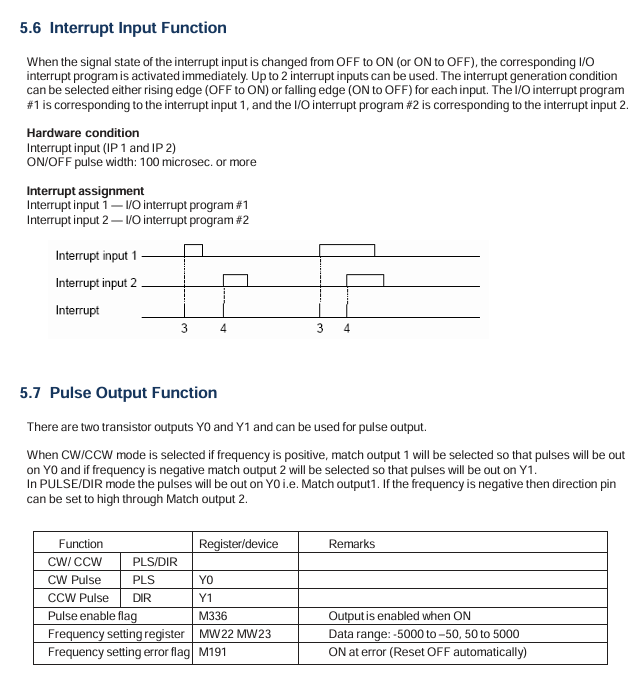
Interrupt program: Timer interrupt (5-1000ms), I/O interrupt (triggered by high-speed counting), must end with the "IRET" instruction.
Detailed explanation of special I/O functions
5.1 High speed counter
Function type:
Type Input Channel Maximum Frequency Counting Range Application Scenarios
Single phase counter 2-channel (X000/X001) 50kHz 0~4294967295 (32-bit) pulse counting (such as encoder)
Single phase speed counter 2-channel (X000/X001) 50kHz 0~4294967295 (32-bit) speed measurement (fixed sampling time)
Orthogonal biphasic counter 1 channel (X000=phase A, X001=phase B) 5kHz 0~4294967295 (32-bit) bidirectional counting (such as motor forward and reverse rotation)
Configuration register: Select the function mode through MW10 (high-speed input configuration register), such as "MW10=0x0010" to enable the single-phase counter.
5.2 Pulse/PWM output
Pulse output:
Channel: 1 channel (Y0=CW/PLS, Y1=CW/DIR).
Frequency range: 50~5000Hz, supports positive and negative frequencies (corresponding to positive and negative reversals).
Configuration: Set MW11 (pulse output configuration register) to "0x0001" enabled, and set the frequency for MW22/MW23.
PWM output:
Channel: 1 channel (Y0).
Parameters: frequency 50~5000Hz, duty cycle 0~100% (1% step size).
Configuration: MW11 is set to "0x0000" enabled, and MW24/MW25 is set to duty cycle.
5.3 Interrupt Input
Channel: 2 channels (X001=Interrupt 1, X002=Interrupt 2).
Trigger method: Rising edge (OFF → ON) or falling edge (ON → OFF), configured through MW10's Bit4/Bit5.
Response time: Interrupt signal ON/OFF pulse width ≥ 100 μ s, ensuring stable recognition of PLC.
Troubleshooting and Maintenance
6.1 Troubleshooting process
Power failure (PWR light not on):
Check the power wiring: whether the terminals are loose and whether the voltage is 24VDC ± 15%.
Remove the expansion module: If the PWR light is restored, troubleshoot the expansion module.
Check internal power supply: If it still doesn't light up, replace the PLC host.
CPU malfunction (RUN light not on):
Check the mode switch: whether it is in the "RUN" position, switch to "RUN" and retry.
Check the ERR light: If the ERR light is on, read the fault code through OIL DS (such as "WDT Error" indicating watchdog timeout).
Re download firmware: If the RUN/ERR lights flash simultaneously, the firmware is damaged and needs to be re downloaded.
Input/output fault (abnormal I/O status):
Check the wiring: Check if the terminal screws are loose and if the wires are damaged.
Monitoring I/O status: Check the X/Y status through the "Monitor" function of OIL DS to determine whether it is a hardware or program issue.
Replace module: If one of the I/O channels is consistently abnormal, replace the corresponding expansion module.
6.2 Maintenance Standards
Daily inspection (daily):
Appearance: The LED status is normal (PWR is constantly on, flashing when RUN is running), and there is no abnormal sound/odor.
Environment: Temperature 0~55 ℃, humidity 20%~90%, no dust accumulation.
Regular inspection (every 6 months):
Cleaning: Use compressed air (≤ 0.3MPa) to clean the dust from the cooling fins and ventilation openings.
Wiring: Tighten all terminal screws (to the specified torque) and check the insulation layer of the wire.
Insulation test: After power failure, use a 500V megohmmeter to test the insulation resistance of the main circuit to ground to be ≥ 1M Ω.
Suggestions for spare parts:
Spare parts names, suggested quantities, and notes
Minimize system downtime with one V200 CPU
1 commonly used I/O module each, such as GDI216S (digital input), GAD208S (analog input)
1 programming cable for troubleshooting and program download
Replace 2 cooling fans after 20000 hours of cumulative operation
- YOKOGAWA
- Reliance
- ADVANCED
- SEW
- ProSoft
- WATLOW
- Kongsberg
- FANUC
- VSD
- DCS
- PLC
- man-machine
- Covid-19
- Energy and Gender
- Energy Access
- Renewable Integration
- Energy Subsidies
- Energy and Water
- Net zero emission
- Energy Security
- Critical Minerals
- A-B
- petroleum
- Mine scale
- Sewage treatment
- cement
- architecture
- Industrial information
- New energy
- Automobile market
- electricity
- Construction site
- HIMA
- ABB
- Rockwell
- Schneider Modicon
- Siemens
- xYCOM
- Yaskawa
- Woodward
- BOSCH Rexroth
- MOOG
- General Electric
- American NI
- Rolls-Royce
- CTI
- Honeywell
- EMERSON
- MAN
- GE
- TRICONEX
- Control Wave
- ALSTOM
- AMAT
- STUDER
- KONGSBERG
- MOTOROLA
- DANAHER MOTION
- Bentley
- Galil
- EATON
- MOLEX
- Triconex
- DEIF
- B&W
- ZYGO
- Aerotech
- DANFOSS
- KOLLMORGEN
- Beijer
- Endress+Hauser
- schneider
- Foxboro
- KB
- REXROTH
- YAMAHA
- Johnson
- Westinghouse
- WAGO
- TOSHIBA
- TEKTRONIX
- BENDER
- BMCM
- SMC
- HITACHI
- HIRSCHMANN
- XP POWER
- Baldor
- Meggitt
- SHINKAWA
- Other Brands
- UniOP
- KUKA
- IBA
- Beckhoff
- ADLINK
-
ALPHA WIRE 1636-RD001 - Hook-Up Wire
-
FANUC A06B-6078-H211#H501 / A06B6078H211H501 - Servo Amplifier Module
-
Alpha H47016 / CA400 - 400W Switching Power Supply Unit
-
Alpha Wire 2821/2 WH001 - Multi-Conductor Communication Control Cable
-
Wittenstein Alpha SP 100S-MF2-25-1E1-2S - Planetary Gearbox Reducer
-
FANUC A06B-6090-H008 / A06B6090H008 - Servo Power Supply Module
-
Alpha Wire 2821/2 WH001 - Multi-Conductor Communication Control Cable
-
NOVOTRON / Alpha NBL2-0080-45-3-320 T0B + SP075-MF1-3-031-000 - Servo Motor with Planetary Gearbox
-
Alpha 0100044-001 CXRF 48/4.6KW - Rectifier Module
-
Lambada-TDK / Alpha YM-00-470B / AMAT 50513215200 - 600W Power Supply Unit
-
FANUC A06B-6290-H122 - Alpha iSV 10HV-B 3-Axis Servo Amplifier Drive
-
Alpha SP 140S-MF1-5-1/1-2S - Planetary Gearbox Reducer
-
Wittenstein Alpha SP 100S-MF1-5-1K1-2S - Planetary Gearbox Reducer
-
Wittenstein Alpha LP 120Z-MF1-10-1/1-3S-INF - LP Series Planetary Gearbox
-
Wittenstein Alpha LP 090-M01-7-111-000 / Schneider - Planetary Gearbox with Servo Motor
-
Alpha TP 050-MX1-7-450-000 - Gearbox Reducer
-
Fanuc A06B-0377-B577#7000 - AC Servo Motor Alpha M2.5/3000
-
ALPHA WIRE 1705-SL001 - Hook-Up Wire
-
ALPHA WIRE 1953/3T-BK003 - Hook-Up Wire
-
ALPHA WIRE 5855/7-SL001 - Hook-Up Wire
-
ALPHA WIRE 2158-NA005 - Hook-Up Wire
-
Wittenstein Alpha TP 025S-MF1-7-0G0-2S - Planetary Gearbox
-
ALPHA WIRE 5356C - 37 Conductor 20AWG Foil & Braid Shield Cable
-
Wittenstein Alpha NP 025S-MF1-5-1G1-1S - Planetary Gearbox
-
Allen Bradley / Alpha N-3412-2-H00AA / LP 120-M02-100-111-000 - Servo Motor with Planetary Gearbox
-
FANUC A06B-6089-H204 - Alpha Series Servo Amplifier Module
-
Man Diesel & Turbo 3157168-7 - Alpha Lubricator Sbu
-
FANUC A20B-2100-0742 - ALPHA ia Servo Control Board
-
ALPHA ALPHA6000E-31R5GB - Frequency Inverter Drive Power Converter
-
Alpha Industries G287775-1 / 5985-01-341-9652 - Variable Attenuator
-
FANUC A06B-6124-H206 - Alpha iSV Servo Amplifier Module
-
Wittenstein Alpha NP 025S-MF1-5-1G1-1S - Planetary Gearbox
-
NOVOTRON / Alpha NBL2-0080-45-0-320-B-S-A + SK060-MF1-3-031-000 - Servo Motor with Alpha Gearbox
-
FANUC A20B-2100-0742 - ALPHA ia Servo Control Board
-
Honeywell CK65-L0N-BLC210F / CK65 - Mobile Computer Barcode Scanner
-
Wittenstein Alpha TK+ 004S-MF2-12-5B1-1S10 - Right Angle Gearbox
-
FANUC A20B-2100-0742 - ALPHA ia Servo Control Board
-
Rexroth MSK071E-0450-NN-M1-UG1-NNNN - 3-Phase AC Motor with Alpha Reducer
-
JAVAD ALPHA2 - GPS Receiver GrAnt G3
-
GROSCHOPP / Alpha WK 1621309 / EK 66-45 NR + TP 010-MF2-61-030-000 - Motor with Alpha Gearbox Construction
-
ALPHA WIRE 5060C-SL005 - Multi-Conductor Cable Wire
-
ALPHA B10 K X 2 T80887 - Potentiometer
-
Alpha 400W J40005 - Switching Power Supply Unit
-
FANUC A20B-1007-0650 - ALPHA Power Supply Module Board
-
Eberline HP-100B - Gas Proportional Alpha Beta Probe GM Geiger Counter
-
ALPHA WIRE 5858-BK001 - Single Conductor Hook-Up Wire
-
FANUC A06B-6127-H103 - Alpha I AiSV-20HV Servo Amplifier Module
-
VIASYS / CareFusion SOMNOSTAR CEPHALO PRO - Portable EEG Neurodiagnostic Sleep System
-
DSI Surgical Instruments Universal - Dental Implant Abutment Surgical Instruments Kit
-
FANUC A06B-6078-H211#H501 / A06B6078H211H501 - Servo Amplifier Module
-
Fanuc A06B-6089-H209 - Alpha Series Servo Amplifier Module
-
Generic / DSI Straight Anatomic Plastic Adapter Head + Screw Hex - Dental Implant Fixture
-
FANUC A20B-1006-0680 - ALPHA Power Supply Module Board
-
B&L Biotech Alpha II - Endodontic Starter Kit
-
FANUC A06B-0166-B088 C009A5653 - AC Servo Motor
-
ALPHA WIRE 74010-BK002 - Multi-Conductor Cable Wire
-
Wittenstein Alpha SPK 100-MF2-10-041-000 - Gear Box Reducer Ratio 10:1
-
Alpha Getriebebau 10-FL-M1-5 - 10:1 Ratio 7/8 Inch Shaft Gear Reducer
-
ALPHA WIRE 2172-SV005 - Multi-Conductor Cable Wire
-
Aloka UST-5410 - Linear Array Probe Compatible Transducer
-
Alpha Xtra-Guard 1 SupraShield - Multiconductor Cable 16 AWG 2 Conductor
-
ALPHA ALPHA7000E-37R5GB/3011PB - Frequency Inverter Drive Power Converter
-
SIEMENS / Alpha 1FT5066 / SP 100 ROD 426B - Servo Motor with Actuator
-
FANUC A06B-6089-H210 / A06B6089H210 - Servo Amplifier Module
-
LAMBDA ALPHA 600W H60553 - Switching Power Supply Unit
-
Alpha 400W J40071A - Switching Power Supply Unit
-
Hyva Alpha Series FC A4.5-3-98-K6-1DA-HC / 70593139 - Dump Body Hydraulic Cylinder
-
ALPHA WIRE 1293C-SL001 - Multi-Conductor Cable Wire
-
NSS Galaxy / Alpha 20 and 16 - Floor Strip and Wax Slow Speed Buffer and Wet Vac
-
Alpha Xtra-Guard 1 SupraShield - Multiconductor Cable 16 AWG 2 Conductor
-
ALPHA ALPHA6000-3015JB - Frequency Inverter Drive Power Converter
-
Densei-Lambda MA4000591A/ME Alpha 400 / MV6500271A Alpha II-650 - Power Supply Unit
-
Wittenstein Alpha SP 140G-MF2-28-0E1-2S-PGG - Planetary Gear Reducer
-
FANUC ROBOCUT ALPHA-1iC - CNC Wire EDM Machine
-
Fanuc A06B-6081-H101 - Alpha Series Power Supply Module PSMR-1
-
ALPHA WIRE 5855-BL001 - Hook-Up Wire
-
Wittenstein Alpha SPK 100-MF2-20-141-000 - Right Angle Gear Reducer 20:1 Ratio
-
LNS ALPHA SL65-S - Bar Feed System
-
ALPHA WIRE 5356C - 37 Conductor 20AWG Foil & Braided Shield TC Shield Cable
-
TDK-Lambda / Alpha H60552 - 600W Switching Power Supply Unit
-
Bruker Alpha - Infrared Spectrometer FTIR Instrument
-
Wittenstein Alpha SP 060S-MF1-7-0B1-2S - Planetary Gearbox Reducer
-
Digital Alpha VME 5/480 - VME SBC Motherboard CPU Board
-
Glentek Alpha Series - Digital Brushless Servo Amplifier Drive
-
Wittenstein Alpha TPM 004S-021M-6KB1-053B-G6 - Rotary Servo Actuator
-
Wittenstein Alpha TP 110-MF2-61-031-000 / 20009377 - Planetary Gearbox Reducer
-
Emerson Alpha 1800 24 60 / 5070800001 - Rectifier Power Module
-
Fanuc A06B-0377-B577#7000 - AC Servo Motor Alpha M2.5/3000
-
Novotron / Alpha NBL2-0080-45-3-320 T0B + SP075 - Servo Motor with Alpha Gearbox
-
Alpha & Omega Semiconductor AOD442 - N-Channel MOSFET Reel Surface Mount
-
Alpha Wire 2156-NA005 - Hook-Up Wire Cable
-
Sankyo 15AD-04277R-LR3VW1 - Rotary Indexer with Motor
-
Wittenstein Alpha TP025S-MF1-7-0G0-2S - Planetary Gearbox i=7
-
Fanuc A20B-2001-0950 - Control Circuit Board PCB
-
TDK-Lambda / Alpha H60553 - 600W Switching Power Supply Unit
-
Alpha Wire 391845-WH001 - Hook-Up Wire Cable
-
Wittenstein Alpha SPK 100-MF2-10-041-000 - Gear Box Reducer Ratio 10:1
-
Novotron / Alpha NBL2-0080-45-0-320-B-S-A + SK060 - Servo Motor with Alpha Gearhead
-
Wittenstein Alpha TP050S-MA2-27.5-0G1-2S - Planetary Gearbox Reducer
-
Fanuc A06B-6096-H305 - Alpha Servo Amplifier Module
-
TDK-Lambda / Alpha H47006 / CA400 - 400W Switching Power Supply
-
Wittenstein Alpha SPK140 MF2-10-051-000 - Bevel Planetary Gearbox Reducer
-
Fanuc A06B-6117-H205 - Alpha iSV Servo Amplifier Module
-
Fanuc A20B-1007-0650 - Alpha Power Supply Module Board PCB
-
Alpha Wire 2248C-SL005 - Multi-Conductor Cable Wire
-
Alpha Wire 6829-BK001 - Hook-Up Wire Cable
-
Wittenstein Alpha SPK+100S-MF2-25-1E1-1K01 - Right Angle Planetary Gearbox Reducer
-
MAN B&W 99100724 - Maintenance Tools Set for Alpha Lubricator
-
Tokyo Electron (TEL) A3619-9215E / Vexta - Carrier Transfer Assembly
-
Tokyo Electron (TEL) Alpha 8 Auto Shutter 200mm - Diffusion Furnace Auto Shutter Assembly
-
Fanuc A06B-6089-H105 - Alpha Series Servo Amplifier Module
-
Aikoku Alpha EZ Amplifier Type Z - Servo Amplifier Drive
-
Fanuc A06B-6096-H204 - Dual Axis Alpha Servo Amplifier Module
-
Ferrocontrol / Alpha Getriebebau FMR063-04-60-RMK-B0 - Servo Controller with Gear Reducer
-
Fanuc A20B-1006-0680 - Alpha Power Supply Module Board PCB
-
Wittenstein Alpha SP 140S-MF1-5-0I1-2S / 20027211 - Servo Speed Reducer Gearbox
-
Stanley / Alpha 21A108721 - QMP Controller Unit
-
TDK-Lambda / Alpha J40071A - 400W Switching Power Supply Unit
-
Fanuc A06B-0235-B300 - AC Servo Motor Alpha iFS 8/4000
-
Tokyo Electron (TEL) Alpha 8s Manifold Flange Plenum - Right Side Ports Manifold Flange
-
Fuji Frontier 570 PS1 / Alpha 650II - Power Supply Assembly
-
Tokyo Electron (TEL) WCIF-01A - T-Bawl Control Unit PCB Assembly
-
Fanuc A06B-6079-H106 - Alpha Servo Drive Amplifier Module
-
Fanuc A06B-6096-H204 - Dual Axis Alpha Servo Amplifier Module
-
Fanuc A06B-6114-H302 - Triple Axis Servo Drive Amplifier Module
-
Fanuc A06B-6110-H015 - Alpha Servo Amplifier Module
-
Hitachi Aloka Prosound Alpha 7 Premier - Diagnostic Ultrasound System
-
Alpha BC35 - Canning Line for Carbonated Beverages Beer RTD

K-JIANG

Add: Jimei North Road, Jimei District, Xiamen, Fujian, China
Tell:+86-15305925923