

K-WANG


UniOP Universal Operation Panel Installation Guide
UniOP Universal Operation Panel Installation Guide
Core General Technical Specifications
This guide specifies the general technical parameters of the entire series of panels, with some models having exclusive customized specifications. The core general parameters are shown in the table below, and special model differences are marked separately:
Specification Category Key Parameters Special Model Description
Power supply DC 18-30V; 2A T-type users can replace fuses CP10G-04, ePAD03-06/33C, eTOP03-50c, etc. as overcurrent protection devices without fuses
The mainstream backup battery is a 3V 270mA lithium manganese battery (CR2430), which is non rechargeable and has a lifespan of about 1 year. Users can replace the eTOP04C with a 3V 50mA lithium battery (VL2330), which is rechargeable and non user replaceable
Environmental parameters Operating temperature: 0~+50 ℃; Storage temperature: -20~+70 ℃
Humidity: 5~85% RH (without condensation)
Vibration/Shock: Compliant with EN60068-2-6/27 B7 suffix model, operating temperature -20~+60 ℃; ETOP/ePAD series operating temperature 0~+45 ℃
Protection and Durability: The front panel has a protection level of IP65 (installation requirements must be strictly followed)
Button reliability>3 million times
Resistive touch screens with IP65 protection for over 1 million cycles must be equipped with sealing gaskets as required to ensure the size of the cutting edge, otherwise they will fail
Electromagnetic compatibility emission interference: EN55011 Class A
Anti interference: electrostatic 8KV air/4KV contact, surge ± 2KV power supply, etc., in compliance with EN61000 series standards, fully adaptable to industrial electromagnetic environments, resistant to RF, transient, and conducted interference
Core port parameters PLC port: 300-38400 baud rate, supports RS232/422/485/20mA current loop
PC/printer port: 300-38400 baud rate, only RS232 baud rate may vary slightly depending on the model, some basic models only support 9600
Programming related standard programming software Designer version 6 (Windows application)
Communication parameters: 9600 baud rate, no parity check, 1 stop bit. Models with PC/printer ports support 19200/38400 baud rate
Exclusive parameters for core models of each series (excerpt)
The display, memory, power consumption, and size of the core models are key to installation and adaptation. The following is a list of representative model parameters for key series:
Model Series Representative Model Display Type/Size User Memory 24VDC Maximum Power Consumption (mA) Installation Opening (mm) Weight (Kg)
EPAD series ePAD03 4x20 LCD/2.8 "512KB 250 149x109 1
ePAD33C 30x80 TFT/10.4” 32MB 1200 311x276 -
ETOP series eTOP04C TFT/4.3 "2MB 400 149x109 1
eTOP05 TFT/5.7” 32MB 600 187x147 1.4
eTOP50C XGA TFT/15” 64MB 1500 392x307 3.8
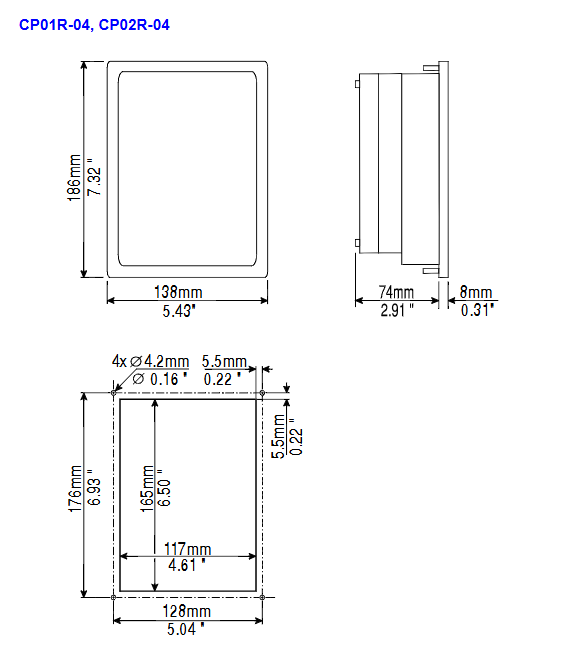
CP series CP01R-04 4x20 LCD 512KB 250 138x186 1.1
CP10G-04 4x20 LCD/2.8” 512KB 300 141x176 1.1
MKDR series MKDR-16 16x40 LCD/5.6 "512KB 500 311x220 2.5
Classic Series BKDC-46 16x40 STN Color Screen/5.6 "32MB 600 275x220 1.9
ETT-VGA 30x80 TFT/9.6” 512KB 700 311x220 2.7
Product installation specifications
Physical size requirements
All installation dimensions are in millimeters, with a uniform tolerance of * * ± 0.5mm * *. The cutting edges, panel thickness, and installation depth of different models/suffixes (45/50/A6/A7) vary, such as eTOP05 opening 187x147mm and eTOP50C opening 392x307mm.
The red battery protection strip must be removed before installation, otherwise it will affect the normal operation of the battery.
Sealing gasket installation (IP65 protective core)
Two types of sealing gaskets, rectangular and linear, are available for panel delivery. They are compatible with the model and must be replaced after disassembly and assembly. The installation requirements are as follows:
Rectangular sealing gasket: applied around the cutting edge of the equipment, tension-free fit, avoiding wrinkles;
Linear sealing gasket: divided into thin and thick strips, with the thin strip fitting the cut (starting from the lower midpoint) and the thick strip sticking to the panel frame (starting from the lower 1/3), with no overlap at both ends.
fixation method
Install 4 fixed brackets on the long edge of the panel near the corner, tighten the fixing screws until the plastic/aluminum frame of the panel is completely in contact with the installation surface to avoid loosening.
Power supply and grounding (mandatory requirement)
The panel must be reliably grounded to protective earth (PE), which can be grounded through screws/quick terminals next to the power terminal. Power terminal 3 also needs to be grounded separately, with a yellow label indicating the grounding position;
The power supply needs to have double/reinforced insulation, and the power supply circuit can be floating or grounded; The floating circuit is connected to the power supply ground through a 1M Ω resistor and a 4.7nF capacitor inside;
It is necessary to ensure that the power supply meets the power consumption requirements of the panel, and all electronic devices in the control system must be grounded in a standardized manner.
Interface configuration and connection
The panel interface is divided into standard core interface, expansion interface, and special function interface. The configuration of different models of interfaces varies greatly. The core interfaces and functions are as follows:
PLC Port: D-15 male, core communication port, used to connect PLC/controller or as UniNET client network port, supports RS232/422/485/20mA current loop, must use corresponding cables, otherwise communication cannot be achieved. Pin 1 is the chassis ground, pin 2 is RXD, and pin 3 is TXD as the core pin.
PC/Printer Port: D-15 female header, only supports RS232, functions vary with panel mode: configuration mode is programming port, UniNET server mode is network port, normal operation mode is serial printer port, programming requires CA2/CA114 cable.
AUX Port: D-9 female head, industrial network expansion port, function determined by optional communication module, pin definition in module manual; Module installation requires power-off operation, and after reinstallation, paste function labels in the designated area.
Ethernet/USB Port: Only equipped with mid to high end eTOP models (eTOP04C/06C/20C/33C/40C/50C), Ethernet is 10/100Mbit, used for device communication, programming, and data transmission; USB has a 1.1 host port and can be connected to a USB flash drive to upgrade firmware/copy data.
Other ports: Some models come with external keyboard ports (connected to ET-F/AT-F keyboards) and DX video ports (eTOP40C/50C); Models without PC/Printer Port use PLC Port as a PLC/PC composite port, and programming requires a gender converter.
Daily maintenance and component operation
(1) Battery replacement
Battery function: Maintaining real-time hardware clock, event list, and recipe data is the core of panel data backup.
Low battery warning: Triple signal - FAULT/FLT LED flashing, system menu displaying Battery LOW, RDA S6 bit value changes, need to be replaced in a timely manner.
Replacement steps: Power off → Loosen the 4 screws of the battery compartment → Remove the battery compartment → Replace with a battery of the same model → Reinstall and tighten → Power on for verification; Replacing will result in the loss of all backup data. Mixing battery models is strictly prohibited, and waste batteries should be disposed of according to regulations to avoid the risk of explosion.
(2) Other maintenance operations
Dismantling of nameplate: Pinch the exposed part of the nameplate and slide it downwards to remove it. When replacing, a nameplate of the same thickness must be used. Thickened nameplates are prohibited to avoid affecting the panel seal.
SSFDC memory card operation: Some models are equipped with strict anti-static measures - clean the gold fingers with soft tissue, prohibit fingers/synthetic cloth from contacting the gold fingers, and place them in an anti-static box after disassembly to avoid contact with oil stains/corrosive substances.
Panel cleaning: Only use a soft cloth and neutral soap to wipe. Do not use any solvents to avoid corroding the panel film and touch screen.
Programming and operational instructions
Programming requirements
Software: Designer version 6, Windows exclusive application, requires separate system installation, supports computer COM1/COM2 ports;
Connection: Switch the panel to configuration mode and connect the computer to the panel using CA2/CA114 cable. The software defaults to communication parameters (9600 baud rate, no parity check, 1 stop bit);
Compatibility: The software version needs to match the panel firmware version, otherwise it cannot be programmed properly.
Operation mode and key commands
Core modes: configuration mode (programming/touch screen calibration), operation mode (normal operation, including sub modes such as data entry, password, alarm, event, etc.);
Key rules: Some models do not have CLEAR keys, which can be achieved through combination keys; Long press the button for 2 seconds to activate special functions (such as ENTER for 2 seconds to enter data entry); Touchscreen models come with CLEAR/ENTER virtual buttons, which automatically pop up a numeric keypad when entering data;
External keyboard support: Some models can be connected to ET-F/AT-F external keyboards, and commands are compatible with the standard keyboard.
Troubleshooting and Touch Screen Calibration
(1) Forced entry into configuration mode
When the panel starts abnormally and cannot switch configuration modes normally, perform the following steps: power off → hold down any 3 buttons → power on and hold the button → until the screen displays configuration mode.
(2) Touch screen calibration
Divided into standard calibration and emergency calibration, emergency calibration is suitable for scenarios where standard calibration cannot be accessed:
Standard calibration: Enter configuration mode → touch the CLEAR button on the screen until a small circular mark appears in the upper right corner → long press the mark to the lower left corner → follow the prompts to touch the designated button/ENTER key in sequence → switch back to operation mode;
Emergency calibration: Power off → Power on → Touch the middle of the screen once per second → Until entering calibration mode → Perform standard calibration steps.
(3) LED fault diagnosis
The panel is equipped with specialized LEDs such as FAULT/DL/RUN/COM/ALARM, which are the core basis for troubleshooting. The status of the core LEDs means:
table
LED name, color, flashing, always on
Fault/FLT red: No hardware failure, battery is normal, battery is low, hardware failure
RUN green hardware failure - panel running normally
COM Green - Communication Error Communication Normal
ALARM red no alarm alarm, alarm activation needs to be confirmed
Safety and Usage Guidelines
Applicable safety standards: Following the EN 60204-1 industrial control system safety standard, it is prohibited to directly control motors, valves, and other actuators without safety protection using panels to avoid personal/equipment hazards caused by malfunctions.
Operation taboos
It is strictly prohibited to remove the panel back cover while powered on to prevent electric shock and equipment damage;
Before operating the live panel, service personnel must perform electrostatic discharge treatment to avoid electrostatic breakdown of components;
Do not use any tools such as screwdrivers or wrenches to operate buttons and touch screens to avoid physical damage.
Environmental taboos
Avoid prolonged exposure of the panel to direct sunlight, which can accelerate the aging of the panel film and affect display and protection;
It is prohibited to install in environments that come into contact with corrosive chemicals. Before installation, the panel film must be tested for its resistance to on-site chemicals.

- YOKOGAWA
- Reliance
- ADVANCED
- SEW
- ProSoft
- WATLOW
- Kongsberg
- FANUC
- VSD
- DCS
- PLC
- man-machine
- Covid-19
- Energy and Gender
- Energy Access
- Renewable Integration
- Energy Subsidies
- Energy and Water
- Net zero emission
- Energy Security
- Critical Minerals
- A-B
- petroleum
- Mine scale
- Sewage treatment
- cement
- architecture
- Industrial information
- New energy
- Automobile market
- electricity
- Construction site
- HIMA
- ABB
- Rockwell
- Schneider Modicon
- Siemens
- xYCOM
- Yaskawa
- Woodward
- BOSCH Rexroth
- MOOG
- General Electric
- American NI
- Rolls-Royce
- CTI
- Honeywell
- EMERSON
- MAN
- GE
- TRICONEX
- Control Wave
- ALSTOM
- AMAT
- STUDER
- KONGSBERG
- MOTOROLA
- DANAHER MOTION
- Bentley
- Galil
- EATON
- MOLEX
- Triconex
- DEIF
- B&W
- ZYGO
- Aerotech
- DANFOSS
- KOLLMORGEN
- Beijer
- Endress+Hauser
- schneider
- Foxboro
- KB
- REXROTH
- YAMAHA
- Johnson
- Westinghouse
- WAGO
- TOSHIBA
- TEKTRONIX
- BENDER
- BMCM
- SMC
- HITACHI
- HIRSCHMANN
- XP POWER
- Baldor
- Meggitt
- SHINKAWA
- Other Brands
- UniOP
- KUKA
- IBA
- Beckhoff
- ADLINK
-
FANUC A06B-0169-B088 - AC Servo Motor Alpha M40 3000 3 KW
-
ALPHA WIRE 1299C-SLATE-1000 - Multi-Conductor Cable Wire
-
alpha / Wittenstein SK+180S-MF1-10-1M1-1K - Hypoid Gearbox i=10
-
ALPHA WIRE 1181/40C SL005 - Multi-Conductor Cable Wire
-
Generic / DSI Straight Anatomic Plastic Adapter Head + Screw Hex - Dental Implant Fixture
-
Alpha II-650 MV6500526A - Power Supply Unit
-
ALPHA WIRE 7036 WH001 - Hook-Up Wire
-
FANUC RDCGM00000004O / TP 050-MF1-7-061-000 - Gear Reducer / Alpha Gearbox
-
Alpha II-650 MV6500436A - TDK-Lambda Power Supply Unit
-
Alpha S-Alpha600 J60033 - 600W Switching Power Supply Unit
-
Alpha 1500W J00032 - Power Supply Unit
-
Alpha 600W H60638 - Switching Power Supply Unit
-
Alpha 650 MV6500314A - Power Supply Unit
-
Aloka UST-5413 - Linear Probe for Prosound Alpha 6
-
ALPHA WIRE TFT25015 NA002 - High Temperature Heat Shrink Tubing Wire Sleeving
-
JAVAD ALPHA2 / GrAnt-G3 - GPS Receiver
-
Alpha 400W H47318 - Switching Power Supply Unit
-
Alpha SG-ALPHA-202-001 / Q1001-010-001 - Circuit Board Module
-
Antlia Dual ERF H-Alpha & Cak/CaH - Density Astronomical Accessory
-
ALPHA WIRE 5100C SL033 - Multi-Conductor Cable Wire
-
ALPHA WIRE 5098C-SL033 - Multi-Conductor Cable Wire
-
Fanuc A06B-6290-H105 - Alpha Sv 80hv-B Module Servo Amplifier
-
FANUC A06B-6240-H105 - Aux Axis Alpha aiSV 80 Servo Amplifier
-
Endress+Hauser Alpha-Log RSA10-61B1S / 42974737/0130 - Data Logger Measurement Instrument
-
ALPHA WIRE 6363-SL002 - Multi-Conductor Cable Wire
-
Alpha SP100S-MF1-7-1K1-2S - Gear Reducer
-
Alpha SP 100G-MF1-4-0H1-2S-PGG - Planetary Gear Reducer
-
FANUC A06B-0143-B175 #0275 - Alpha 12/3000 AC Servo Motor
-
James Burn Alpha Doc P33 / GBC PDI - Automatic Punch DocuPunch
-
Titus HVAC 105383-01 - ALPHA BAC Controller and Actuator
-
Wittenstein Alpha SP 100S-MF2-20-0E0-2S - Planetary Gearbox i=20
-
Kashiyama Alpha-85-ZV / SP-8026G - Pump Controller
-
Christ Alpha 2-4 LDplus - Freeze Drier Part N/ 101542
-
Lambda / Alpha H40896 - 400W Power Supply Unit
-
Wittenstein Alpha LP-070S-MF1-3-1E1-38 - Planetary Gearbox
-
Matrox / EXO-2480 133-D06-3 / 398-17962-1 - Alpha Numeric PCB Board
-
Fanuc A06B-6096-H204 - Dual Axis Alpha Servo Amplifier Module
-
Alpha Wire 5002C-SL001 - Multi-Conductor Cable 2 Conductors 22AWG 300VAC
-
Alpha 600W H60638 - Switching Power Supply Unit
-
Alpha Scientific Spin Precession Dual Electro Magnet Beam Line Chamber - Electro Magnet Beam Line Chamber
-
ALPHA WIRE 6017C SL005 - Multi-Conductor Cable Wire
-
ALPHA WIRE 65804 SL002 - Multi-Conductor Cable Wire
-
Fanuc A06B-0152-B010 - AC Servo Motor Alpha A30/2000 with Brake
-
ALPHA WIRE 5856-VI001 - Hook-Up Wire
-
ALPHA WIRE M13142-SL001 - Multi-Conductor Cable Wire
-
Alpha & Omega AOZ1017 - 8-Pin SOIC SMD Buck Switching Regulator IC
-
Alpha 600W H67027 CA600 - 600W Switching Power Supply Unit
-
ALPHA WIRE 2845/7-RD001 - Hook-Up Wire
-
Wittenstein Alpha VH+063S-MF1-10-6H1-1K-0C2 - Worm Gear Reducer i=10
-
ALPHA WIRE 2414C SL022 - Multi-Conductor Cable Wire
-
ALPHA WIRE 5672-SL005 - Multi-Conductor Cable Wire
-
BECKHOFF / Alpha AM8021-0B10-0000 + CP 040-MO1-10 - Servo Motor with Planetary Gearbox
-
ALPHA Systems Lab Inc MBA-WV1-F / PCB-WV1-F - PCB Board
-
FANUC A06B-0826-B201 - Alpha P12 AC Spindle Motor
-
WF & HC / Alpha-E 10045 - Tiller Bar Flat Flange Inlet 3150LB 3X 2.5 Inch
-
Seiler Alpha Air 3 - Dental Microscope
-
Alpha 400W H47223 - Switching Power Supply Unit
-
Wittenstein Alpha SP 180S-MC1-5-1M0-2K - Planetary Gearbox
-
FANUC A06B-6117-H211 - Servo Amplifier Module Alpha iSV 160/160 Amp
-
Alpha S-Alpha600 J60033 - 600W Switching Power Supply Unit
-
Adaptive Alpha Eclipse StreetSmart Model 17X - Master Slave LED Sign 44 x 44 Inch
-
ALPHA WIRE 391697-WH005 / 391697WH005 - Hook-Up Wire
-
Generic 22W Laser Engraver Cutter - Smart Air Pump APP Control CNC Dual-core CPU DIY Tools
-
FANUC A06B-6102-H226 / A06B6102H226 - Spindle Amplifier Module
-
FANUC A06B-6090-H006 / A06B6090H006 - Servo Power Supply Module
-
Alpha Wire Apr-19 - High Low Temperature Cable 75 FT
-
Wittenstein Alpha HG+ 075S-MF2-28-6E1-1S10 - Hypoid Gearbox Reducer i=28
-
Alpha J00032 - 1500W Power Supply Unit
-
Alpha H47038 - 400W Power Supply Unit
-
FANUC A06B-6096-H204 - Dual Axis Alpha Servo Amplifier Module
-
Wittenstein Alpha LPB090-MO1-10-111-00 - Alpha Planetary Gearbox
-
ALPHA WIRE 2842/19-YL001 - Hook-Up Wire
-
WITTENSTEIN ALPHA HG+060S-MF1-56C1-1K00 - Planetary Gearbox
-
Basler A102K Alpha VIS - Black and White CCD Industrial Camera
-
Alpha H40935 - 400W Power Supply Unit
-
FANUC A06B-6114-H207 - 2-Axis Servo Amplifier Module SVM20/40i Alpha i Series
-
TDK-Lambda / Alpha H47318 - 400W Switching Power Supply Unit
-
HITACHI Aloka Prosound Alpha 7 Premier - Diagnostic Ultrasound System
-
Alpha SP100S-MF1-4-1E1-2S - Precision Gear Reducer
-
FANUC A20B-2001-0950 - Control Circuit Board PCB
-
ALPHA WIRE 2855/1-GR001 - Hook-Up Wire
-
FANUC A06B-6096-H204 - Dual Axis Alpha Servo Amplifier Module
-
Wittenstein Alpha LPB090-MO1-10-111-00 - Alpha Planetary Gearbox
-
ALPHA WIRE 2842/19-YL001 - Hook-Up Wire
-
Basler A102K Alpha VIS - Black and White CCD Industrial Camera
-
Wittenstein Alpha LP 090-M01-7-111-000 / Schneider - Gear Box i:7 Schneider Electric Servo Motor
-
LAMBDA ALPHA 600W H60554 - Switching Power Supply Unit
-
Fanuc A06B-0238-B100 / A860-2000-T301 - AC Servo Motor with Encoder
-
FANUC A06B-6290-H322 - ALPHA iSV 10/10/10HV-B 3-Axis Servo Drive
-
Polymotor Italiana 9919 121 90332 / Alpha SP75-M1-3 - D.C. Permanent Magnet Motor with Gearbox
-
MJ Research PTC-200 - PCR DNA Engine Thermal Cycler with Dual 48-Well Alpha Block
-
ALPHA WIRE 5002C-SL002 - Multi-Conductor Cable Wire
-
Fluke / Victoreen ASM 990 / 489-110D - Biomedical Radiation Detector Probe with Pelican Case
-
ALPHA WIRE 5855-BK001 - Hook-Up Wire 22AWG Silver Plated Copper
-
Tetra / Alpha 600W H60552 - Switching Power Supply Unit
-
Bruker Alpha FTIR Spectrometer / Alpha-P ATR - Infrared Spectrometer FTIR Instrument
-
Simagic AlphaM-FX-C 290mm FX-C - Formula Steering Wheel with Alpha Mini Wheel Base
-
Alpha Wire 5152C 20/2C - XtraGuard High Performance Instrumentation/Control Cable
-
ALPHA WIRE 1219/40C SL005 - Multi-Conductor Cable Wire
-
ALPHA WIRE 3131441 TN005 - Multi-Conductor Cable Wire
-
ALPHA WIRE 2172-SV005 - Multi-Conductor Cable Wire
-
FANUC A20B-2100-0742 - ALPHA ia Servo Control Board
-
Olympus Endo Alpha Cart TI-A1 - Medical Equipment Cart with Accessories
-
ALPHA WIRE 74010-BK002 - Multi-Conductor Cable Wire
-
Fanuc A06B-6110-H026#N - ALPHA i Power Supply Module PSM-26i
-
Alpha Laval SX2/013 - Rotary Lobe Pump
-
Alpha II-450P MV4500007B - Switching Power Supply Unit
-
TDK-Lambda / Alpha 400W - Switching Power Supply Unit
-
ALPHA ALPHA6000E-3015GB/3018PB - Frequency Inverter Drive Power Converter
-
ALPHA WIRE 391245-WH005 - Hook-Up Wire
-
Alpha H60562 CA600 - 600W Switching Power Supply Unit
-
Fanuc A06B-0147-B675 - Alpha 22/2000 3.8kW 2000rpm AC Servo Motor
-
ALPHA WIRE 9821 - Twinaxial Cable 1PR 25AWG Poly Insulation
-
Fanuc / Alpha A16B-2203-0820 - ALPHA i Spindle Wiring PCB
-
FANUC A20B-2100-0742 - ALPHA ia Servo Control Board
-
Fanuc A06B-6096-H104 - Alpha Servo Module
-
Fuji Electric RYT202D5-VV2 / Faldic Alpha5 - Servo Amplifier
-
ALPHA WIRE 2817/6 20 AWG - PTFE High Temperature Cable
-
Aloka Prosound Alpha 10 / EU-6031C / JB-274D - High Voltage Power Supply for Ultrasound
-
Wittenstein Alpha SP 140S-MF1-5-01F-2S - Planetary Gearbox
-
FANUC A06B-6124-H205 - Alpha iSV Servo Amplifier Module
-
TDK-Lambda / Alpha MV6500314A - 650W Power Supply Unit
-
TDK-Lambda / Alpha H47318 - 400W Switching Power Supply Unit
-
Alpha H47318 - 400W Switching Power Supply Unit
-
CNC Bearing / Alpha AR090-S1-300-20-N - Robotics Bearing Component
-
Alpha CA400 5A,3.3Q,5B,12/12E / DXH47037 - 400W Power Supply Unit
-
FANUC A20B-2100-0742 - ALPHA ia Servo Control Board
-
Fanuc / Amada A04B-0810-C403 / LC1212 alpha II - Pressure Regulator

K-JIANG

Add: Jimei North Road, Jimei District, Xiamen, Fujian, China
Tell:+86-15305925923