

K-WANG


YOKOGAWA AIP 830 Single Circuit Operation Keyboard
YOKOGAWA AIP 830 Single Circuit Operation Keyboard
Product Overview
(1) Product positioning and core applications
AIP830 is a single loop operation keyboard designed specifically for desktop HIS (Human Interface Station) by Yokogawa Electric Corporation. Its core application is process control and factory monitoring in industrial scenarios, and it can achieve key functions such as equipment operation, parameter setting, and alarm processing, providing a stable and efficient human-machine interaction solution for industrial automation systems. Each desktop HIS is only compatible with one AIP830 keyboard to ensure uniqueness and stability of operation.
(2) Product Core Features
Compared to conventional operation keyboards, AIP830 has dual audio functions: in addition to the traditional buzzer sounds, it is equipped with an independent USB speaker (sound function) that can provide clearer and more diverse audio feedback, meeting the differentiated needs of alarm prompts, operation confirmation, and other audio signals in industrial environments.
Detailed hardware specifications
(1) Basic types and interface parameters
Keyboard type: Flat panel keyboard, integrated USB speaker sound function, compact structure, suitable for industrial console installation scenarios.
PC interface configuration:
Interface type: 2 USB A-type interfaces (* 1 note: Both interfaces must always be directly connected to the PC and cannot be transferred through intermediate devices such as hubs to ensure signal transmission stability).
Compatible with USB standards: The keyboard function follows the USB 2.0 standard (full speed mode, bus powered), with stable data transfer rate, meeting the real-time operation command transmission requirements in industrial control; The sound function follows the USB 1.1 standard (full speed mode, bus powered) to ensure smooth output of audio signals.
(2) Power supply and power consumption parameters
Input voltage: 5V ± 5%, powered directly through the USB port of the PC, without the need for an additional power adapter, simplifying the installation process and reducing device deployment complexity.
Maximum current consumption: 1A, reasonable power consumption control, will not cause excessive load pressure on the PC power supply system, ensuring the stable operation of the entire equipment.
(3) Physical characteristics
Weight: The weight is 2.0kg without VESA bracket and 2.5kg with VESA bracket (* 2 note: AIP830 keyboard with VESA bracket must be installed in a position with a load-bearing capacity of not less than 10kg to prevent detachment after installation and ensure safe use).
Body color: black, with a color standard equivalent to Munsell No. N1.5. The appearance is simple and durable, suitable for the visual needs and anti pollution and wear-resistant requirements of industrial environments.
Installation category: Compliant with Class I installation category in IEC 61010-1 standard, it belongs to equipment that is not directly connected to the main power supply. The insulation protection design is more reliable and reduces safety risks in industrial electrical environments.
(4) Environmental adaptation parameters
Work environment:
Environmental temperature: 5 ℃~40 ℃ (normal operating temperature range), can adapt to the temperature conditions of most industrial plants and control rooms, without the need for additional constant temperature equipment.
Environmental humidity: 20%~80% RH (no condensation), to avoid internal short circuits and component corrosion caused by humidity changes, and ensure stable operation in humid or dry environments.
Storage and transportation environment:
Environmental temperature: -20 ℃~60 ℃, can withstand extreme temperature changes during long-distance transportation, as well as low or high temperature environments during long-term storage, reducing the risk of equipment damage when not in use.
(5) Size and cable specifications
External dimensions (unit: mm): The core dimensional parameters include length of 500mm, width of 225mm, height of 44mm, and detailed dimensions such as local protrusion height of 17mm. The compact size design facilitates installation and deployment within the limited space of the operating platform.
Cable length: 2300mm ± 100mm, longer cables can flexibly adapt to the installation distance between PC and keyboard, with a tolerance range of ± 100mm to ensure production consistency and ease of use.
VESA bracket installation dimensions (unit: mm):
Bracket hole specifications: Supports two standard VESA mounting hole distances of 75mm × 75mm and 100mm × 100mm, suitable for most industrial brackets on the market.
Screw requirements: Only M4 × L10 specification screws are supported, with a total of 8 mounting holes to ensure a secure connection between the bracket and keyboard, avoiding loosening caused by vibration.
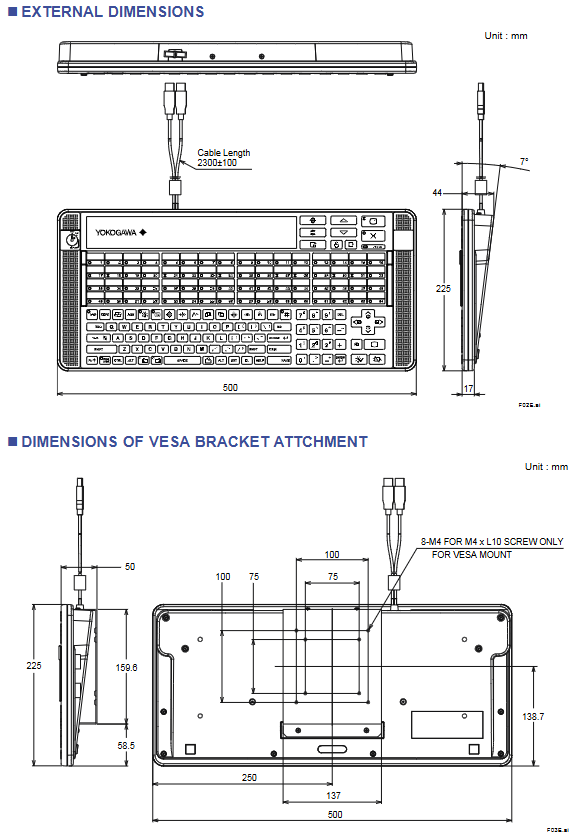
Compliance standards
(1) Safety standards
Compatibility standards: CSA, CE Marking.
Compliance prerequisite: The AIP830 keyboard can only comply with the compliance requirements of this standard when the corresponding certification marks (CSA mark, CE mark) are marked on the connected PC device, ensuring the safety certification consistency of the entire system.
(2) EMC (Electromagnetic Compatibility) Compliance Standards
Compatibility standards: CE Marking, C-Tick Marking, KC Marking.
Compliance prerequisite: Consistent with safety standards, PC devices that need to be connected must be labeled with corresponding certification marks (CE mark, C-Tick mark, KC mark) to meet electromagnetic compatibility requirements, avoid electromagnetic interference generated during device operation affecting other industrial equipment, and resist interference from external electromagnetic signals on keyboard operations.
Exception: In the CE Marking standard, EN 61000-3-2 (harmonic current emission limits) and EN 61000-3-3 (voltage fluctuation and flicker limits) are not applicable to the AIP830 keyboard, as the design characteristics of the device do not require it to meet the requirements of these two sub standards.
(3) Standard reference source
For detailed technical requirements of all compliance standards, please refer to the "System Overview" document (document numbers: GS 33K01A10-50E, GS 33K01A20-50E), which provides system level compliance details and testing basis.
Keyboard layout and functional design
(1) Button composition and classification
The key layout of AIP830 keyboard is designed around the efficiency and convenience of industrial operations, covering the following core key types:
Basic input keys: alphanumeric keys (for text input and parameter setting needs), numeric keypad (for quick input of numerical parameters), cursor movement keys (for interface navigation and parameter adjustment).
Control function keys: control keys (core control operations such as device start stop and mode switching), operation confirmation keys (confirm input instructions, execute operations), buzzer reset key (clear alarm beep), alarm confirmation key (respond and confirm industrial system alarms), data input key (accurately input process parameters, equipment instructions), display key (switch display interface, retrieve equipment status information).
Function expansion button:
Dedicated window calling key: designed by functional grouping, it can quickly access different industrial control windows (such as parameter setting window, equipment monitoring window, alarm log window, etc.), reducing operation steps.
64 user-defined function keys: The core is used for process control and factory monitoring. Users can customize key functions according to actual process requirements (such as quickly switching production formulas, retrieving specific equipment parameters, executing preset operation processes, etc.), greatly improving operational efficiency.
Fn combination key: As a function extension trigger key, it works in conjunction with other keys to achieve additional functions.
Page keys, Clear screen key, Container window key: adapted to the operational requirements of industrial control interfaces, supporting multi page switching, interface cleaning, specific function window calling, etc.
Status indication and audio components: POWER indicator light (displaying keyboard power status), built-in electronic buzzer (alarm prompt), built-in USB speaker (sound function output).
Protective structure: Plastic cover, used to protect the core button area, prevent dust, oil, water droplets, etc. from entering the industrial environment, and extend the service life of the equipment.
(2) Optional configuration function (selected by suffix code)
Mode selection switch:
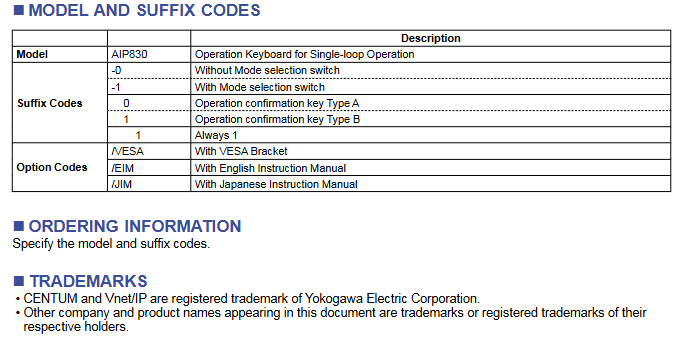
Postfix code -0: No mode selection switch, suitable for scenarios where there is no need to switch operating modes.
Suffix-1: Equipped with a mode selection switch, supporting quick switching between different operating modes (such as manual/automatic mode, edit/run mode, etc.), suitable for complex control requirements.
Operation confirmation keys symbol type:
The suffix code 0: Type A symbol meets the operational needs of specific regions or users.
Suffix code 1: Type B symbol, providing differentiated visual identification for operators to quickly recognize.
Fixed suffix code: All models include a fixed suffix code "1" to indicate product series consistency.
(3) Fn combination key extension function
Page up key+Fn key: Switch to the "volume control key", which can adjust the volume of the built-in USB speaker to meet the audio needs of different environments (such as increasing the volume in noisy environments and decreasing the volume in quiet control rooms).
Cursor movement key+Fn key: Switch to the "scroll key" to control the scrolling operation of the industrial control interface, making it easy to view monitoring data, alarm logs, and other information on long pages.
Clear screen button+Fn button: activates the clear screen function, clears temporary data, pop ups, etc. on the current display interface, and restores the interface to a clean state; At the same time, it supports modifying hardware settings to enable the clear screen button to take effect directly without pressing the Fn key, adapting to different user operating habits.
(4) Specific version restrictions (R5.01 and R5.02 versions)
Function key limitation: Only supports the first 32 user-defined function keys (No.1 to No.32), the last 32 function keys are not available, suitable for simplified application scenarios with less demand for custom functions.
Button disabled: The Container window key is not available, and there is no need to use this feature in this version.
- YOKOGAWA
- Reliance
- ADVANCED
- SEW
- ProSoft
- WATLOW
- Kongsberg
- FANUC
- VSD
- DCS
- PLC
- man-machine
- Covid-19
- Energy and Gender
- Energy Access
- Renewable Integration
- Energy Subsidies
- Energy and Water
- Net zero emission
- Energy Security
- Critical Minerals
- A-B
- petroleum
- Mine scale
- Sewage treatment
- cement
- architecture
- Industrial information
- New energy
- Automobile market
- electricity
- Construction site
- HIMA
- ABB
- Rockwell
- Schneider Modicon
- Siemens
- xYCOM
- Yaskawa
- Woodward
- BOSCH Rexroth
- MOOG
- General Electric
- American NI
- Rolls-Royce
- CTI
- Honeywell
- EMERSON
- MAN
- GE
- TRICONEX
- Control Wave
- ALSTOM
- AMAT
- STUDER
- KONGSBERG
- MOTOROLA
- DANAHER MOTION
- Bentley
- Galil
- EATON
- MOLEX
- Triconex
- DEIF
- B&W
- ZYGO
- Aerotech
- DANFOSS
- KOLLMORGEN
- Beijer
- Endress+Hauser
- schneider
- Foxboro
- KB
- REXROTH
- YAMAHA
- Johnson
- Westinghouse
- WAGO
- TOSHIBA
- TEKTRONIX
- BENDER
- BMCM
- SMC
- HITACHI
- HIRSCHMANN
- XP POWER
- Baldor
- Meggitt
- SHINKAWA
- Other Brands
- UniOP
- KUKA
- IBA
- Beckhoff
- ADLINK
-
ENOTEC OXITEC 5000 SME-53310000 InSitu O2 Gas Analyzer System
-
TRICONEX 3723X 32-Channel TMR Analog Input Module with HART for Tricon CX
-
GE 151X1233DB02SA02 Rev A Pitch Converter 30 Nm DC Pitch Conversion Module
-
GE 151X1207CK02SA02 77MM DE Excitation Module for Mark VI Turbine Control Systems
-
HIMA H6200A Analogue Isolator Power Supply for HIMax Safety Systems
-
ABB SACO 64D4 Digital Annunciator Unit with 64 Alarm Channels
-
Allen-Bradley 5069-L306ER - SER A CompactLogix Controller PLC
-
Omron CJ1W-CORT21 - CANopen Master Unit PLC Module
-
Danfoss 131B9523 / FC-102P5K5T4E20H1 - 5.5kW VLT HVAC Drive Inverter
-
Schneider Electric LXM32MU90M2 - Lexium 32 Servo Drive Controller
-
Danfoss AKD102P15KT4P21H1 - 15kW 131L2413 ADAP-KOOL Drive Inverter
-
Kollmorgen S70602-NANANA - Servo Drive Controller
-
Allen-Bradley 6189-PS2 - Power Supply Industrial Computer PS
-
Beijer E900T / 03010F - Operator Panel IFC ETTP HMI
-
Schneider Electric LMC20 - PacDrive Motion Controller PLC
-
Sartorius CAW2S1-3DC-NCE - COMBICS 2 Industrial Scale Terminal
-
Kollmorgen / Danaher S30301-NA / S300 - SERVOSTAR343 Servo Drive Controller
-
Siemens A5E00159503 - 12 INCH TFT Touch Panel HMI
-
Siemens 3UF5021-3AB00-1 - SIMOCODE DP Basic Unit Control Module
-
Danfoss 131B8872 / FC-202PK37T4E20H1 - 0.37kW VLT AQUA Drive Inverter
-
Atlas Copco ICB421-2003D / VSK001001 - W9139 ICM431-0025C ICM431-0025D Controller
-
Lenze EV82EV751_4C - Version 4A39 Frequency Inverter Drive
-
Atlas Copco / ABB 3HAB8101-19/07B - Robot Cable Assembly Harness
-
Beijer X2 Pro7-B2 - Operator Panel HMI Touch Screen
-
Honeywell CDW45L - Damper Actuator
-
B&R X67DM9331.L12 - Rev. I0 Digital Mixed Module
-
B&R X67DM9331.L12 - Rev. H0 Digital Mixed Module
-
Sanyo Denki PMM-BA-5604-1 - Pentasyn Stepper Motor Driver
-
SICK AWS1-113 / 1008900 - Evaluation Unit
-
Siemens 1TF6064-1AF71-3AH1 - SIMOTICS Synchronous Servo Motor
-
Heidenhain ERN680.P003-4096 / 29416004 - Rotary Encoder
-
Schneider Electric LC1G185EHEA - TeSys Control Contactor
-
Parker SBC HPD5N - High Performance Drive Electronics SPA
-
Advantech UNO-2170-CE11BE - Embedded Automation Computer IPC
-
Siemens 6AG1231-4HF32-4XB0 - SIPLUS S7-1200 SM 1231 Analog Input Module
-
Advantech UNO-2170-BTO - Embedded Automation Computer IPC
-
Jumo SR-96/4-001.0.0.00.111 - Solid State Relay Power Controller
-
Pepperl+Fuchs FC-21-V - FC-20P Safety Barrier Module
-
Emerson SP1404 - Unidrive AC Drive Inverter
-
B&R X67AI1233 - Rev.C0 Analog Input Module
-
Mitsubishi FR-F740-00250-EC - Frequency Inverter AC Drive
-
Allen-Bradley 2711P-T7C21D8S - PANELVIEW PLUS 7 SERIES B Touch Screen HMI
-
Pilz PMCprotego D.03/000/0/0/2/208-480VAC / 8176101 - Servo Amplifier Drive
-
Reliance Electric 57C414 / 57414-1N - Modbus Interface Module
-
Mitsubishi FR-F740-00250-EC - Frequency Inverter AC Drive
-
Siemens 6SN1123-1AA00-0EA2 - Version A 160A SIMODRIVE Power Module
-
Siemens 1TF6064-1AF71-3AH1 - SIMOTICS Synchronous Servo Motor
-
AEG ALU202 / DAP216 / DEP216 / DAU202 - SIM216 SIM203 DNP205 ADU205 PLC Controller KIT
-
Atlas Copco / ABB 3HAB8101-19/07B - Robot Cable Assembly Harness
-
Hitachi CPU22-02HB - Micro-EHV Programmable Controller PLC
-
Parker SBC HPD5N - High Performance Drive Electronics SPA
-
Jetter JX3-THI2-RTD - JX3-BP Temperature Input Module
-
Eaton DC1-34014FB-A20N - 5.5kW Inverter Variable Frequency Drive
-
Eaton DS7-34DSX041N0-D - Soft Starter
-
Reliance Electric 57C422B / 57422-2E - 2-Axis Servo Controller
-
Hitachi CPU22-02HB - Micro-EHV Programmable Controller PLC
-
Eaton DC1-34014FB-A20N - 5.5kW Frequency Inverter Variable Frequency Drive
-
Siemens 6SN1123-1AA00-0EA2 - Version A 160A SIMODRIVE Power Module
-
Reliance Electric 57C414 / 57414-1N - Modbus Interface Module
-
Eaton DS7-34DSX041N0-D - Soft Starter
-
Reliance Electric 57C422B / 57422-2E - 2-Axis Servo Controller
-
Johnson Controls DX-9120-8454 - Digital Controller
-
Jetter JX3-THI2-RTD - JX3-BP Temperature Input Module
-
Siemens 6SL3210-1KE21-7AP1 - SINAMICS G120C DP 7.5kW BOP-2 Inverter Drive
-
Siemens 1FK7042-2AF21-1QG0 - SIMOTICS S Synchronous Servo Motor
-
Mettler Toledo IND570 - Harsh Analog Weighing Terminal Controller
-
Schneider Electric TM238LDA24DR - Modicon M238 Programmable Logic Controller PLC
-
Hitachi EH-CPU548 - EH-150 PLC CPU Module
-
Honeywell Q7750A2003 - Excel 10 Zone Controller
-
Ferag 584.002.V003 - Control Panel HMI
-
Danfoss AK-SM 720 / 080Z8511 - ADAP-KOOL System Manager Controller
-
Ferag 584.002.V003 - Control Panel HMI
-
Kern 3210001.001 / LOP-KS 2903440.001 - PRT.205A.0000.V001.02341 Servo Controller Board
-
Reliance Electric 57C424 - Maxpak III High Speed Link Module
-
Telemecanique XBTA70101PA - Compact Terminal HMI Panel
-
Reliance Electric 57C424 - Maxpak III High Speed Link Module
-
Reliance Electric 57C422B - 2-Axis Servo Controller
-
Honeywell Q7750A2003 - Excel 10 Zone Controller
-
Telemecanique XBTN400 - Magelis Small Panel HMI
-
Schneider Electric TM172PDG42S - Modicon Programmable Logic Controller PLC
-
Fanuc HE693THM884M - Thermocouple Input Module
-
Selectron PMC22BAEZD / 220735 - Selecontrol PMC 22 ABEZD Controller Module
-
Baumuller BUS21-22/45-31-020 - Servo Drive Inverter
-
Schneider Electric TM172PDG42S - Modicon Programmable Logic Controller PLC
-
Schneider Electric ATV32HD11N4 - Altivar Variable Frequency Drive Inverter
-
Lenze 494_E.4B - DC Speed Controller
-
NORD SK300E-111-340-B - SKDA130E-111-340-IBS-AAA Frequency Inverter
-
Reliance Electric GMI-S02 - AC/AC Converter 380/400V 50/60Hz 2.3/2.8A Drive
-
Hakko / Monitouch V710CD - Operator Panel HMI Touch Screen
-
B&R 5PC910.SX01-00 / 5YZCAA00700000-005 - Automation PC Industrial Computer
-
Hitachi EH-CPU548 - EH-150 PLC CPU Module
-
Tecnau / Fortec FORTEC-04/UL / 10117 - PCB Circuit Board
-
Bosch PSS 2037 10B - Power Supply Module
-
Newall B602000 - Digital Readout Scale
-
ELCON PC Controller - Industrial PC Controller
-
Siemens 3UF5100-0AB00 - SIMOCODE-DP Control Module
-
Omron NS8-TV00B-V2 - Touch Screen HMI Panel
-
Siemens 6ES5264-8MA12 / IP264 - CAM Controller Module
-
Allen-Bradley 1756-L72S - SER B GuardLogix Safety Controller
-
Schneider Electric SXWMPC15A10001 - SmartX Controller Automation Server
-
Telemecanique LC1F265F7 - TeSys F Contactor
-
Siemens 6ES7314-6CH04-0AB0 - SIMATIC S7-300 CPU 314C-2 DP PLC
-
Allen-Bradley 1734-EI4S - POINT I/O Safety Module
-
Allen-Bradley 2711P-T7C4D8 / 2711P-RP8D - PanelView Plus HMI Touch Screen Logic Module
-
Ropex UPT-640-V - Resistron Temperature Controller
-
KEB 07.F5.B3A-0A00 - VERSION 1.1 Combivert Frequency Inverter
-
Sensopart V50-OB-A3-IW-M2-L - VISOR Vision Sensor Camera
-
SICK AFM60A-S1NB018X12 / 1059040 - Absolute Rotary Encoder
-
Kern AG KMC600 / 2903436.001 - Servo Drive Controller
-
Lenze E82EV302_4C200 / 13015655 - VERSION 3D35 Frequency Inverter Drive
-
Schneider Electric XBTOT2210 - Magelis Touch Screen HMI Panel
-
Baumuller BM5-O-SAF-000-000-000-001-202 - Parameter Safety Module
-
SICK UE4470-22EE690 - Safety Relay Controller
-
Hitachi EH-CPU448 / EH-150 - PLC CPU Module
-
Rexroth VT5005-13 - R5 00010592 Proportional Valve Amplifier Board
-
Siemens 6ES7510-1DJ00-0AB0 - SIMATIC ET 200SP CPU PLC
-
Beckhoff CX5120-0121 - 2GB Embedded PC Controller
-
Priva BlueiD S10 / 5010002 - SN3t 5020004 5010101 Building Automation Controller
-
Sigmatek DM161 - S-DIAS Digital Mix I/O Module
-
Telemecanique LC3D50P7A64 - Star Delta Starter Contactor
-
Siemens 6SN1123-1AA00-0BA2 - SIMODRIVE 611 Power Module
-
Siemens 6SN1124-1AA00-0CA1 - SIMODRIVE 611 Power Module
-
Dixell XC1015D-1C01F / XC1000D - Compressor Controller
-
Siemens A5E02184619 / 19T 577B - Industrial Touch Screen HMI Panel
-
Siemens 6SE6420-2AD27-5CA1 - Filter 6SE6400-2FS03-8CD0 Micromaster Inverter
-
Schneider Electric LC1G400LSEN - TeSys Control Contactor
-
Baldor BPS10-200-20-P - Servo Drive Motor Controller
-
Ingersoll Rand X4I / Y06IR03.00 - Air Compressor Controller

K-JIANG

Add: Jimei North Road, Jimei District, Xiamen, Fujian, China
Tell:+86-15305925923