

K-WANG
+086-15305925923
Service expert in industrial control field!


Product
Article
NameDescriptionContent
Adequate Inventory, Timely Service
pursuit of excellence


Ship control system
Equipment control system
Power monitoring system
Brand
Product parameters
- Telephone:+86-15305925923
- contacts:Mr.Wang
- Email:wang@kongjiangauto.com
Description
Product Description
Analog output modules IC200ALG320 and BXIOAO4200 provide four
4mA to 20mA analog current-sourcing outputs. Including a modest
amount of overrange current, approximately 20.38mA of output current
per channel is available to drive output loads.
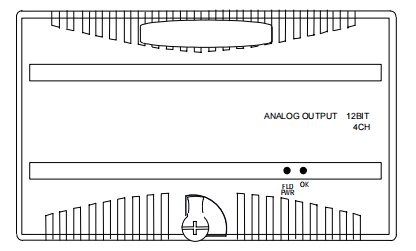
GE IC200ALG320 12-Bit 4 Channels Analog Output Module
Analog output modules IC200ALG321 and BXIOAO4205 provide four
analog voltage outputs. The output range is 0 to +10VDC
Analog output modules IC200ALG322 and BXIOAO4210 provide four
analog voltage outputs. The output range is -10 to +10VDC
ANALOG OUTPUT 12BIT
4CH
OK FLD
PWR
An external power supply is required for the outputs.
Intelligent processing for this module is performed by the CPU or
Network Interface Unit. The module receives 4 words of analog output
data.
LED Indicators
The green FLD PWR LED indicates the presence of user-side power for
the analog field-side circuits.
The green OK LED is on when backplane power is present to the
module.
Diagnostics
The module reports a Loss of User Side Power fault for field-side
circuits.
Configuration Parameters
The module is easily set up with a jumper for the outputs to either hold
their last states or default if backplane power or communications are
interrupted or the PLC is stopped. External user power must remain
uninterrupted.
Outputs remain in their default or last state until the module receives
different output data from the backplane, or until field power is removed.
Preinstallation Check
Carefully inspect all shipping containers for damage. If any equipment is
damaged, notify the delivery service immediately. Save the damaged
shipping container for inspection by the delivery service. After unpacking
the equipment, record all serial numbers. Save the shipping containers
and packing material in case it is necessary to transport or ship any part
of the system
Module Characteristics
Channels 4 single-ended, one group
Module ID IC200ALG320 / BXIOAO4200: FFFF9440
IC200ALG321 / BXIOAO4205: FFFF9040
IC200ALG322 / BXIOAO4210: FFFF9040
Isolation:
User input to logic (optical)
and to frame ground
Group to group
Channel to channel
250VAC continuous; 1500VAC for 1 minute
Not applicable
None
LED indicators FLD PWR LED indicates field power is present
OK LED indicates backplane power is present
Backplane current
consumption
5V output: 50mA max.
Thermal derating IC200ALG320 / BXIOAO4200: see diagram
IC200ALG321 / BXIOAO4205: none
IC200ALG322 / BXIOAO4210: none
Configuration parameters Output default
Diagnostics Loss of User Side Power
External Power Supply
Recommended range +18 to +30VDC (including ripple)
Current consumption at
recommended range
160mA max. (including load current)
12V operation range 9.6 to 15VDC, 12VDC nominal (including ripple)
Current consumption at 12V
range (including load current)
IC200ALG320 / BXIOAO4200: 240mA max
IC200ALG321 / BXIOAO4205: 210mA max.
IC200ALG322 / BXIOAO4210: 210mA max.
Output Characteristics
Output voltage or current IC200ALG320 / BXIOAO4200: 4 to 20mA
IC200ALG321 / BXIOAO4205: 0 to 10.24VDC
IC200ALG322 / BXIOAO4210: ±10.24VDC
IC200ALG320 / BXIOAO4200:
Resistive: 0 to 1250 Ohms maximum*
Capacitive: 0.1µF maximum
Inductive: 0.5H maximum
Load characteristics:
IC200ALG321 / BXIOAO4205:
IC200ALG322 / BXIOAO4210:
Resistive: 5000 Ohms minimum
Capacitive: 1.0 µF maximum
Accuracy:
+25 deg C**
0 to +60 degrees C
+/- 0.3% of full scale (typical),
+/- 0.5% of full scale (max)
+/-1% of full scale (max)
Resolution IC200ALG320 / BXIOAO4200: 4µA = 8 counts
IC200ALG321 / BXIOAO4205: 2.5mV = 8 counts
IC200ALG322 / BXIOAO4210: 5mV = 16 counts
Update rate per module 0.3ms maximum
Channel-to-channel crosstalk
rejection
70dB minimum
Output default IC200ALG320 / BXIOAO4200:
Hold Last State (default), 4mA (configurable)
IC200ALG321 / BXIOAO4205:
IC200ALG322 / BXIOAO4210:
Hold Last State (default), 0 (configurable)
Field Wiring Terminals
Terminal assignments for the module are shown below.
Number Connection Number Connection
A1 No connection B1 No connection
A2 OUT AQ1 B2 Shield Termination Point
A3 RET 1 B3 No connection
A4 No connection B4 Shield Termination Point
A5 OUT AQ2 B5 No connection
A6 RET 2 B6 Shield Termination Point
A7 No connection B7 No connection
A8 OUT AQ3 B8 Shield Termination Point
A9 RET 3 B9 No connection
A10 No connection B10 Shield Termination Point
A11 OUT AQ4 B11 No connection
A12 RET 4 B12 Shield Termination Point
A13 No connection B13 JMP 1A
A14 No connection B14 JMP 1B
A15 No connection B15 No connection
A16 No connection B16 No connection
A17 DC- B17 No connection
A18 DC+ B18 No connection
Wiring Connections for Carriers with Two Rows of Terminals
The diagram below shows wiring connections for this module when
installed on a carrier with two rows of terminals.
JMP1
AQ1
Shield Connections
AQ2 AQ3 AQ4
1 2 3 4 5 6 7 8 9 11 12 13 14 15 16 17 18
1 2 3 4 5 6 7 8 9 11 12 13 14 15 16 17 18 10
10
B
A
Wiring Connections for Carriers with Three Rows of Terminals
The next diagram shows wiring connections for this module when
installed on a carrier with three rows of terminals.
A 1 2 3
13 14 15 16
7 8 9 11 12 10
4 5 6
Shield Connections
AQ1
B 1 2 3
13 14 15 16 17 18
7 8 9 11 12 10
JMP1
4 5 6
AQ2
AQ3 AQ4
17 18
Jumper Selection
If no jumper is installed outputs hold their last state (the last commanded
value from the backplane) if backplane power or communications are
interrupted or the PLC is stopped. With a jumper installed, if such
conditions occur outputs default as indicated in the table below.
The jumper setting should only be changed with field power and
backplane power removed.
Jumper Default for
IC200ALG320
BXIOAO4200
Default for
IC200ALG321/ 322
BXIOAO4205 / 4210
None Hold Last State Hold Last State
JMP 1 4mA 0
Wiring Example
OUT AQ4
RET 4
JMP 1A
JMP 1B
Field Power
Field Return
OUT AQ1
RET 1
-
+
Shield
Shield
24VDC
Load
Load
Jumper installed =default
no jumper = hold last state
Cable Shield Connections
Shielded twisted pair cable is recommended for all of the analog channel
connections.
If the module is installed on a Terminal-style I/O Carrier (IC200CHS001,
002, or 005) or a Compact Terminal-style I/O Carrier (IC200CHS022,
025), the cable shield can be connected directly to the carrier per the
Field Wiring Table. An Auxiliary I/O Terminal Strip (IC200TBM001, 002,
or 005) can also be added to the Terminal-style I/O Carriers to aid in
grounding shields. Be sure to ground the Auxiliary I/O Terminal Strip as
well if you plan to use it for this purpose.
If the module is installed on a Connector-style I/O Carrier
(IC200CHS003), the cable shield can be connected directly to an
Interposing Terminal (IC200CHS011, 012, 015). Be sure to ground the
Interposing Terminal. It is recommended to use a shielded interposing
cable as well between the Interposing Terminal and the Connector Base.
A custom shielded cable can be made using the Connector kit
(IC200ACC304). In addition, a custom shield braid can be wrapped
around standard Interposing Cables (IC200CBL105, 110, 120, 230). If
this approach is used be sure to ground the braid.
All cable shield connections should be connected to earth ground and be
kept as short as practical. The power cable does not need to be
shielded
Purchase history
| User name | Member Level | Quantity | Specification | Purchase Date |
|---|
Total 0 Record
Customer Reviews
Satisfaction :
5 Stars
No evaluation information


- LTI Drives
- other
- ADLINK
- Beckhoff
- Shinkawa
- Other Brands
- AMAT
- Iba
- PEPPERL+FUCHS
- Aerotech
- WATLOW
- MAN
- ADVANCED
- Abaco
- YOKOGAWA
- KOLLMORGEN
- MEGGITT
- kong-sberg
- METSO
- Motorola
- NI
- OEMAX
- RELIANCE
- scanlab
- schneider
- uniop
- Vibro-Meter
- Honeywell
- Rolls-Royce
- MOOG
- GE
- B&R
- Woodward
- Yaskawa
- xYCOM
- Siemens
- Emerson
- HIMA
- Bently
- ZYGO
- FOXBORO
- OMACO
- PROSOFT
- ENTERASYS
- TRICONEX
- Parker
- Lenze
- KEBA
- Alstom
- CTI
- ABB
- A-B
145

-
 Woodward CPC-II Current Pressure Converter
 -
 EXOR UniOP ePALM10 Handheld HMI
 -
 TMEIC TMdrive-30/TMdrive-P30 IGBT Inverter/Converter Operation Manual
 -
 TEWS TVME200 6U VME Bus Industry Pack (IP) Carrier Board
 -
 TDK Lambda Alpha-400 (CA400) Switching Power Supply Installation Instructions
 -
 Stucke GROUP SYMAP ® Series digital protection relay
 -
 Softing CAN-AC2-PCI PCI Bus CAN Communication Interface Board
 -
 Siemens SIMATIC C7-623/C7-624 Control System
 -
 Foxboro DCS Compact 200 Series 16 Slot Horizontal Base RH916RB
 -
 Foxboro 84F/84W Intelligent Vortex Flow Meter
 -
 Foxboro E69F-BI2 on-site installation type electric pneumatic converter (I/P)
 -
 Foxboro DCS Compact200 series RH916RB (16 slot horizontal bottom plate)
 -
 Operation Instructions for Reliance Electric PSC7000 Control Card
 -
 Eaton MTL F809F Plus DTM Operating Instructions
 -
 Motorola ACE3600 series remote terminal unit RTU
 -
 MOOG D136-003-001 Rugged Motion Controller
 -
 Micro Innovation GF1 series industrial touch screen (Micro Panel)
 -
 Neles ™ NDX ™ Compact intelligent valve controller (positioner)
 -
 Jamesbury Valv‑Powr ™ Installation, maintenance, and operation of VPVL mod D actuator
 -
 Jamesbury Valv‑Powr ™ VPVL series D-type compact gear rack pneumatic actuator
 -
 GMW IPP 144-40G Embedded Thermal Printer
 -
 Meggitt C327845 flow cut-off valve
 -
 Meggitt C422425/C422685/C422695/C422705 solenoid valve
 -
 Selection of LTi Drives ServoOne Full Series Servo Drive Systems
 -
 Jenaer Antriebstechnik ECOVARIO ® Installation and Operation Instructions for 114/214/414 Servo Drivers
 -
 Honeywell TDC3000X APM Advanced Process Manager
 -
 Honeywell Notifier NFS2-3030 Intelligent Addressing Fire Alarm Controller
 -
 Honeywell EP-DOCX-SCA-SMSC-100 Universal Signal Conditioning Wiring Solution for Safety Systems (UMS)
 -
 Installation Instructions for Honeywell XL1404 Fire Alarm Controller
 -
 Honeywell Enhanced Micro TDC 3000 (MT11-520) DCS Control System
 -
 HIMA X-DI 64 01 Digital Input Module
 -
 Hirschmann MICE MS20/MS30 Industrial Switch Installation Instructions
 -
 Exor UniOP ePAD05/ePAD06 Compact HMI Industrial Human Machine Panel
 -
 Exor Effectiveness View eV058- TST/eV058- TNT Industrial Touch Screen HMI Human Machine Panel
 -
 Esd VME-PMC CADDY/2 Intelligent VME-PMC Carrier Board
 -
 Installation Instructions for Elmo Gold Tuba (G-TUB) Servo Drive
 -
 Eaton COM-MPB1-TP/COM-MPB2-TP communication module
 -
 Delta Tau Turbo PMAC2 PCI Ultralite Programmable Multi Axis Motion Controller
 -
 DATA PATTERNS DP-VME-5114 module
 -
 CMZ SVM Series Independent Two Phase Synchronous Servo Driver SVM1608 Product Specification
 -
 SUMITOMO T2100Z steel turning
 -
 SUMITOMO PSZ Turn Modular Quick Change Tool System
 -
 SUMITOMO EGU positive front corner chip breaker groove
 -
 SUMITOMO GND series slotting and cutting tools
 -
 SUMITOMO AC8000P series (AC8115P/AC8020P/AC8025P/AC8035P) steel turning
 -
 SUMITOMO AC6000M series (AC6020M/AC6030M/AC6135M/AC6145M) stainless steel turning
 -
 SUMITOMO ELECTRIC AC5000S series (AC5005S/AC5015S/AC5025S) heat-resistant alloy turning
 -
 SUMITOMO ELECTRIC AC4000K series (AC4010K/AC4015K/AC4125K) cast iron turning
 -
 SUMITOMO ELECTRIC AC1135U small lathe for turning small parts
 -
 SUMITOMO ELECTRIC AC1030U Material Blade
 -
 CCS 6900G/6900P Non Explosion proof Pressure Switch Installation and Maintenance Manual
 -
 BENDER WR70 × 175S (P)~WR200 × 500S (P) rectangular measuring current transformer
 -
 BENDER RCMA475LY B-type residual current monitor
 -
 BENDER IRDH575 A‑ISOMETER ® Insulation monitoring device
 -
 BENDER IRDH265 / IRDH365(ISOMETER ®) Insulation monitoring device
 -
 BENDER RCMA475LY AC/DC sensitive residual current monitor
 -
 Beckwith Electric M-3425A Generator Integrated Protection Relay
 -
 Automated Logic MEx816u I/O Expansion Module
 -
 ASEM HT2150 Fanless Industrial Panel X86
 -
 Advantest U3771/U3772 portable microwave millimeter wave spectrum analyzer
 -
 Advantest R6144 Programmable DC Voltage/Current Source (Calibration Source)
 -
 Aerotech UNIDEX 100/U100i single axis motion controller
 -
 Aerotech Ndrive MP Ultra Compact PWM Digital Servo Driver
 -
 Aerotech Ndrive HPe 10/20/30 High Performance PWM Digital Servo Drive
 -
 Aerotech Ndrive Linear (HLe/ML) Linear Servo Drive
 -
 Aerotech Ndrive CP Compact PWM Digital Servo Driver
 -
 Aerotech Ndrive Linear (HLe/CL/ML) linear servo drive
 -
 Aerotech Ndrive HL (EDU176 Rev1.08b) Digital Servo Drive
 -
 Aerotech Ndrive HP10/20/30 PWM Digital Servo Drive
 -
 Aerotech Ndrive series digital servo drives
 -
 SIGMATEK TAE 1941 Touch Display Unit
 -
 SIGMATEK TAE 151 Touch Display Unit
 -
 SIGMATEK AKM series servo motor
 -
 SIGMATEK S-DIAS Control System
 -
 SIGMATEK Human Machine Interface (HMI)
 -
 SIGMATEK DIAS Drive 310-23 servo amplifier
 -
 SIGMATEK CCP 521 C-DIAS processor module
 -
 MEGMEET L6 series electric drive
 -
 Sysmex XN-1000/XN-2000 Hematology Analyzer
 -
 Sysmex XN-L series (XN-530/XN-430/XN-330) fully automatic blood cell analyzer
 -
 Sysmex XN-9000 Series Fully Automated Blood Analysis Pipeline
 -
 LTI‑Motion ServoOne Field Bus Systems PROFIBUS and PROFINET
 -
 Micro Innovation MICRO PANEL GF1 Color Touch Human Computer Interface
 -
 Micro Innovation WINbloc Distributed Remote I/O System
 -
 Micro Innovation MICRO PANEL GS-2 Industrial Touch Visualization Operation Panel (HMI)
 -
 LTi LST/LSH series synchronous servo motor
 -
 LTi CDE/CDB3000 positioning controller
 -
 ENOTEC SILOTEC ® Installation and Operation Instructions for 8000 Silo Monitoring O ₂/CO ₑ Analyzer System
 -
 ENOTEC ENSITU ® 7000 Compact Oxygen Transmitter Probe
 -
 ENOTEC COMTEC ® Installation and Operation Instructions for 6000 ATEX GasEx Explosion proof O ₂/COE Analyzer System
 -
 ENOTEC Integrated Products
 -
 ENOTEC OXITEC ® 500E Extraction Oxygen Analyzer
 -
 KUKA KR CS Box-2 Compact Controller for Four Axis SCARA Robot
 -
 KUKA KR C5 slim-2 Robot Controller
 -
 KUKA KR C5 micro With KUKA System Software (KSS/VSS) Assembly Instructions
 -
 KUKA KR C5 micro controller
 -
 KUKA KR C5 Controller Assembly Instructions
 -
 KUKA KR C5 compactcab and KR C5 small-size cab cabinets
 -
 KUKA KR C4 smallsize-2 small robot control cabinet
 -
 KUKA KR C4 Midsize/KR C4 Midsize CK Assembly Manual
 -
 ENOTEC ® Installation and Operation Instructions for 5000/5000+Oxygen Analyzer System
 -
 KUKA KR C4 extended; KR C4 extended CK Assembly Instructions Assembly Manual
 -
 Assembly/Installation Manual for KUKA KR C4 Compact Control Cabinet
 -
 KUKA Sunrise Cabinet Med Medical Collaborative Robot Special Control Cabinet
 -
 KUKA Sunrise Cabinet Next Generation Small Control Cabinet
 -
 KUKA KR C4 Smallsize-2 family's smallest control cabinet
 -
 KUKA KR C4 midsize; KR C4 midsize CK medium-sized control cabinet
 -
 KUKA KR C4 extended is a high-power multi axis control cabinet
 -
 General installation and operation instructions for KUKA KR C4 and KR C4 CK controllers
 -
 KUKA KR C4 compact controller operation instructions
 -
 Installation and Operation Instructions for KUKA Robot Arm
 -
 KUKA TITAN-2 Ultra Ground Overloading Six Axis Robot
 -
 Assembly instructions for KUKA KR SCARA-2 CS series robotic arm body
 -
 KUKA MA KR SCARA X Installation Guide
 -
 KUKA KR FORTEC-2 Ultra Heavy duty Ground Six Axis Robot Mechanical Assembly Manual
 -
 KUKA KR FORTEC-2 new generation heavy-duty ground six axis robot
 -
 KUKA Robots KR 1000 titan; KR 1000 L750 titan With F Variants Assembly Instructions
 -
 KUKA KR 600 FORTEC heavy-duty six axis ground mounted industrial robot
 -
 KUKA KR 500 MT FORTEC Heavy duty Six Axis Industrial Robot
 -
 KUKA KR 360 FORTEC Heavy duty Six Axis Industrial Robot
 -
 KUKA Sunrise Cabinet Med Medical Edition Robot Controller User Manual
 -
 KUKA Robots KR SCARA HO Assembly Instructions
 -
 KUKA Robots KR QUANTEC-2 PA Assembly Instructions
 -
 KUKA Robots KR QUANTEC-2 K and KR QUANTEC-2 P With K-F and P-C Variants Assembly Instructions
 -
 KUKA Robots KR QUANTEC-2 HO Assembly Instructions
 -
 KUKA Robots KR QUANTEC-2 HC Assembly Instructions
 -
 KUKA KR QUANTEC-2 series heavy-duty ground mounted six axis industrial robot
 -
 KUKA KR QUANTEC PA series heavy-duty palletizing robot

K-JIANG

Add: Jimei North Road, Jimei District, Xiamen, Fujian, China
Tell:+86-15305925923