

K-WANG


- Telephone:+86-15305925923
- contacts:Mr.Wang
- Email:wang@kongjiangauto.com
All Panel 800 Version 6 are developed to satisfy the demands of human-machine communication. Built-in functions such as displaying and controlling text, dynamic indication, time channels, alarm and recipe handling are included.
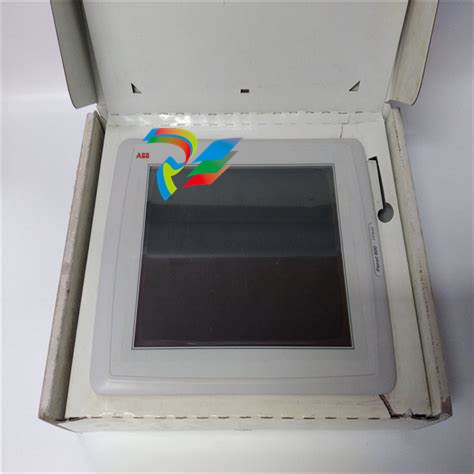
ABB-PP877/3BSE069272R2Touch Screen
During Installation • The operator panel is designed for stationary installation on a planar surface, where the following conditions are fulfilled: – no high explosive risks – no strong magnetic fields – no direct sunlight – no large, sudden temperature changes • Install the operator panel according to the accompanying installation instructions. • Ground the operator panel according to the accompanying installation instructions. • Only qualified personnel may install the operator panel. • Separate the high voltage, signal and supply cables. • Make sure that the voltage and polarity of the power source is correct before connecting the operator panel to the power outlet. • Peripheral equipment must be appropriate for the application and location. • In a Zone 2 environment, this equipment shall be installed in an enclosure that provides a degree of protection not less than IP 54 or greater than IP 65 in accordance with IEC/EN 600079-0. The IP rating of the equipment is limited to the IP rating of the enclosure it is to be installed into. • In a Zone 22 environment, this equipment shall be installed in an enclosure that provides a degree of protection not less than IP 64 or greater than IP 65 in accordance with IEC/EN 600079-0. The IP rating of the equipment is limited to the IP rating of the enclosure it is to be installed into.
Installation Process The following is needed: • A Phillips/slot screwdriver 1. Unpack and check the delivery. If damage is found, notify the supplier. 2. Place the operator panel on a stable surface during installation. Dropping the operator panel or letting it fall may cause damage. 3. To cut a correct opening for the operator panel, use the cut out dimensions in the outline drawing. For more information, see sections Operator Panel Drawings and Technical Data. 4. Secure the operator panel in position using all the fastening holes and the provided brackets and screws:
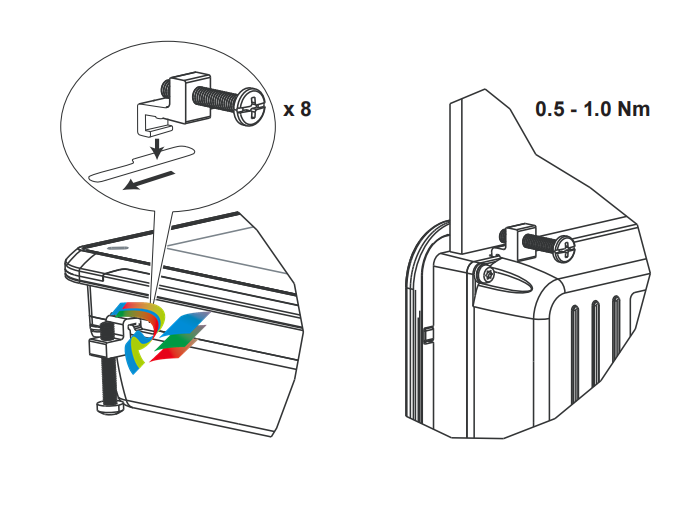
5. Connect the cables in the specified order, according to the drawing and steps below. • The operator panel must be brought to ambient temperature before it is started up. If condensation forms, ensure that the operator panel is dry before connecting it to the power outlet. • Ensure that the operator panel and the controller system have the same electrical grounding (reference voltage level), otherwise errors in communication may occur. • Ensure that the voltage and polarity of the power source is correct. • Separate high voltage cables from signal and supply cables. • Shielded communication cables are recommended.
In some industrial units for Ethernet, the RJ45 contact’s shield is connected to the chassis via a capacitor, see 1 in drawing above. The operator panel’s Ethernet shield is directly connected to the chassis, see 2 in drawing above. 1. Check whether the other Ethernet unit has its shield directly grounded or grounded via a capacitor. In many cases, connecting the shielded Ethernet cabling to the chassis at both ends is inappropriate. Hum or grounding loops can occur. Unshielded cabling may even result in fewer communication errors. A good solution may be to use a shielded Ethernet cable, but to connect the shield at one end only. One option is to break the shield, see 3 in drawing above.
To Achieve Better EMC Protection • Use shielded cables for RS232 communication. • Use twisted pair and shielded cabling for RS422 and RS485. • Use the cabling intended for the bus type; Ethernet, Profibus, CC-Link, CAN, Device Net etc. • Install and connect according to applicable specifications for the relevant bus standard. • Use shielded cabling for Ethernet, preferably with foil and a braided shield. • D-sub covers should be shielded, and the shield should be connected to the cover 360° where the cable enters. • Connect the shield at both ends. Shielded cable Not same potential Ground plane 1 Ground plane 2 Ground plate Ground plate in another building 0.1 μF/250 V With longer distances, there is a risk that the ground potential may be different. In that case, the shield should only be connected at one end. A good alternative is to connect the other end of the shield to the ground via a 0.1 µF/250 V plastic capacitor. Both ends are then connected to the ground in terms of HF, but only connected to the ground at one end in terms of LF, thus avoiding the 50/60 Hz grounding loops.
Metal cabinet Metal cabinet Terminal or connector Terminal or connector EMC cable gland Plastic cable gland Shielded cable Cable clamp in steel Shielded cable
| User name | Member Level | Quantity | Specification | Purchase Date |
|---|


- other
- Other Brands
- AMAT
- Iba
- PEPPERL+FUCHS
- Aerotech
- WATLOW
- MAN
- ADVANCED
- Abaco
- YOKOGAWA
- KOLLMORGEN
- MEGGITT
- kong-sberg
- METSO
- Motorola
- NI
- OEMAX
- RELIANCE
- scanlab
- schneider
- uniop
- Vibro-Meter
- Honeywell
- Rolls-Royce
- MOOG
- GE
- B&R
- Woodward
- Yaskawa
- xYCOM
- Siemens
- Emerson
- HIMA
- Bently
- ZYGO
- FOXBORO
- OMACO
- PROSOFT
- ENTERASYS
- TRICONEX
- Parker
- Lenze
- KEBA
- Alstom
- CTI
- ABB
- A-B

-
 Instructions for using LK-TECH MGv2 servo motor
 -
 Zebra EPL2 Programming Language Programming Guide
 -
 How to install Elmo Gold Whistle digital servo drive?
 -
 MITSUBISHI ELECTRIC FR-D700 frequency converter
 -
 Edwards EST3 Emergency Communication and Life Safety Platform
 -
 ABB ACS380 mechanical frequency converter
 -
 MITSUBISHI ELECTRIC MELSEC iQ-R/System Q/L series PLC family
 -
 Rockwell Automation Bulletin 5069 Series Controllers
 -
 CODESYS Control Win SL
 -
 ABB AC 800M controller and communication interface
 -
 Honeywell 7800 Series EC/RM7830A/7850A Combustion Relay Module
 -
 Rockwell AutoMax Distributed Power Drive System Manual
 -
 SNO 4062 K/KM safety relay
 -
 World Encoders iPHD/iHDW series handheld electronic handwheel
 -
 Copes Vulcan turbine bypass system (CV-1163)
 -
 ZF Marine MM9000 ClearCommand Marine Propulsion Control System
 -
 Pro face GP-2400/2500/2600 Series Operating Manual
 -
 TI C2000 CLA Software Development Guide
 -
 Honeywell ControlEdge HC900 Controller
 -
 Metso DNA Device Status Monitoring System
 -
 ABB Millmate Rolling Mill Force Measurement System
 -
 Reliance Electric GV3000/SE AC Inverter
 -
 EUCHNER handheld operating unit and electronic handwheel
 -
 GE Fanuc Automation VersaMax ® I/O and Control
 -
 Microchip dsPIC30F series 16 bit high-performance digital signal controller
 -
 Milacron ELEKTRON 400/500/600 series fully electric injection molding machine
 -
 PRECILEC RE.0444N series DC tachometer generator
 -
 Mitsubishi GOT2000/GOT1000 series serial communication unit
 -
 Keyence GS series safety interlock switch
 -
 GE AT868 AquaTrans ™ Single/dual channel ultrasonic water flow transmitter
 -
 MITSUBISHI ELECTRIC GOT1000 Series Connection Manual
 -
 Allen Bradley Guardmaster GSR Safety Relay
 -
 Delta AH500 PLC Operating Instructions
 -
 Pilz PNOZmulti series safety control system
 -
 Operation Instructions for Pilz PNOZ XV3P Safety Relay
 -
 Pilz PZE 9 Safety Relay Expansion Module
 -
 SCHNEIDER TSX Premium P57 Processor and Discrete I/O Modules
 -
 KONGSBERG High Precision Acoustic Positioning – HiPAP®
 -
 KONGSBERG Seatex MRU 5 The Ideal Marine Motion Sensor
 -
 KONGSBERG BWMS Bridge Watch Monitoring System
 -
 WCU Watch Cabin Unit - LED version
 -
 Albatross Control System NMEA 2000 ® Standard modular shipborne monitoring and control system
 -
 KONGSBERG Simrad PI50 Catch monitoring system
 -
 Kongsberg C-series CNC cutting machine
 -
 KONGSBERG RCU500 Remote Controller Unit
 -
 Operator Manual for AutroSafe Interactive Fire Detection System (Release 4)
 -
 EAU-321 is an AutroSafe fire detection system
 -
 Installation and usage instructions for MTL4850 HART multiplexer
 -
 MITSUBISHI ELECTRIC FR-A500 Series Inverter Manual
 -
 Laumas TLM8 8-channel weight transmitter
 -
 General User Manual for the Anybus X-gateway Series Industrial Gateway
 -
 Instructions for Using NJ/NX Series CPU Unit OPC UA
 -
 OMRON Machine Automation Controller NX-series System Units
 -
 FANUC Series 16i/18i/21i MODEL B Series CNC System Hardware Connection
 -
 PILZ PNOZmulti Classic and PNOZmulti Mini configurable safety controllers
 -
 MITSUBISHI ELECTRIC MELSEC A series Programmable Controller
 -
 Renishaw PHC10-3 PLUS Probe Controller Installation Guide
 -
 Hine Automation Constellation series vacuum wafer transfer system
 -
 PILZ PNOZ m B0 configurable safety control system basic unit
 -
 BANNER BES58-6 series incremental rotary encoder
 -
 Programming Guide for Modicon 884 Programmable Controller
 -
 Eaton LZM series molded case circuit breaker
 -
 Pilz PSWZ X1P Safety Static Monitoring Relay
 -
 Keyence CV-3502P/CV-3000 series visual system
 -
 Pro face GP2400/2500/2600 series programmable human-machine interface (HMI)
 -
 Siemens SINAMICS S120 AC frequency converter
 -
 Allen Bradley 160-IB1 InterBus Communication Module
 -
 MX321 AVR Automatic Voltage Regulator
 -
 GE Multilin MM2 Motor Manager 2 Manual
 -
 SIEMENS C500 microcontroller family architecture and instruction set description
 -
 HORIBA SEC-Z500X Series Digital Mass Flow Controller
 -
 QUBE Servo 2 integrated rotary servo teaching experimental platform
 -
 Schneider Telemecanique TSX17 Micro PLC Communication Module
 -
 GE DC Drives (BCH series) DC Speed Governor
 -
 Honeywell X-DCS3000 Digital Integrated System Manager
 -
 OMRON Z500 high-precision contour measurement system
 -
 Siemens SIMATIC S5-90U/S5-95U Compact PLC
 -
 KEB COMBIVERT F5 elevator dedicated frequency converter
 -
 TOSHIBA TOSBERT VF-S15 Inverter Description
 -
 LS Power Generation SV-IG5A Series Inverter Easy Operation Instructions
 -
 Allen Bradley GuardPLC 1200/1600/1800/2000 Series Controller Systems
 -
 Installation Guide for Omron C1000H/C2000H Series PLC
 -
 Omron F160 Vision Sensor
 -
 Bonner Q45U series short range analog output ultrasonic sensor
 -
 Schneider C60H-DC C-curve DC supplementary protector
 -
 Omron SYSMAC CPM2B series board PLC
 -
 Omron C500 series rack mounted PLC
 -
 Mitsubishi language hardware manual for Mitsubishi FX0/FX0N series PLC
 -
 PULS QS40.241/QS40.241-C2 models 24V/40A/960W single-phase rail mounted switching power supply
 -
 Eaton XV-102-L series industrial touch screen HMI
 -
 Omron FZ5 series visual system
 -
 Schneider TSX 47-10/20/25 series modular sequential PLC
 -
 ABB Procontic CS 31 Distributed Automation System Description
 -
 OMRON H8PR series electronic cam controller
 -
 OMRON 3G3MX2 frequency converter
 -
 Safety and installation wiring instructions for GP477R-EG11 touch human-machine interface
 -
 I/O module for Siemens 3RK series AS-i SlimLine Compact control cabinet
 -
 OMRON NS Series Programmable Terminal Web Interface User Manual
 -
 OMRON Z4M laser displacement sensor
 -
 HIMMERWERK SINUS series high-frequency induction heating generator
 -
 OMRON CP series CP1E CPU unit
 -
 OMRON ZFX-C series intelligent visual sensor
 -
 OMRON ZFV series intelligent visual sensor
 -
 OMRON CJ series CPU unit operation instructions
 -
 Murr Electronics 7000-41034-0400400 M12 Power Connector Instructions
 -
 OMRON ZFX series simple visual sensor
 -
 REER ULISSE UNC safety photoelectric protection device
 -
 Siemens SIMATIC S5-90U/S5-95U Compact PLC
 -
 OMRON CPM2C Programmable Controller
 -
 Yaskawa ∑ - V series SGDV servo drive matching
 -
 OMRON SYSMAC CP1H series PLC (X/XA/Y type) operating instructions
 -
 OMRON SYSMAC C20K/C28K/C40K/C60K series K-type programmable controllers
 -
 PEPPERL+FUCHS SLVA-4Kplus Safety Light Curtain Controller
 -
 Yaskawa ∑ - II series SGMBH servo motor+SGDH servo driver
 -
 Yaskawa VS-616PC5/P5 series variable torque frequency converter
 -
 OMRON 3G3SV series book style fully digital low-noise frequency converter
 -
 Pro face GP-370 series human-machine interface (HMI)
 -
 OMRON FQ2 series integrated intelligent visual sensor
 -
 SONY SH800SFP cell sorter BioImaging Facility IST Austria
 -
 OMRON 3F88L-160/162 cam locator
 -
 KEB COMBIVERT F4 series frequency converter
 -
 OMRON CJ Series PLC (CJ1H-R/H/G, CJ1M, CJ1) Operating Instructions
 -
 Schneider C60H-DC C-curve DC supplementary protector
 -
 OMRON 3G3MV Multi functional Compact Inverter
 -
 OMRON CQM1H series modular PLC
 -
 Huichuan MCTC-ARD-C Elevator Automatic Rescue Device (ARD)
 -
 SolaHD SDN-D series rail mounted high-performance power supply
 -
 OMRON C200H Series PLC (CPU01-E/03-E/11-E) Operating Instructions

K-JIANG

Add: Jimei North Road, Jimei District, Xiamen, Fujian, China
Tell:+86-15305925923