

K-WANG


- Telephone:+86-15305925923
- contacts:Mr.Wang
- Email:wang@kongjiangauto.com
Manufacturers
ABB
Model(s)
ABB Advant Controller 31, ABB Advant OCS
Additional Information
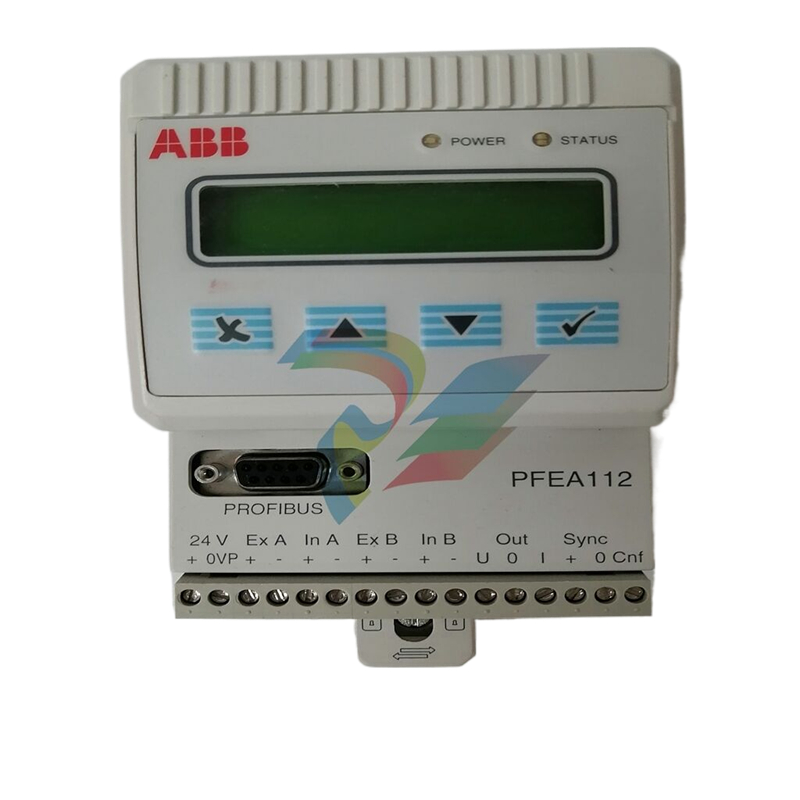
Control Panel, 3 programmable + 8 function Keys, LCD text diplay 2 line 20 Characteres
Estimated Shipping Size
Dimensions: 4.0" x 2.0" x 6.0"
(10.2 cm x 5.1 cm x 15.2 cm)
Weight: 0 lbs 12.9 oz (0.4kg )
Tariff Code: 8518510000
Country of Origin: Sweden
Ships from Webster NY, USA
ABB 1SBP260171R1001 CP502 Text Display Panel
Basic Information
Model and Name: ABB 1SBP260171R1001 CP502 Text Display Panel, ‘1SBP260171R1001’ is the product model number, ‘CP502’ may be the ‘1SBP260171R1001’ is the product model number, “CP502” may be the product series code, this is a text display panel for displaying text messages in industrial automation systems or other equipment.
Family: belongs to the Display Devices section of the ABB industrial automation equipment family. In this series, there are other types of human-machine interface (HMI) devices, such as touch screen monitors, graphic display terminals, etc., which together provide human-machine interaction functions for industrial control systems.
Application Scenario Correlation: Widely used in equipment monitoring and operation at industrial sites, such as factory automation production lines, process control systems (chemical, pharmaceutical, electric power and other industries), intelligent building systems (for equipment status display and parameter setting) and so on. It is used to display the running status of equipment, parameter setting information, alarm messages and other text contents to operators.
Functional features
Text display function
Clear display: text information can be displayed clearly, and the characters are clear and easy to read. The resolution and contrast of the screen are optimised for use in different lighting conditions, whether in a bright industrial workshop or a relatively dark equipment control room, to ensure that the operator can accurately read the display.
Multi-line display capability: Often with multi-line display capabilities, for example, multiple lines of parameter information or message queues can be displayed. This makes it possible to display the status of multiple devices or a series of operating tips at the same time, making it easy for operators to quickly access comprehensive information.
Multiple fonts and font sizes: Different fonts and font sizes are supported, allowing users to flexibly adjust fonts and font sizes according to the importance and length of the displayed content in order to achieve the best display effect. For example, title information can be highlighted with a larger font size, while detailed parameter values can be displayed with more content using a smaller font size.
Data Display and Update Functions
Real-time data display: It can communicate with controllers or other devices in the industrial automation system to acquire and display the operating data of the devices in real time. For example, it displays the rotational speed and temperature of the motor, the flow rate and pressure of the pipeline, and other parameters. The update speed of the data can be configured according to the system requirements to ensure that the operator can understand the latest status of the equipment in a timely manner.
Data format customisation: It supports the customisation of the format of the displayed data, such as the number of decimal places, unit display, data alignment, etc. This makes the displayed information more in line with the user's requirements. This makes the displayed information more in line with user habits and industry standards. For example, temperature data can be displayed as ‘25.0°C’, pressure data as ‘1.20 MPa’, and can be aligned according to left-aligned or right-aligned, etc.
User interaction functions (possible)
Key operation support: it may be equipped with keys, through which the operator can perform some simple interactions, such as switching the display page, confirming the alarm information, setting parameters, etc. The layout and function of the buttons are designed with ergonomics and ease of operation in mind, making it convenient for operators wearing gloves or for quick operation in emergency situations.
Menu navigation function: If there is a menu system, it can provide clear menu navigation function. Operators can enter different menu levels through keystrokes or other specified means to view detailed equipment information, historical data, setting options and other content. The structure of the menu is well-designed, easy to understand and operate, and reduces the user's learning cost.
Reliability and Durability
Industrial-grade design: Adopting industrial-grade design standards, the enclosure is rugged and durable, able to withstand a certain degree of mechanical shock, vibration, and contamination such as dust and oil. For example, when installed next to equipment on a factory floor, it will still work properly even when subjected to vibrations or occasional collisions from nearby equipment operation.
Wide temperature operating range: able to work normally in a wide temperature range, generally - 20 ℃ - + 70 ℃ or so, some high-performance products may support a wider temperature range. This can be adapted to a variety of industrial environments, whether it is cold outdoor equipment control scene or high temperature production workshop.
Protection level: with a certain level of protection, such as IP20 or higher, to prevent the intrusion of foreign objects and prevent people from accidentally contacting the internal circuitry, to protect the safety and reliability of the equipment.
Technical Parameters
Electrical parameters
Working voltage range: The working voltage is generally DC voltage, the range may be around 18V - 30V DC, which can adapt to the common power supply situation in the industrial field, to ensure that the panel can work stably under different power conditions.
Power Consumption: Low power consumption, usually between a few watts and a dozen watts, depending on the complexity of the display content, backlight brightness and other factors. The low power consumption design helps to run stably for a long time in industrial environments, and it can reduce the heat generated by the equipment and improve the reliability of the equipment.
Display Parameters
Screen size and type: the screen size depends on the specific product, may be a few inches in size, the screen type is generally liquid crystal display (LCD), with a good viewing angle and contrast.
Resolution: with a certain resolution, for example, may be a few hundred by a few hundred pixels of resolution, to meet the requirements of a clear display of text information.
Backlight function: Equipped with a backlight system, the brightness of the backlight can be adjusted. Under different lighting environments, the brightness of the backlight can be adjusted to obtain the best visual effect, and at the same time, energy can be saved to a certain extent.
Environmental parameters
Operating Temperature Range: As mentioned above, it can usually work normally around - 20℃ - + 70℃, some products may support a wider temperature range.
Humidity range: The relative humidity range is generally 5% - 95% (non-condensing), able to operate stably in humid industrial environments without performance degradation or failure due to humidity changes.
| User name | Member Level | Quantity | Specification | Purchase Date |
|---|


- LTI Drives
- other
- ADLINK
- Beckhoff
- Shinkawa
- Other Brands
- AMAT
- Iba
- PEPPERL+FUCHS
- Aerotech
- WATLOW
- MAN
- ADVANCED
- Abaco
- YOKOGAWA
- KOLLMORGEN
- MEGGITT
- kong-sberg
- METSO
- Motorola
- NI
- OEMAX
- RELIANCE
- scanlab
- schneider
- uniop
- Vibro-Meter
- Honeywell
- Rolls-Royce
- MOOG
- GE
- B&R
- Woodward
- Yaskawa
- xYCOM
- Siemens
- Emerson
- HIMA
- Bently
- ZYGO
- FOXBORO
- OMACO
- PROSOFT
- ENTERASYS
- TRICONEX
- Parker
- Lenze
- KEBA
- Alstom
- CTI
- ABB
- A-B

-
 Foxboro E69F-BI2 on-site installation type electric pneumatic converter (I/P)
 -
 Foxboro DCS Compact200 series RH916RB (16 slot horizontal bottom plate)
 -
 Operation Instructions for Reliance Electric PSC7000 Control Card
 -
 Eaton MTL F809F Plus DTM Operating Instructions
 -
 Motorola ACE3600 series remote terminal unit RTU
 -
 MOOG D136-003-001 Rugged Motion Controller
 -
 Micro Innovation GF1 series industrial touch screen (Micro Panel)
 -
 Neles ™ NDX ™ Compact intelligent valve controller (positioner)
 -
 Jamesbury Valv‑Powr ™ Installation, maintenance, and operation of VPVL mod D actuator
 -
 Jamesbury Valv‑Powr ™ VPVL series D-type compact gear rack pneumatic actuator
 -
 GMW IPP 144-40G Embedded Thermal Printer
 -
 Meggitt C327845 flow cut-off valve
 -
 Meggitt C422425/C422685/C422695/C422705 solenoid valve
 -
 Selection of LTi Drives ServoOne Full Series Servo Drive Systems
 -
 Jenaer Antriebstechnik ECOVARIO ® Installation and Operation Instructions for 114/214/414 Servo Drivers
 -
 Honeywell TDC3000X APM Advanced Process Manager
 -
 Honeywell Notifier NFS2-3030 Intelligent Addressing Fire Alarm Controller
 -
 Honeywell EP-DOCX-SCA-SMSC-100 Universal Signal Conditioning Wiring Solution for Safety Systems (UMS)
 -
 Installation Instructions for Honeywell XL1404 Fire Alarm Controller
 -
 Honeywell Enhanced Micro TDC 3000 (MT11-520) DCS Control System
 -
 HIMA X-DI 64 01 Digital Input Module
 -
 Hirschmann MICE MS20/MS30 Industrial Switch Installation Instructions
 -
 Exor UniOP ePAD05/ePAD06 Compact HMI Industrial Human Machine Panel
 -
 Exor Effectiveness View eV058- TST/eV058- TNT Industrial Touch Screen HMI Human Machine Panel
 -
 Esd VME-PMC CADDY/2 Intelligent VME-PMC Carrier Board
 -
 Installation Instructions for Elmo Gold Tuba (G-TUB) Servo Drive
 -
 Eaton COM-MPB1-TP/COM-MPB2-TP communication module
 -
 Delta Tau Turbo PMAC2 PCI Ultralite Programmable Multi Axis Motion Controller
 -
 DATA PATTERNS DP-VME-5114 module
 -
 CMZ SVM Series Independent Two Phase Synchronous Servo Driver SVM1608 Product Specification
 -
 SUMITOMO T2100Z steel turning
 -
 SUMITOMO PSZ Turn Modular Quick Change Tool System
 -
 SUMITOMO EGU positive front corner chip breaker groove
 -
 SUMITOMO GND series slotting and cutting tools
 -
 SUMITOMO AC8000P series (AC8115P/AC8020P/AC8025P/AC8035P) steel turning
 -
 SUMITOMO AC6000M series (AC6020M/AC6030M/AC6135M/AC6145M) stainless steel turning
 -
 SUMITOMO ELECTRIC AC5000S series (AC5005S/AC5015S/AC5025S) heat-resistant alloy turning
 -
 SUMITOMO ELECTRIC AC4000K series (AC4010K/AC4015K/AC4125K) cast iron turning
 -
 SUMITOMO ELECTRIC AC1135U small lathe for turning small parts
 -
 SUMITOMO ELECTRIC AC1030U Material Blade
 -
 CCS 6900G/6900P Non Explosion proof Pressure Switch Installation and Maintenance Manual
 -
 BENDER WR70 × 175S (P)~WR200 × 500S (P) rectangular measuring current transformer
 -
 BENDER RCMA475LY B-type residual current monitor
 -
 BENDER IRDH575 A‑ISOMETER ® Insulation monitoring device
 -
 BENDER IRDH265 / IRDH365(ISOMETER ®) Insulation monitoring device
 -
 BENDER RCMA475LY AC/DC sensitive residual current monitor
 -
 Beckwith Electric M-3425A Generator Integrated Protection Relay
 -
 Automated Logic MEx816u I/O Expansion Module
 -
 ASEM HT2150 Fanless Industrial Panel X86
 -
 Advantest U3771/U3772 portable microwave millimeter wave spectrum analyzer
 -
 Advantest R6144 Programmable DC Voltage/Current Source (Calibration Source)
 -
 Aerotech UNIDEX 100/U100i single axis motion controller
 -
 Aerotech Ndrive MP Ultra Compact PWM Digital Servo Driver
 -
 Aerotech Ndrive HPe 10/20/30 High Performance PWM Digital Servo Drive
 -
 Aerotech Ndrive Linear (HLe/ML) Linear Servo Drive
 -
 Aerotech Ndrive CP Compact PWM Digital Servo Driver
 -
 Aerotech Ndrive Linear (HLe/CL/ML) linear servo drive
 -
 Aerotech Ndrive HL (EDU176 Rev1.08b) Digital Servo Drive
 -
 Aerotech Ndrive HP10/20/30 PWM Digital Servo Drive
 -
 Aerotech Ndrive series digital servo drives
 -
 SIGMATEK TAE 1941 Touch Display Unit
 -
 SIGMATEK TAE 151 Touch Display Unit
 -
 SIGMATEK AKM series servo motor
 -
 SIGMATEK S-DIAS Control System
 -
 SIGMATEK Human Machine Interface (HMI)
 -
 SIGMATEK DIAS Drive 310-23 servo amplifier
 -
 SIGMATEK CCP 521 C-DIAS processor module
 -
 MEGMEET L6 series electric drive
 -
 Sysmex XN-1000/XN-2000 Hematology Analyzer
 -
 Sysmex XN-L series (XN-530/XN-430/XN-330) fully automatic blood cell analyzer
 -
 Sysmex XN-9000 Series Fully Automated Blood Analysis Pipeline
 -
 LTI‑Motion ServoOne Field Bus Systems PROFIBUS and PROFINET
 -
 Micro Innovation MICRO PANEL GF1 Color Touch Human Computer Interface
 -
 Micro Innovation WINbloc Distributed Remote I/O System
 -
 Micro Innovation MICRO PANEL GS-2 Industrial Touch Visualization Operation Panel (HMI)
 -
 LTi LST/LSH series synchronous servo motor
 -
 LTi CDE/CDB3000 positioning controller
 -
 ENOTEC SILOTEC ® Installation and Operation Instructions for 8000 Silo Monitoring O ₂/CO ₑ Analyzer System
 -
 ENOTEC ENSITU ® 7000 Compact Oxygen Transmitter Probe
 -
 ENOTEC COMTEC ® Installation and Operation Instructions for 6000 ATEX GasEx Explosion proof O ₂/COE Analyzer System
 -
 ENOTEC Integrated Products
 -
 ENOTEC OXITEC ® 500E Extraction Oxygen Analyzer
 -
 KUKA KR CS Box-2 Compact Controller for Four Axis SCARA Robot
 -
 KUKA KR C5 slim-2 Robot Controller
 -
 KUKA KR C5 micro With KUKA System Software (KSS/VSS) Assembly Instructions
 -
 KUKA KR C5 micro controller
 -
 KUKA KR C5 Controller Assembly Instructions
 -
 KUKA KR C5 compactcab and KR C5 small-size cab cabinets
 -
 KUKA KR C4 smallsize-2 small robot control cabinet
 -
 KUKA KR C4 Midsize/KR C4 Midsize CK Assembly Manual
 -
 ENOTEC ® Installation and Operation Instructions for 5000/5000+Oxygen Analyzer System
 -
 KUKA KR C4 extended; KR C4 extended CK Assembly Instructions Assembly Manual
 -
 Assembly/Installation Manual for KUKA KR C4 Compact Control Cabinet
 -
 KUKA Sunrise Cabinet Med Medical Collaborative Robot Special Control Cabinet
 -
 KUKA Sunrise Cabinet Next Generation Small Control Cabinet
 -
 KUKA KR C4 Smallsize-2 family's smallest control cabinet
 -
 KUKA KR C4 midsize; KR C4 midsize CK medium-sized control cabinet
 -
 KUKA KR C4 extended is a high-power multi axis control cabinet
 -
 General installation and operation instructions for KUKA KR C4 and KR C4 CK controllers
 -
 KUKA KR C4 compact controller operation instructions
 -
 Installation and Operation Instructions for KUKA Robot Arm
 -
 KUKA TITAN-2 Ultra Ground Overloading Six Axis Robot
 -
 Assembly instructions for KUKA KR SCARA-2 CS series robotic arm body
 -
 KUKA MA KR SCARA X Installation Guide
 -
 KUKA KR FORTEC-2 Ultra Heavy duty Ground Six Axis Robot Mechanical Assembly Manual
 -
 KUKA KR FORTEC-2 new generation heavy-duty ground six axis robot
 -
 KUKA Robots KR 1000 titan; KR 1000 L750 titan With F Variants Assembly Instructions
 -
 KUKA KR 600 FORTEC heavy-duty six axis ground mounted industrial robot
 -
 KUKA KR 500 MT FORTEC Heavy duty Six Axis Industrial Robot
 -
 KUKA KR 360 FORTEC Heavy duty Six Axis Industrial Robot
 -
 KUKA Sunrise Cabinet Med Medical Edition Robot Controller User Manual
 -
 KUKA Robots KR SCARA HO Assembly Instructions
 -
 KUKA Robots KR QUANTEC-2 PA Assembly Instructions
 -
 KUKA Robots KR QUANTEC-2 K and KR QUANTEC-2 P With K-F and P-C Variants Assembly Instructions
 -
 KUKA Robots KR QUANTEC-2 HO Assembly Instructions
 -
 KUKA Robots KR QUANTEC-2 HC Assembly Instructions
 -
 KUKA KR QUANTEC-2 series heavy-duty ground mounted six axis industrial robot
 -
 KUKA KR QUANTEC PA series heavy-duty palletizing robot
 -
 KUKA KR IONTEC-2 series six axis industrial robot
 -
 KUKA KR IONTEC ultra series six axis heavy-duty industrial robot
 -
 KUKA KR IONTEC HO Robot Assembly Manual
 -
 KUKA Robots KR CYBERTECH-3 HW Assembly Instructions
 -
 KUKA Robots KR CYBERTECH-3 Assembly Instructions
 -
 KUKA Robots KR CYBERTECH-2 arc Assembly Instructions
 -
 KUKA Robots KR CYBERTECH nano-2 Assembly Instructions
 -
 KUKA KR CYBERTECH CR HO (KR 20 R1810-HO) assembly instructions
 -
 KUKA Robots KR CYBERTECH With F variant Assembly Instructions
 -
 KUKA KR CYBERTECH CR (KR 20 R1810-CR) Clean Room (CR) Version 6-Axis Industrial Robot

K-JIANG

Add: Jimei North Road, Jimei District, Xiamen, Fujian, China
Tell:+86-15305925923