

K-WANG


- Telephone:+86-15305925923
- contacts:Mr.Wang
- Email:wang@kongjiangauto.com
Woodward offers two different HMI software packages - OpView and 505View - to enable operation
Operators can remotely browse operational inputs, adjust controller settings, issue operating mode commands, and
And monitor/troubleshoot the turbine controller. Both HMI software packages can be automatically configured to reduce
Small on-site workload - able to automatically set its screen display according to the programming configuration of 505E.
Woodward-505E 8200-1302-digital controller
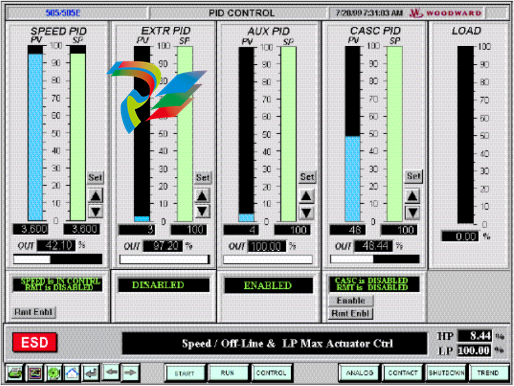
1-1. 505 human-machine interface software
By connecting OpView or 505View to any Modbus of 505E Interface connection, it comes from
Configure its screen display to match the programming application of the 505E. If 505E is not available
The HMI is configured to accept Modbus commands and can only be used as a system monitor. If 505E
If configured to accept Modbus commands, the 505E operating mode can be monitored and executed through HMI
All operations under the formula (start, stop, mode input/output, given value rise/fall). For safety reasons
Consider that the overspeed test function cannot be performed through HMI. Further information on Modbus interface programming
Please refer to Chapter 7 of Volume 1 for information.
The user-friendly touch screen allows operators to browse and control multiple screens from a single display screen
Operation mode and given value. Featuring 10 different screen displays for users to browse flexibly
Look. These screens will display the following information:
• Control parameter information
• Complete startup program
• Turbine and/or generator information
• Speed, extraction/replenishment, auxiliary, cascade, and limiter information
• Simulate input and output values
• Contact input/relay output status
• Alarm and shutdown records
OpView or 505View is connected to 505E through serial RS232. RS422. or RS485 communication
Take it. Using RS422 and RS485 communication, the HMI can be located as far away as the 505E digital controller
4000 feet (1220 meters) away.
Digital remote terminal driver
Digital Remote Terminal Driver (DRFD) is used for 505E digital controllers with integral
The connection of existing valve control mechanisms or Woodward actuators that do not match the 505E function.
The output channel of the 505E controller's actuator can output one for the actuator coil
A proportional signal of 4~20mA or 20~160mA (maximum 200mA). These 505E actuators lose
The output signal represents the command signal (proportional) equivalent to the required valve position. If the executing agency used
If different driving signals or control actions are required for servo components (combined with zero adjustment devices), then it is necessary
Digital remote terminal drivers or similar devices must be used.
Figure 1-2 Digital remote terminal driver
Woodward digital remote terminal driver accepts a valve position proportional to the required valve position
4~20mA actuator drive signal, and correspondingly control a servo component. According to the connected
The type of servo component can adopt integral or proportional DRFD. Woodward's DRFD is capable of
Drive unipolar or bipolar actuator command signals, with a maximum of 0-400mA or
+400mA.
The digital remote terminal driver is assembled in a NEMA-4X housing with a hinged cover
Internally, it consists of driver components and power components. The driver components use plug-in jumpers and letters
Digital display for easy on-site configuration and calibration.
The proportional DRFD can provide a maximum output drive signal of 400mA to match the existing servo group
Match the item. This drive signal is proportional to the 4-20mA input from the 505E digital controller.
Integral DRFD detects the actual valve position (via LVDT, RVDT, MLDT, or DC position)
The feedback device compares the signal with the input position command signal from 505E and responds accordingly
Output a driving signal to control the servo mechanism components. Refer to Figure 1-2.
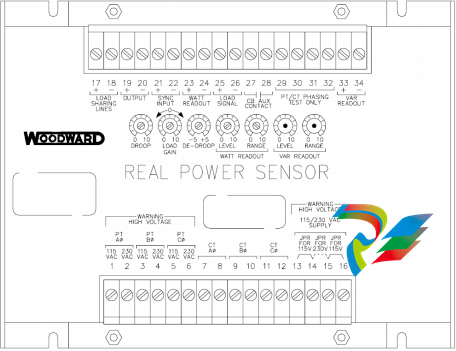
Active power sensor
Active power sensor (RPS) is used to detect the power generated by the generator or flowing through the grid connection line
The active power. Woodward's active power sensor detects three-phase voltage and three-phase current
Compare the voltage and current relationship of each phase and generate a 4-20mA proportional to the active power
Output.
Figure 1-3 Active power sensor
Woodward produces two types of active power sensors. The first type of RPS is only used for detection
Unidirectional power flux (only 0~+5A center tap current), and output a proportional
4-20mA signal. This type of RPS is used to detect the power output of a generator. At present, the market
There are many different types of active power sensors available. Optional RPS features include reactive power
VAR detection, load distribution, 0-1A center tap current detection, and combinations of these characteristics.
For specific applications, please consult Woodward authorized distributors or Woodward factories for recommendations
Recommended RPS for use.
The second RPS produced by Woodward is used to detect power flux between power grids. such
RPS (8272-726) detects the center tap current of -5A~+5A to ensure that its output represents two directions
Upward power flux. RPS provides a 4-20mA power indication output signal. Here, 12
MA represents zero power flux. It is recommended to use this RPS to detect the power flux passing through the grid. about
The input or output power detection of power plants requires the use of this RPS or equivalent equipment
| User name | Member Level | Quantity | Specification | Purchase Date |
|---|


- LTI Drives
- other
- ADLINK
- Beckhoff
- Shinkawa
- Other Brands
- AMAT
- Iba
- PEPPERL+FUCHS
- Aerotech
- WATLOW
- MAN
- ADVANCED
- Abaco
- YOKOGAWA
- KOLLMORGEN
- MEGGITT
- kong-sberg
- METSO
- Motorola
- NI
- OEMAX
- RELIANCE
- scanlab
- schneider
- uniop
- Vibro-Meter
- Honeywell
- Rolls-Royce
- MOOG
- GE
- B&R
- Woodward
- Yaskawa
- xYCOM
- Siemens
- Emerson
- HIMA
- Bently
- ZYGO
- FOXBORO
- OMACO
- PROSOFT
- ENTERASYS
- TRICONEX
- Parker
- Lenze
- KEBA
- Alstom
- CTI
- ABB
- A-B

-
 ABB PFEA113 coil tension measurement electronic unit
 -
 ABB PFEA111/112/122 Strip Tension Controller
 -
 ABB LS4000 diode laser gas analyzer
 -
 ABB SPAU 341 C On Load Voltage Regulating Controller
 -
 ABB V-Contact VSC medium voltage vacuum contactor
 -
 ABB UNITOL 1020 Compact Digital Excitation Regulator AVR
 -
 ABB UNITROL ® 1000 series excitation regulator
 -
 ABB SYNCHROTACT ® Synchronous and parallel devices and systems
 -
 ABB SYNCHROTACT ® 5 Synchronous devices
 -
 ABB Ability ™ Symphony ® Plus DCS/SCADA system
 -
 ABB I/O Systems‑S900 I/O ABB Ability™ System 800xA® hardware selector
 -
 ABB System 800xA Operations 5.1 Operator Operating Instructions
 -
 Medium voltage high-power water-cooled inverter for ABB PCS6000 IGCT device
 -
 ABB PCS 8000 AC Excitation
 -
 ABB 70BK08b new Modbus bus coupler
 -
 ABB NextMove ESB-2 (NSB20x series) motion controller
 -
 ABB MEGADRIVE LCI medium voltage load commutation inverter
 -
 ABB MEGADRIVE LCI transmission chain vibration damping function
 -
 ABB MEGADRIVE LCI. W water-cooled load commutation inverter
 -
 ABB DCS880 series DC speed control device
 -
 ABB SDCS-IOB-3 board
 -
 ALSTOM MAE99-04 8-way isolated serial interface terminal board
 -
 ALSTOM ALSPA MV3000 MVS3001-4001 Handheld Operator Cable/Installation Kit
 -
 ABB KPM KB2 paper breakage detector
 -
 ABB SCC-K Converter
 -
 ABB SCC Series Sample Gas Processing System Components
 -
 ABB NGC8206/NGC8209 gas chromatograph
 -
 ABB DCS400/DCS500B/DCS600, DCF500B/DCF600 thyristor DC drive converters
 -
 ABB ASTAT ® Crane motion controller
 -
 ABB ACS800 EconoPACK+ IGBT modules to TIM foil
 -
 ABB AO2000-LS25 laser gas analyzer
 -
 ABB REM543/REM545 motor/generator protection and measurement device
 -
 ABB REL670 (Relion 670 series) line distance protection device
 -
 ABB SUE 3000 High Speed Power Switching Device Operating Instructions
 -
 ABB REF630 feeder protection and measurement device
 -
 ABB REF620 (Relion 620 series) feeder protection and measurement device
 -
 ABB SACE Emax E1B-A 800 air circuit breaker
 -
 ABB SensyCal FCU400-IR Non Contact Temperature Monitoring System Operating Instructions
 -
 ABB TZIDC-200 electric pneumatic valve positioner
 -
 ABB DHH805-A HART Handheld Operator
 -
 ABB SACO 16D1 alarm light plate unit
 -
 ABB 5SHY3545L0016 IGCT module (3BHB020720R0002)
 -
 ABB Advant Controller 160 (AC160) DCS System Specific S600 Series I/O Module
 -
 ABB NextMove e100 motion controller
 -
 Rockwell PowerFlex 700 AC frequency converter
 -
 Installation Instructions for Allen Bradley 1762-OW16 (MicroLogix) Relay Output Module
 -
 Allen Bradley IntelliVAC 1503VC Series E Control Module
 -
 Allen‑Bradley IntelliVAC ™ 1503VC contactor control module
 -
 Woodward SOGAV ™ 250 solenoid valve drives gas intake valve
 -
 Woodward easyYgen-3000XT series generator set controller
 -
 Woodward CPC-II Current Pressure Converter
 -
 EXOR UniOP ePALM10 Handheld HMI
 -
 TMEIC TMdrive-30/TMdrive-P30 IGBT Inverter/Converter Operation Manual
 -
 TEWS TVME200 6U VME Bus Industry Pack (IP) Carrier Board
 -
 TDK Lambda Alpha-400 (CA400) Switching Power Supply Installation Instructions
 -
 Stucke GROUP SYMAP ® Series digital protection relay
 -
 Softing CAN-AC2-PCI PCI Bus CAN Communication Interface Board
 -
 Siemens SIMATIC C7-623/C7-624 Control System
 -
 Foxboro DCS Compact 200 Series 16 Slot Horizontal Base RH916RB
 -
 Foxboro 84F/84W Intelligent Vortex Flow Meter
 -
 Foxboro E69F-BI2 on-site installation type electric pneumatic converter (I/P)
 -
 Foxboro DCS Compact200 series RH916RB (16 slot horizontal bottom plate)
 -
 Operation Instructions for Reliance Electric PSC7000 Control Card
 -
 Eaton MTL F809F Plus DTM Operating Instructions
 -
 Motorola ACE3600 series remote terminal unit RTU
 -
 MOOG D136-003-001 Rugged Motion Controller
 -
 Micro Innovation GF1 series industrial touch screen (Micro Panel)
 -
 Neles ™ NDX ™ Compact intelligent valve controller (positioner)
 -
 Jamesbury Valv‑Powr ™ Installation, maintenance, and operation of VPVL mod D actuator
 -
 Jamesbury Valv‑Powr ™ VPVL series D-type compact gear rack pneumatic actuator
 -
 GMW IPP 144-40G Embedded Thermal Printer
 -
 Meggitt C327845 flow cut-off valve
 -
 Meggitt C422425/C422685/C422695/C422705 solenoid valve
 -
 Selection of LTi Drives ServoOne Full Series Servo Drive Systems
 -
 Jenaer Antriebstechnik ECOVARIO ® Installation and Operation Instructions for 114/214/414 Servo Drivers
 -
 Honeywell TDC3000X APM Advanced Process Manager
 -
 Honeywell Notifier NFS2-3030 Intelligent Addressing Fire Alarm Controller
 -
 Honeywell EP-DOCX-SCA-SMSC-100 Universal Signal Conditioning Wiring Solution for Safety Systems (UMS)
 -
 Installation Instructions for Honeywell XL1404 Fire Alarm Controller
 -
 Honeywell Enhanced Micro TDC 3000 (MT11-520) DCS Control System
 -
 HIMA X-DI 64 01 Digital Input Module
 -
 Hirschmann MICE MS20/MS30 Industrial Switch Installation Instructions
 -
 Exor UniOP ePAD05/ePAD06 Compact HMI Industrial Human Machine Panel
 -
 Exor Effectiveness View eV058- TST/eV058- TNT Industrial Touch Screen HMI Human Machine Panel
 -
 Esd VME-PMC CADDY/2 Intelligent VME-PMC Carrier Board
 -
 Installation Instructions for Elmo Gold Tuba (G-TUB) Servo Drive
 -
 Eaton COM-MPB1-TP/COM-MPB2-TP communication module
 -
 Delta Tau Turbo PMAC2 PCI Ultralite Programmable Multi Axis Motion Controller
 -
 DATA PATTERNS DP-VME-5114 module
 -
 CMZ SVM Series Independent Two Phase Synchronous Servo Driver SVM1608 Product Specification
 -
 SUMITOMO T2100Z steel turning
 -
 SUMITOMO PSZ Turn Modular Quick Change Tool System
 -
 SUMITOMO EGU positive front corner chip breaker groove
 -
 SUMITOMO GND series slotting and cutting tools
 -
 SUMITOMO AC8000P series (AC8115P/AC8020P/AC8025P/AC8035P) steel turning
 -
 SUMITOMO AC6000M series (AC6020M/AC6030M/AC6135M/AC6145M) stainless steel turning
 -
 SUMITOMO ELECTRIC AC5000S series (AC5005S/AC5015S/AC5025S) heat-resistant alloy turning
 -
 SUMITOMO ELECTRIC AC4000K series (AC4010K/AC4015K/AC4125K) cast iron turning
 -
 SUMITOMO ELECTRIC AC1135U small lathe for turning small parts
 -
 SUMITOMO ELECTRIC AC1030U Material Blade
 -
 CCS 6900G/6900P Non Explosion proof Pressure Switch Installation and Maintenance Manual
 -
 BENDER WR70 × 175S (P)~WR200 × 500S (P) rectangular measuring current transformer
 -
 BENDER RCMA475LY B-type residual current monitor
 -
 BENDER IRDH575 A‑ISOMETER ® Insulation monitoring device
 -
 BENDER IRDH265 / IRDH365(ISOMETER ®) Insulation monitoring device
 -
 BENDER RCMA475LY AC/DC sensitive residual current monitor
 -
 Beckwith Electric M-3425A Generator Integrated Protection Relay
 -
 Automated Logic MEx816u I/O Expansion Module
 -
 ASEM HT2150 Fanless Industrial Panel X86
 -
 Advantest U3771/U3772 portable microwave millimeter wave spectrum analyzer
 -
 Advantest R6144 Programmable DC Voltage/Current Source (Calibration Source)
 -
 Aerotech UNIDEX 100/U100i single axis motion controller
 -
 Aerotech Ndrive MP Ultra Compact PWM Digital Servo Driver
 -
 Aerotech Ndrive HPe 10/20/30 High Performance PWM Digital Servo Drive
 -
 Aerotech Ndrive Linear (HLe/ML) Linear Servo Drive
 -
 Aerotech Ndrive CP Compact PWM Digital Servo Driver
 -
 Aerotech Ndrive Linear (HLe/CL/ML) linear servo drive
 -
 Aerotech Ndrive HL (EDU176 Rev1.08b) Digital Servo Drive
 -
 Aerotech Ndrive HP10/20/30 PWM Digital Servo Drive
 -
 Aerotech Ndrive series digital servo drives
 -
 SIGMATEK TAE 1941 Touch Display Unit
 -
 SIGMATEK TAE 151 Touch Display Unit
 -
 SIGMATEK AKM series servo motor
 -
 SIGMATEK S-DIAS Control System
 -
 SIGMATEK Human Machine Interface (HMI)
 -
 SIGMATEK DIAS Drive 310-23 servo amplifier
 -
 SIGMATEK CCP 521 C-DIAS processor module
 -
 MEGMEET L6 series electric drive

K-JIANG

Add: Jimei North Road, Jimei District, Xiamen, Fujian, China
Tell:+86-15305925923